Primate Labs has officially released Geekbench 7, introducing updated CPU and GPU workloads alongside redesigned multi-core testing. The new cross-platform benchmark suite is available today across Android, iOS, Windows, macOS, and Linux platforms.
Geekbench 7's updated CPU workloads focus on real-world media tasks, including AV1 video encoding for screen-sharing, Opus audio compression, and Whisper speech recognition for live captions. Primate Labs also added a Game Physics workload built on the Jolt Physics engine while expanding image format support in the Photo Library to include JPEG XL and DNG. Multi-core testing has been restructured so workloads only run multi-threaded if corresponding real-world applications do, excluding single-threaded tasks like the HTML5 Browser test.
GPU benchmarks now place greater emphasis on machine learning and creation tasks, adding face tracking, super-resolution upscaling, and background blurring alongside RAW processing, path tracing, and fluid simulation. In response to user demand, CUDA joins OpenCL, Vulkan, and Metal as a natively supported GPU API. Primate Labs updated the underlying datasets across tests such as File Compression and PDF Viewer to support larger, more demanding file processing.
KitGuru says: Geekbench 7 brings welcome updates to reflect modern workloads, particularly with the addition of native CUDA support and a more realistic multi-core scoring approach. Have you already tried Geekbench 7?
Up bright and early this morning to put the finishing touches on what has been a whirlwind of SSD reviews over the past few weeks. In less than 48 hours, I’ll be setting the keyboard aside for a month as I embark on a coast-to-coast-to-coast motorcycle journey across North America in under three weeks, Atlantic …
An engineering sample of AMD's upcoming 10-core Medusa Point mobile processor has surfaced on Geekbench, achieving its highest benchmark scores to date. The chip reached 3,329 points in the single-core test and 16,555 points in the multi-core test, marking a notable performance jump over previous-gen chips.
The processor appeared on Geekbench (via Tom's Hardware) on an AMD Plum-MDS1 platform under the engineering sample identifier 100-000001713-33_N. Geekbench logs reveal a configuration with 10 cores and 20 threads, divided into two clusters of 4 and 6 cores. Telemetry data indicate that the chip reached a peak frequency of 5.37GHz during testing. The listing also details 10MB of L2 cache and 32MB of L3 cache.
This latest run outperforms a previous submission by 5% on single-core and 10% on multi-core. When compared with current retail models, this Zen 6 chip delivers a significant performance boost. It scores roughly 28% higher in single-core workloads and 24% higher in multi-core workloads than the 12-core Ryzen AI 9 HX 370, which averages 2,605 and 13,397 points, respectively.
While final clock speeds and power limits remain unconfirmed, the Medusa Point lineup is expected to form the foundation of AMD's upcoming mobile Ryzen 500 series.
KitGuru says: AMD's Zen 6 mobile architecture is shaping up to deliver a substantial performance uplift, if these early engineering-sample benchmarks are anything to go by.
I absolutely love world firsts. Even more than that, I love seeing genuine technological innovation. Not long ago, we introduced the Longsys Gen4 mSSD, and we were fortunate enough to receive the drive directly from Longsys Chairman Huabo Cai, giving us the opportunity to publish what turned out to be an unexpected world exclusive. That …
When it comes to SSDs, I can’t help but wonder whether the latest price spike is simply a temporary shock driven by AI demand, or whether it was inevitable all along. For a while, we had it incredibly good. High-performance, DRAM-equipped SSDs with generous capacities and five-year warranties were selling at prices that would seem …
I’d like to say change is coming to the SSD market, but the reality is that it’s already here. Looking back, it’s a bit amusing because long before the current NAND and DRAM shortages, I wondered whether SSD performance would eventually plateau with PCIe Gen4. What I didn’t anticipate, and neither did anyone else, was …
I may get a bit of backlash for saying this, but I continue to be amazed at how a single manufacturer has managed to champion a storage format the way Sony has with the CFexpress Type A card. Many people probably assumed this format would have faded away by now, yet the millions of Sony …
Random write performance in an enterprise SSD is critical as workloads rely heavily on processing thousands of small, scattered, and simultaneous data requests per second. These are measured in IOPS. Unlike sequential workloads, random writes do not write data in a contiguous line, making them much harder for the SSD to handle. SQL, Oracle and …
So this is our third report on a KIOXIA retail SSD and the same thing seems hitting me hard. This SSD is not available ‘officially’ through KIOXIA retail sales as of yet. We can find availability of it on Amazon (which is a great thing) but one needs to be careful as this may be …
Our review of Seagate’s latest FireCuda Gen4 DRAMless consumer SSD has left us somewhat perplexed, and quite frankly, a little surprised. Until we examined the controller used in this drive, we had long assumed that Seagate and Phison maintained a strategic, long-term partnership across their SSD product lines. This release appears to mark a significant …
It has been a while since this release, but we received an SSD in the mail today that deserves a quick look: the XPG Mars 980 Blade by ADATA. This 1TB SSD stands out because we can’t remember the last time we had a drive of this capacity in hand, let alone reviewed one. Times …
Our look at the KIOXIA CD9P-R Gen5 Data Center SSD marks a first for The SSD Review, and it’s a bit of a nostalgic one. Our connection with the KIOXIA team stretches back many years, all the way to the early OCZ Revo and Vertex days. That lineage later became Toshiba, and eventually KIOXIA around …
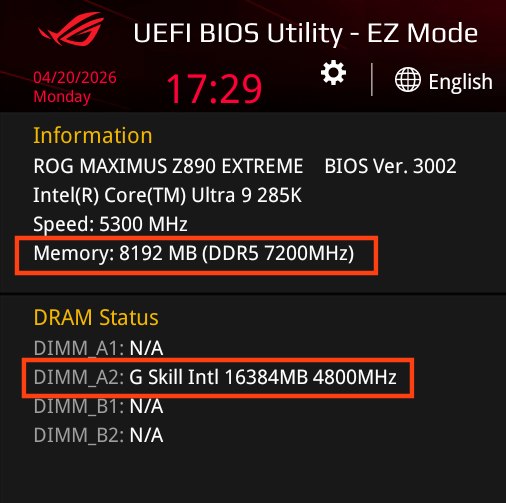
Intel, in partnership with various partners, has introduced the HUDIMM (Half-Unbuffered DIMM) standard to address the ongoing global memory shortage and rising hardware costs. This new specification aims to lower the barrier to entry for DDR5 platforms by simplifying the internal architecture of the memory modules. However, this new module type appears to have disadvantages, particularly in terms of performance.
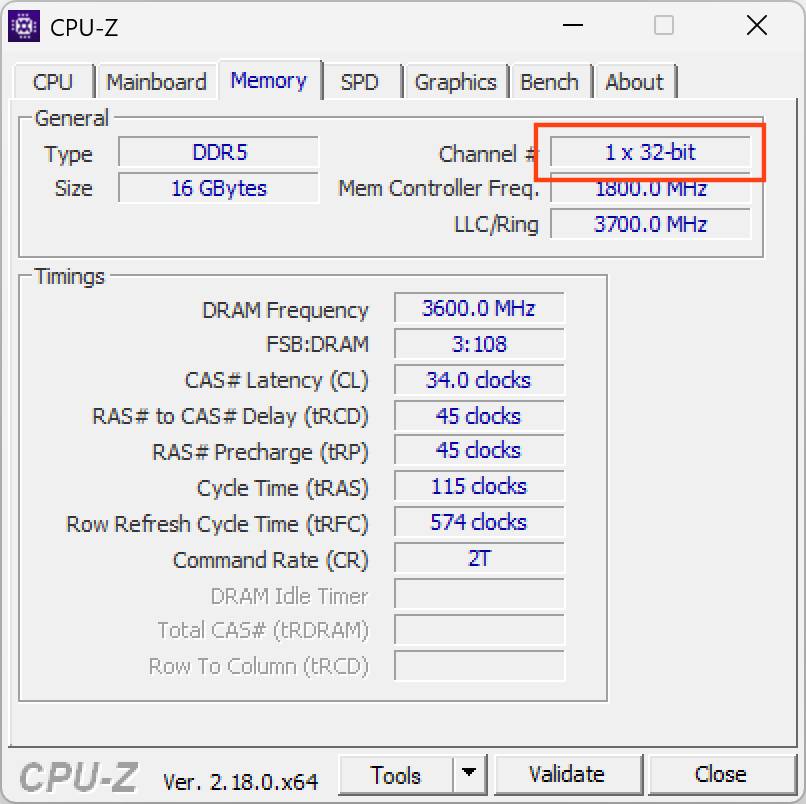
The core design of HUDIMM involves transitioning from the standard two 32-bit subchannels (forming a 64-bit-wide bus) found on traditional UDIMMs to a single 32-bit subchannel. By populating only half of the memory banks, manufacturers can produce modules using fewer DRAM chips, directly reducing production costs. Initial releases are expected in 8GB and 12GB capacities, targeted primarily at entry-level office systems and budget-conscious builds.
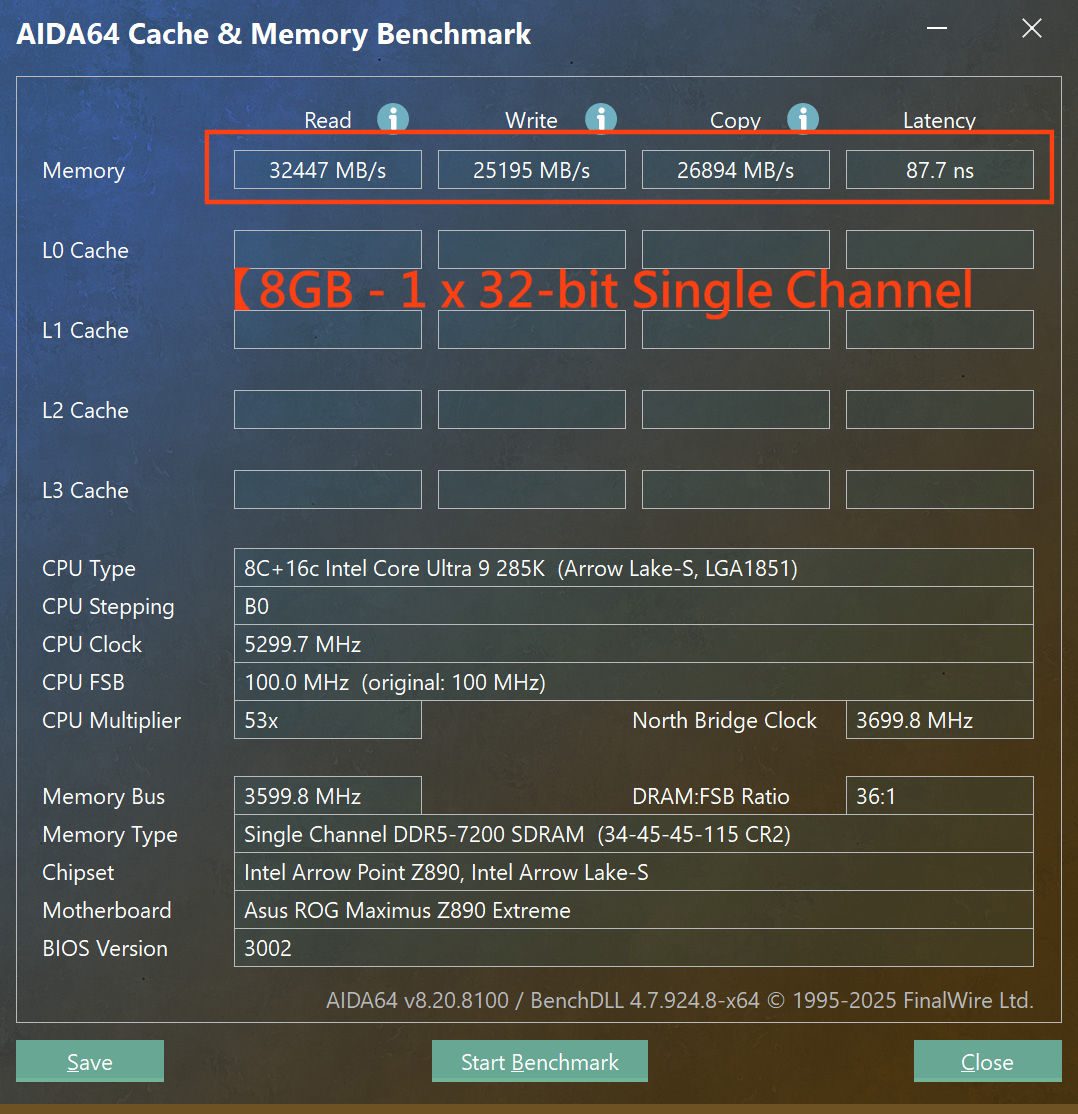
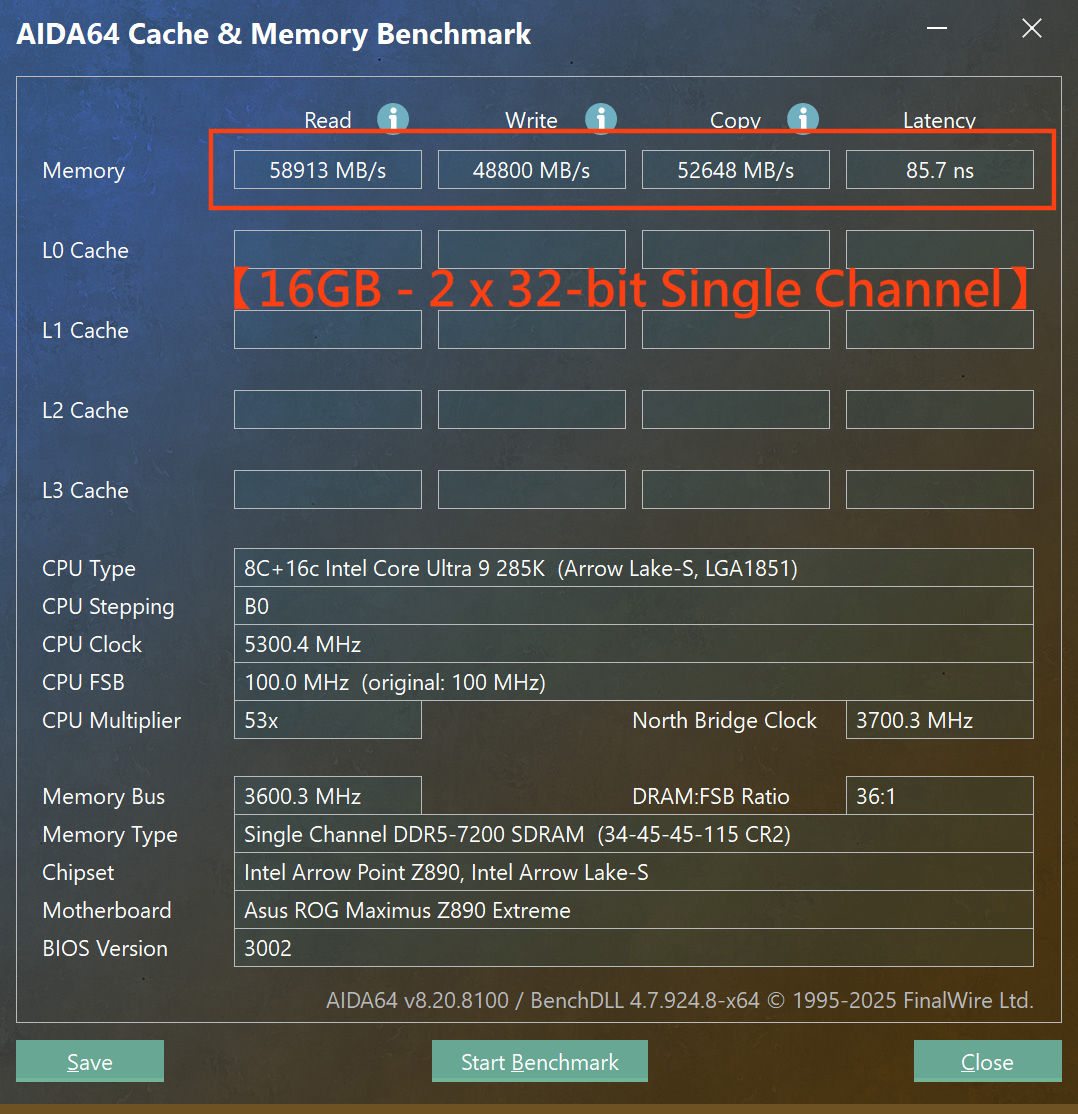
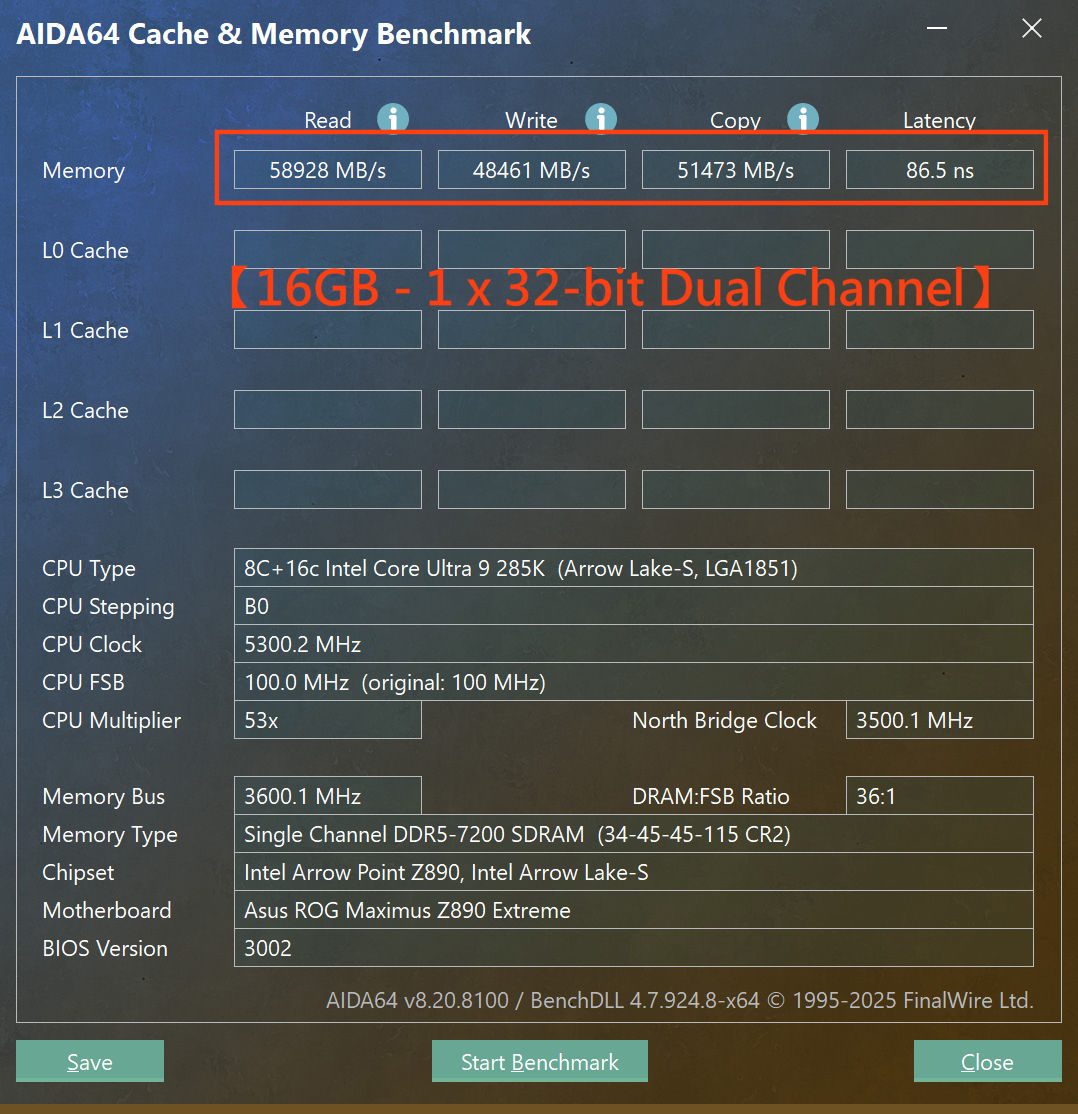
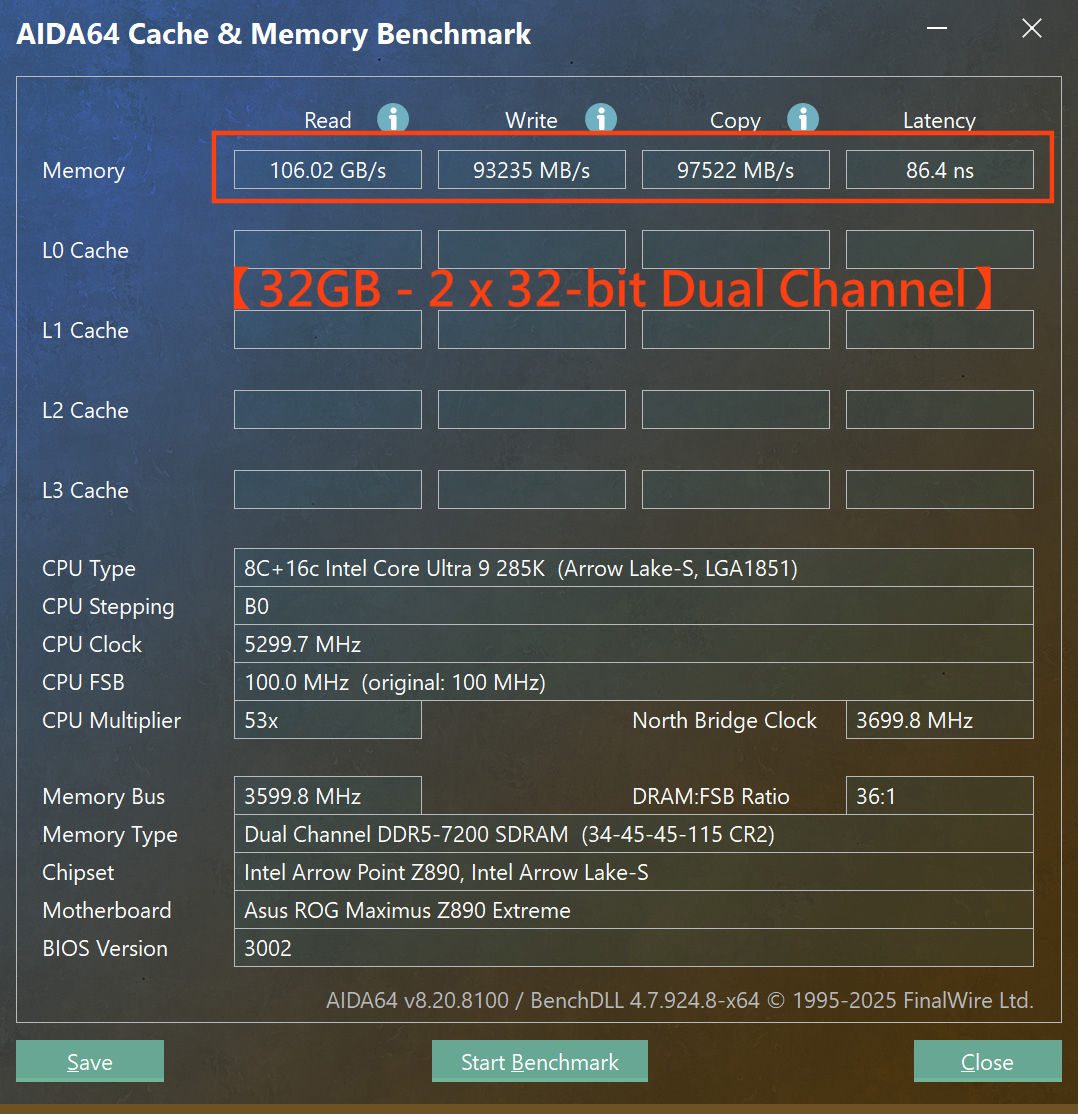
Despite the cost benefits, performance benchmarks conducted by HKEPC and Asus (via Wccftech) show a severe trade-off. The test was performed by selecting a standard UDIMM and converting it into a HUDIMM module by shielding half of the banks. The transition to a single 32-bit subchannel results in an approximate 45–50% loss in total bandwidth across read, write, and copy operations. While memory latency remained relatively stable at 85–87ns, the throughput of a dual-channel HUDIMM setup was roughly equivalent to that of a single standard UDIMM running in single-channel mode.
One redeeming feature is the support for asymmetrical dual-channel operation. This allows users to mix different module types, like HUDIMM and UDIMM, to achieve unique capacities while maintaining three active 32-bit subchannels. However, for users prioritising speed, the significant bandwidth reduction makes HUDIMM only a solution for systems where peak memory performance is secondary to overall cost efficiency.
KitGuru says: Given the performance trade-offs (and without knowing the pricing of HUDIMMs), do you think budget builders will be willing to sacrifice half their bandwidth to get a modern platform running, or will they stick to older DDR4 systems?
The Dell XPS 13 9345 is one of the most compelling compact Windows laptops released in recent memory, and the Snapdragon X Elite X1E-80-100 at its heart is a significant part of why. At 1.19kg and just 15.3mm thick, Dell has built its thinnest and lightest XPS ever, and it genuinely does not feel like anything meaningful has been sacrificed to get there. The CNC-machined aluminium chassis is premium throughout, the 13.4-inch 2K 120Hz InfinityEdge display is sharp and colour-accurate, and the quad-speaker system punches well above its weight for a machine this size. This laptop makes a strong first impression and, for the most part, backs it up once you get into the details.
Design and Build (Snapdragon Elite X version)
Dell has always known how to make an attractive laptop, and the XPS 13 9345 continues that tradition with what is arguably the best-looking XPS the company has produced. The CNC-machined aluminium chassis feels genuinely premium from the moment you pick it up, with a fit and finish that competes with anything at this price point and well above it. At 1.19kg, it is light enough that you legitimately forget it is in your bag, and the 15.3mm profile at its thickest point puts it in direct physical competition with the MacBook Air in a way that very few Windows laptops can claim. The graphite finish on our review unit is clean and professional, without tipping into the kind of anonymous corporate grey that plagues many ultrabooks in this space.
The 13.4-inch InfinityEdge display makes the machine feel smaller than its screen size suggests, and that is a deliberate design outcome rather than an accident. Dell has pushed the bezels down to the point where the laptop chassis itself is not much wider than the screen, which gives the whole package a cohesion that larger-bezel competitors lack. The 2K 120Hz non-touchpanel in our configuration delivers 500 nits of brightness and adaptive refreshes, keeping things fluid, whether you are scrolling through a document or watching streaming content. Colour accuracy is good for general use and video consumption, and outdoor visibility is reasonable at higher brightness settings. However, a glossy finish makes direct sunlight challenging, and the display technology overall is well-matched to the kind of user this laptop is aimed at.
The keyboard is where opinions will diverge. Dell has gone with a flat, low-travel design that prioritises the thin chassis over typing depth, and whether that works for you depends heavily on how much time you spend typing and what you’re coming from. It is functional for extended use once you have adjusted your expectations, but anyone coming from a ThinkPad or a MacBook with more traditional key travel will notice the difference. The haptic touchpad similarly takes an adjustment period, with no physical border and a click mechanism that is entirely software-driven. Once calibrated to your preferences, it works well, the glass surface is accurate and smooth, and multi-finger gestures are responsive. It is just different enough from a conventional touchpad that you will spend a day or two relearning muscle memory.
The speaker system is a genuine highlight that deserves more attention than it typically gets in coverage of this machine. The quad-speaker arrangement with a tweeter and woofer configuration produces 8W of total output with actual bass presence, noticeable stereo separation, and volume levels more than adequate for a room environment. Most laptops at this size and weight produce thin, tinny audio that is barely acceptable for a video call. The XPS 13 9345 sounds meaningfully better than that, and it is one of those details that makes day-to-day use noticeably more pleasant.
The port situation needs to be addressed directly and honestly because it is one of the most significant real-world limitations of this machine. There are two USB-C ports, both supporting USB4 at 40Gbps with DisplayPort and Power Delivery. That is the entire connectivity story. No USB-A, no headphone jack, no SD card slot, no HDMI out natively. Both ports are on the same side of the machine, which creates cable management annoyances at a desk. Dell has clearly made a deliberate design choice to strip the chassis to its minimum to meet dimensions and weight requirements, and it is a defensible decision. Still, it is also one that will require most buyers to purchase a USB-C hub as an effectively mandatory accessory. Factors that go into the total when comparing prices against competitors.
CPU Performance (Snapdragon Elite X)
The Snapdragon X Elite X1E-80-100 is a 12-core Arm-based SoC built on TSMC’s 4nm process, with a dual-core boost ceiling of 4GHz, a 45 TOPS NPU for Copilot+ PC features, and Qualcomm’s Adreno integrated graphics handling display output and light GPU workloads. The architecture draws on the same design philosophy that has made Apple Silicon compelling since the M1, prioritising energy-efficient compute over brute-force clock speeds, and the results consistently demonstrate that approach paying off in the x86 Windows laptop market for the first time at a level that genuinely competes.
Starting with Cinebench 2024, the XPS 13 9345 posts a multi-core score of 943 and a single-core score of 118. The multi-core result leads every direct competitor in this class by a meaningful margin. The Microsoft Surface Laptop 2024 13-inch, which runs the same Snapdragon X Elite silicon, scores 798 on multi-core and 123 on single-core. That is a 145-point gap on multi-core between two machines with the same processor, which suggests that Dell’s thermal configuration allows the chip to sustain higher frequencies under load for longer than Microsoft’s chassis permits. The HP OmniBook X 14 lands at 742 multi-core, the Asus Zenbook 14 OLED at 507, and the ThinkPad X1 Nano Gen 3, running an Intel Core Ultra processor, trails the field significantly at 318. The XPS 13 is the class leader here, and it is not particularly close.
Geekbench Pro 6.3 tells a broadly consistent story. The XPS 13 leads multi-core with 14,574, fractionally ahead of the Surface Laptop at 14,432 and more clearly ahead of the HP OmniBook X 14 at 13,233, the Asus Zenbook at 12,310, and the ThinkPad at 10,744. Single-core scores compress into a tight cluster at the top of the chart, with the Surface Laptop marginally ahead at 2,825 versus 2,821 for the XPS 13, a difference so small as to be statistically meaningless. It is worth noting that the ThinkPad posts a competitive single-core score of 2,469 despite being demolished on multi-core, which reflects the architectural difference between Intel’s hybrid-core design and Qualcomm’s more homogeneous approach,h rather than any particular tuning issue.
The HandBrake 1.8.0 real-world encoding test is where the performance picture becomes most compelling. Transcoding a 12-minute 4K source file down to 1080p using the Fast 1080p30 preset, the XPS 13 9345 completes the task in 4 minutes 35 seconds. Every other machine in this comparison takes longer, and some take considerably longer. The Surface Laptop, again running identical silicon, needs 5 minutes 9 seconds, which is 34 seconds behind despite the same chip. The HP OmniBook X 14 takes 6 minutes 1 second, the Asus Zenbook 6 minutes 24 seconds, and the ThinkPad X1 Nano Gen 3 takes over 10 minutes. The HandBrake result is a sustained multi-threaded workload that punishes machines with poor thermal management, and the XPS 13 handles it better than any of its direct competition. Dell’s engineers have clearly done careful work on the thermal solution inside a chassis this thin, and it produces real, measurable results.
On the UL Procyon Computer Vision benchmark, which specifically tests Arm CPU performance on AI- and machine-learning-adjacent workloads, the XPS 13 9345 scores 1,708. This lands it third in a group that is honestly very tightly bunched, behind the HP OmniBook X 14 at 1,771 and the HP EliteBook Ultra G1q at 1,762, and just ahead of the Surface Laptop 2024 at 1,705 and the Surface Pro 2024 at 1,694. The entire field spans fewer than 80 points, indicating the Snapdragon X Elite platform delivers essentially consistent AI compute performance regardless of which OEM has configured it. The differentiator across this field on AI workloads is the platform, not the implementation.
Battery Life and Real-World Use
Battery life is the single strongest argument the Snapdragon X Elite makes against x86 competition, and the XPS 13 9345 demonstrates it convincingly. The 55Wh cell is not large by the standards of larger laptops. Still, the combination of ARM efficiency and Qualcomm’s power management means it goes considerably further than equivalent x86 machines with similar or larger batteries. Streaming BBC iPlayer over hospital Wi-Fi for extended sessions, light document work, and browsing for several hours without access to a charger, the machine kept going from a morning charge well into the evening without complaint. Dell’s all-day battery claim is not marketing language in this case. It holds up in real-world conditions, and that is genuinely more than can be said for most x86 ultrabooks in this size class.
The 60W USB-C power adapter that ships with the machine is appropriately compact for travel, charges the battery at a reasonable rate when you do plug in, and, because both USB-C ports support Power Delivery, you have flexibility about which side of the machine you charge fr, om, depending on where the socket is. That sounds like a small detail, but it matters in the kinds of environments where you are working without a proper desk setup.
The 60W USB-C adapter is compact and charges quickly when you do plug in, which matters in situations where power access is not convenient.
The Windows on Arm Situation
Windows on Arm in 2024 is a substantially different proposition from what it was even two years ago, and the XPS 13 9345 benefits from that progress. Qualcomm’s Prism emulation layer handles most mainstream x86 applications without any visible degradation in the experience, and native Arm64 support now covers the applications that most users spend most of their time in. Chrome, Edge, Firefox, Microsoft Office, Spotify, Visual Studio Code, Slack, Teams, Zoom, and a broad and growing catalogue of productivity tools all run natively and feel snappy. The platform distinction largely disappears for day-to-day use if your workflow sits within the mainstream.
Where the cracks still show is at the edges. Older applications with kernel-level components, certain VPN clients, some creative and media production tools, legacy enterprise software, and a meaningful chunk of the PC gaming catalogue either run with limitations or do not run at all. Driver support for some peripherals can also be inconsistent. None of this is Qualcomm’s or Dell’s fault specifically; it is the reality of a platform transition that is still in progress, but it is also not something that can be glossed over in an honest review. If your workflow depends on any software in those categories, the Compatibility Checker at dell.com for Snapdragon is a necessary first stop before purchase, not optional.
Photos all taken while in hospital having a life-threatening surgery and nasty infection; we’re dedicated to tech even in life and death!
For users whose needs are covered, the Copilot+ PC features add a layer of increasingly useful on-device AI functionality. Live Captions, AI image generation in Paint and Photos, and the NPU-accelerated features in supported applications all work as advertised. Whether they change how you work depends entirely on what you do, but they are present and functional rather than being a marketing checkbox.
Dell XPS 13 9345 (Snapdragon X Elite) Verdict
The sustained multi-core lead in Cinebench and the HandBrake encoding result make a clear case for what Dell’s thermal tuning has achieved here. The fact that the XPS 13 outpaces machines running the same chip is not a small detail. It means Dell has done the engineering work properly rather than simply dropping the Snapdragon X Elite into a thin chassis and hoping for the best. The battery life is the other headline result, and in genuine extended real-world use, it delivers on every claim made for it.
The port situation is the one area that requires honest acknowledgement. Two USB-C ports and nothing else is a deliberate design trade-off, and for desk users, it means a hub is a required purchase rather than an optional one. The Windows on Arm compatibility question is also worth taking seriously before buying, rather than after. Neither issue is a reason to avoid this laptop, but both deserve more than a footnote.
For the right user, someone who wants a compact, light, beautifully built Windows laptop with genuine all-day battery life and a workflow that sits within the mainstream, the Dell XPS 13 9345 is one of the best ultrabooks available right now at any price. The benchmarks make the case, and real-world use backs it up without reservation. Buy the hub at the same time.
Dell provided the XPS 13 9345 in this review for testing. Dell had no input on the contents of this article. Pricing correct at time of writing.
I’ve always felt there’s a gap in the flash storage industry. We do a great job serving consumer and client segments, and then suddenly jump straight to server and data center solutions. Media professionals are often lumped in with enthusiast-level consumer storage and it feels like there is a segment missing in flash storage. When …
Artificial intelligence models are multiplying fast, and competition is stiff. With so many players crowding the space, which one will be the best — and who decides that? Arena, formerly LM Arena, has emerged as the de facto public leaderboard for frontier LLMs, influencing funding, launches, and PR cycles. In just seven months, the startup went from a UC Berkeley PhD research […]
Almost nine months after the game's announcement, the team behind Ashes of the Singularity II is finally ready to share more about this highly anticipated real-time strategy game sequel. A demo is available for download on Steam as part of the newly launched Next Fest, allowing players to try two of three factions, three maps, the full skirmish mode, and even 8-player multiplayer. Moreover, we have an exclusive interview with Oxide Games, diving into pretty much every major aspect of the game. The participants were Brett Norton (Head of Production), Adrian Wright (General Manager), Gabriela Leskur (Narrative and Experience Lead), […]

 Login
Login