Samsung Mobile is facing its gravest crisis right now, ironically brought about by Samsung's memory division refusing to grant any special price-related concessions amid a historic increase in DRAM and NAND prices. This means that while Samsung's semiconductor-focused DS division will report more profit this year than what it cumulatively earned over the past 40 years, Samsung Mobile is about to report its first operating loss. Samsung's Mobile (MX) and Network Business division is all set to report an operating loss of 5.84 trillion won or ~$4 billion for FY 2026 Earlier this week, Samsung released key guidance for its […]
Intel's Arc Pro B70 GPU delivers strong performance in DeepSeek R1, beating the RTX 5090D & RTX 4090D in AI LLMs. Intel Arc Pro B70 32 GB Tested In Quad-GPU Configuration Against The NVIDIA 5090D & RTX 4090D, Offers Superb AI Capabilities In DeepSeek R1 LLM Graphics card manufacturer Gunnir has posted some interesting tests where they pit the Intel Arc Pro B70 32 GB graphics card against the NVIDIA RTX 5090D 32 GB and the RTX 4090D 24 GB, all in quad-GPU configurations. The purpose of these tests was to evaluate the performance of AI LLMs such as DeepSeek […]
EasySMX X05 Pro comes after EasySMX has already built a strong name in the gaming market. The brand is now well known for making controllers that focus on real user needs. It does not chase flashy features. It focuses on what actually improves gameplay.
After the success of the earlier X05, the company has launched the Pro version. This time, the goal is simple. Improve control. Fix small issues. Add useful upgrades that actually matter in daily use.
The X05 Pro is not a basic update. It brings modern features that users actually asked for. You get a two-stage trigger lock system for better control in different types of games. It also includes Hall effect joysticks, which help reduce stick drift and improve long-term accuracy. The buttons are quieter. The vibration system is improved. The D-pad is also more precise.
What makes it more interesting is the price. EasySMX has added these Pro-level features without pushing the cost too high. It stays in the budget range while offering upgrades that are usually seen in more expensive controllers.
On paper, these changes look meaningful. But real value depends on actual use. In this review, we will go through all the features and see how the controller performs in daily gaming.
Unboxing
The unboxing experience of the EasySMX X05 Pro is simple but well organised. The box design follows a clean and modern look. Each colour variant comes with its own matching controller image printed on the front, which makes it easy to identify without opening the box.
The front side shows a large image of the controller along with basic compatibility details like PC, Switch, iOS, and Android. The layout looks neat and not overloaded with text. The yellow accents on the sides add a bit of contrast, which helps the box stand out.
On the back, you get more detailed information. It shows the controller layout, key features, and technical details. The printing is clear and easy to read. It gives a quick idea of what you are getting before opening the box.
Inside the box, everything is packed securely in a moulded tray. The controller sits firmly in place, so there is no unnecessary movement during shipping. The presentation feels organised, not messy.
In the box, you get the controller, a USB cable for charging and wired use, a wireless dongle, and user manuals. All items are placed properly, and nothing feels thrown in randomly.
Overall, the unboxing is clean and straightforward. It does not try to look premium, but it delivers a neat and practical experience without cutting corners.
Switch, Switch Lite, Switch OLED, Windows 7/8/8.1/10/11, Android, iOS
Polling rate
1000Hz (2.4GHz & wired), 125Hz–250Hz (Bluetooth)
Charging port
Type-C
Battery capacity
1,000mAh
Weight
261.6g
Size
15.70 × 9.50 × 6.50 cm
A closer look
The EasySMX X05 Pro is part of the company’s X series lineup. This is the Pro version of the earlier X05, so the focus here is on refinement rather than a full redesign. The overall shape stays familiar, but small changes improve daily use.
In terms of size and weight, the controller feels balanced. It is not too heavy and not too light. The dimensions are standard, so it sits naturally in hand without feeling awkward.
The controller follows an Xbox-style layout. The thumbsticks, D-pad, and buttons are placed in a way most users already understand. This makes it easy to pick up and use without any adjustment time.
Looking at the front, the ABXY buttons use a quiet rubber base. Inside, silicone dampers are added to reduce noise. When pressed, the buttons feel soft and controlled instead of loud and sharp. This change is clearly noticeable during use.
The D-pad sits slightly lower with a solid design. It is easy to reach and gives proper feedback. The thumbsticks have a textured edge, which helps with grip during movement.
The finish changes depending on the colour. The black and white versions come with a simple matte look. They feel clean and minimal. The purple version is different. It has a slightly shiny surface that reflects light when you move it. This gives it a more eye-catching look without being too flashy.
The grip design on the back is well thought out. Both sides have a textured surface that improves hold. The coating is sweat-resistant and feels soft in hand. This helps during long sessions, especially when hands start to get warm.
On the top, you get standard shoulder buttons and triggers. Along with them, small programmable buttons are placed nearby. They are not large, but they are easy to reach once you get used to their position.
At the back, there are dedicated trigger locks for both left and right triggers. These are placed separately, so you can adjust each side based on your preference. Just below that, you can see charging points that work with a dock setup.
The USB Type-C port is placed at the top centre for charging and wired use. The button layout around the centre includes menu, pairing, and function buttons, all placed within easy reach.
Overall, the physical design focuses on control and comfort. Everything is placed with purpose, and nothing feels out of place.
Conntectivity and battery
The EasySMX X05 Pro gives multiple connection options, so you are not limited to one setup. You can use 2.4GHz wireless with the included dongle, Bluetooth, or a wired connection using the Type-C cable. This makes it easy to switch between devices without any extra effort.
In terms of compatibility, the controller works with Switch, Switch Lite, Switch OLED, Windows systems, Android, and iOS. Pairing is simple, and the connection stays stable during use.
One of the biggest upgrades here is the polling rate. In 2.4GHz wireless and wired mode, you get a 1000Hz polling rate. This is a strong improvement and makes inputs feel faster and more responsive. In Bluetooth mode, the polling rate drops to 125Hz–250Hz, which is normal for this mode.
The battery has also been upgraded. The older X05 had a 750mAh battery, but the EasySMX X05 Pro now comes with a 1000mAh battery. This increase allows longer gaming sessions without frequent charging.
Charging is done through the Type-C port, which is placed at the top. You can also charge the controller using a dock, thanks to the charging pins on the back. This adds more convenience, especially if you prefer a clean setup.
Overall, the improvements in connectivity and battery are useful. The 1000Hz polling rate in 2.4GHz mode is a key upgrade and directly helps in better performance.
Connectivity setup and usage
The EasySMX X05 Pro is easy to set up, but only if you follow the correct mode. If you ignore the mode toggle, you will waste time thinking the controller is not working. Each connection type has its own method, and you need to switch modes properly.
2.4GHz wireless (dongle)
This is the best way to use the controller on PC. It gives the highest performance.
Insert the USB receiver into your PC. Switch the mode toggle to 2.4GHz. Press the Home button to turn on the controller.
The LED will start flashing. Once it becomes stable and you feel a short vibration, the controller is connected.
If it does not connect automatically, you need to force pairing. Press the button on the receiver for one second until its LED flashes. Now press and hold the Home button on the controller for five seconds.
The LED will flash fast and then become stable. That confirms pairing.
Wired connection
This is the simplest method.
Switch the mode to 2.4GHz. Connect the controller using a USB cable.
That’s it. No pairing needed. It works instantly.
Bluetooth connection (mobile devices)
Switch the mode to Bluetooth. Press and hold the Home button for five seconds.
The LED will flash, which means pairing mode is active. Turn on Bluetooth on your phone and search for devices. Select “Xbox Wireless Controller” from the list.
Once connected, the LED becomes stable with a small vibration.
For reconnecting, just press the Home button once while staying in Bluetooth mode.
Nintendo Switch connection
Switch the mode to NS (Switch). Press and hold the Home button for five seconds.
The LED will flash. On the Switch, go to Controllers and open “Change Grip/Order.”
After pairing, the LED becomes stable and confirms connection.
For reconnecting, press the Home button once while staying in Switch mode.
In Switch mode, you can double press the “O” button to take screenshots. You can also use the Home button to wake the console.
RGB lighting
The EasySMX X05 Pro features a stylish RGB lighting zone that is placed in key areas instead of spreading across the whole controller. This keeps the design clean while still adding a strong visual touch.
You get an RGB strip on the top front section, just below the logo. It follows a curved shape and gives a smooth glow. There is also RGB lighting around the D-pad ring, which creates a second lighting zone. Together, these areas give a balanced and modern look.
With this setup, every session feels more lively. The lighting adds colour and motion without becoming distracting. It also makes the controller stand out, especially if you are using it on a desk setup or during streaming.
The purple variant reflects the lighting more due to its slightly shiny finish, while the black and white versions keep the effect softer and more controlled.
You can adjust the RGB directly from the controller. Press the M button twice to switch lighting modes. A short vibration confirms the change.
Then use the left stick to control the lighting.
Mode 1 gives a dynamic colourful effect with constant movement. Mode 2 adds a breathing effect, where colours fade in and out. You can move the left stick left or right to change colours. Mode 3 is a solid colour mode with manual colour selection. Mode 4 gives a gradient effect with smooth transitions. Mode 5 turns the lighting off completely.
There is no need for extra software. Everything works from the controller itself.
User experience
The EasySMX X05 Pro focuses on real gameplay experience instead of just adding features on paper. In daily use, the controller feels consistent and reliable. Inputs register properly, and there is no confusion while switching between different play styles.
One of the first things you notice is the quiet buttons. The noise reduction actually works. The buttons use a soft base with dampening inside, so clicks sound low and controlled. This makes a clear difference during late-night sessions or when you are sharing space with others. You still get proper feedback, but without loud noise.
The triggers are another strong point. The dual-stage trigger lock system changes how the controller feels in different situations. You can use a longer press when control matters, and switch to a shorter press when speed matters. This is not just a feature for show. It changes how quickly you react and how much control you have.
The vibration system adds more depth. The controller uses a 2+2 motor setup, which means feedback is not limited to one area. You can feel it in both the triggers and the grips. Actions feel more clear and separated instead of blended together. It is not overpowered, but it is enough to add a layer of feedback during gameplay.
The Hall effect joysticks also make a difference over time. Movement feels smooth and stable. Small adjustments are easier, and there is no sudden jump or drift. This helps in games where precision matters.
The D-pad is reliable for directional inputs. Diagonal movements register properly, which helps in games that need accurate control. There is less chance of missed inputs, and the feedback feels consistent.
During longer sessions, the controller stays comfortable. The grip design helps maintain control without needing to adjust your hands again and again. The surface also handles sweat well, so it does not become slippery.
Overall, the EasySMX X05 Pro delivers a stable and controlled experience. It improves small but important areas like noise, trigger control, and stick accuracy. These changes may look simple, but they directly affect how the controller feels during real gameplay.
Final verdict
The EasySMX X05 Pro is not trying to compete with high-end controllers on branding. It competes on value, and that is where it wins.
You get features that actually matter in daily use. Quiet buttons make a real difference. Hall effect joysticks improve long-term reliability. Dual-stage trigger locks add control flexibility. The 1000Hz polling rate in 2.4GHz mode improves responsiveness. On top of that, you also get stable connectivity, useful RGB, and a comfortable grip.
There are no unnecessary extras here. Everything added has a purpose. More importantly, these features are usually seen in more expensive controllers, but here they come at a much lower price.
If you are looking for a controller for PC, calling this one of the best budget options would not be wrong. It delivers modern features without putting pressure on your wallet.
This is a controller that focuses on what actually matters. It performs well, stays reliable, and keeps the cost under control.
Mobile gaming is about to feel a lot more exciting. EasySMX has revealed its new M20 mobile gaming controller, and it is built to bring a true console-like feel to devices like the iPad Mini and smartphones.
For many players, touch controls can feel limiting and uncomfortable, especially during long gaming sessions. The M20 changes that with a smart handheld design that stretches up to 215mm and supports devices up to 8.5 inches. It holds your device firmly while keeping the screen fully visible, so you can focus on the game without your fingers getting in the way.
The biggest highlight here is the new RoSync rotating button system. This clever feature lets you switch the ABXY button layout with a simple rotation. Whether you are playing on cloud gaming services or remote play, the controller quickly adapts to your setup. There is no need to adjust your muscle memory, which makes switching between platforms feel smooth and natural.
Performance is also a strong point. The EasySMX M20 uses Hall Effect analog sticks to avoid stick drift and deliver accurate control. Along with that, the 1000Hz polling rate ensures fast input response, which can make a real difference in fast-paced games like shooters and action titles.
The EasySMX M20 controller also features mechanical micro-switch buttons that feel quick and responsive with every press. On top of that, you get dual-mode triggers, programmable back buttons, and turbo support. These features help you play smarter and reduce effort during long sessions.
EasySMX says the M20 is designed around real player needs. Instead of small upgrades, the company focused on solving common problems like control layout confusion and comfort during extended gameplay.
EasySMX M20 availability
The EasySMX M20 is currently available for pre-launch on the official website and major online stores. Pricing and release details will be shared soon.
Intel has just published its latest MLPerf Inference v6.0 benchmarks, showcasing strong performance with the Arc Pro B70 & Arc Pro B60 GPUs. Intel's Continuous AI Optimizations Deliver A 18% Boost for Existing Arc Pro GPUs, While Arc Pro B70 Offers A 80% Uplift Over Arc Pro B60. MLCommons has just published its latest benchmarks in MLPerf Inference v6.0, which showcase the AI inference performance of various GPUs and CPUs. Today's results are special for Intel since they are the first showcase of their latest Arc Pro GPUs, the Arc Pro B70 and Arc Pro B65, which were recently unveiled, […]
With more Switch 2 controllers entering the market, users now have many choices at different price points. The original EasySMX S10 stood out as a strong option, offering a premium feel and solid features, but its price made it a bit hard to pick for budget users.
To solve that, EasySMX introduced the S10 Lite. This version is made for people who want a similar experience without spending too much. It focuses on keeping things simple while still delivering what matters most.
Even though it costs less, the S10 Lite keeps the same familiar design and comfortable feel. It still sits nicely in the hands and feels solid during use. Instead of trying to do everything, it focuses on the basics and aims to do them well.
The idea is clear. This is not trying to replace the S10, but to offer a more affordable option that still makes sense. In this review, we will see if the S10 Lite can really deliver a good experience at its lower price.
Unboxing
The EasySMX S10 Lite comes in a simple box with a clean white and yellow design. We have two colours with us right now: blue and black. There is also a pink option available, but here we are focusing on the blue and black versions.
On the front of the box, you get a clear image of the controller along with the model name. It also shows platform support like Switch 2, PC, iOS, and Android, so you know straight away what devices it works with.
On the back side, there are more details about the controller. You can see images from different angles and a list of key features and specifications. It also shows some basic information about connectivity and battery.
Inside the box, the contents are simple and straight to the point. You get: 1 x EasySMX S10 Lite Gamepad 1 x Type-C Data Cable 1 x Instruction Manual
There is no extra stuff here, but everything you need to get started is included. The packaging is basic, but it does the job well and keeps the controller safe.
Switch 2, Switch, Windows 7/8/8.1/10/11, Android, iOS
Charging Interface
Type-C
Vibration
4-level adjustable
Battery
1000 mAh
Weight
244g
A closer look
The EasySMX S10 Lite has a compact design that is easy to handle and fits well in different hand sizes. The curved shape helps it sit naturally in the palms, and once you hold it, your hands rest around the controller without much adjustment. It feels fairly sturdy for the price, not loose or fragile, and the matte finish adds enough grip to keep it steady during longer sessions.
At around 244g, the weight feels balanced. It is light enough to avoid fatigue, but it still has enough weight to not feel hollow. The handles have a simple shape with a slight texture, which helps in keeping a secure grip, especially when playing for a long time.
The layout is standard and easy to get used to. The sticks are placed in a comfortable position and move smoothly. There is enough space between buttons, so nothing feels cramped while playing. The D-pad is on the softer side, which works fine for casual use, but it does not feel very sharp for quick inputs.
On the back, there are two extra buttons placed where your fingers naturally rest. They are easy to reach without changing your grip, though the feedback is a bit soft. The triggers feel smooth when pressed, but overall, the back side keeps things simple and focuses more on basic usability than anything extra.
User experience
Using the EasySMX S10 Lite was mostly straightforward. I tested it on a Switch 1 with games like Mario Wonder and It Takes Two. The initial setup needed one extra step. I had to connect it with a cable while the Switch was in dock mode. After that, the controller paired properly, and I did not need to use the cable again. Bluetooth connection worked fine, and things like wake-up also worked as expected.
In daily use, the controller feels easy to pick up and play. The One-Tap wake works without delay, so you can jump straight into the game. The dedicated C button is there for quick chat, though it depends on the game if you actually use it. The connection stays stable, and there were no random disconnects during testing.
The sticks feel smooth in actual gameplay, and movements are easy to control. The Hall Effect setup helps here, as there is no strange drift or unwanted movement. The Glide feel is noticeable, especially when making slow or precise movements.
Motion controls also work well. The 9-axis setup feels accurate in games that use motion. In titles like Mario Wonder, movements felt natural, and there was no delay or weird tracking issues. It is not something you always notice, but when you use motion features, it works as it should.
The back buttons are simple to use. They are easy to reach, and once you get used to them, they can be helpful in certain situations. They are not very clicky, but they respond fine during gameplay.
Battery life is also good. It comes with a 1000mAh battery, and since there are no extra power-hungry features, it lasts longer than expected. This feels like a smart choice, as you get better play time instead of unnecessary extras.
Overall, the experience is smooth and simple. It may not feel like a high-end controller, but it works reliably, which is what matters most at this price.
Final verdict
The EasySMX S10 Lite is a simple and practical controller that focuses on doing the basics right. It does not try to compete with high-end controllers, but it also does not feel like a cheap option that you will regret later. In daily use, it feels comfortable, works reliably, and covers most of the important features that actually matter while gaming.
The overall experience is smooth. The connection stays stable, the sticks feel consistent, and features like motion control and back buttons work as expected. It may not have the extra features of the original S10, but nothing here feels like a major compromise during normal use.
It makes the most sense as a second controller, a family controller, or for someone who just wants something affordable that works without issues. For the price, it feels like a fair deal and easy to recommend for casual and regular gaming.
It's a 'dog eat dog' world within Samsung's labyrinthine halls right now, with the memory division refusing to offer more-precious-than-gold memory chips to the mobile division on concessionary terms, leading to unprecedented cost pressures for Samsung's Galaxy division. And, in its desperation, Samsung Mobile is now reportedly turning to a major China-based manufacturer of OLED panels to cut down on costs, especially for mid-rangers such as the Galaxy S26 FE and A57 smartphones. How the mighty have fallen: Samsung Mobile is now turning to China Star Optoelectronics Technology (CSOT) for the OLED panels within the upcoming Galaxy S26 FE and […]
Samsung's labyrinthine corporate structure means that one segment's gains can indeed translate into another's losses. As a case in point, look no further than the South Korean behemoth's mobile-centric MX division, which has been forced to embark on a series of belt-tightening measures after it failed to win a reprieve on memory prices from Samsung DS. And, some of these new frugal measures now include a ban on traveling in business class. Samsung MX division executives to only travel in the economy class We reported recently that Samsung's mobile-focused MX division was under a lot of pressure from the behemoth's […]
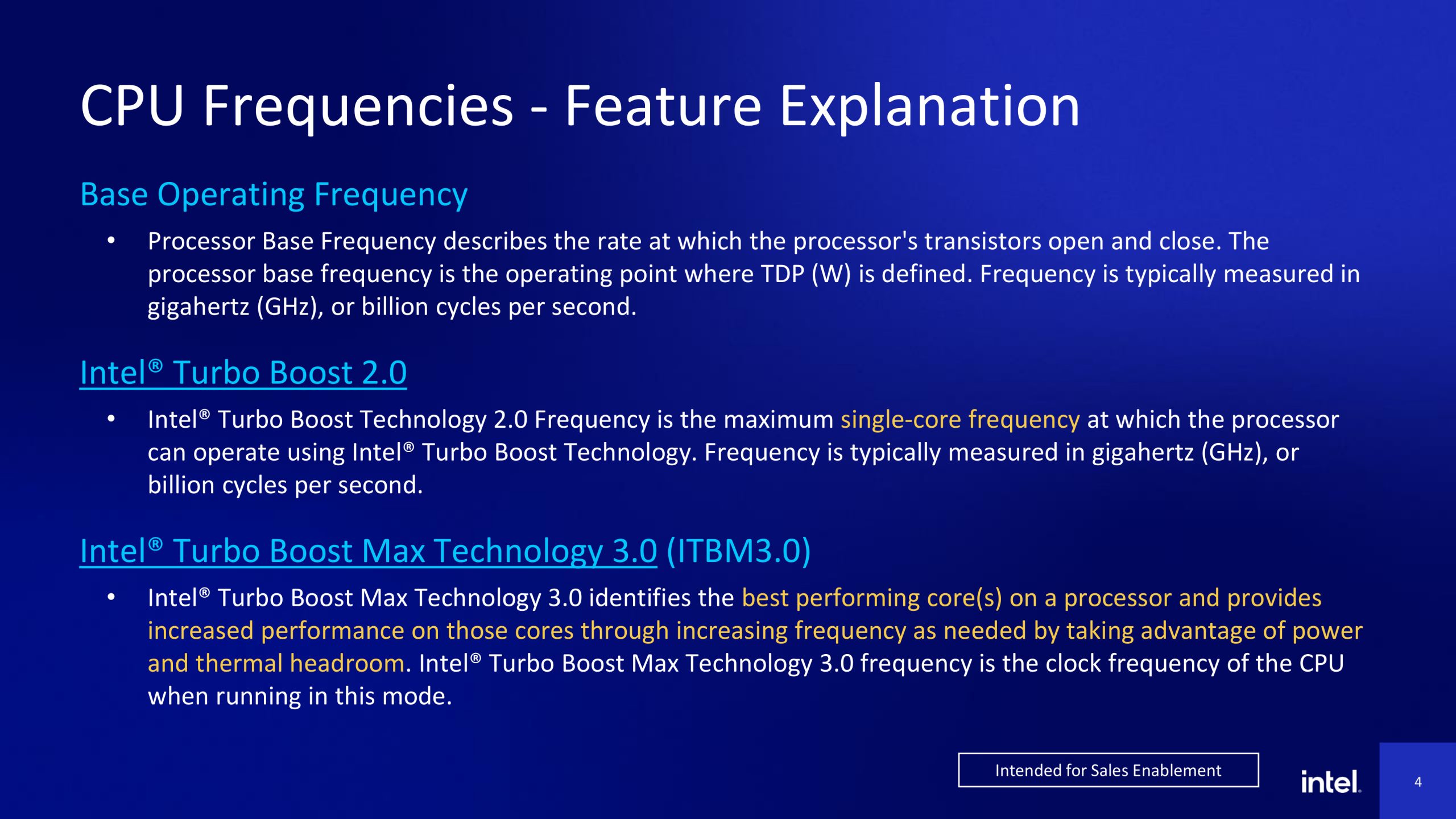
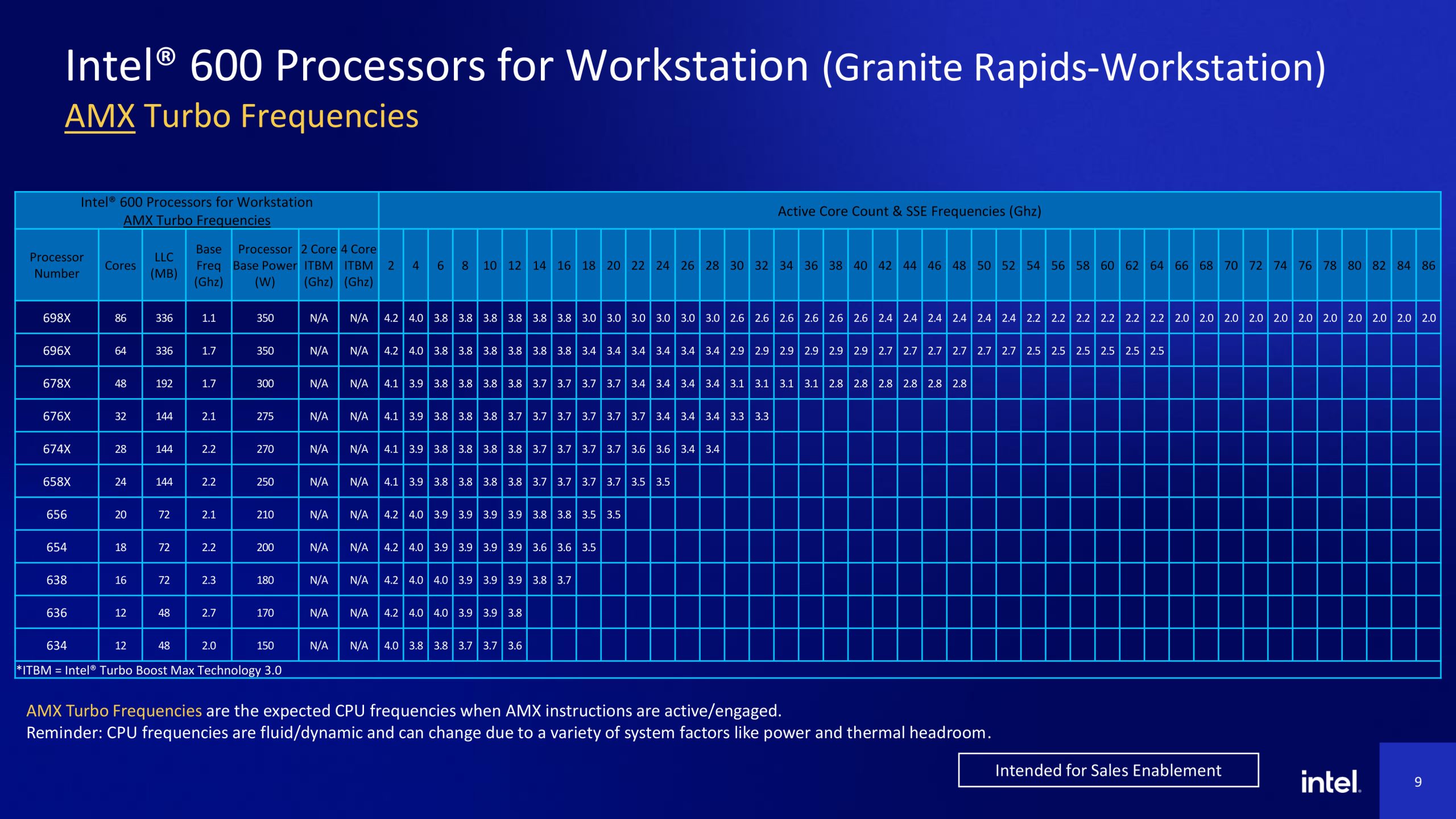
Intel has pulled back the curtain on the frequency behaviour of its new Granite Rapids-WS Xeon 600 workstation series. While marketing materials highlight a peak of 4.9 GHz via Turbo Boost Max 3.0, newly published documentation confirms that sustained speeds are heavily dependent on the instruction set being utilised.
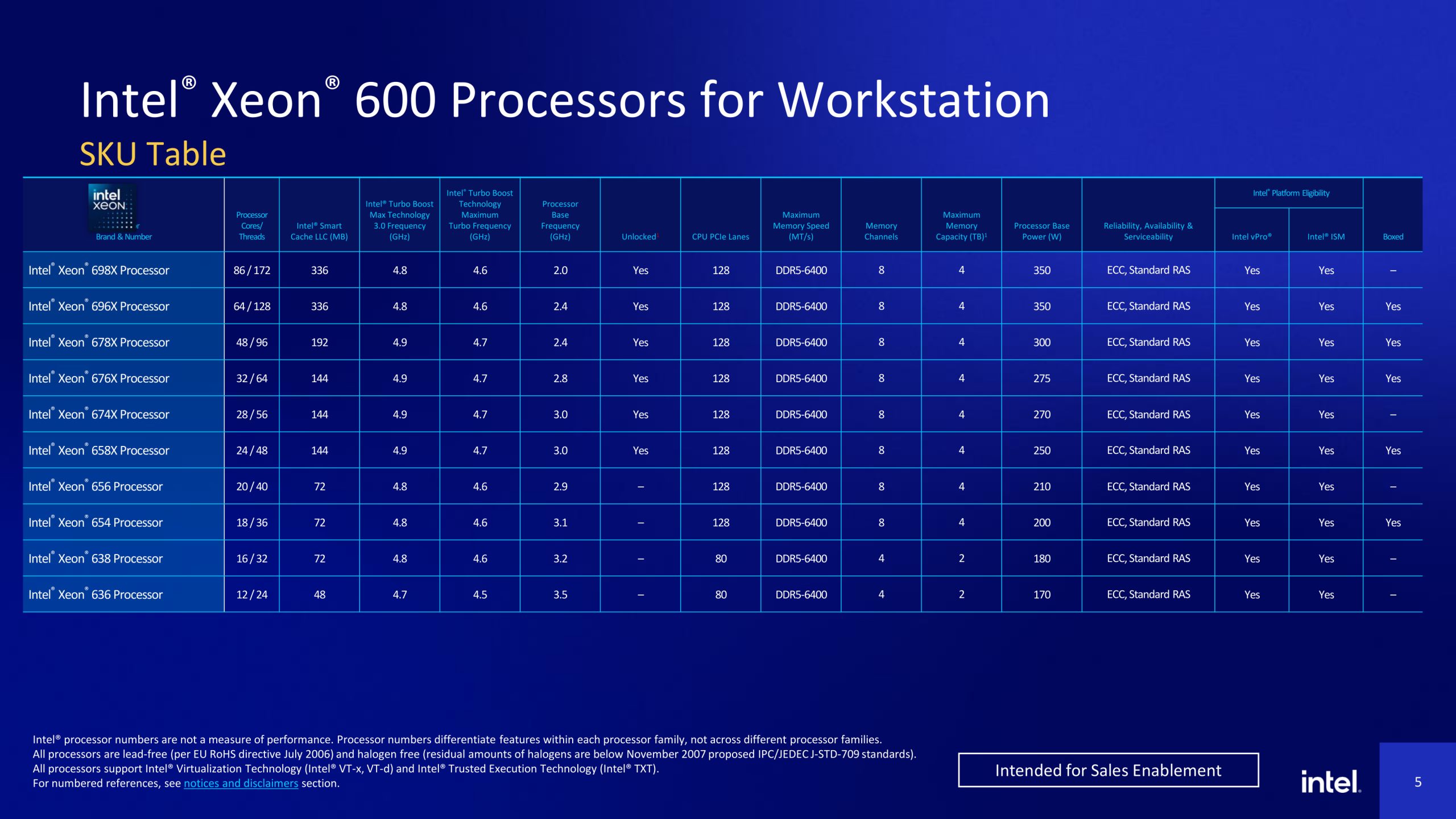
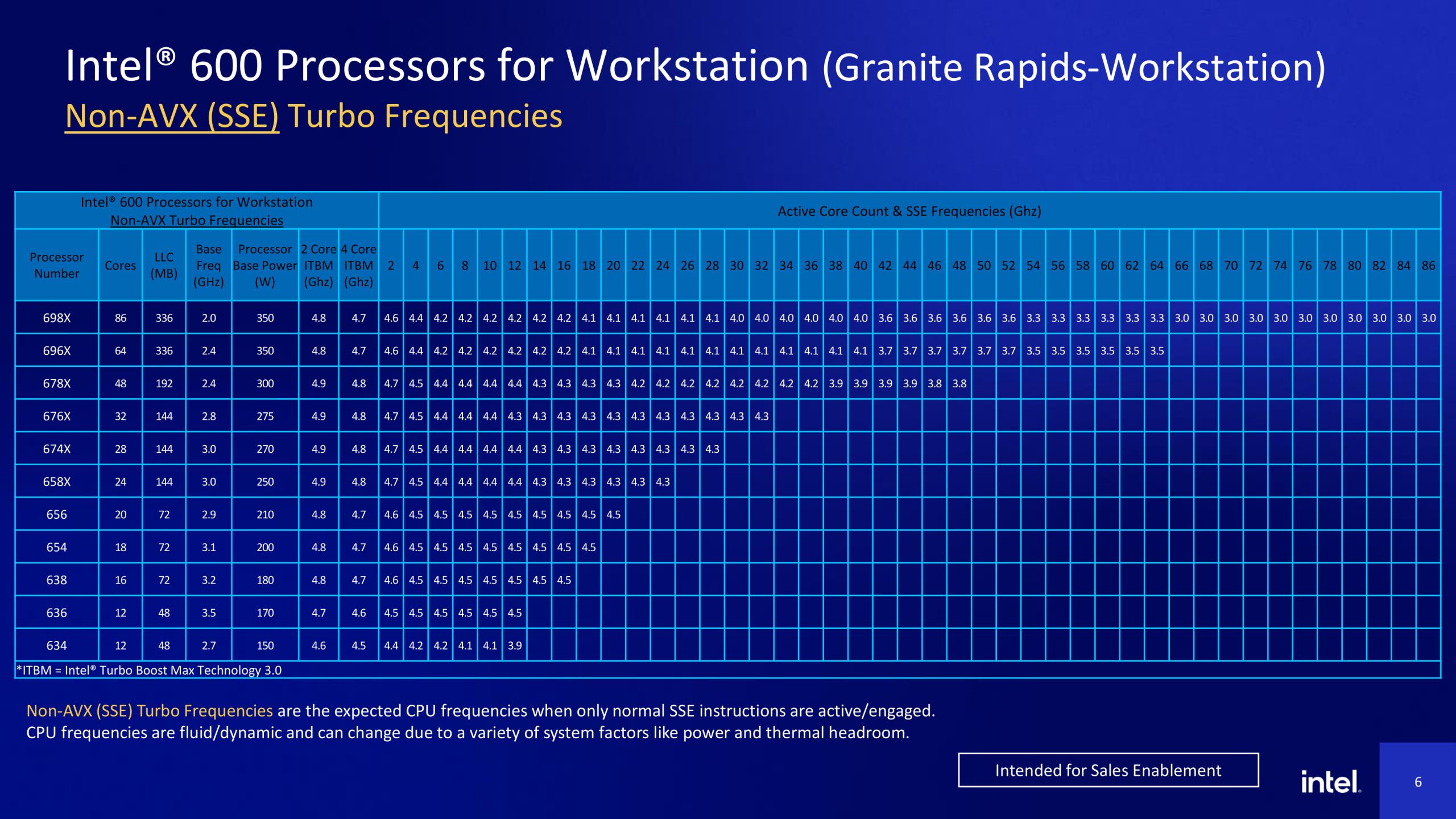
As shared by InstLatX64 (via TechPowerUP), the top-tier SKU in the Xeon 600 Series, the 698X, features 86 cores and 172 threads paired with a massive 336 MB of L3 cache, making it a powerhouse for multi-threaded professional applications. The frequency scaling across different workloads reveals the thermal and power trade-offs required to keep the 86-core silicon stable. In non-AVX workloads, the CPU maintains its peak of 4.8 GHz in single-core mode, but as the active core count increases, the boost frequency can drop to as low as 3.0 GHz. In such workloads, the base frequency is set at 2.0 GHz.
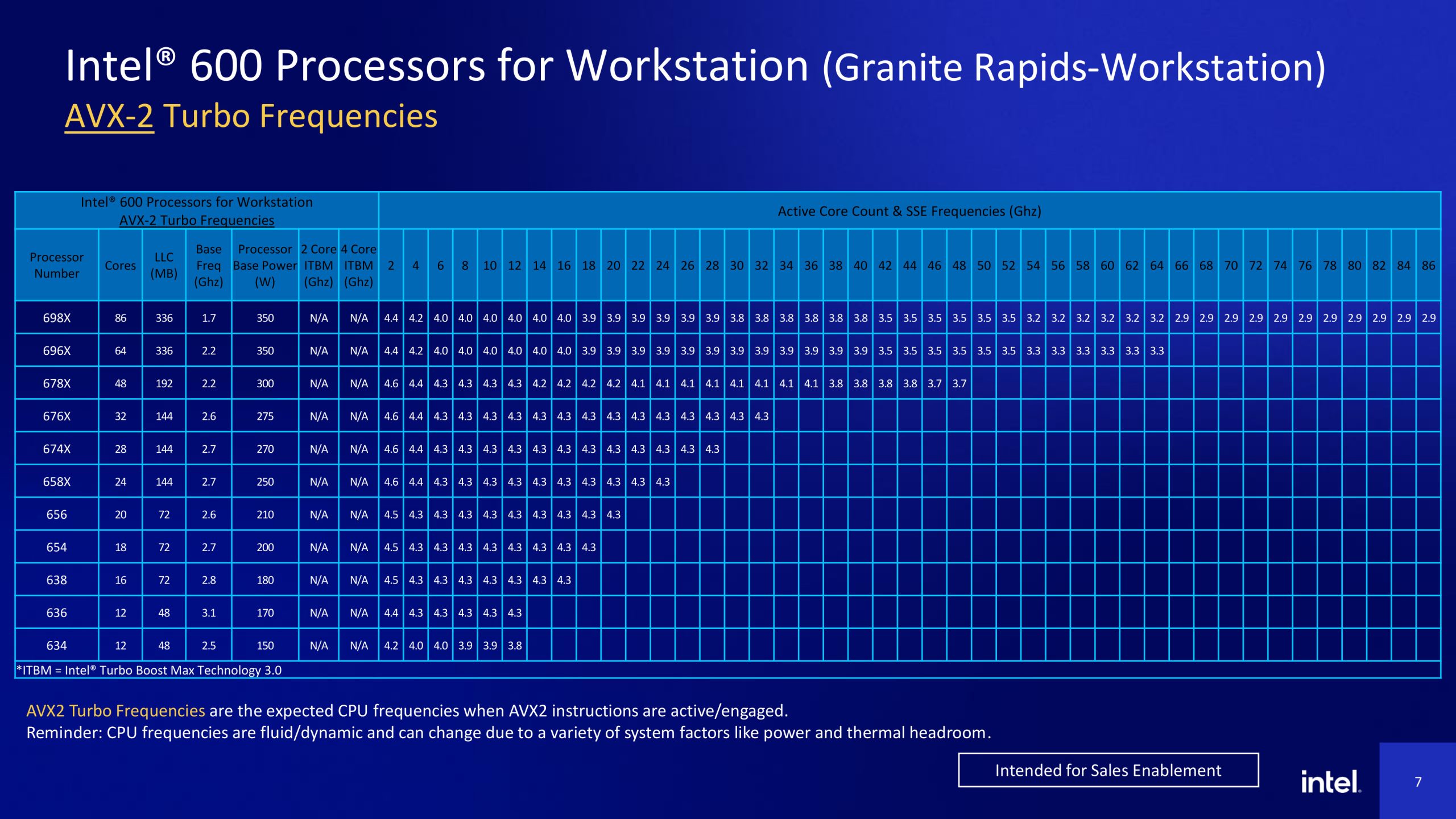
Moving on to the AVX-2 instruction set, the CPU can't boost as high, capping at 4.4 GHz in single-core and dropping to 2.9 GHz as the core count increases. In this case, the base frequency is set at 1.7 GHz. In AVX-512, clock frequencies are even lower, with the maximum turbo frequency ranging from 4.2 GHz to 2.5 GHz and the base frequency dropping to 1.3 GHz. Lastly, we have AMX, where the maximum boost frequency drops even further at the lower end, ranging from 4.2 GHz to 2.0 GHz, and the base frequency goes as low as 1.1 GHz.
KitGuru says: Seeing the Xeon 698X drop to nearly 1.1 GHz under heavy AMX workloads might look alarming, but it is standard for chips of this density. Fortunately, this CPU is unlocked, meaning overclocking is a possibility if you want to bump the clock frequencies.

 Login
Login