8BitDo has officially introduced a new special edition controller called the Ultimate 3 Lavender Dusk. The new controller comes with a soft purple design inspired by evening skies and is made for PC, Xbox, and mobile gamers. Along with the fresh new colour, the controller also packs many high-end features for players who want comfort and better control during gaming sessions.
The Ultimate 3 Lavender Dusk supports both 2.4 GHz wireless and Bluetooth connectivity. Players can also use the included matching charging dock to keep the controller powered when not in use. According to 8BitDo, the controller offers up to 20 hours of battery life with its built-in 1,000 mAh battery, while a full charge takes around 4 to 5 hours.
The controller uses tension-adjustable TMR joysticks and Hall effect triggers with two trigger stop levels. These features are designed to give smoother movement and more accurate input while gaming. The d-pad also has a new disc-style design that should make diagonal movements easier, especially in fighting and action games.
Extra L4 and R4 shoulder buttons are included as well, alongside rear paddles that users can customise for extra commands. All buttons can be remapped through 8BitDo Software X and Software V2 Mobile, allowing players to change controls based on their own gaming style across different devices.
The controller keeps the familiar Xbox-style face button layout but slightly improves the grip design for better comfort during long gaming sessions. It also includes 6-axis gyro controls for supported games.
8BitDo Ultimate 3 Lavender Dusk controller pricing and availability
The 8BitDo Ultimate 3 Lavender Dusk is now available for pre-order for $99.99 through 8BitDo and Amazon. Pre-orders are expected to start shipping on August 31, 2026.
Turtle Beach has officially launched the new Pacific Skyline Wireless Controller for Xbox, PC, and Android devices. The company designed the controller with a colourful look inspired by the San Diego skyline and the California coast, where Turtle Beach first started.
The Pacific Skyline Wireless Controller comes with soft pastel colours, palm tree artwork, and six RGB lighting zones. The lighting creates a glowing skyline effect across the controller, giving it a unique style that stands out from standard gaming controllers. Turtle Beach says the design is made for players who want their gaming setup to match their personality.
Along with the eye-catching design, the controller also focuses on gaming performance. It features premium TMR thumbsticks that offer faster and more accurate movement during gameplay. The controller also includes dual rumble motors and impulse triggers for stronger feedback while playing racing, action, and shooting games.
Players will also get two mappable back buttons that can be customised for different controls and shortcuts. Wireless support is available for Xbox and Windows PCs through a USB transmitter, while Bluetooth support allows users to connect the controller to Android devices.
Turtle Beach says the controller is built for both casual and competitive gaming, while also giving players a more stylish option for their setup.
Turtle Beach Pacific Skyline Wireless Controller availability and price
Spotted by The Verge, Brazilian regulator Tecnoblog has seemingly leaked a new Xbox controller made specifically for Xbox Cloud Gaming. Images of the new controller were published on Tecnoblog, and while it's still unclear as to when this controller could hit the market, not only does it look like it'll be ready for launch soon, but it also looks like Xbox took a page or two from 8BitDo's book of controller making. The face of the new gamepad and its finish are both reminiscent of 8BitDo's style of controller, so much so that when it is officially revealed, it may […]
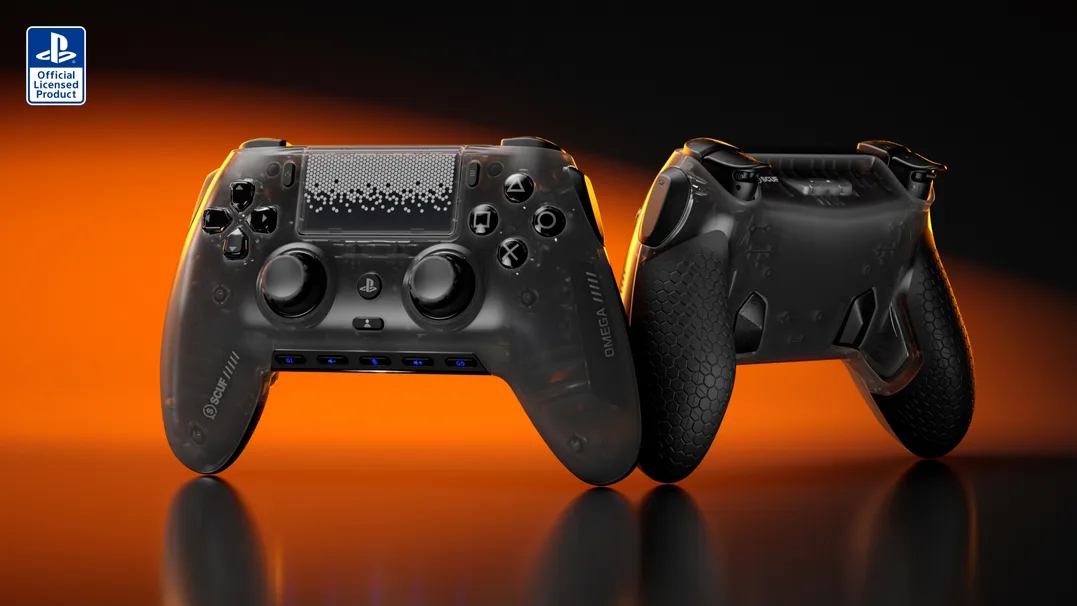
SCUF Gaming has announced the Omega, a high-performance controller officially licensed for PlayStation 5 and PlayStation 5 Pro. The controller features 1K polling, Omron mechanical switches, and TMR thumbsticks designed for increased durability.
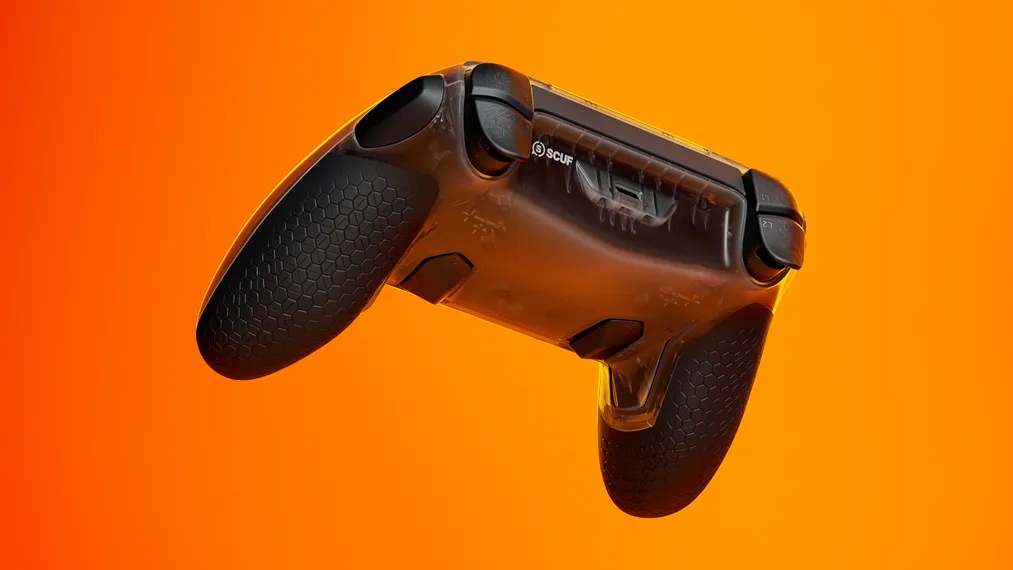
The SCUF Omega features 11 additional customisable inputs, including rear paddles, side-action buttons, and G-keys. For the first time, SCUF has introduced a dedicated mobile app for iOS and Android, allowing users to adjust trigger response curves, thumbstick deadzones, and rebind inputs in real time. The controller uses Omron mechanical switches for the D-pad and action buttons to provide tactile activation.
Hardware specifications include TMR (Tunnel Magnetoresistance) thumbsticks, which are engineered to resist wear and stick drift while maintaining traditional tension. The controller also features “Instant Triggers” for near-zero travel time and refined ergonomics, omitting vibration modules to reduce overall weight. When used on PC, the Omega supports a 1000Hz polling rate in both wired and wireless modes.
The SCUF Omega features a built-in rechargeable battery and supports fast charging. While compatible with the broader PlayStation ecosystem, the controller is specifically optimised for the PS5 Pro's hardware. Pricing for the SCUF Omega starts at £209.99/$219.99/€249.99 for the base model, with further costs for custom cosmetic configurations.
KitGuru says: Do you have a PlayStation 5 console? When you're looking for a new controller, is the standard DualSense enough for your needs, or do you prefer something more premium like the Omega?
EasySMX X05 Pro comes after EasySMX has already built a strong name in the gaming market. The brand is now well known for making controllers that focus on real user needs. It does not chase flashy features. It focuses on what actually improves gameplay.
After the success of the earlier X05, the company has launched the Pro version. This time, the goal is simple. Improve control. Fix small issues. Add useful upgrades that actually matter in daily use.
The X05 Pro is not a basic update. It brings modern features that users actually asked for. You get a two-stage trigger lock system for better control in different types of games. It also includes Hall effect joysticks, which help reduce stick drift and improve long-term accuracy. The buttons are quieter. The vibration system is improved. The D-pad is also more precise.
What makes it more interesting is the price. EasySMX has added these Pro-level features without pushing the cost too high. It stays in the budget range while offering upgrades that are usually seen in more expensive controllers.
On paper, these changes look meaningful. But real value depends on actual use. In this review, we will go through all the features and see how the controller performs in daily gaming.
Unboxing
The unboxing experience of the EasySMX X05 Pro is simple but well organised. The box design follows a clean and modern look. Each colour variant comes with its own matching controller image printed on the front, which makes it easy to identify without opening the box.
The front side shows a large image of the controller along with basic compatibility details like PC, Switch, iOS, and Android. The layout looks neat and not overloaded with text. The yellow accents on the sides add a bit of contrast, which helps the box stand out.
On the back, you get more detailed information. It shows the controller layout, key features, and technical details. The printing is clear and easy to read. It gives a quick idea of what you are getting before opening the box.
Inside the box, everything is packed securely in a moulded tray. The controller sits firmly in place, so there is no unnecessary movement during shipping. The presentation feels organised, not messy.
In the box, you get the controller, a USB cable for charging and wired use, a wireless dongle, and user manuals. All items are placed properly, and nothing feels thrown in randomly.
Overall, the unboxing is clean and straightforward. It does not try to look premium, but it delivers a neat and practical experience without cutting corners.
Switch, Switch Lite, Switch OLED, Windows 7/8/8.1/10/11, Android, iOS
Polling rate
1000Hz (2.4GHz & wired), 125Hz–250Hz (Bluetooth)
Charging port
Type-C
Battery capacity
1,000mAh
Weight
261.6g
Size
15.70 × 9.50 × 6.50 cm
A closer look
The EasySMX X05 Pro is part of the company’s X series lineup. This is the Pro version of the earlier X05, so the focus here is on refinement rather than a full redesign. The overall shape stays familiar, but small changes improve daily use.
In terms of size and weight, the controller feels balanced. It is not too heavy and not too light. The dimensions are standard, so it sits naturally in hand without feeling awkward.
The controller follows an Xbox-style layout. The thumbsticks, D-pad, and buttons are placed in a way most users already understand. This makes it easy to pick up and use without any adjustment time.
Looking at the front, the ABXY buttons use a quiet rubber base. Inside, silicone dampers are added to reduce noise. When pressed, the buttons feel soft and controlled instead of loud and sharp. This change is clearly noticeable during use.
The D-pad sits slightly lower with a solid design. It is easy to reach and gives proper feedback. The thumbsticks have a textured edge, which helps with grip during movement.
The finish changes depending on the colour. The black and white versions come with a simple matte look. They feel clean and minimal. The purple version is different. It has a slightly shiny surface that reflects light when you move it. This gives it a more eye-catching look without being too flashy.
The grip design on the back is well thought out. Both sides have a textured surface that improves hold. The coating is sweat-resistant and feels soft in hand. This helps during long sessions, especially when hands start to get warm.
On the top, you get standard shoulder buttons and triggers. Along with them, small programmable buttons are placed nearby. They are not large, but they are easy to reach once you get used to their position.
At the back, there are dedicated trigger locks for both left and right triggers. These are placed separately, so you can adjust each side based on your preference. Just below that, you can see charging points that work with a dock setup.
The USB Type-C port is placed at the top centre for charging and wired use. The button layout around the centre includes menu, pairing, and function buttons, all placed within easy reach.
Overall, the physical design focuses on control and comfort. Everything is placed with purpose, and nothing feels out of place.
Conntectivity and battery
The EasySMX X05 Pro gives multiple connection options, so you are not limited to one setup. You can use 2.4GHz wireless with the included dongle, Bluetooth, or a wired connection using the Type-C cable. This makes it easy to switch between devices without any extra effort.
In terms of compatibility, the controller works with Switch, Switch Lite, Switch OLED, Windows systems, Android, and iOS. Pairing is simple, and the connection stays stable during use.
One of the biggest upgrades here is the polling rate. In 2.4GHz wireless and wired mode, you get a 1000Hz polling rate. This is a strong improvement and makes inputs feel faster and more responsive. In Bluetooth mode, the polling rate drops to 125Hz–250Hz, which is normal for this mode.
The battery has also been upgraded. The older X05 had a 750mAh battery, but the EasySMX X05 Pro now comes with a 1000mAh battery. This increase allows longer gaming sessions without frequent charging.
Charging is done through the Type-C port, which is placed at the top. You can also charge the controller using a dock, thanks to the charging pins on the back. This adds more convenience, especially if you prefer a clean setup.
Overall, the improvements in connectivity and battery are useful. The 1000Hz polling rate in 2.4GHz mode is a key upgrade and directly helps in better performance.
Connectivity setup and usage
The EasySMX X05 Pro is easy to set up, but only if you follow the correct mode. If you ignore the mode toggle, you will waste time thinking the controller is not working. Each connection type has its own method, and you need to switch modes properly.
2.4GHz wireless (dongle)
This is the best way to use the controller on PC. It gives the highest performance.
Insert the USB receiver into your PC. Switch the mode toggle to 2.4GHz. Press the Home button to turn on the controller.
The LED will start flashing. Once it becomes stable and you feel a short vibration, the controller is connected.
If it does not connect automatically, you need to force pairing. Press the button on the receiver for one second until its LED flashes. Now press and hold the Home button on the controller for five seconds.
The LED will flash fast and then become stable. That confirms pairing.
Wired connection
This is the simplest method.
Switch the mode to 2.4GHz. Connect the controller using a USB cable.
That’s it. No pairing needed. It works instantly.
Bluetooth connection (mobile devices)
Switch the mode to Bluetooth. Press and hold the Home button for five seconds.
The LED will flash, which means pairing mode is active. Turn on Bluetooth on your phone and search for devices. Select “Xbox Wireless Controller” from the list.
Once connected, the LED becomes stable with a small vibration.
For reconnecting, just press the Home button once while staying in Bluetooth mode.
Nintendo Switch connection
Switch the mode to NS (Switch). Press and hold the Home button for five seconds.
The LED will flash. On the Switch, go to Controllers and open “Change Grip/Order.”
After pairing, the LED becomes stable and confirms connection.
For reconnecting, press the Home button once while staying in Switch mode.
In Switch mode, you can double press the “O” button to take screenshots. You can also use the Home button to wake the console.
RGB lighting
The EasySMX X05 Pro features a stylish RGB lighting zone that is placed in key areas instead of spreading across the whole controller. This keeps the design clean while still adding a strong visual touch.
You get an RGB strip on the top front section, just below the logo. It follows a curved shape and gives a smooth glow. There is also RGB lighting around the D-pad ring, which creates a second lighting zone. Together, these areas give a balanced and modern look.
With this setup, every session feels more lively. The lighting adds colour and motion without becoming distracting. It also makes the controller stand out, especially if you are using it on a desk setup or during streaming.
The purple variant reflects the lighting more due to its slightly shiny finish, while the black and white versions keep the effect softer and more controlled.
You can adjust the RGB directly from the controller. Press the M button twice to switch lighting modes. A short vibration confirms the change.
Then use the left stick to control the lighting.
Mode 1 gives a dynamic colourful effect with constant movement. Mode 2 adds a breathing effect, where colours fade in and out. You can move the left stick left or right to change colours. Mode 3 is a solid colour mode with manual colour selection. Mode 4 gives a gradient effect with smooth transitions. Mode 5 turns the lighting off completely.
There is no need for extra software. Everything works from the controller itself.
User experience
The EasySMX X05 Pro focuses on real gameplay experience instead of just adding features on paper. In daily use, the controller feels consistent and reliable. Inputs register properly, and there is no confusion while switching between different play styles.
One of the first things you notice is the quiet buttons. The noise reduction actually works. The buttons use a soft base with dampening inside, so clicks sound low and controlled. This makes a clear difference during late-night sessions or when you are sharing space with others. You still get proper feedback, but without loud noise.
The triggers are another strong point. The dual-stage trigger lock system changes how the controller feels in different situations. You can use a longer press when control matters, and switch to a shorter press when speed matters. This is not just a feature for show. It changes how quickly you react and how much control you have.
The vibration system adds more depth. The controller uses a 2+2 motor setup, which means feedback is not limited to one area. You can feel it in both the triggers and the grips. Actions feel more clear and separated instead of blended together. It is not overpowered, but it is enough to add a layer of feedback during gameplay.
The Hall effect joysticks also make a difference over time. Movement feels smooth and stable. Small adjustments are easier, and there is no sudden jump or drift. This helps in games where precision matters.
The D-pad is reliable for directional inputs. Diagonal movements register properly, which helps in games that need accurate control. There is less chance of missed inputs, and the feedback feels consistent.
During longer sessions, the controller stays comfortable. The grip design helps maintain control without needing to adjust your hands again and again. The surface also handles sweat well, so it does not become slippery.
Overall, the EasySMX X05 Pro delivers a stable and controlled experience. It improves small but important areas like noise, trigger control, and stick accuracy. These changes may look simple, but they directly affect how the controller feels during real gameplay.
Final verdict
The EasySMX X05 Pro is not trying to compete with high-end controllers on branding. It competes on value, and that is where it wins.
You get features that actually matter in daily use. Quiet buttons make a real difference. Hall effect joysticks improve long-term reliability. Dual-stage trigger locks add control flexibility. The 1000Hz polling rate in 2.4GHz mode improves responsiveness. On top of that, you also get stable connectivity, useful RGB, and a comfortable grip.
There are no unnecessary extras here. Everything added has a purpose. More importantly, these features are usually seen in more expensive controllers, but here they come at a much lower price.
If you are looking for a controller for PC, calling this one of the best budget options would not be wrong. It delivers modern features without putting pressure on your wallet.
This is a controller that focuses on what actually matters. It performs well, stays reliable, and keeps the cost under control.

 Login
Login