❌

Normal view

There are new articles available, click to refresh the page.
Yesterday β€” 27 July 2026Main stream

NVIDIA Blackwell RTX 50 Hotspot And Per-Memory Temperature Monitoring: Here’s Everything Enthusiasts Have Uncovered So Far

26 July 2026 at 17:00

A close-up of an NVIDIA GeForce RTX graphics card with visible thermal paste on the GPU and the 'NVIDIA GPU Hotspot' graphic in the background.

NVIDIA's GeForce RTX 50 series has introduced various architectural improvements, but one change that caught the attention of hardware enthusiasts wasn't related to the gaming performance or AI capabilities. Instead, it was related to the temperature monitoring on the RTX 50 series graphics cards. Unlike previous-generation RTX GPUs, NVIDIA removed the GPU hotspot measurement from the GPUs, even though the sensor for these cards exists. This prevented monitoring software from displaying the hottest point on the GPU die, which has served enthusiasts, reviewers, and overclockers for years and helped them learn about GPU behavior. This has been discussed across various […]

Read full article at https://wccftech.com/roundup/nvidia-blackwell-rtx-50-hotspot-and-memory-temperature-monitoring-heres-everything-uncovered-so-far/
Before yesterdayMain stream

MSI Afterburner is adding a GPU voltage and frequency heat map

13 July 2026 at 14:30

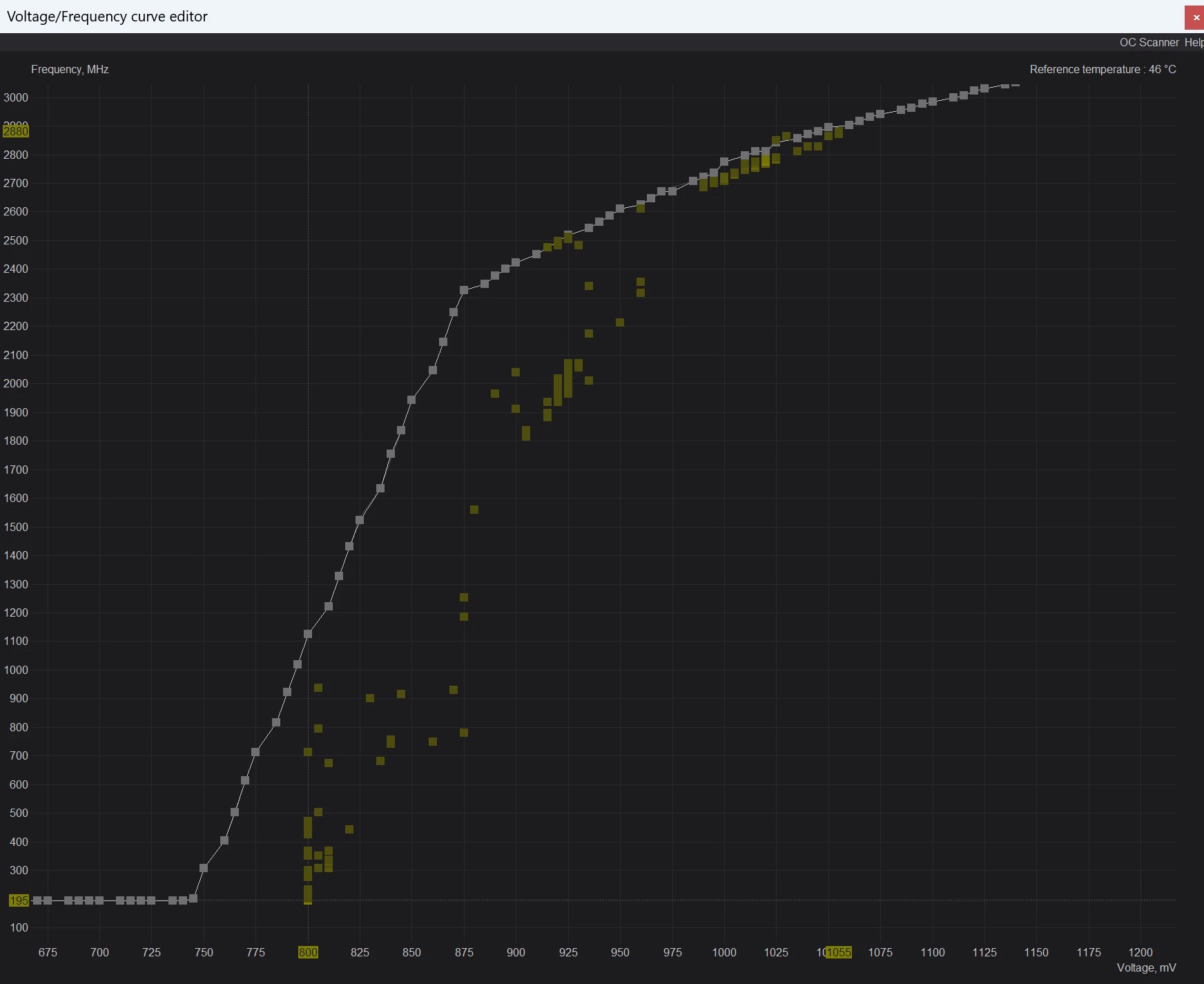
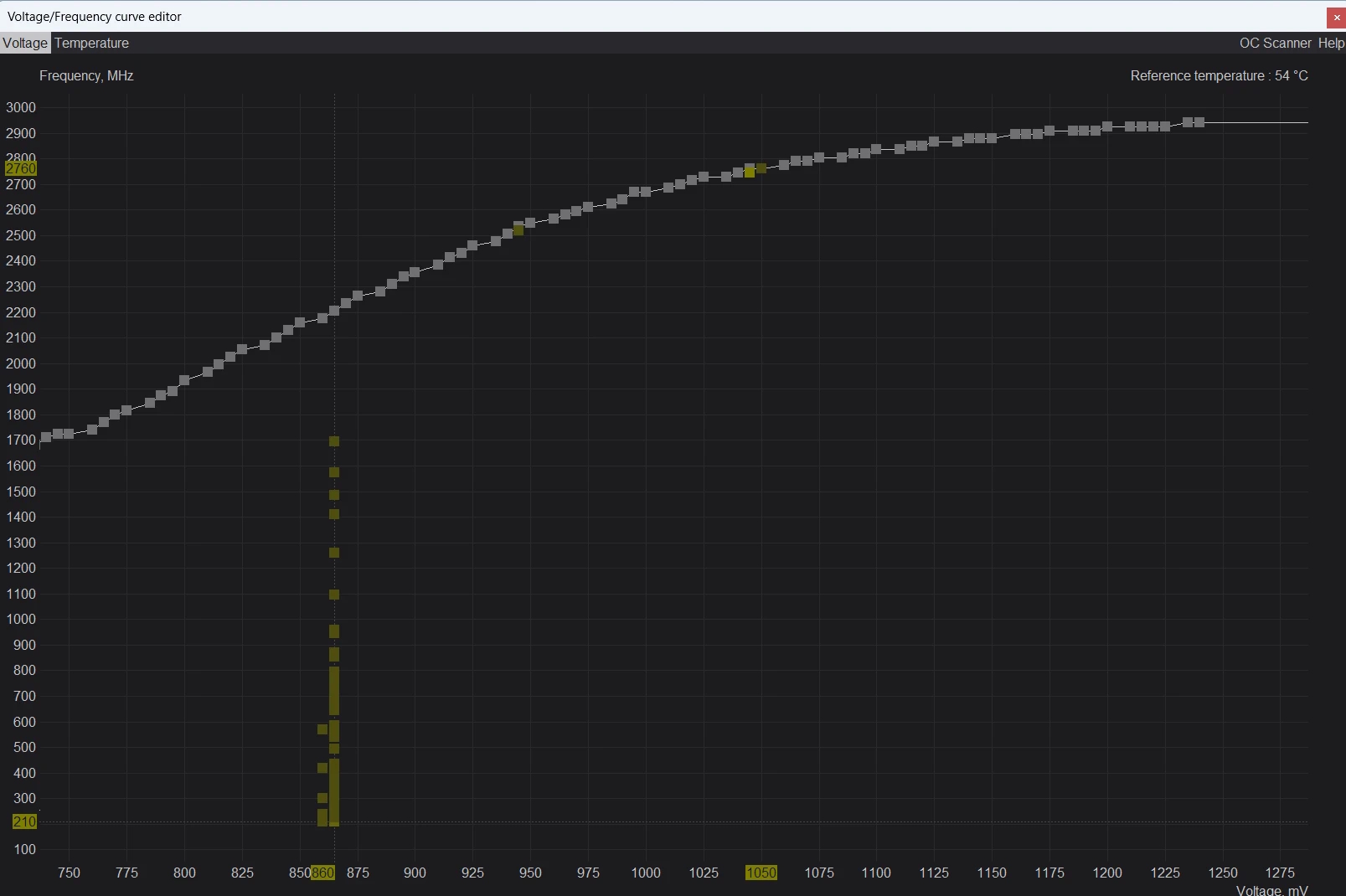
MSI Afterburner developer β€œUnwinder” has revealed an upcoming beta release featuring a voltage and frequency curve editor heat map. This new tool allows users to record and visualize how Nvidia GeForce RTX graphics cards scale their clock speeds and voltage levels in real time.

Brought to our attention by Uniko's Hardware and VideoCardz, the developer of MSI Afterburner launched beta 4 of v4.6.7 of its overclocking tool. To access the heat map, users must press β€œM” within the editor to show the Nvidia GPU Boost algorithm navigating its predefined frequency-scaling points. The utility uses yellow gradients to highlight the most frequently hit voltage and frequency targets. Below, you can see the data captured for both the GeForce RTX 5090 and GeForce RTX 4090, highlighting clear generational differences in V/F scaling:

Image credit: Unwinder (Guru3D)

Unwinder noted that Nvidia introduced significant changes to dynamic voltage and frequency scaling (DVFS) starting with its Blackwell architecture. While older architectures jumped directly between target V/F points without using intermediate values, Blackwell handles transitions along a more gradual curve, switching its V/F targets considerably faster.

KitGuru says: This update should provide overclockers with much finer insights into how different GPU architectures behave. Will you download the new beta version of Afterburner, or wait for the new feature to reach the stable branch?

The post MSI Afterburner is adding a GPU voltage and frequency heat map first appeared on KitGuru.

NVIDIA GPU Hotspot Temperature Has Been Unlocked Through Mods, & Shows Widespread Thermal Issues Affecting RTX 50 GPUs That Throttle Gaming Performance

11 July 2026 at 08:55

A close-up of an NVIDIA GeForce RTX graphics card with visible thermal paste on the GPU and the 'NVIDIA GPU Hotspot' graphic in the background.

Mods have unlocked NVIDIA's GPU Hotspot measurement on the RTX 50 series, which can give you a clue why your latest card is running at lower performance. NVIDIA Removed GPU Hotspot Measurement From RTX 50, Focusing On Average Temperatures, But The Latter Masks Your Thermal Throttling Problems Starting with the NVIDIA GeForce RTX 50 "Blackwell" generation, NVIDIA dropped GPU Hotspot measurements. According to reports from TechPowerUp and the creators of the GPU-Z tool, NVIDIA had allegedly removed the Hotspot sensor from its latest GPU, which led to incorrect readings in popular diagnostic and real-time monitoring tools such as HWMonitor, HWiNFO, […]

Read full article at https://wccftech.com/nvidia-gpu-hotspot-temperature-unlocked-by-mods-as-rtx-50-gpus-face-poor-thermal-issues/

CPU or GPU Bottleneck? How to Diagnose What’s Really Limiting Your Gaming Performance

20 June 2026 at 17:55

A promotional image titled 'CPU or GPU Bottleneck? How to Diagnose & Fix' shows a CPU and GPU with a graph displaying 'FPS 142,' 'Frametime 7.1 ms,' 'CPU Usage 92%,' and 'GPU Usage 58%'.

Ah, the ultimate PC gaming boogeyman: β€œIs my CPU bottlenecking my graphics card?” It’s the first question we ask ourselves when building a new rig, slapping in a shiny GPU upgrade, or wondering why a game feels like a stuttery mess despite dropping a small fortune on PC hardware. But here is the hard truth, folks: a bottleneck isn’t a permanent stamp on your PC. It is a dynamic, fast-shifting state dictated by the specific game you're playing, the resolution you're running, your graphics presets, and your target framerate. Your system can be completely GPU-bound in a graphically heavy AAA […]

Read full article at https://wccftech.com/how-to/cpu-or-gpu-bottleneck-how-to-diagnose-whats-really-limiting-your-gaming-performance/

How To Properly Stress Test Your GPU: Why FurMark Alone Is Not Enough For Modern GPUs

12 June 2026 at 20:45

A gaming GPU setup displays a monitor showing 'GPU TEMPERATURE' at 72Β°C and 'GPU UTILIZATION' at 99%, with text above reading 'How To Properly Stress Test Your GPU'.

Let's face it: the days of running FurMark for 30 minutes, watching nothing explode, and calling your GPU "stable" are long gone. Modern GPUs from NVIDIA, AMD, and Intel are smarter, more power-hungry, and far more dynamic in their clock-speed behavior than the older graphics cards we grew up overclocking. GPU synthetic/stress tests like FurMark, OCCT, and 3DMark absolutely still have their place, but treating any single tool as the holy grail of stability is a big mistake. Today's GPUs constantly juggle clocks, voltages, and temperatures on the fly. A GPU overclock (or undervolt) that flies through a traditional rasterized […]

Read full article at https://wccftech.com/how-to/how-to-properly-stress-test-your-gpu/

Do Computer Chips Actually Get Slower With Age? The Real Science Behind Silicon Aging

26 May 2026 at 19:50

A split-image of a computer chip with 'Do Computer Chips Slow Down With Age?' shows performance margin graphs and chip deterioration, contrasting performance over time.

There is a question that keeps coming back in enthusiast circles every few years: Do computer chips actually get slower as they age? It sounds simple, but the answer is more interesting than a clean yes or no. Your old CPU or GPU usually doesn’t wake up one day and decide to become 10% slower just because it’s been inside your system for five years. In most normal cases, if an older PC feels slower, the culprit is more likely to be accumulated dust, dried/pumped-out TIM (thermal interface material), background apps, operating system bloat, security patches, newer/more demanding games, or […]

Read full article at https://wccftech.com/do-computer-chips-actually-get-slower-with-age-the-real-science-behind-silicon-aging/

MSI MPG Ai1600TS PCIe5 1600W Power Supply Impressions – Safeguarding Your 16-Pin GPUs!

7 April 2026 at 02:35

A close-up of a black PC component with large white 'PERFORMANCE' text and a fan visible through a mesh grille, against a colorful blurred background.

MSI entered the PSU market in 2020, and since then, it has offered some really good designs, featuring the latest standards and exclusive features. The manufacturer offers its line in three segments: the entry-level MAG, the mid-tier MPG, and the enthusiast-grade MEG series. We previously got a taste of the MEG Ai1600T, MEG Ai1300P, and the MPG A1000G PSU, but this year, MSI unleashed its high-end MPG Ai1600TS series, which goes all-in on the ATX 3.1 standard with premium components and ratings ranging from 1300W up to 1600W. MSI MPG Ai1600TS 80+ Titanium PSU Specifications The MSI MPG Power Supplies […]

Read full article at https://wccftech.com/review/msi-mpg-ai1600ts-pcie5-1600w-power-supply-impressions-safeguarding-your-16-pin-gpus/

MSI debuts MPG Ai TS Series PSUs with Safeguard+ GPU protection system

26 March 2026 at 16:30

MSI has officially introduced its MPG Ai TS series, a high-end PSU lineup that moves beyond passive safety measures. The headline feature here is GPU Safeguard+, a monitoring suite designed to detect electrical anomalies before they cause physical damage to graphics cards.

Unlike traditional PSUs that rely on over-current protection (OCP) to shut down a system after a failure, the MPG Ai TS (Ai1600TS and Ai1300TS) uses a dedicated smart IC to monitor real-time current on each pin of the 12V-2Γ—6 interface. This allows the PSU to detect imbalances in the electrical current, a common precursor to connector failure often caused by poor cable seating or uneven pin contact. If the system detects an uneven distribution or a single pin carrying an excessive load, it triggers an active intervention.

To prevent the frustration of a sudden β€œhard” shutdown, MSI has implemented a β€œSave Buffer” system. When a potential risk is identified, the PSU triggers a hardware-level buzzer and a desktop software pop-up simultaneously. This provides a critical window for users to save their work or exit a game before shutting down. Safeguard+ can also work in conjunction with Afterburner to throttle a GPU to reduce electrical load and lower temperatures.

KitGuru says: We've seen plenty of β€œrevisions” to the 12V-2Γ—6 standard, but safety measures like this are going to be very nice to have for those who have invested many hundreds or even thousands in their graphics cards.Β 

The post MSI debuts MPG Ai TS Series PSUs with Safeguard+ GPU protection system first appeared on KitGuru.
❌
❌