It's a familiar story by now. With Samsung reportedly increasing its DRAM prices by around 20 percent for the ongoing quarter, NVIDIA felt it had no choice but to raise the prices of its consumer graphics cards, constituting the third such inflationary episode so far this year, one that has purportedly emptied store shelves as distributors enter a full-on panic mode. Unlike NVIDIA's price hike in May, the current inflationary episode has reportedly impacted a lot more consumer-facing graphics card models, spurring empty store shelves as rumors ran rampant According to Taiwan's Economic Daily, NVIDIA has increased the prices of […]
There have been rumours about an RTX 50 Super launch for months now, but continued price rises across memory products have apparently derailed the planned launch. According to reports, a shortage of 3GB GDDR7 modules and increased pricing has forced Nvidia to delay RTX 50 Super.
VideoCardz reports that while partners possess the chips for RTX 50 Super graphics cards, they can't proceed with manufacturing due to a lack of available memory, coupled with high pricing for the GDDR7 chips available. To put it in perspective, a 3GB GDDR7 chip is currently estimated to cost between $60 and $70. On the other hand, a 2GB GDDR7 chip reportedly costs about $20.
The rumoured RTX 50 Super refresh was apparently planned with 3GB GDDR7 modules in mind, up from the standard 2GB chips found on regular RTX 50 cards. This upgrade shifts the RTX 5070 Super to 18GB of VRAM, while both the RTX 5070 Ti Super and RTX 5080 Super should feature 24GB. However, Nvidia is allegedly redirecting these specific 3GB components to its more profitable AI graphics cards, including RTX Pro 6000 Blackwell and Rubin CPX, where it's easier to mask the increased price of the 3GB GDDR7 modules.
According to the Seasonic Power Supply calculator, the RTX 50 Super GPUs may also have higher TGP targets than their non-Super counterparts. Apparently an RTX 5080 Super will draw as much as 415W, a 55W increase over the RTX 5080. The RTX 5070 Ti Super has been seen listed at 350W and the RTX 5070 Super is listed at 275W. The theory is that the increased power draw is tied to the denser memory configuration, as well as potential clock speed bumps.
KitGuru Says: Do you think we will eventually get an RTX 50 Super refresh, or will Nvidia jump right to RTX 60?
AMD seems to be testing its upcoming FSR multi-frame generation (MFG) technology within its Radeon drivers. Discoveries in the third-party software RadeonTuner show that the company has added placeholders for the feature, offering options ranging from 1x to 8x frame generation.
RadeonTuner allows users to modify Radeon driver settings without using the standard AMD Software: Adrenalin Edition application. According to the utility's developer, AMD frequently implements placeholders well ahead of a feature's official launch. The multi-frame generation within AMD's ecosystem was the latest one to be found.
A Chiphell user (via Wccftech) attempted to force the technology on using a Radeon RX 9070 XT graphics card but found it entirely non-functional. AMD has not yet shipped the underlying model required to make the frame generation operational. This upcoming technology puts AMD against competitors like Nvidia, which offers DLSS Dynamic MFG with up to 6x generation, and Intel, which provides 4x XeSS MFG through its XeSS 3 release.
Other options available in the RadeonTuner tool include overrides for FSR Ray Regeneration and FSR Neural Radiance Caching. These are already available, but they require native support to be enabled. However, according to this third-party tool, AMD appears to be working on a manual override to extend these benefits to more games.
KitGuru says: Are you a fan of multi-frame generation? What MFG multiplier do you usually choose?
A new GPU generation always arrives with a mix of expectation and skepticism, especially in an era where ray tracing, AI‑assisted rendering, and increasingly complex game engines push hardware harder than ever. NVIDIA’s GeForce 50‑series marked a clear architectural pivot toward neural‑assisted graphics, blending traditional raster performance with machine‑learning‑driven techniques that reshape how frames are built. And after a long wait - nearly 18 months since its original launch window - NVIDIA finally sent over the GeForce RTX 5070 Founders Edition, a card positioned to show what Blackwell’s mid‑range silicon can really do.
NVIDIA (NASDAQ: NVDA) is the world leader in AI and accelerated computing. The pioneer of GPU-accelerated computing, NVIDIA specializes in products and platforms for the large, growing markets of gaming, professional visualization, data center, and automotive.
The GeForce RTX 5070 is built on the GB205 silicon with 48 SMs (streaming multiprocessors), delivering 6144 CUDA cores, 192 Tensor cores, 48 RT cores, 192 TMUs, and 80 ROPs, backed by 48MB L2 cache. It features 12GB GDDR7 on a 192‑bit bus running at 28Gbps, yielding 672GB/s bandwidth. GPU boost clocks reach 2512MHz, and the card implements PCIe 5.0x16. The GB205 die includes 5 GPCs, plus one each of the latest NVENC and NVDEC engines, all fabricated on NVIDIA’s 4N process. It also introduces Neural Rendering powered by Blackwell’s AI‑driven graphics pipeline, combining neural objects with traditional rasterization through the new AI Management Processor. It adds concurrent FP32+INT32 execution on every CUDA core, 4th‑gen RT cores prepared for Mega Geometry, and 5th‑gen Tensor cores with FP4 support. The Founders Edition uses a compact Dual Flow‑Through cooler within SFF‑Ready dimensions and targets higher sustained clocks with a 250W TGP. PCIe 5.0, next‑gen NVENC/NVDEC, and architectural IPC gains round out the generational uplift.
SPECIFICATIONS AND FEATURES
PACKAGING AND CONTENTS
NVIDIA uses a simple cardboard box (probably from recycled paper) to ship the GeForce RTX 5070 FE.
The card itself is actually placed inside a secondary box (probably also made by recycled materials).
Along with the GeForce RTX 5070 Founders Edition card NVIDIA has placed just a two 8-pin PCIe to 12V-2x6 power adapter and a quick start guide.
THE GEFORCE RTX 5070 FE
Just like with past Founders Edition models the GeForce RTX 5070 FE carries the same industrial design language NVIDIA has refined over the last few generations, a dense, sculpted block of aluminum with a minimalist, almost architectural presence.
The matte metal frame wraps around the card in a seamless loop, interrupted only by the signature X‑shaped brace that gives the cooler its rigid, engineered look.
On the front, the dual‑axial fans dominate the design, large, quiet, and framed with precision, giving the card a sense of purpose rather than decoration.
The top has two long openings and the 12V-2x6 power connector.
The rear exhaust cutout and the clean row of display outputs (3xDP v2.1b / 1xHDMI v2.1b) reinforce that functional aesthetic.
Yes, for some people the lack of RGB/ARGB lighting may push them towards models by NVIDIA partners but I think it looks great.
TEST BED
TESTING METHODOLOGY
Since I changed my graphics card test rig i decided to tweak things a bit and so the entire testing methodology has changed. So, for the foreseeable future for tests, I’ll be using the EV3285 monitor by EIZO (later on I may also add tri-monitor results since I do have 2 cockpits here in the lab) for 2160p UHD (3840x2160p), 1440p (2560x1440p) and 1080p Full HD (1920x1080p) tests. Needless to say, since most of you voted for it, I’ll also be using the Intel Core I9-13900K (5.8GHz P/4.7GHz E/4.9GHz RING), EVGA Z790 DARK test rig which I’ve completed with the Kingston FURY RENEGADE LIMITED EDITION 48GB DDR5 8000MHz CL36 dual-channel kit.
Most games have also been changed so instead of manually testing every single one (and always allowing a small percentage of error) i chose all the latest ones to feature a built-in benchmark. In certain cases, built-in benchmarks may perform better than in-game, but my purpose is comparison and not what one can expect in terms of in-game performance. So, this list includes Chernobylite, Cyberpunk 2077, F1 2022, Far Cry 6, Forza Horizon 5, Guardians Of The Galaxy, Horizon Zero Dawn CE, Metro Exodus Enhanced Edition, Red Dead Redemption 2 and Returnal. Also, since some of you have asked for Synthetic benchmarks in the past, I’ll also be using Speed Way and Port Royal from 3D Mark.
As with the past options like power saving, sharpness, overlays and even zero fan mode are all disabled in the cards we’re testing (to achieve the purest and maximum performance) and all tests are repeated a total of 3 times in a fresh Windows 11 Pro installation with all updates installed until the day of our review (same as all the games used). Room temperature is as usual controlled and steady at 23 degrees Celsius for all tests and to record the temperatures of the cards we used AIDA64, and GPU-Z. Recording noise levels is done with an ExTech HD600 dBA meter from a distance of just 15cm away while power consumption is measured again using GPU-Z.
TEST RESULTS – SPEED WAY
3DMark Speed Way’s engine is assembled to demonstrate what the latest DirectX API (12 Ultimate) brings to ray traced gaming, using DirectX Raytracing tier 1.1 for real-time global illumination and real-time raytraced reflections, coupled with new performance optimizations like Mesh Shaders.
TEST RESULTS – PORT ROYAL
3DMark Port Royal is the world’s first real-time ray tracing benchmark for gamers. It shows you how well your PC handles ray tracing effects in real-time.
TEST RESULTS – CHERNOBYLITE
Chernobylite is a 1st person RPG set in the hyper-realistic, 3D-scanned wasteland of Chernobyl's Exclusion Zone. It's based on Unreal Engine 4 and will be used at Ultra graphics (RT Ultra/Off).
TEST RESULTS – CYBERPUNK 2077
Cyberpunk 2077 is the latest game by CD Project and is based on their REDEngine 4. Graphics are set at Ultra/Psycho (RT Psycho/Off).
TEST RESULTS – F1 2022
F1 2022 is built on Codemasters' in-house engine, EGO, which has been upgraded to include DX12 and Raytracing. Graphics are set to Ultra High (RT is enabled in all tests).
TEST RESULTS – FAR CRY 6
Far Cry 6 is based on the Dunia engine. Graphics are set to Ultra with DXR enabled.
TEST RESULTS – FORZA HORIZON 5
Forza Horizon 5 uses ForzaTech, a proprietary engine built by Turn 10. Graphics are set to Extreme (RT is always enabled at high).
TEST RESULTS - GUARDIANS OF THE GALAXY
Guardians Of The Galaxy is based on the Dawn Engine by EIDOS. Graphics are set to maximum (RT Ultra/Off).
TEST RESULTS - HORIZON ZERO DAWN CE
Horizon Zero Dawn CE (Complete Edition) is based on Guerrilla Games' Decima engine. Graphics are set to Ultimate Quality.
TEST RESULTS - METRO EXODUS ENHANCED EDITION
Metro Exodus Enhanced Edition is based on the 4A Engine and contains huge graphical upgrades compared to the normal version, including Ray Traced Emissive Lighting. Graphics are set at Extreme quality.
TEST RESULTS – RED DEAD REDEMPTION 2
For Red Dead Redemption 2 Rockstar has used their RAGE engine (Rockstar Advanced Game Engine). Graphics preset level slider is set to favor quality.
TEST RESULTS – RETURNAL
Returnal is also based on Unreal Engine 4. Graphics are set to EPIC (RT EPIC/Off).
TEST RESULTS – MULTI FRAME GENERATION / BLACK MYTH WUKONG / F1 2025 / CYBERPUNK 2077 PHANTOM LIBERTY
TEST RESULTS - OVERCLOCKING
Using 406MHz extra on the core and 350MHz on the VRAM (strangely enough GPUZ didn’t show the jump in RAM speed) resulted in a very good boost in performance (going higher would result in games crashing to desktop). I also recommend tweaking voltage curves since undervolting this card is quite easy (recommend MSI Afterburner for anything OC).
TEST RESULTS - POWER CONSUMPTION / TEMPERATURES / NOISE LEVELS
CONCLUSION
NVIDIA taking so long to send over a GeForce RTX 5070 FE sample ended up being both a blessing and a drawback. On the positive side, over a year's worth of driver updates have noticeably improved the card’s performance compared to launch. On the negative side, eighteen months is a long wait in this industry. NVIDIA also put extra emphasis on DLSS 4.5 and Multi‑Frame Generation with the GeForce RTX 5xxx series, so I evaluated those gains by adding DLSS tests across several titles and using Black Myth Wukong, Cyberpunk 2077 Phantom Liberty, and F1 2025 to measure MFG performance (DLSS Quality mode, 2x/4x MFG). So, from my time with the GeForce RTX 5070 Founders Edition, it’s clear that DLSS 4.5 and Multi‑Frame Generation aren’t optional extras, they’re the backbone of the experience. Raw performance alone puts the card in familiar 70‑series territory (Raster performance alone is a small improvement over the RTX 4070, and even ray‑traced workloads don’t dramatically shift the hierarchy), but once you flip on DLSS 4.5, the GPU suddenly feels a tier higher. The updated transformer model cleans up motion stability, and Dynamic MFG although not quite perfect yet does a very good job of pushing frame rates right up to your panel’s refresh ceiling without the jitter or input‑lag spikes older FG versions struggled with. Even 4x and 6x MFG modes feel surprisingly natural, delivering a level of fluidity that belies the card’s mid‑range positioning. Yes, you can still spot the occasional artifact in chaotic scenes (in my case I encountered instant white screens a few times), but the trade‑off is overwhelmingly worth it, DLSS 4.5 is what transforms the RTX 5070 from “solid” to “genuinely exciting” in modern AAA workloads. Power consumption is another quiet win since in most cases during real gaming the GeForce RTX 5070 hardly ever surpasses 200W (although during all my benchmarks it did break the 250W barrier), making it both cooler and more efficient than you’d expect for this class. Unfortunately, even though the cooling system is sufficient in order for NVIDIA to keep noise levels at low levels they had to compromise.
NVIDIA’s GeForce RTX 5070 Founders Edition has quietly slipped out of the retail ecosystem, no store lists it, no distributor expects it, and NVIDIA hasn’t pushed any new batches. With the FE effectively gone, the only remaining path is to pick from the various AIC partner designs, which currently start at around USD549–579 in the USA and roughly 620–670Euros in the EU for brand‑new cards. In terms of price‑to‑performance, the GeForce RTX 5070 lands in a strong position, it outpaces the previous‑gen RTX 4070 while launching at a lower street price, and on the AMD side, the only real modern counter is the RX 9070 GRE, a card that trades blows in pure raster but still falls behind once ray‑tracing and mixed workloads enter the picture, leaving the GeForce RTX 5070 as the more balanced option at roughly the same money. Overall, the GeForce RTX 5070 FE delivers where it matters and even though it’s not quite perfect the Golden Award is in order.
A new GPU generation always arrives with a mix of expectation and skepticism, especially in an era where ray tracing, AI‑assisted rendering, and increasingly complex game engines push hardware harder than ever. NVIDIA’s GeForce 50‑series marked a clear architectural pivot toward neural‑assisted graphics, blending traditional raster performance with machine‑learning‑driven techniques that reshape how frames are built. And after a long wait - nearly 18 months since its original launch window - NVIDIA finally sent over the GeForce RTX 5070 Founders Edition, a card positioned to show what Blackwell’s mid‑range silicon can really do.
NVIDIA (NASDAQ: NVDA) is the world leader in AI and accelerated computing. The pioneer of GPU-accelerated computing, NVIDIA specializes in products and platforms for the large, growing markets of gaming, professional visualization, data center, and automotive.
The GeForce RTX 5070 is built on the GB205 silicon with 48 SMs (streaming multiprocessors), delivering 6144 CUDA cores, 192 Tensor cores, 48 RT cores, 192 TMUs, and 80 ROPs, backed by 48MB L2 cache. It features 12GB GDDR7 on a 192‑bit bus running at 28Gbps, yielding 672GB/s bandwidth. GPU boost clocks reach 2512MHz, and the card implements PCIe 5.0x16. The GB205 die includes 5 GPCs, plus one each of the latest NVENC and NVDEC engines, all fabricated on NVIDIA’s 4N process. It also introduces Neural Rendering powered by Blackwell’s AI‑driven graphics pipeline, combining neural objects with traditional rasterization through the new AI Management Processor. It adds concurrent FP32+INT32 execution on every CUDA core, 4th‑gen RT cores prepared for Mega Geometry, and 5th‑gen Tensor cores with FP4 support. The Founders Edition uses a compact Dual Flow‑Through cooler within SFF‑Ready dimensions and targets higher sustained clocks with a 250W TGP. PCIe 5.0, next‑gen NVENC/NVDEC, and architectural IPC gains round out the generational uplift.
SPECIFICATIONS AND FEATURES
PACKAGING AND CONTENTS
NVIDIA uses a simple cardboard box (probably from recycled paper) to ship the GeForce RTX 5070 FE.
The card itself is actually placed inside a secondary box (probably also made by recycled materials).
Along with the GeForce RTX 5070 Founders Edition card NVIDIA has placed just a two 8-pin PCIe to 12V-2x6 power adapter and a quick start guide.
THE GEFORCE RTX 5070 FE
Just like with past Founders Edition models the GeForce RTX 5070 FE carries the same industrial design language NVIDIA has refined over the last few generations, a dense, sculpted block of aluminum with a minimalist, almost architectural presence.
The matte metal frame wraps around the card in a seamless loop, interrupted only by the signature X‑shaped brace that gives the cooler its rigid, engineered look.
On the front, the dual‑axial fans dominate the design, large, quiet, and framed with precision, giving the card a sense of purpose rather than decoration.
The top has two long openings and the 12V-2x6 power connector.
The rear exhaust cutout and the clean row of display outputs (3xDP v2.1b / 1xHDMI v2.1b) reinforce that functional aesthetic.
Yes, for some people the lack of RGB/ARGB lighting may push them towards models by NVIDIA partners but I think it looks great.
TEST BED
TESTING METHODOLOGY
Since I changed my graphics card test rig i decided to tweak things a bit and so the entire testing methodology has changed. So, for the foreseeable future for tests, I’ll be using the EV3285 monitor by EIZO (later on I may also add tri-monitor results since I do have 2 cockpits here in the lab) for 2160p UHD (3840x2160p), 1440p (2560x1440p) and 1080p Full HD (1920x1080p) tests. Needless to say, since most of you voted for it, I’ll also be using the Intel Core I9-13900K (5.8GHz P/4.7GHz E/4.9GHz RING), EVGA Z790 DARK test rig which I’ve completed with the Kingston FURY RENEGADE LIMITED EDITION 48GB DDR5 8000MHz CL36 dual-channel kit.
Most games have also been changed so instead of manually testing every single one (and always allowing a small percentage of error) i chose all the latest ones to feature a built-in benchmark. In certain cases, built-in benchmarks may perform better than in-game, but my purpose is comparison and not what one can expect in terms of in-game performance. So, this list includes Chernobylite, Cyberpunk 2077, F1 2022, Far Cry 6, Forza Horizon 5, Guardians Of The Galaxy, Horizon Zero Dawn CE, Metro Exodus Enhanced Edition, Red Dead Redemption 2 and Returnal. Also, since some of you have asked for Synthetic benchmarks in the past, I’ll also be using Speed Way and Port Royal from 3D Mark.
As with the past options like power saving, sharpness, overlays and even zero fan mode are all disabled in the cards we’re testing (to achieve the purest and maximum performance) and all tests are repeated a total of 3 times in a fresh Windows 11 Pro installation with all updates installed until the day of our review (same as all the games used). Room temperature is as usual controlled and steady at 23 degrees Celsius for all tests and to record the temperatures of the cards we used AIDA64, and GPU-Z. Recording noise levels is done with an ExTech HD600 dBA meter from a distance of just 15cm away while power consumption is measured again using GPU-Z.
TEST RESULTS – SPEED WAY
3DMark Speed Way’s engine is assembled to demonstrate what the latest DirectX API (12 Ultimate) brings to ray traced gaming, using DirectX Raytracing tier 1.1 for real-time global illumination and real-time raytraced reflections, coupled with new performance optimizations like Mesh Shaders.
TEST RESULTS – PORT ROYAL
3DMark Port Royal is the world’s first real-time ray tracing benchmark for gamers. It shows you how well your PC handles ray tracing effects in real-time.
TEST RESULTS – CHERNOBYLITE
Chernobylite is a 1st person RPG set in the hyper-realistic, 3D-scanned wasteland of Chernobyl's Exclusion Zone. It's based on Unreal Engine 4 and will be used at Ultra graphics (RT Ultra/Off).
TEST RESULTS – CYBERPUNK 2077
Cyberpunk 2077 is the latest game by CD Project and is based on their REDEngine 4. Graphics are set at Ultra/Psycho (RT Psycho/Off).
TEST RESULTS – F1 2022
F1 2022 is built on Codemasters' in-house engine, EGO, which has been upgraded to include DX12 and Raytracing. Graphics are set to Ultra High (RT is enabled in all tests).
TEST RESULTS – FAR CRY 6
Far Cry 6 is based on the Dunia engine. Graphics are set to Ultra with DXR enabled.
TEST RESULTS – FORZA HORIZON 5
Forza Horizon 5 uses ForzaTech, a proprietary engine built by Turn 10. Graphics are set to Extreme (RT is always enabled at high).
TEST RESULTS - GUARDIANS OF THE GALAXY
Guardians Of The Galaxy is based on the Dawn Engine by EIDOS. Graphics are set to maximum (RT Ultra/Off).
TEST RESULTS - HORIZON ZERO DAWN CE
Horizon Zero Dawn CE (Complete Edition) is based on Guerrilla Games' Decima engine. Graphics are set to Ultimate Quality.
TEST RESULTS - METRO EXODUS ENHANCED EDITION
Metro Exodus Enhanced Edition is based on the 4A Engine and contains huge graphical upgrades compared to the normal version, including Ray Traced Emissive Lighting. Graphics are set at Extreme quality.
TEST RESULTS – RED DEAD REDEMPTION 2
For Red Dead Redemption 2 Rockstar has used their RAGE engine (Rockstar Advanced Game Engine). Graphics preset level slider is set to favor quality.
TEST RESULTS – RETURNAL
Returnal is also based on Unreal Engine 4. Graphics are set to EPIC (RT EPIC/Off).
TEST RESULTS – MULTI FRAME GENERATION / BLACK MYTH WUKONG / F1 2025 / CYBERPUNK 2077 PHANTOM LIBERTY
TEST RESULTS - OVERCLOCKING
Using 406MHz extra on the core and 350MHz on the VRAM (strangely enough GPUZ didn’t show the jump in RAM speed) resulted in a very good boost in performance (going higher would result in games crashing to desktop). I also recommend tweaking voltage curves since undervolting this card is quite easy (recommend MSI Afterburner for anything OC).
TEST RESULTS - POWER CONSUMPTION / TEMPERATURES / NOISE LEVELS
CONCLUSION
NVIDIA taking so long to send over a GeForce RTX 5070 FE sample ended up being both a blessing and a drawback. On the positive side, over a year's worth of driver updates have noticeably improved the card’s performance compared to launch. On the negative side, eighteen months is a long wait in this industry. NVIDIA also put extra emphasis on DLSS 4.5 and Multi‑Frame Generation with the GeForce RTX 5xxx series, so I evaluated those gains by adding DLSS tests across several titles and using Black Myth Wukong, Cyberpunk 2077 Phantom Liberty, and F1 2025 to measure MFG performance (DLSS Quality mode, 2x/4x MFG). So, from my time with the GeForce RTX 5070 Founders Edition, it’s clear that DLSS 4.5 and Multi‑Frame Generation aren’t optional extras, they’re the backbone of the experience. Raw performance alone puts the card in familiar 70‑series territory (Raster performance alone is a small improvement over the RTX 4070, and even ray‑traced workloads don’t dramatically shift the hierarchy), but once you flip on DLSS 4.5, the GPU suddenly feels a tier higher. The updated transformer model cleans up motion stability, and Dynamic MFG although not quite perfect yet does a very good job of pushing frame rates right up to your panel’s refresh ceiling without the jitter or input‑lag spikes older FG versions struggled with. Even 4x and 6x MFG modes feel surprisingly natural, delivering a level of fluidity that belies the card’s mid‑range positioning. Yes, you can still spot the occasional artifact in chaotic scenes (in my case I encountered instant white screens a few times), but the trade‑off is overwhelmingly worth it, DLSS 4.5 is what transforms the RTX 5070 from “solid” to “genuinely exciting” in modern AAA workloads. Power consumption is another quiet win since in most cases during real gaming the GeForce RTX 5070 hardly ever surpasses 200W (although during all my benchmarks it did break the 250W barrier), making it both cooler and more efficient than you’d expect for this class. Unfortunately, even though the cooling system is sufficient in order for NVIDIA to keep noise levels at low levels they had to compromise.
NVIDIA’s GeForce RTX 5070 Founders Edition has quietly slipped out of the retail ecosystem, no store lists it, no distributor expects it, and NVIDIA hasn’t pushed any new batches. With the FE effectively gone, the only remaining path is to pick from the various AIC partner designs, which currently start at around USD549–579 in the USA and roughly 620–670Euros in the EU for brand‑new cards. In terms of price‑to‑performance, the GeForce RTX 5070 lands in a strong position, it outpaces the previous‑gen RTX 4070 while launching at a lower street price, and on the AMD side, the only real modern counter is the RX 9070 GRE, a card that trades blows in pure raster but still falls behind once ray‑tracing and mixed workloads enter the picture, leaving the GeForce RTX 5070 as the more balanced option at roughly the same money. Overall, the GeForce RTX 5070 FE delivers where it matters and even though it’s not quite perfect the Golden Award is in order.
A new GPU generation always arrives with a mix of expectation and skepticism, especially in an era where ray tracing, AI‑assisted rendering, and increasingly complex game engines push hardware harder than ever. NVIDIA’s GeForce 50‑series marked a clear architectural pivot toward neural‑assisted graphics, blending traditional raster performance with machine‑learning‑driven techniques that reshape how frames are built. And after a long wait - nearly 18 months since its original launch window - NVIDIA finally sent over the GeForce RTX 5070 Founders Edition, a card positioned to show what Blackwell’s mid‑range silicon can really do.
NVIDIA (NASDAQ: NVDA) is the world leader in AI and accelerated computing. The pioneer of GPU-accelerated computing, NVIDIA specializes in products and platforms for the large, growing markets of gaming, professional visualization, data center, and automotive.
The GeForce RTX 5070 is built on the GB205 silicon with 48 SMs (streaming multiprocessors), delivering 6144 CUDA cores, 192 Tensor cores, 48 RT cores, 192 TMUs, and 80 ROPs, backed by 48MB L2 cache. It features 12GB GDDR7 on a 192‑bit bus running at 28Gbps, yielding 672GB/s bandwidth. GPU boost clocks reach 2512MHz, and the card implements PCIe 5.0x16. The GB205 die includes 5 GPCs, plus one each of the latest NVENC and NVDEC engines, all fabricated on NVIDIA’s 4N process. It also introduces Neural Rendering powered by Blackwell’s AI‑driven graphics pipeline, combining neural objects with traditional rasterization through the new AI Management Processor. It adds concurrent FP32+INT32 execution on every CUDA core, 4th‑gen RT cores prepared for Mega Geometry, and 5th‑gen Tensor cores with FP4 support. The Founders Edition uses a compact Dual Flow‑Through cooler within SFF‑Ready dimensions and targets higher sustained clocks with a 250W TGP. PCIe 5.0, next‑gen NVENC/NVDEC, and architectural IPC gains round out the generational uplift.
SPECIFICATIONS AND FEATURES
PACKAGING AND CONTENTS
NVIDIA uses a simple cardboard box (probably from recycled paper) to ship the GeForce RTX 5070 FE.
The card itself is actually placed inside a secondary box (probably also made by recycled materials).
Along with the GeForce RTX 5070 Founders Edition card NVIDIA has placed just a two 8-pin PCIe to 12V-2x6 power adapter and a quick start guide.
THE GEFORCE RTX 5070 FE
Just like with past Founders Edition models the GeForce RTX 5070 FE carries the same industrial design language NVIDIA has refined over the last few generations, a dense, sculpted block of aluminum with a minimalist, almost architectural presence.
The matte metal frame wraps around the card in a seamless loop, interrupted only by the signature X‑shaped brace that gives the cooler its rigid, engineered look.
On the front, the dual‑axial fans dominate the design, large, quiet, and framed with precision, giving the card a sense of purpose rather than decoration.
The top has two long openings and the 12V-2x6 power connector.
The rear exhaust cutout and the clean row of display outputs (3xDP v2.1b / 1xHDMI v2.1b) reinforce that functional aesthetic.
Yes, for some people the lack of RGB/ARGB lighting may push them towards models by NVIDIA partners but I think it looks great.
TEST BED
TESTING METHODOLOGY
Since I changed my graphics card test rig i decided to tweak things a bit and so the entire testing methodology has changed. So, for the foreseeable future for tests, I’ll be using the EV3285 monitor by EIZO (later on I may also add tri-monitor results since I do have 2 cockpits here in the lab) for 2160p UHD (3840x2160p), 1440p (2560x1440p) and 1080p Full HD (1920x1080p) tests. Needless to say, since most of you voted for it, I’ll also be using the Intel Core I9-13900K (5.8GHz P/4.7GHz E/4.9GHz RING), EVGA Z790 DARK test rig which I’ve completed with the Kingston FURY RENEGADE LIMITED EDITION 48GB DDR5 8000MHz CL36 dual-channel kit.
Most games have also been changed so instead of manually testing every single one (and always allowing a small percentage of error) i chose all the latest ones to feature a built-in benchmark. In certain cases, built-in benchmarks may perform better than in-game, but my purpose is comparison and not what one can expect in terms of in-game performance. So, this list includes Chernobylite, Cyberpunk 2077, F1 2022, Far Cry 6, Forza Horizon 5, Guardians Of The Galaxy, Horizon Zero Dawn CE, Metro Exodus Enhanced Edition, Red Dead Redemption 2 and Returnal. Also, since some of you have asked for Synthetic benchmarks in the past, I’ll also be using Speed Way and Port Royal from 3D Mark.
As with the past options like power saving, sharpness, overlays and even zero fan mode are all disabled in the cards we’re testing (to achieve the purest and maximum performance) and all tests are repeated a total of 3 times in a fresh Windows 11 Pro installation with all updates installed until the day of our review (same as all the games used). Room temperature is as usual controlled and steady at 23 degrees Celsius for all tests and to record the temperatures of the cards we used AIDA64, and GPU-Z. Recording noise levels is done with an ExTech HD600 dBA meter from a distance of just 15cm away while power consumption is measured again using GPU-Z.
TEST RESULTS – SPEED WAY
3DMark Speed Way’s engine is assembled to demonstrate what the latest DirectX API (12 Ultimate) brings to ray traced gaming, using DirectX Raytracing tier 1.1 for real-time global illumination and real-time raytraced reflections, coupled with new performance optimizations like Mesh Shaders.
TEST RESULTS – PORT ROYAL
3DMark Port Royal is the world’s first real-time ray tracing benchmark for gamers. It shows you how well your PC handles ray tracing effects in real-time.
TEST RESULTS – CHERNOBYLITE
Chernobylite is a 1st person RPG set in the hyper-realistic, 3D-scanned wasteland of Chernobyl's Exclusion Zone. It's based on Unreal Engine 4 and will be used at Ultra graphics (RT Ultra/Off).
TEST RESULTS – CYBERPUNK 2077
Cyberpunk 2077 is the latest game by CD Project and is based on their REDEngine 4. Graphics are set at Ultra/Psycho (RT Psycho/Off).
TEST RESULTS – F1 2022
F1 2022 is built on Codemasters' in-house engine, EGO, which has been upgraded to include DX12 and Raytracing. Graphics are set to Ultra High (RT is enabled in all tests).
TEST RESULTS – FAR CRY 6
Far Cry 6 is based on the Dunia engine. Graphics are set to Ultra with DXR enabled.
TEST RESULTS – FORZA HORIZON 5
Forza Horizon 5 uses ForzaTech, a proprietary engine built by Turn 10. Graphics are set to Extreme (RT is always enabled at high).
TEST RESULTS - GUARDIANS OF THE GALAXY
Guardians Of The Galaxy is based on the Dawn Engine by EIDOS. Graphics are set to maximum (RT Ultra/Off).
TEST RESULTS - HORIZON ZERO DAWN CE
Horizon Zero Dawn CE (Complete Edition) is based on Guerrilla Games' Decima engine. Graphics are set to Ultimate Quality.
TEST RESULTS - METRO EXODUS ENHANCED EDITION
Metro Exodus Enhanced Edition is based on the 4A Engine and contains huge graphical upgrades compared to the normal version, including Ray Traced Emissive Lighting. Graphics are set at Extreme quality.
TEST RESULTS – RED DEAD REDEMPTION 2
For Red Dead Redemption 2 Rockstar has used their RAGE engine (Rockstar Advanced Game Engine). Graphics preset level slider is set to favor quality.
TEST RESULTS – RETURNAL
Returnal is also based on Unreal Engine 4. Graphics are set to EPIC (RT EPIC/Off).
TEST RESULTS – MULTI FRAME GENERATION / BLACK MYTH WUKONG / F1 2025 / CYBERPUNK 2077 PHANTOM LIBERTY
TEST RESULTS - OVERCLOCKING
Using 406MHz extra on the core and 350MHz on the VRAM (strangely enough GPUZ didn’t show the jump in RAM speed) resulted in a very good boost in performance (going higher would result in games crashing to desktop). I also recommend tweaking voltage curves since undervolting this card is quite easy (recommend MSI Afterburner for anything OC).
TEST RESULTS - POWER CONSUMPTION / TEMPERATURES / NOISE LEVELS
CONCLUSION
NVIDIA taking so long to send over a GeForce RTX 5070 FE sample ended up being both a blessing and a drawback. On the positive side, over a year's worth of driver updates have noticeably improved the card’s performance compared to launch. On the negative side, eighteen months is a long wait in this industry. NVIDIA also put extra emphasis on DLSS 4.5 and Multi‑Frame Generation with the GeForce RTX 5xxx series, so I evaluated those gains by adding DLSS tests across several titles and using Black Myth Wukong, Cyberpunk 2077 Phantom Liberty, and F1 2025 to measure MFG performance (DLSS Quality mode, 2x/4x MFG). So, from my time with the GeForce RTX 5070 Founders Edition, it’s clear that DLSS 4.5 and Multi‑Frame Generation aren’t optional extras, they’re the backbone of the experience. Raw performance alone puts the card in familiar 70‑series territory (Raster performance alone is a small improvement over the RTX 4070, and even ray‑traced workloads don’t dramatically shift the hierarchy), but once you flip on DLSS 4.5, the GPU suddenly feels a tier higher. The updated transformer model cleans up motion stability, and Dynamic MFG although not quite perfect yet does a very good job of pushing frame rates right up to your panel’s refresh ceiling without the jitter or input‑lag spikes older FG versions struggled with. Even 4x and 6x MFG modes feel surprisingly natural, delivering a level of fluidity that belies the card’s mid‑range positioning. Yes, you can still spot the occasional artifact in chaotic scenes (in my case I encountered instant white screens a few times), but the trade‑off is overwhelmingly worth it, DLSS 4.5 is what transforms the RTX 5070 from “solid” to “genuinely exciting” in modern AAA workloads. Power consumption is another quiet win since in most cases during real gaming the GeForce RTX 5070 hardly ever surpasses 200W (although during all my benchmarks it did break the 250W barrier), making it both cooler and more efficient than you’d expect for this class. Unfortunately, even though the cooling system is sufficient in order for NVIDIA to keep noise levels at low levels they had to compromise.
NVIDIA’s GeForce RTX 5070 Founders Edition has quietly slipped out of the retail ecosystem, no store lists it, no distributor expects it, and NVIDIA hasn’t pushed any new batches. With the FE effectively gone, the only remaining path is to pick from the various AIC partner designs, which currently start at around USD549–579 in the USA and roughly 620–670Euros in the EU for brand‑new cards. In terms of price‑to‑performance, the GeForce RTX 5070 lands in a strong position, it outpaces the previous‑gen RTX 4070 while launching at a lower street price, and on the AMD side, the only real modern counter is the RX 9070 GRE, a card that trades blows in pure raster but still falls behind once ray‑tracing and mixed workloads enter the picture, leaving the GeForce RTX 5070 as the more balanced option at roughly the same money. Overall, the GeForce RTX 5070 FE delivers where it matters and even though it’s not quite perfect the Golden Award is in order.
The majority of the Radeon RX 9070 GRE reviews have covered Sapphire's version. They are not the only ones releasing a golden rabbit into the ecosystem, ASRock also has a version.
Ars Technica did some digging and figure that we first saw NVIDIA's Control Panel in 2006, around the time the 7x00GS/GT/GTX series were shiny and new. Tangentially, this is part of…
NVIDIA has reacted to the complete disconnect between GPU MSRPs and the actual price you pay by slashing in half the ... memory. That's right folks, just in case you forgot GPU…
Microsoft is living in it's own world and loves reminding their customers of this fact for some strange reason. They inject AI into things in Win11 which make absolutely no sense, such…
If I recall correctly, Nvidia introduced a 12VHPWR 16-pin or technically 12+4 pin power connector on its GeForce RTX 3090Ti graphics card. That was a hint that they would be using a new form factor connector on the next generation of graphics cards. We saw exactly that on the GeForce RTX 40xx series of graphics cards, with the exception of entry-level SKUs.
While the idea is lucrative, as instead of using up to 3 or in some cases 4 8-pin PEG connectors giving us a cable management challenge, let a single connector handle it all for us, with a capacity of delivering up to 600W power. However, this connector or its idea met a serious issue where many users reported instability issues or melting (overheating at its core), triggering another related issue of warranty claims. I am not delving into its details; we all know about it!
The same continues with the GeForce RTX 50xx series graphics cards, with users reporting the same issues with RTX 5090 and RTX 5080s. Regardless of whether it is a loss of connection or some other underlying issue, this unique situation presented an unequivocal yet complex challenge to the community – to come up with a genuine solution without violating the warranty!
Many modders and vendors have ventured into this business, and we are taking a look at one of these solutions from Thermal Grizzly. It is WireView Pro, an adapter that technically sits between your graphics card and the PSU. It monitors the power parameters and reports them on the small screen. It also comes equipped with a speaker that sounds off if an abnormality is detected.
However, this is only a monitoring tool at its core, and it lacks the logging of sensors and software capability, which is why its second-generation WireView Pro II is out already. If you are not aware, this product is a collaboration between Elmor Labs and Thermal Grizzly. This is possibly the best combination that one could have on the market in my opinion. I have been using Elmor Labs monitoring tools, and they are a must-have for enthusiasts, modders, and reviewers alike.\
The WireView Pro has an MSRP of $89.97. Thermal Grizzly offers a 5-year warranty for its product.
Specifications
Packaging and Unboxing
The product is shipped inside a pouch, which is clearly not sufficient for the actual cardboard box inside. I encourage Thermal Grizzly to review its packaging for more user-friendly packaging while remaining eco-friendly.
The product itself comes inside a small cardboard box.
Thermal Grizzly has provided a basic user guide. You’d better check the detailed documents on their website.
Closer Look
The main housing is made of aluminum and ABS materials. You can see two connectors on the adapter. One goes into your graphics card, and the PSU’s 12VHPWR or 12V-2×6 cable is connected to the second connector/header. Its dimensions are 52x43x33mm.
Here is what Thermal Grizzly says about it, “The WireView Pro GPU is an advanced version of the device for measuring and monitoring the power consumption of graphics cards. Developed in collaboration with Jon “elmor” Sandström, the WireView Pro GPU connects to the 12VHPWR power connector of the graphics card and is linked to the power supply through the power cable. Power consumption data is displayed on an OLED screen. The Pro version has been enhanced with connector detection and temperature sensors. An added buzzer provides an audible warning if the adjustable temperature or current limit is exceeded or if the cable is not correctly connected or if an incorrectly specified cable is used.”
Salient properties of the adapter include:
OLED display
Power consumption measurement
Power consumption recording
Internal temperature sensors at the power connectors
External temperature sensors
Pin detection for sensor-pin connectors
Alarm function
Optimized cable management
The main housing has an aluminum construction, making it robust. You can see an OLED display screen on the front. WireView PRO is printed in white as well. You can see line stenciling, which is for style only. One connected the display screen will remain upright on the front.
One end of the adapter has a standard 12VHPWR connector to which your PSU’s 12VHPWR or 12V-2×6 cable is attached. You must hear a click sound confirming that the cable is properly attached to the connector.
One end of the adapter has a 12VHPWR connector. This connector goes into your graphics card. When installing the adapter, you will not hear a clicking sound. This sound confirms that the adapter sits correctly into the card.
In case you are wondering why that is so. It has a simple reason. There is not enough space around the 12VHPWR connector on the adapter and the graphics card’s PCB for you to conveniently press the locking tab or latch to unlock it and pull the adapter. On this account, I must appreciate the design team for covering this aspect as well.
You can see two thick metallic legs with heavy soldering/anchoring on the base. This is done to ensure that a high amount of current can flow through these without causing electrical disturbances like VDroop or heat buildup.
They have used two shunt resistances of 50 milliohms. In case you are not aware, a shunt is a device that provides a low-impedance path for current in a circuit. This is done to divert the current from the main component to prevent overcurrent. It uses Ohm’s law and the principle of voltage sensing. In operations, when current flows through a shunt resistor, a small voltage drop is introduced, which is proportional to the amount of current flowing through the resistor. This is where Ohm’s law comes into the equation, as we can measure the voltage drop in relation to actual current flow using V=IR. This allows the designers to measure the actual current without affecting the overall current flow.
Once we have the current reading and voltage reading, we can simply calculate the actual power being consumed or pulled during the operation. This makes the WireView Pro robust as it displays the minimum and maximum values in addition to the current power, and also provides energy measurement in KW/h which you can use to calculate the electricity cost.
Two logos confirm the joint venture of Elmor Labs and Thermal Grizzly in designing and manufacturing this product. Even if there was no Elmor Labs logo over it, the very design, layout, and screen display when navigating would give out.
You can see some additional headers on the PCB. Two are labeled TA and TB. These are two-pin sense headers. You can connect two thermal probes to these headers and get to measure the temperature reading of the surface on which the probes are attached. A 4-pin header is there as well. I think it is reserved for ROM programming of the embedded controller, but I am not sure.
Thermal Grizzly has provided two thermal probes as well. One has a small length compared to the other one. You can use these to monitor the PCB or connector temperature of the graphics card.
A small, rounded black button is provided on the backside of the OLED screen. It has a toggle function. Pressing it once will show the next sensor data on the screen. Also, you can long-press it for other functions.
The above picture illustrates the menu system of the display. You should read this document carefully to fully understand the menu settings and operations.
Connector Types
Thermal Grizzly offers WireView Pro in two basic configurations:
Normal Connector
Reverser Connector
The above picture gives an idea of which type of connector to select based on the alignment of the 12VHPWR connector on your graphics card. In addition, Thermal Grizzly offers 90° and 180° implemented connectors to which your PSU cable is connected.
Installation
Installation of WireView Pro is actually a simple step. I connected the PSU cable before installing the adapter on the card. Just align the connector on the adapter to the one on the graphics card and plug it in. Though you would not get a click sound, you should get a feeling for firm seating. An alarm is there in case the connection is lost, so here is your peace of mind. I have used it on the AsusROG Astral GeForce RTX 5080 16G OC White edition.
Display Screen
The above pictures show you the sensor readouts, including temperature, electrical current, voltage, power, TA, and TB sensor values. Sense will show 600W all the time. I am not going into the details as it is self-explanatory. This is a monitoring-only tool, so don’t expect more.
Thermaltake Core P6 TG Snow Edition in an open-frame layout
I don’t have dedicated equipment to measure the actual power being drawn by the graphics card. I will be setting up Elmor Labs PMD2 along with ADT-Link R33G PCIe 5.0 soon, for that matter. These days, it is not that straightforward to measure the actual power draw of the component since some portion of this power comes from the 24-pin ATX connector and PCIe connector as well.
Anyhow, I will keep it to the basics. I will use TPU GPU-Z Sensor Log’s Board Power Draw and 16-pin Power sensors and compare it to the values reported by the WireView Pro. For this, I ran the 3DMARK Time Spy Extreme stress benchmark. This test runs for some 20 minutes. Here is the comparison:
Source
Power Reading
Board Power Draw
342.7 W
16-pin Power
332.6 W
WireView Pro
468 W
The reported values are the maximum from each source. Average power value on WireView Pro during the test remains around 338W, which actually sits closer to the GPU-Z sensor data, but the maximum power the graphics card took during this session was reported to be 468W with a current value of up to 28A on the WireView Pro.
Thermal Imaging
I wanted to monitor the WireView Pro housing temperature as well, given the high amount of electrical current flowing through it. During this, I observed the heat pattern on the 12VHPWR connector onthe PSU cable.
You can see that electrical current is not flowing evenly when the PSU cable is connected directly to the graphics card, as evidenced by the heat source (shown in white). However, when this cable is connected to the adapter, it shows a balanced and evenly spread of current on all wires (visible top 6 wires).
During idling, the housing temperature was 31°C at an ambient temperature of 24°C. Under load, the housing temperature reached 41.3°C. Please keep in mind that I have tested the adapter on stock settings without unlocking the power limits on RTX 5080. On RTX 5090, this housing can reach much higher temperatures given the higher power draw. In that case, active cooling is definitely a consideration.
Conclusion
We are seeing options in the market in the wake of issues with the 12VHPWR connector. WireView Pro is a monitoring tool/adapter from Thermal Grizzly that sits between your graphics card and the PSU. What it does is continuously monitor the power parameters along with the thermals on the source. It comes equipped with a buzzer that sounds off in case of any power instability or if the cable connection is not proper/adequate.
This product and its upgrade are a collaboration between Elmor Labs and Thermal Grizzly. In case you are not familiar with Elmor Labs (John), I encourage you to visit his website, and you will find a range of monitoring tools and other related items that are handy for overclockers, enthusiasts, and product testers.
WireView Pro has an OLED display screen – although a small size – that shows values like current power, Energy, Min and Max values, Sensor probe readouts, Voltage readout, current value, Temperature on Input and Output, HPWR Sense, etc. It has a toggle button that can be used to toggle between the sensors, and long pressing it would give you access to the menu. You should check the technical documentation on the Thermal Grizzly website.
This adapter uses two 50-milliohms shunt resistors to accurately monitor input current and voltage, providing accurate power readings without affecting the overall electrical current. The housing of this adapter is made of aluminum material and has a size of 52x43x33mm.
Thermal Grizzly has provided two probes/sensor cables to record the surface temperature and provided two headers so that you can monitor the thermals on the OLED screen. This is a handy tool; in fact, it is a must-have tool to protect your investment in a graphics solution.
While this tool does not provide any logging function nor it provides any software based monitoring nor it regulates the power unlike the Aqua Computer’s AMPINEL which is a real deal but lacks in the warranty department, the WireView Pro provides a peace of mind that your graphics card and its power connection is being monitored and alarm would sound in case of any issue giving you a time to respond before damage happens. While I did not observe high housing temperatures on RTX 5080 but same can’t be said when this adapter will be used on RTX 5090 due to higher power draw and electrical current. For that, active cooling would be needed. It is advised not to touch the adapter during operation.
On a side note, this adapter is not compatible with Nvidia’s Founder Edition cards due to their 45° layout. Do check the compatibility on the Thermal Grizzly website. Also, make sure to check the configuration to avoid clearance issues with the CPU cooler.
This tool has an MSRP of $89.97. Thermal Grizzly offers a 5-year warranty, which is excellent, and this is where it outshines the competition. Based on my experience and testing, I am recommending this product to RTX 40xx and 50xx users and even AMD 9070/XT cards that use the same connectors.
As modern GPUs push well beyond the 400W envelope and routinely generate transient spikes that stress even high‑end PSUs, the electrical interface between the card and its power delivery has become a critical point of failure. Real‑time power monitoring isn’t just a convenience anymore, it’s a diagnostic necessity for validating load behavior, transient response, and connector integrity under sustained thermal and electrical stress. This is especially relevant today, as both the original 12VHPWR and its successor, the supposedly improved 12V‑2X6 connector, continue to exhibit documented cases of melting, pin‑row deformation, and partial‑seating failures under load. With incidents occurring even on undervolted or power‑limited cards, it’s clear the problem could be deeper and even tied to the connector design itself. Thermal Grizzly’s WireView Pro II directly addresses this vulnerability by inserting a precision measurement stage into the 12VHPWR/12V‑2X6 path, giving users an instrument‑grade view of real power draw and helping identify unsafe conditions long before they escalate into catastrophic connector damage.
Thermal Grizzly was founded in 2013 as a sole proprietorship by Dipl.-Inf. (FH) Wolf Eike Salow in Hamburg. In 2015, the first thermal paste was launched after Eike Salow entered into a collaboration with B. Eng. Roman Hartung (der8auer e.K.) for product development. Eike and Roman merged from sole proprietors in 2020 to form the newly founded Thermal Grizzly Holding GmbH. In 2021, the company headquarters were relocated to Berlin, where a new location for development and production was established. After almost two years, the company moved to the new production site in Hohen Neuendorf, Brandenburg, in 2023. The logistics center has been located in Lippstadt since 2019.
The WireView Pro II represents a substantial evolution over the original WireView Pro, moving from a straightforward inline power‑monitoring tool to a far more advanced diagnostic platform tailored for modern 12VHPWR and 12V‑2X6 GPU power delivery. The first‑generation WireView Pro introduced core features such as an OLED display for real‑time power readouts, onboard and external temperature sensors, connector‑type detection, and an adjustable acoustic alarm for thermal or electrical irregularities. The WireView Pro II builds on this foundation with per‑pin current measurement, enabling users to detect uneven load distribution or poor terminal contact key contributors to connector overheating. It also adds PC software integration, allowing the device to be controlled, monitored, and logged directly from a computer for deeper analysis and long‑term data capture. Thermal Grizzly further enhances reliability by integrating an 30mm active cooling fan inside the unit to help dissipate heat around the connector area, reducing thermal stress during high‑load or extended testing scenarios. Additional improvements include automatic data logging, 320x170p TFT‑IPS display for higher‑clarity readouts, and an extended warranty on the GPU‑side connector. To accommodate different GPU layouts and cable‑routing constraints, Thermal Grizzly offers the WireView Pro II in two orientations, normal and reverse. Together, these upgrades position the WireView Pro II as a comprehensive, precision‑grade tool for monitoring total and per‑pin current, temperature behavior, connector integrity, and now full PC‑based control and even active cooling.
SPECIFICATIONS AND FEATURES
PACKAGING AND CONTENTS
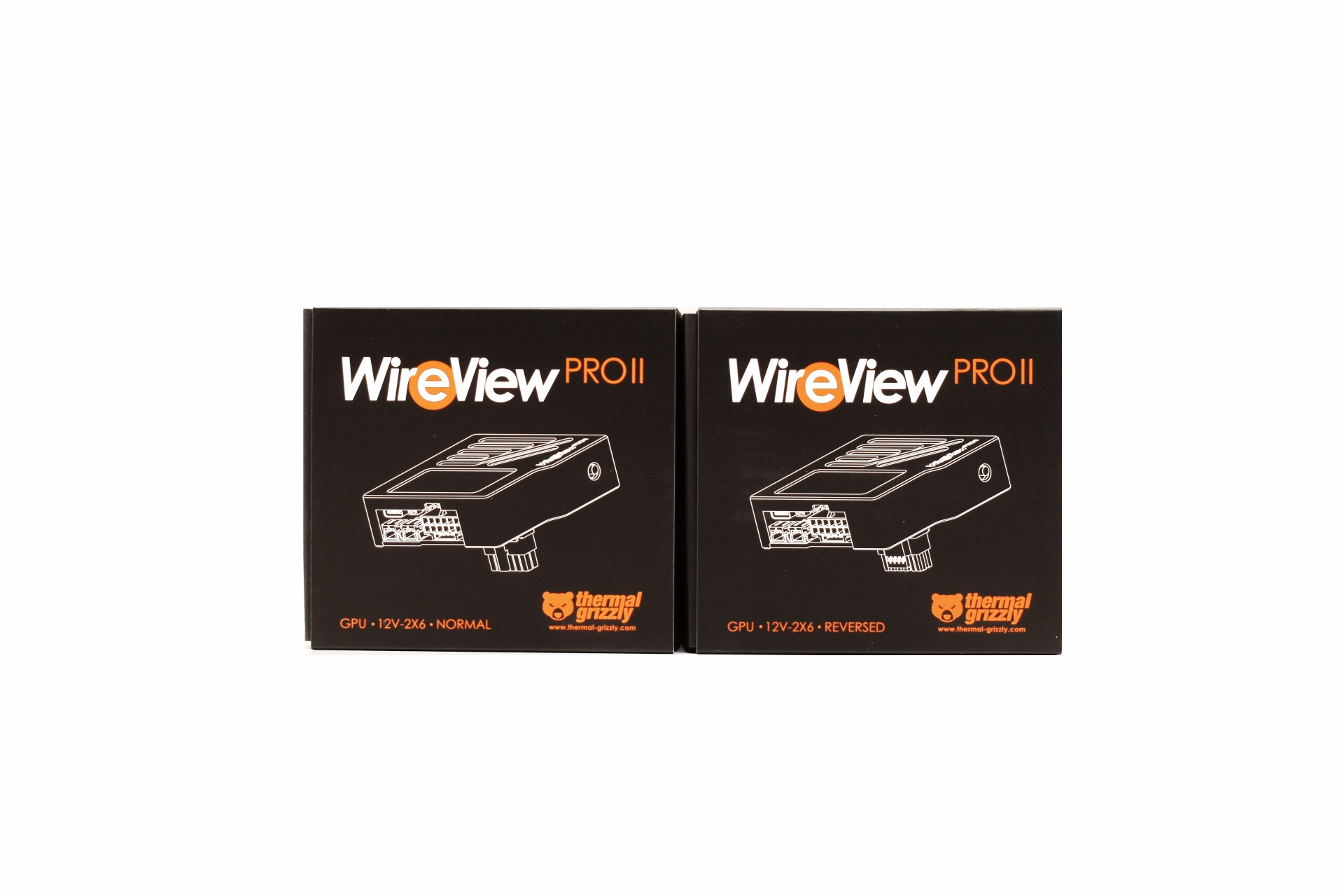
Thermal Grizzly shipped both orientations to us and so even though both boxes have the company logo and model name at the front each has a different design of the device (different connector orientation) and of course the type of connector and orientation printed beneath it.
The product features are printed at the rear of the box in 10 languages and just over a 2D barcode, serial number and barcode and contact information for Therman Grizzly.
A foam piece keeps the device safe inside the box.
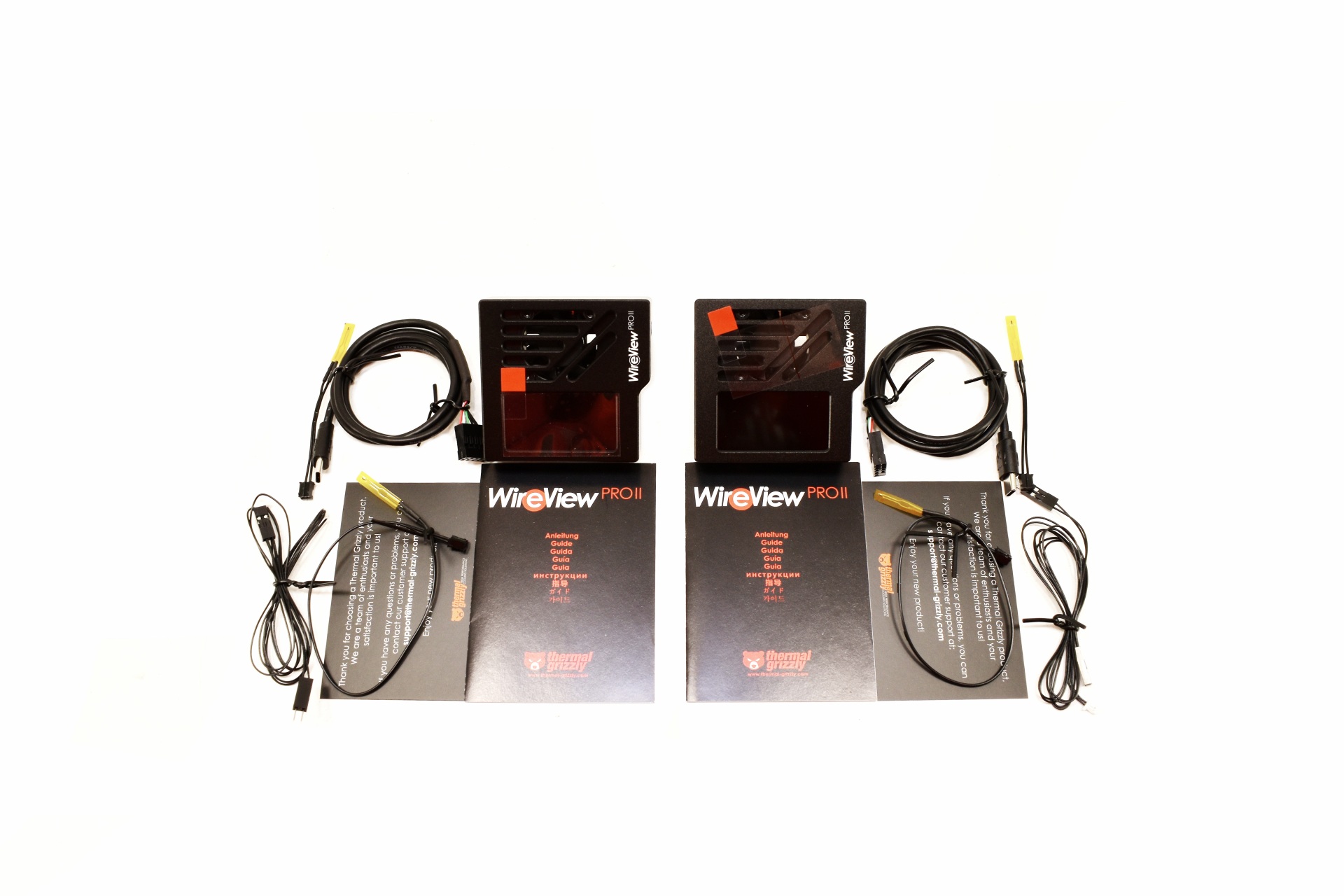
Inside the box of either orientation, you’ll find a USB-C to motherboard header cable, two temperature sensors/probes, 2 pin motherboard power cable, thank you card and a guide.
THE WIREVIEW PRO II
What stands out at the front is without doubt the 320x170p TFT-IPS screen.
For any of you wondering this is how the WireView Pro II looks next to the original WireView/Pro device.
Right under the screen we find the 30mm cooling intake fan (an single button is placed on the right side).
At the base both models have the 12VHPWR/12V-2X6 power connector, USB-C port, two temperature probe headers and the motherboard power on/off header.
At the rear both have a small soft pad at the area where the devices touch the GPU and the 12V-2X6 connector, normal and reversed.
The 320x170p TFT-IPS display has a live view of power consumption (W), cable type/output, temperature, current (A) and voltages.
You can also check the firmware update (v03 for this review).
Finally, you can enter the menu to change the current and power scales, temperature source and information order (short clip is available on both YouTube and TikTok).
WIREVIEW2 SOFTWARE V1.0.5
Initial tab is basically a monitoring dashboard showing total current, voltage, power draw, and multiple temperature sensors, along with a fault‑status panel that confirms whether any electrical or thermal limits have been triggered.
Second tab features a time‑based graph that plots total power, total current, and voltage lines, with adjustable sampling intervals and export options for logging and analysis.
Next tab has a long‑duration graph displaying thousands of loaded samples, allowing users to inspect voltage, current, power, and temperature trends over extended periods for deeper diagnostics.
From the device tab you can rename the unit, adjust display brightness, configure the cooling‑fan curve, set how the device responds to various fault conditions, set temperature, current, wire‑current, power, and imbalance limits and adjust the display.
Inside the settings tab you can adjust UI preferences such as theme, background color, opacity, startup behavior, and what screen the device should show upon connection.
CONCLUSION
What ultimately elevates the WireView Pro II is how well its hardware and software work together to give you a clear, controlled view of your GPU’s power behavior. The upgraded TFT‑IPS display already makes on‑device monitoring far more readable, but the real leap comes from the PC software. It provides structured graphs, per‑pin data visualization, adjustable limits, fan‑curve control, and full logging, thus turning the WireView Pro II into a proper analysis tool rather than just an inline meter. You can tweak thresholds, monitor temperatures, export data, and even adjust the device’s behavior in real time, all from a clean, responsive interface. And with the integrated cooling fan actively managing connector temperatures during heavy load or long‑term testing, the device doesn’t just report conditions, it helps stabilize them. My sole concern is clearance issues with very large CPU coolers since the WireView Pro II is larger/longer compared to its predecessor. This of course also has to do with the length and location of the power port on the graphics card but it's a possibility.
At the time of my you can pre-order the WireView Pro II directly from Thermal Grizzly for USD140.28/119.90Euros, a price tag which is considerably higher compared to its predecessor. Thing is it’s a definite upgrade and so for people who really want what the WireView Pro II offers it’s a one way currently and that’s also why it gets the Golden Award.
PROS
- Display Information (Power Consumption / Temperatures / Current) - Large 320x170p TFT IPS Color Display - 30mm Cooling Fan - PC Software - Available Orientations (Normal & Reversed) - Bundle (2 Temperature Probes & PC On/Off Header Cable)
As modern GPUs push well beyond the 400W envelope and routinely generate transient spikes that stress even high‑end PSUs, the electrical interface between the card and its power delivery has become a critical point of failure. Real‑time power monitoring isn’t just a convenience anymore, it’s a diagnostic necessity for validating load behavior, transient response, and connector integrity under sustained thermal and electrical stress. This is especially relevant today, as both the original 12VHPWR and its successor, the supposedly improved 12V‑2X6 connector, continue to exhibit documented cases of melting, pin‑row deformation, and partial‑seating failures under load. With incidents occurring even on undervolted or power‑limited cards, it’s clear the problem could be deeper and even tied to the connector design itself. Thermal Grizzly’s WireView Pro II directly addresses this vulnerability by inserting a precision measurement stage into the 12VHPWR/12V‑2X6 path, giving users an instrument‑grade view of real power draw and helping identify unsafe conditions long before they escalate into catastrophic connector damage.
Thermal Grizzly was founded in 2013 as a sole proprietorship by Dipl.-Inf. (FH) Wolf Eike Salow in Hamburg. In 2015, the first thermal paste was launched after Eike Salow entered into a collaboration with B. Eng. Roman Hartung (der8auer e.K.) for product development. Eike and Roman merged from sole proprietors in 2020 to form the newly founded Thermal Grizzly Holding GmbH. In 2021, the company headquarters were relocated to Berlin, where a new location for development and production was established. After almost two years, the company moved to the new production site in Hohen Neuendorf, Brandenburg, in 2023. The logistics center has been located in Lippstadt since 2019.
The WireView Pro II represents a substantial evolution over the original WireView Pro, moving from a straightforward inline power‑monitoring tool to a far more advanced diagnostic platform tailored for modern 12VHPWR and 12V‑2X6 GPU power delivery. The first‑generation WireView Pro introduced core features such as an OLED display for real‑time power readouts, onboard and external temperature sensors, connector‑type detection, and an adjustable acoustic alarm for thermal or electrical irregularities. The WireView Pro II builds on this foundation with per‑pin current measurement, enabling users to detect uneven load distribution or poor terminal contact key contributors to connector overheating. It also adds PC software integration, allowing the device to be controlled, monitored, and logged directly from a computer for deeper analysis and long‑term data capture. Thermal Grizzly further enhances reliability by integrating an 30mm active cooling fan inside the unit to help dissipate heat around the connector area, reducing thermal stress during high‑load or extended testing scenarios. Additional improvements include automatic data logging, 320x170p TFT‑IPS display for higher‑clarity readouts, and an extended warranty on the GPU‑side connector. To accommodate different GPU layouts and cable‑routing constraints, Thermal Grizzly offers the WireView Pro II in two orientations, normal and reverse. Together, these upgrades position the WireView Pro II as a comprehensive, precision‑grade tool for monitoring total and per‑pin current, temperature behavior, connector integrity, and now full PC‑based control and even active cooling.
SPECIFICATIONS AND FEATURES
PACKAGING AND CONTENTS
Thermal Grizzly shipped both orientations to us and so even though both boxes have the company logo and model name at the front each has a different design of the device (different connector orientation) and of course the type of connector and orientation printed beneath it.
The product features are printed at the rear of the box in 10 languages and just over a 2D barcode, serial number and barcode and contact information for Therman Grizzly.
A foam piece keeps the device safe inside the box.
Inside the box of either orientation, you’ll find a USB-C to motherboard header cable, two temperature sensors/probes, 2 pin motherboard power cable, thank you card and a guide.
THE WIREVIEW PRO II
What stands out at the front is without doubt the 320x170p TFT-IPS screen.
For any of you wondering this is how the WireView Pro II looks next to the original WireView/Pro device.
Right under the screen we find the 30mm cooling intake fan (an single button is placed on the right side).
At the base both models have the 12VHPWR/12V-2X6 power connector, USB-C port, two temperature probe headers and the motherboard power on/off header.
At the rear both have a small soft pad at the area where the devices touch the GPU and the 12V-2X6 connector, normal and reversed.
The 320x170p TFT-IPS display has a live view of power consumption (W), cable type/output, temperature, current (A) and voltages.
You can also check the firmware update (v03 for this review).
Finally, you can enter the menu to change the current and power scales, temperature source and information order (short clip is available on both YouTube and TikTok).
WIREVIEW2 SOFTWARE V1.0.5
Initial tab is basically a monitoring dashboard showing total current, voltage, power draw, and multiple temperature sensors, along with a fault‑status panel that confirms whether any electrical or thermal limits have been triggered.
Second tab features a time‑based graph that plots total power, total current, and voltage lines, with adjustable sampling intervals and export options for logging and analysis.
Next tab has a long‑duration graph displaying thousands of loaded samples, allowing users to inspect voltage, current, power, and temperature trends over extended periods for deeper diagnostics.
From the device tab you can rename the unit, adjust display brightness, configure the cooling‑fan curve, set how the device responds to various fault conditions, set temperature, current, wire‑current, power, and imbalance limits and adjust the display.
Inside the settings tab you can adjust UI preferences such as theme, background color, opacity, startup behavior, and what screen the device should show upon connection.
CONCLUSION
What ultimately elevates the WireView Pro II is how well its hardware and software work together to give you a clear, controlled view of your GPU’s power behavior. The upgraded TFT‑IPS display already makes on‑device monitoring far more readable, but the real leap comes from the PC software. It provides structured graphs, per‑pin data visualization, adjustable limits, fan‑curve control, and full logging, thus turning the WireView Pro II into a proper analysis tool rather than just an inline meter. You can tweak thresholds, monitor temperatures, export data, and even adjust the device’s behavior in real time, all from a clean, responsive interface. And with the integrated cooling fan actively managing connector temperatures during heavy load or long‑term testing, the device doesn’t just report conditions, it helps stabilize them. My sole concern is clearance issues with very large CPU coolers since the WireView Pro II is larger/longer compared to its predecessor. This of course also has to do with the length and location of the power port on the graphics card but it's a possibility.
At the time of my you can pre-order the WireView Pro II directly from Thermal Grizzly for USD140.28/119.90Euros, a price tag which is considerably higher compared to its predecessor. Thing is it’s a definite upgrade and so for people who really want what the WireView Pro II offers it’s a one way currently and that’s also why it gets the Golden Award.
PROS
- Display Information (Power Consumption / Temperatures / Current) - Large 320x170p TFT IPS Color Display - 30mm Cooling Fan - PC Software - Available Orientations (Normal & Reversed) - Bundle (2 Temperature Probes & PC On/Off Header Cable)
As modern GPUs push well beyond the 400W envelope and routinely generate transient spikes that stress even high‑end PSUs, the electrical interface between the card and its power delivery has become a critical point of failure. Real‑time power monitoring isn’t just a convenience anymore, it’s a diagnostic necessity for validating load behavior, transient response, and connector integrity under sustained thermal and electrical stress. This is especially relevant today, as both the original 12VHPWR and its successor, the supposedly improved 12V‑2X6 connector, continue to exhibit documented cases of melting, pin‑row deformation, and partial‑seating failures under load. With incidents occurring even on undervolted or power‑limited cards, it’s clear the problem could be deeper and even tied to the connector design itself. Thermal Grizzly’s WireView Pro II directly addresses this vulnerability by inserting a precision measurement stage into the 12VHPWR/12V‑2X6 path, giving users an instrument‑grade view of real power draw and helping identify unsafe conditions long before they escalate into catastrophic connector damage.
Thermal Grizzly was founded in 2013 as a sole proprietorship by Dipl.-Inf. (FH) Wolf Eike Salow in Hamburg. In 2015, the first thermal paste was launched after Eike Salow entered into a collaboration with B. Eng. Roman Hartung (der8auer e.K.) for product development. Eike and Roman merged from sole proprietors in 2020 to form the newly founded Thermal Grizzly Holding GmbH. In 2021, the company headquarters were relocated to Berlin, where a new location for development and production was established. After almost two years, the company moved to the new production site in Hohen Neuendorf, Brandenburg, in 2023. The logistics center has been located in Lippstadt since 2019.
The WireView Pro II represents a substantial evolution over the original WireView Pro, moving from a straightforward inline power‑monitoring tool to a far more advanced diagnostic platform tailored for modern 12VHPWR and 12V‑2X6 GPU power delivery. The first‑generation WireView Pro introduced core features such as an OLED display for real‑time power readouts, onboard and external temperature sensors, connector‑type detection, and an adjustable acoustic alarm for thermal or electrical irregularities. The WireView Pro II builds on this foundation with per‑pin current measurement, enabling users to detect uneven load distribution or poor terminal contact key contributors to connector overheating. It also adds PC software integration, allowing the device to be controlled, monitored, and logged directly from a computer for deeper analysis and long‑term data capture. Thermal Grizzly further enhances reliability by integrating an 30mm active cooling fan inside the unit to help dissipate heat around the connector area, reducing thermal stress during high‑load or extended testing scenarios. Additional improvements include automatic data logging, 320x170p TFT‑IPS display for higher‑clarity readouts, and an extended warranty on the GPU‑side connector. To accommodate different GPU layouts and cable‑routing constraints, Thermal Grizzly offers the WireView Pro II in two orientations, normal and reverse. Together, these upgrades position the WireView Pro II as a comprehensive, precision‑grade tool for monitoring total and per‑pin current, temperature behavior, connector integrity, and now full PC‑based control and even active cooling.
SPECIFICATIONS AND FEATURES
PACKAGING AND CONTENTS
Thermal Grizzly shipped both orientations to us and so even though both boxes have the company logo and model name at the front each has a different design of the device (different connector orientation) and of course the type of connector and orientation printed beneath it.
The product features are printed at the rear of the box in 10 languages and just over a 2D barcode, serial number and barcode and contact information for Therman Grizzly.
A foam piece keeps the device safe inside the box.
Inside the box of either orientation, you’ll find a USB-C to motherboard header cable, two temperature sensors/probes, 2 pin motherboard power cable, thank you card and a guide.
THE WIREVIEW PRO II
What stands out at the front is without doubt the 320x170p TFT-IPS screen.
For any of you wondering this is how the WireView Pro II looks next to the original WireView/Pro device.
Right under the screen we find the 30mm cooling intake fan (an single button is placed on the right side).
At the base both models have the 12VHPWR/12V-2X6 power connector, USB-C port, two temperature probe headers and the motherboard power on/off header.
At the rear both have a small soft pad at the area where the devices touch the GPU and the 12V-2X6 connector, normal and reversed.
The 320x170p TFT-IPS display has a live view of power consumption (W), cable type/output, temperature, current (A) and voltages.
You can also check the firmware update (v03 for this review).
Finally, you can enter the menu to change the current and power scales, temperature source and information order (short clip is available on both YouTube and TikTok).
WIREVIEW2 SOFTWARE V1.0.5
Initial tab is basically a monitoring dashboard showing total current, voltage, power draw, and multiple temperature sensors, along with a fault‑status panel that confirms whether any electrical or thermal limits have been triggered.
Second tab features a time‑based graph that plots total power, total current, and voltage lines, with adjustable sampling intervals and export options for logging and analysis.
Next tab has a long‑duration graph displaying thousands of loaded samples, allowing users to inspect voltage, current, power, and temperature trends over extended periods for deeper diagnostics.
From the device tab you can rename the unit, adjust display brightness, configure the cooling‑fan curve, set how the device responds to various fault conditions, set temperature, current, wire‑current, power, and imbalance limits and adjust the display.
Inside the settings tab you can adjust UI preferences such as theme, background color, opacity, startup behavior, and what screen the device should show upon connection.
CONCLUSION
What ultimately elevates the WireView Pro II is how well its hardware and software work together to give you a clear, controlled view of your GPU’s power behavior. The upgraded TFT‑IPS display already makes on‑device monitoring far more readable, but the real leap comes from the PC software. It provides structured graphs, per‑pin data visualization, adjustable limits, fan‑curve control, and full logging, thus turning the WireView Pro II into a proper analysis tool rather than just an inline meter. You can tweak thresholds, monitor temperatures, export data, and even adjust the device’s behavior in real time, all from a clean, responsive interface. And with the integrated cooling fan actively managing connector temperatures during heavy load or long‑term testing, the device doesn’t just report conditions, it helps stabilize them. My sole concern is clearance issues with very large CPU coolers since the WireView Pro II is larger/longer compared to its predecessor. This of course also has to do with the length and location of the power port on the graphics card but it's a possibility.
At the time of my you can pre-order the WireView Pro II directly from Thermal Grizzly for USD140.28/119.90Euros, a price tag which is considerably higher compared to its predecessor. Thing is it’s a definite upgrade and so for people who really want what the WireView Pro II offers it’s a one way currently and that’s also why it gets the Golden Award.
PROS
- Display Information (Power Consumption / Temperatures / Current) - Large 320x170p TFT IPS Color Display - 30mm Cooling Fan - PC Software - Available Orientations (Normal & Reversed) - Bundle (2 Temperature Probes & PC On/Off Header Cable)

 Login
Login