ASUS’s ROG Rapture GT-BN98 Pro, first announced late last month together with the non-Pro version, is poised to be available in the North American market—Canada and the US, to be specific. It’s no clickbait: I’m looking at one right now and have photo proof. Apparently, ASUS has gotten conditional approval, ...
2026 has been a trying year for router manufacturers, as the Federal Communications Commission (FCC) has subjected leading companies to strict oversight and outright bans. As an olive branch of sorts, the FCC has handed out "conditional approvals" to be included on the Covered List to companies that have jumped through all the necessary hoops to satisfy the commission's concerns. Asus is the latest company to secure that approval, which was confirmed in an FCC notice issued this week.
According to the FCC, the following Asus networking products have been granted conditional approval:
RT Series
ROG GT Series
OG Strix GS Series
TUF Gaming Series
ExpertWiFi Series
ZenWiFi Mesh Series
5G MiFi Series
Wireless repeaters
Wireless access points
In other words, Asus' entire wireless networking portfolio is cleared for sale in the U.S., with the conditional approval granted until March 6, 2028 (18 months from the date of issuance). The FCC explains, "We find that each of the Conditional Approvals constitutes 'a specific determination' by [Department of War] that such devices do not pose risks to U.S. national security."
This latest move by the FCC is a welcome sigh of relief for Asus, a Taiwanese company with an extensive networking portfolio and some of the best Wi-Fi routers. More importantly, Asus is ready to unleash a whole new generation of Wi-Fi 8 products over the next year. Wi-Fi 8 promises significant reliability and quality-of-life improvements across a wide range of wireless devices, so having a front-row seat to the transition from Wi-Fi 7 to Wi-Fi 8 is pivotal for Asus.
We've already seen a concept ROG NeoCore Wi-Fi 8 router from Asus at CES this year, and the company announced its first consumer Wi-Fi 8 router, the ROG Rapture GT-BN98 Pro, in June. The ROG Rapture GT-BN98 Pro is promising a 2x uplift in real-world throughput compared to its current-generation Wi-Fi 7 products.
Asus joins Netgear and Amazon Eero/Leo on the conditional approval list. The largest player in the U.S. wireless router market is TP-Link, and it still hasn't gained FCC approval. The U.S. government has been reluctant to give its blessing, and a war of words has been brewing over alleged Chinese ties despite TP-Link Systems Inc. being headquartered in California. As a result, the company has not confirmed a release date for its newly announced Wi-Fi 8 "Ultra" routers in the U.S.
Following up on the previous unveiling, TP-Link today released more details on its upcoming Wi-Fi 8 lineup, along with full rendered photos of some of the hardware and their specific model names. Still, it seems far from clear what will be available and, most importantly, when. TP-Link’s first Archer 8 ...
Earlier this year, TP-Link announced its intentions to launch the first members of its Wi-Fi 8 (802.11bn) networking family. At the time, the company revealed that it would first launch a standalone Archer 8 consumer router this fall, followed by a Deco 8 mesh router. And right on cue, TP-Link stated today that the Archer 8 Ultra BN19000 tri-band router will launch on September 30.
TP-Link is going light on the details at this time, but this is what we know so far. The Archer 8 Ultra BN19000 will come equipped with 18 internal antennas and deliver up to 19 Gbps aggregate wireless speeds. In addition, it will have 10 Gbps wired connectivity, though we don’t know whether that includes WAN and LAN ports or just the latter.
For users who require broader coverage in larger homes or offices, the Deco 8 Ultra BN22000 tri-band mesh router offers aggregate speeds of up to 22 Gbps and includes 10 Gbps wired connectivity. TP-Link typically sells its mesh systems in two- or three-pack configurations, and the Deco 8 Ultra BN22000 3-pack covers up to 9,800 square feet. Unfortunately, the Wi-Fi 8 mesh system won’t be available until Q1 2027, according to TP-Link.
TP-Link plans to expand its Wi-Fi 8 portfolio by Q2 2027 with a new Roam 8 travel router, along with range extenders and PCIe/USB client adapters. Although we don’t know which specific chipsets will power Archer 8 Ultra, Deco 8 Ultra, and other unannounced Wi-Fi 8 devices, the company says its products will use hardware from Broadcom, MediaTek, and Qualcomm.
Wi-Fi 8 is shaping up to be more of a quality-of-life improvement over Wi-Fi 7 than a substantial theoretical speed improvement. Put simply, Wi-Fi 8 hardware devices should be able to come closer to fulfilling the real-world performance metrics that Wi-Fi 7 devices originally promised.
To this end, TP-Link says that its so-called StabilityEngine leverages core Wi-Fi technologies including Enhanced Long Range (ELR) and Distributed Resource Units (DRU). These features together help improve wireless connectivity, primarily for low-power IoT devices that are typically positioned at the edge of your home’s wireless coverage. There are also additional technologies at play, such as Unequal Modulation (UEQM) and Modulation and Coding Schemes (MCS), to ensure uninterrupted wireless traffic in high-interference situations.
A new design language is also being ushered in with the Archer 8 and Deco 8 products, which was teased during TP-Link’s May 2026 announcement. “We stopped building a piece of networking equipment and started designing for the home,” explained TP-Link industrial design chief Gary Chang. “When a router’s design becomes something people want to display, it ends up exactly where it performs best.”
What remains unclear is how or when these new Wi-Fi 8 products will launch in the U.S. As of today, TP-Link has yet to obtain FCC approval to release all-new products in the country. Unlike competitors Amazon and Netgear, which received conditional approval from the FCC Covered List, the U.S. government is still playing hardball with TP-Link. For its part, TP-Link only says that preorders for the Archer 8 Ultra will open in “select regions” on September 30.
Ubiquiti today announced the availability of its UniFi Travel Router Long-Range (model UTR-LR). As the name suggests, it’s an upgrade to the original UTR that came out late last year: it’s a UTR with a significant boost in range. In return, the UTR-LR is slightly thicker and a tad heavier. ...
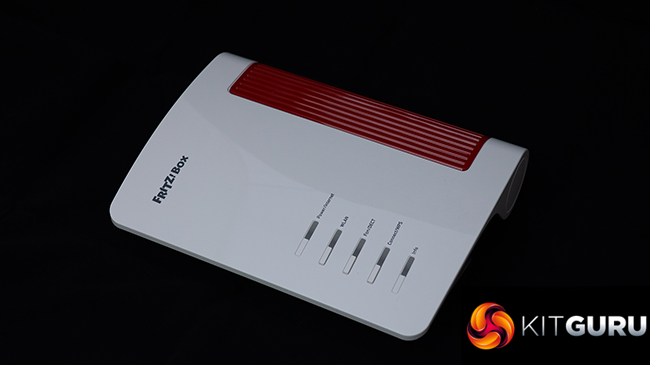
We've generally been impressed by AVM wireless broadband routers here at KitGuru. They're a little quirky, but performance is generally good and the features are top of the pile, with unique telephony and smart home capabilities. Since we last looked at one of the company's products, the AVM name has disappeared and now it's just FRITZ! This doesn't mean any change in ownership, however, just a simplification. Speaking of simplifying things, the FRITZ!Box 4690 is for people who already have a cable modem or fibre, so don't want the complication of a device with this built in. It's intended to deliver the fastest home networking to an already rapid broadband connection.
The FRITZ!Box 4690 returns to the wave-like design we've seen in many previous routers, such as the AVM FRITZ!Box 7690. Apart from the lack of a built-in VDSL/ADSL 2+ modem, the 4690 has a very similar specification to the 7690, although it also lacks the latter's support for Zigbee, a wireless standard for controlling smart home devices such as lightbulbs, roller blinds, temperature and motion sensors, smart plugs, and switches. It does still offer the signature FRITZ!Box support for telephony, however.
With its focus on users with an existing fast broadband modem, the WAN connection is 10Gbit, but you get a second of these and all the remaining LAN connections deliver 2.5Gbit. WiFi 7 is of course supported, albeit only in dual-band form. The 4690 is BE7000 rated, combining 5,760Mbits/sec at 5GHz and 1,200Mbits/sec at 2.4GHz. There's no 6GHz signal with this router, unlike the AVM FRITZ!Box 5690 Pro. There are optional extras to create a mesh network, too, although units to test this weren't supplied for our review.
Telephony options include two RJ11 phone ports on the back plus a single German TAE on the side. You also get a single USB 3.0 connection for media server storage, NAS options, or mobile data backup. All this comes in at around £330, which is pricey for a router but not one with this range of features available. Read on to see how the promising specifications shape up in reality.
The FRITZ!Box 4690 is available from Amazon UK for £330.31 inc VAT.
Specification:
Wireless protocols: MU-MIMO with 802.11b/g/n/be 2.4GHz, 802.11a/n/ac/ax/be 5GHz
Performance: BE7000 (5,760 + 1,200 Mbits/sec)
Antenna Configuration: 4×4 internal antennas
Ports: 3 x 2.5Gigabit Ethernet LAN, 1 x 10Gigabit Ethernet LAN, 1 x 10Gigabit Ethernet WAN, 1 x USB 3.0, 2 x RJ11 phone, 1 x TAE phone
If you’ve been holding off on getting a Wi-Fi 7 router because Wi-Fi 8 is on the horizon, the wait is almost over. ASUS today announced its first round of Wi-Fi 8 hardware, featuring not one, not two, but three options: two standalone routers and one ZenWiFi mesh system. In ...
TP-Link has a rather expansive family of Wi-Fi 7 mesh routers, and it can often be confusing to keep up with the growing assortment. We’ve tested several Deco Wi-Fi 7 mesh routers over the past three years, and they’ve offered class-competitive performance and a well-designed app for controlling all aspects of the network.
Today, we’re taking a look at the Deco 7 Pro BE13000, which is one of TP-Link’s tri-band “whole home mesh Wi-Fi 7” systems. It’s also a rather interesting option, as it’s exclusively available at Costco as a 3-pack. With a selling price of $399 and coverage for up to 8,100 square feet, the Deco 7 Pro BE13000 has stiff competition among the best Wi-Fi routers.
Design of the TP-Link Deco 7 Pro BE13000
Like all other members of TP-Link’s tri-band Wi-Fi 7 mesh family, the satellites on the Deco 7 Pro BE13000 are white cylinders measuring 4.23 inches in diameter and 6.93 inches in height. A stylized “7” is molded into the plastic, and the top of the unit features the TP-Link logo under a clear circular cover. Looking down, the molded concentric circles give the impression that the logo suggests a splash in a puddle of water.
Beneath the stylized 7 on the front of the satellite, there’s “deco’ branding, and below it is a status LED. It blinks blue during setup, is solid green when the satellites are online, and stays solid red if there’s a connectivity problem. Out back is where things get a bit interesting. The slightly lower-positioned Deco BE63 features four 2.5 GbE LAN/WAN ports. The Deco 7 Pro BE13000, on the other hand, only has three LAN/WAN ports, and they’re oddly spec’d. You get one GbE, one 2.5 GbE, and one 5 GbE port.
Tom's HardwareTom's HardwareTom's Hardware
Personally, I would have preferred four LAN/WAN ports: two 2.5 GbE and two 5 GbE. At the very least, the single GbE port should have been replaced with a 2.5 GbE port. In addition to the LAN/WAN ports, there’s also a USB 3.0 port for storage. The port allotment is the same across all three wireless nodes.
TP-Link Deco 7 Pro BE13000 Wi-Fi 7 Mesh Router Specifications
The setup process for the Deco 7 Pro BE13000 is rather straightforward and is accomplished solely via the TP-Link Deco smartphone app for iOS or Android. Before getting started, you'll need a TP-Link account, which enables remote management of your network when you're not at home.
I started the setup regimen by placing the three wireless nodes throughout my house, trying to keep them as evenly spaced as possible. Next, I plugged each node into power. Since all of the wireless nodes are identical, the first one that you plug into your modem will serve as the main router. In this case, I plugged the node in my office into my fiber modem. The setup program asked me to bring my phone close to the router, and it was quickly found; then the configuration process began.
For simplicity, I created a single network, using Deco 7 Pro as the SSID. This single SSID encompasses 2.4 GHz, 5 GHz, and 6 GHz bands. You can also enable MLO, Guest, and IoT networks with further granular controls for the bands that you want to make available. For example, you can limit the Guest network to just 2.4 GHz and 5 GHz traffic (or, only one of the two) at any time. If you want to give guests access to the 6 GHz band, you can do that as well.
After completing the setup (which took under 5 minutes), the network was fully operational. I then went into the advanced settings to check for any firmware updates. One was available, so I downloaded it and installed it across the three wireless nodes.
TP-Link Deco 7 Pro BE13000 Software
TP-Link’s Deco and Tether apps continue to be among the best thought-out and well-rounded apps for wireless routers. And that’s a good thing, because the Deco 7 Pro BE13000 cannot be configured using a traditional desktop web browser – it’s exclusively controlled via the app.
The router homepage provides relevant at-a-glance information about your network. Front and center are your main router and its two satellite nodes. The diagram also shows how the satellites are connected to the main router, which, in this case, is via a 5 GHz/6GHz wireless backhaul. Current upload/download activity is shown, along with a green status light indicating “Everything looks good.” If there were an issue with your network, there would be a red status light and an explanation of what was amiss. You can also see how many devices are actively connected to the network.
(Image credit: Tom's Hardware)
The Security tab offers some basic features without requiring the paid Security+ subscription. However, these are simply quick links to features that are buried in the Advanced settings tab. For example, you can control network access on a per-device basis with Network Access Control and Device Isolation. Camera Security lets you limit internet access to your smart cameras.
Upgrading to the Security+ subscription services gives you more features, including Web Protection, Intrusion Protection, Antivirus, VPN access, and password management (among other security-related features). Security+ costs $35.99/year, while the Total Security Package is $129.99/year. As I've mentioned ad nauseam, I have to applaud Asus for providing most of the features (minus the VPN) for free with its AsusWRT platform.
TP-Link offers parental controls that let you create individual profiles for your children's devices. For $17.99/year, you can enable Advanced Parental Controls, including SafeSearch, YouTube restrictions, bedtime controls, offline control, and more. However, all of these subscriptions seem a bit much for a consumer router. We should note that the Total Security Package includes Advanced Parental Controls. The More tab opens access to the full complement of network settings, from Wi-Fi settings to WPS control, firmware updates, VPN access, and Network Optimization (for optimizing your mesh network to avoid household radio interference).
TP-Link Deco Pro 7 BE13000 Performance
Our wireless client system consists of a Windows 11 Home desktop system with an MSI Herald-BE Wi-Fi 7 adapter. Our testing server was a Windows 11 Professional desktop with a 10 GbE network card connected to the 5 GbE port on the main Deco 7 Pro BE13000 router.
The iPerf3 tests are conducted at six feet and 25 feet (from the main router), with and without traffic across the network. In the congested traffic tests, we add six wireless clients streaming 4K YouTube videos evenly across all bands.
The Deco 7 Pro BE13000 proved to be the best performer on the 6 GHz band in both uncongested and congested testing. The router reached 2,200 Mbps at 6 feet and pulled roughly half that at 25 feet, with no additional traffic on the network. This put it comfortably ahead of the MSI Roamii BE Pro and just ahead of the Deco BE63. It was a similar situation with congested traffic, as the Deco 7 Pro BE13000 was still able to maintain over 2,100 Mbps at close range and nearly 1,100 Mbps at 25 feet.
During testing on the 5 GHz band, the Deco 7 Pro BE13000 couldn't quite keep up with its two rivals. We saw 1,113 Mbps at six feet and 701 Mbps at 25 feet during the uncongested test. That put it in third place at close range and second place at long range. Those rankings held firm with congested traffic, with the Deco 7 Pro BE13000 still pulling over 1,000 Mbps at six feet.
The Deco 7 Pro BE13000 once again found itself in last place during the 2.4 GHz band testing, falling roughly 15 Mbps shy of the Roamii BE Pro and Deco BE63 at close range with uncongested traffic. Things were a bit closer when we moved out to 25 feet, with the Deco 7 Pro BE13000 nearly matching its Deco BE63 sibling (53 Mbps versus 54 Mbps). With increased network traffic, the performance differential between the routers narrowed, although the Deco 7 Pro BE13000 still lagged slightly.
Bottom Line
The Deco 7 Pro BE13000 is a bit of an odd duck in the TP-Link mesh router family. While its 6 GHz performance is commendable and superior to that of the cheaper Deco BE63, it couldn’t quite reach its more affordable rivals on the 5 GHz and 2.4 GHz bands. With that said, the Deco 7 Pro BE13000 is by no means a poor performer – it just isn’t a standout across the board.
A bit more confounding is its port layout. Although it’s higher-positioned than the Deco BE63, it comes with one fewer LAN/WAN port. And while you do gain a 5 GbE LAN/WAN port, what you’re left with is a GbE LAN/WAN and a 2.5 GbE LAN/WAN. At this price point, TP-Link shouldn’t be putting GbE LAN/WAN ports on its mesh routers.
Finally, we come to the subscription services required to enable features such as web protection, intrusion protection, and antivirus. You’re looking at upwards of $129.99/year for the Total Security Package. Other router manufacturers like Asus give you those tools for free, which should definitely factor into the pricing equation for the Deco 7 Pro BE13000.
If the extra security protection isn’t appealing to you (or if the built-in tools are sufficient for your needs), the $399 price tag for three nodes is a good value, especially given the 8,100-square-foot coverage.
As the model name suggests, the RT-BE90U is slightly below the previous RT-BE92U and proved less capable in real-world testing. However, it can still be an excellent alternative, even better in certain cases. Here’s the bottom line: For those living in a small home that needs only a single access ...
With the pervasiveness of Flock cameras and the public’s backlash against surveillance technology that can track their movements under seemingly lax oversight, Comcast hopes consumers will be more receptive to monitoring activities inside the home. This week, Comcast announced Xfinity Shield, which it claims offers first-of-its-kind “intelligent home protection” courtesy of your seemingly mundane Wi-Fi router.
While the best Wi-Fi routers on the market are supposed to give you higher connection speeds, extended coverage, and enough capacity to handle all of your wireless devices, Comcast is tapping into a little-used aspect of Wi-Fi signals. Called Wi-Fi Motion, it monitors the signal strength and interference between your Wi-Fi router and connected devices. By measuring these frequency signals, it can detect if someone is moving around in your house. When unauthorized activity is detected, the router can instantly send an alert to your phone.
You could achieve the same intruder detection using traditional motion sensors in your home, or even an off-the-shelf security camera, but Wi-Fi Motion doesn’t require you to purchase additional hardware to function. However, since it’s only relying on changes in frequency signals, we’d imagine that it won’t offer as much granularity in motion detection, and it could even be more prone to false positives.
This isn’t exactly new technology, as we reported on Wi-Fi routers being used to detect humans in a room over three years ago. At the time, researchers at Carnegie Mellon University used a TP-Link Archer AC1750 router to track human movement and positions in a room.
(Image credit: Comcast)
With that said, we must be clear that this feature is opt-in by default. You will need to use the Xfinity app to enable Wi-Fi Motion, then enable alerts to monitor for suspicious activity. The app also provides three protection modes for monitoring: Home Watch, Away Watch, and Dark Watch.
Wi-Fi Motion is just one pillar of Wi-Fi Shield, which is a subset of Xfinity Shield. The other two pillars are Xfinity CyberSecure, which provides automatic protection for devices against phishing attacks and malware, and Family Settings, which allows you to manage screen time for individual devices. Wi-Fi Shield is available free of charge to Comcast customers with Advanced Xfinity Gateways. If you want additional protection, Comcast offers Shield Select for $15/month. Shield Select includes an indoor camera, a window/door sensor, cloud storage for captured video footage, and 24/7 emergency response support.
Over the years, many of you have repeatedly asked me for recommendations on a Wi-Fi router (or mesh system) with “excellent Parental Controls.” I generally don’t have the answer because I deliberately don’t use this feature—and I’m a dad of three. In this post, I’ll explain what the Parental Controls ...
I first thought the ASUS RT-BE82U would somewhat resemble the RT-AX82U, the way the RT-BE86U and RT-BE88U continue their respective design lineages. I thought wrong. The RT-BE8U is more of an upgrade to the RT-BE58U, with slightly higher Wi-Fi specs and all 2.5GbE ports. Here’s the bottom line: For those ...
This post will explain the “Guest” notion in a Wi-Fi network and how to use that properly. To cut to the chase: A Guest Wi-Fi network is a special Internet-only SSID for short-term use. While it’s a handy feature, it’s not intended as a security measure, and using it for ...
If you’re considering using your own home-made VPN server, ASUS routers are generally good options. However, do you know that most of them are also great if you want to hook your entire home network to a paid VPN service? If that piques your interest — and you don’t want ...
If you’re looking to buy a new router for your home today, chances are you’ll be offered a Wi-Fi router. This type of device has been so prevalent that the “Wi-Fi” notion is often presumed when you say “router”. But a non-Wi-Fi router — a standard router without a built-in ...
Here’s some great news for fans of the Omada Wi-Fi access points: TP-Link today announced the availability of its all-new Fusion Gateway family, with the Fusion 2.5G being the first to hit the market. From the look of it, the new gateways aim to compete with Ubiquiti’s UniFi ecosystem, which ...
The Fusion 2.5G is an excellent addition to TP-Link’s Omada ecosystem. It represents TP-Link’s all-new Fusion Gateway lineup, officially launched on July 20, 2026, which simplifies hardware deployment by integrating an Omada hardware controller — similar to the OC300 — and a 2.5Gbps Multi-Gig router in a compact package. The ...
ASUS is one of the most prolific networking vendors and has, over the years, released numerous models of standalone Wi-Fi routers and purpose-built mesh systems. This post includes the company’s top five in each category, along with their applicable alternatives. All of these devices delivered excellent performance during my evaluation ...
The SpaceX satellite internet service Starlink has just introduced its latest residential kit, letting users connect to the satellite network using a smaller and lighter terminal. The company announced the Starlink V5 on X, saying that it could hit up to 375+ Mbps for “streaming, video calling, gaming, and more.” It’s currently available in select areas only, though, with wider availability expected later as the company ramps up production.
Download speeds
Antenna
Field of View
Dish Weight
Environmental Rating
Operational Temperature
Mounted Wind Speed
Snow Melt Capability
Average Power Consumption
Power Indicator
Starlink V5
Up 375+ Mbps
Electronic Phased Array
110 degrees
2.4 lbs. (1.1kg)
IP67 Type 4
-22 deg F to 122 deg F (-30 deg C to 50 deg C)
165 mph (265 kph)
Up to 1.6 in. per hour (40mm per hour)
35 to 50 watts
LED / Starlink Top Face
Standard 4
Up to 400+ Mbps
Electronic Phased Array
110 degrees
6.4 lbs. (2.9kg)
IP67 Type 4
-22 deg F to 122 deg F (-30 deg C to 50 deg C)
60 mph (96 kph)
Up to 1.6 in. per hour (40mm per hour)
75 to 100 watts
LED / Router Face Plate
Mini
Up to 300+ Mbps
Electronic Phased Array
110 degrees
2.43 lbs. (1.1kg)
IP67 Type 4
-22 deg F to 122 deg F (-30 deg C to 50 deg C)
60 mph (96 kph)
Up to 1 in. per hour (25mm per hour)
25 to 40 watts
LED / Starlink Rear Face Plate
The new unit is significantly smaller and lighter than the Standard 4 used in most home deployments, and brings it close to the Starlink Mini, which is designed for both fixed and portable use. However, the Starlink V5 still requires a router (included), whereas the Mini can work without one, providing a wireless connection using its built-in Wi-Fi antenna. Still, the former is faster, offering speeds of up to 375+ Mbps. Although this is 25 Mbps slower than the 400+ Mbps that the Standard 4 is rated for, it’s still higher than the up to 300+ Mbps that SpaceX has set for the Mini.
The changes that SpaceX made to the Starlink V5 would make it much easier to set up, which is especially helpful for users who prefer to DIY their Starlink setup. Another interesting update to the new terminal is that it can handle faster wind speeds while mounted despite being lighter than the Standard 4. This should help it withstand tougher meteorological conditions, especially in areas frequently battered by storms and tornadoes.
(Image credit: Starlink)
The much lower average power consumption, which is just about half of what the previous-generation Starlink terminals consumed, would also help power stations last longer, making it ideal for keeping communications alive, especially during emergencies. This is exactly what Japan is experimenting with, as Tokyo has started putting up Starlink antennas on fire hydrant signs to provide emergency Wi-Fi.
Although SpaceX and its owner, Elon Musk, are no strangers to controversy, Starlink has proven useful in various situations. Aside from being useful for first responders in disaster zones, it also helped Ukraine stay connected during the height of Russia’s invasion of the country in 2024. It has even gotten to the point that China simulated a Starlink blockade over Taiwan because of how useful the service is in keeping a government online and communicating with its allies during times of distress.

 Login
Login