❌

Normal view

There are new articles available, click to refresh the page.
Before yesterdayMain stream

CPU or GPU Bottleneck? How to Diagnose What’s Really Limiting Your Gaming Performance

20 June 2026 at 17:55

A promotional image titled 'CPU or GPU Bottleneck? How to Diagnose & Fix' shows a CPU and GPU with a graph displaying 'FPS 142,' 'Frametime 7.1 ms,' 'CPU Usage 92%,' and 'GPU Usage 58%'.

Ah, the ultimate PC gaming boogeyman: β€œIs my CPU bottlenecking my graphics card?” It’s the first question we ask ourselves when building a new rig, slapping in a shiny GPU upgrade, or wondering why a game feels like a stuttery mess despite dropping a small fortune on PC hardware. But here is the hard truth, folks: a bottleneck isn’t a permanent stamp on your PC. It is a dynamic, fast-shifting state dictated by the specific game you're playing, the resolution you're running, your graphics presets, and your target framerate. Your system can be completely GPU-bound in a graphically heavy AAA […]

Read full article at https://wccftech.com/how-to/cpu-or-gpu-bottleneck-how-to-diagnose-whats-really-limiting-your-gaming-performance/
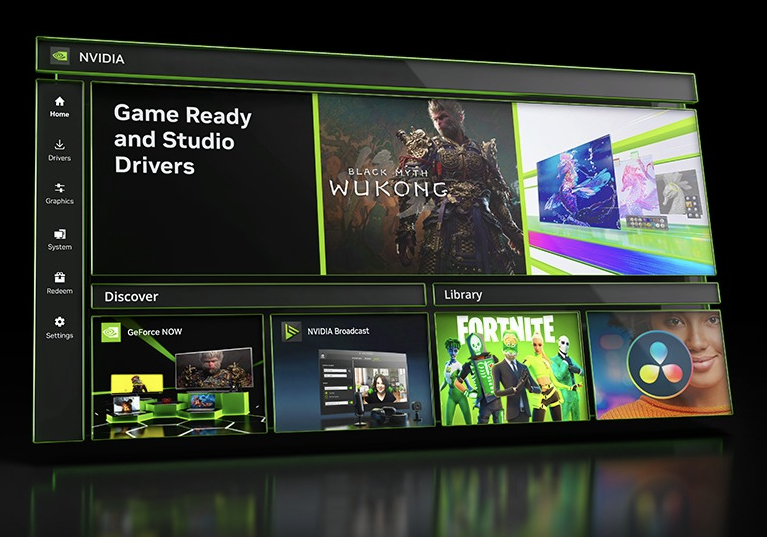
Nvidia is ending support for the classic Control Panel

27 May 2026 at 11:30

Nvidia dropped a new GeForce Game Ready driver yesterday, but it also quietly announced something else on its forum. The long-standing Nvidia Control Panel is losing support.

This has been coming for a while. In a major Nvidia App update back in 2024, Nvidia began migrating over Control Panel features. In a recent update to the app, the final β€˜supported' Control Panel features were brought into the Nvidia App version, so the old control panel is being retired.

Here is what the forum post said:

β€œWith the introduction of our most recent NVIDIA App update, all actively supported NVIDIA Control Panel features for GeForce users have been modernized and transitioned to the new client.

After 20 years of dedicated service, the classic NVIDIA Control Panel is officially retiring for Game Ready and Studio Drivers. For NVIDIA RTX PRO users, the NVIDIA Control Panel will continue to be supported until we have migrated professional features to the NVIDIA app.

Existing installs of the NVIDIA Control Panel will remain on users’ systems, unless they perform a clean installation, and users who still need the NVIDIA Control Panel can continue to download it from the Microsoft Store, but we won’t be adding features, fixes, or other changes.”

Discuss on our Facebook page, HERE.

KitGuru Says: Did you still use the classic Nvidia Control Panel?Β 

The post Nvidia is ending support for the classic Control Panel first appeared on KitGuru.

NVIDIA Control Panel Is Officially Dead After Two Decades, As The Company Pushes Everyone Onto Its New App

26 May 2026 at 15:15

The image shows the NVIDIA Control Panel with the 'Adjust Image Settings with Preview' option selected, alongside an NVIDIA GeForce RTX graphics card and the NVIDIA logo.

The interface lived for nearly two decades and served us well, but now it's time to switch to the latest NVIDIA App. NVIDIA Announces the Official Retirement of Control Panel, One of the Most Popular Tools for NVIDIA GPU-Based Systems The popular NVIDIA GPU tool, NVIDIA Control Panel, launched in February 2026. It has been just over two decades since the tool went live and has remained the most used utility on NVIDIA GPU-based systems. From offering simple settings to change refresh rate, resolution, and multiple-display setups to manage 3D settings, the Control Panel remained one of the easiest to […]

Read full article at https://wccftech.com/nvidia-control-panel-is-officially-dead-after-two-decades/

NVIDIA DLSS 5 Could Eventually Become a Driver-Level Toggle

27 March 2026 at 15:00

A character in the game 'Starfield' holds a futuristic tablet device in an office setting, with the text 'NVIDIA DLSS 5 On' displayed.

The NVIDIA DLSS 5 reveal at GTC 2026 is now over ten days past, but footage and impressions are still trickling in from attendees. Earlier this week, PC World did a livestream where they showed footage captured off-screen (with a DJI Osmo Pocket 3 in D-Log, with Rec.709 LUT applied) after checking the various DLSS 5 demos available, including Avalanche Software's Hogwarts Legacy, Bethesda's Starfield and Oblivion Remastered, Ubisoft's Assassin's Creed Shadows, and NVIDIA's own Zorah Tech demo crafted in Unreal Engine 5. PC World's Adam said he was able to freely toggle the technology on and off during the […]

Read full article at https://wccftech.com/nvidia-dlss-5-could-become-driver-level-toggle/

❌
❌