Apple’s Liquid Glass UI could be the next aesthetic change to copy, particularly that transparency slider, but Microsoft doesn’t wish to adopt this approach. According to an executive, Windows 11 won’t offer additional options for users to tweak the appearance of the operating system with customization tools, and provides his reasoning for that. Fortunately, he hasn’t denied that such a release won’t happen. Third-party tools are available to enable customization on Windows 11, which could be why Microsoft doesn’t want to bring the transparency slider The software giant’s Partner Director of Design, Mark Rogers, was pinged by Emrah on X […]
Xbox PC games, distributed through the Xbox app, fail to run on Linux because of Microsoft's proprietary GDK runtime environment. This also breaks Game Pass even though the company supports cloud streaming Game Pass titles. A new open-source project from the developers of Heroic Launcher, called "Xodus," is aiming to fix this by reverse engineering and emulating the necessary components required for Xbox PC games on Linux.
(Image credit: Tom's Hardware)
Xodus primarily targets modern, GDK-based Xbox PC titles and their MSIXVC packages; not older, UWP-based releases like Gears of War 4 and early Forza Horizon games. The problem with those isn't the DirectX API or x86 instructions; Proton and DXVK/VKD3D can already translate those. That's also the reason why you can still run Xbox PC games on Linux if you somehow get your hands on the DRM-free executables.
The real issue is the trifecta of Microsoft's proprietary GDK (Game Development Kit), Xbox identify services, and encrypted MSIXVC packages. This framework is responsible for verifying licenses for the games you own through the Xbox app. Without it running in the background, the games will simply crash right as you try to open them, or not launch at all. This is where Xodus comes into play.
The Xodus team says the project can already log into Xbox services, download game packages and obtain game licenses. It includes its own open-source implementation of the xgameruntime.dll and custom forks of both Wine and Proton, along with xal-rs, which is an Xbox authentication library for Rust. Xodus uses proxy libraries to interface with GDK games and intercepts API calls to transmit valid Xbox Live tokens.
For now, efforts are focused on emulating the Xbox Gaming Runtime from the Xbox GDK through Wine, then the project will move on to actually launching and playing Xbox PC titles locally. Considering they've already solved the Xbox/Microsoft authentication, license check, and package decryption hurdles, it shouldn't be long before we see PC Game Pass running natively on Linux.
BedrockonLinux 2.0, another open-source project that brings Minecraft Bedrock to the platform, already relies on similar reverse-engineering tech to handle these components since Microsoft migrated the game to GDK. This allows the game to talk to Xbox Live in real-time through a secure doorway to authenticate tokens despite the game running in a sandboxed environment like SteamOS (Linux).
Microsoft itself brought four original Xbox titles to PC last month and it says more are coming, along with leaked documents suggesting Xbox 360 titles also releasing on PC next year. These games come with a baked-in Xbox 360 emulator. It's not clear if these games use the same GDK stack as native Xbox PC titles, however.
Windows is in a tough spot right now, with years of neglect and stagnation reaching a boiling point with customers. Lack of optimization, bloat, ads, forced AI slop, and persistent tracking have forced Microsoft to admit its missteps and commit to fixing the OS at large. Windows Latest's new testing shows that the built-in weather app is a perfect representation of the state of Windows. The "app" consumes up to 1.2GB of RAM while idling, and it serves up a bunch of ads while you check the temperature.
MSN Weather is the default weather app that ships with Windows, which explains why it's filled with promotions throughout, despite being part of a paid OS. To be clear, the app looks very modern and has all the data you could ask for, such as live radar overlays, hourly wind and precipitation breakdowns, air quality index, and moon phases. It's also accurate because the data is sourced from a bunch of different providers across the world, but mostly Foreca.
(Image credit: Future)
The author explains that getting accurate forecasts is not a cheap endeavor, so it's not like Microsoft is running a charity. But the comparison falls apart when you look at what the competition is offering. Apple's native weather app on macOS is just as beautiful, detailed, and accurate, yet it's free of ads. It also only consumes about 250MB of memory to show all that data, so 5x less than Windows. This is because MSN Weather is technically not even an app to begin with; it's a web wrapper that's pinging a bunch of browser tabs in real-time.
When the author clicked on the Task Manager entry for MSN Weather, they saw 8 Chromium-based subprocesses, confirming that they're just looking at a website being rendered via WebView 2. For context, native Windows apps are supposed to adhere to the WinUI framework, which the company is slowly adopting over Win32 and UWP. Microsoft is committed to updating all the native apps Windows ships with to Win32, which should significantly improve their optimization, but we don't know if the ads will suddenly disappear as well.
For us, it consumed up to 1GB of RAM (Image credit: Future)
The author saw Adobe Acrobat ads while checking the forecast, and we saw two ads — one for LendingTree and another for Spotify. Apart from that, scrolling around the app and clicking on the different menus and boxes was fast enough. We have to emphasize that the app really is granular and well-built from an aesthetic point of view; Microsoft gets full points for that, or is it MSN? That distinction is another issue that makes the weather app conundrum a bit more confusing.
When Microsoft promised to rebuild all native Windows 11 apps, it didn't explicitly say those would include MSN-branded services too, like MSN Weather and MSN News. Seeing as though they're simply called by their utilitarian names in the OS, there's a strong chance that these memory hoggers will also be eventually upgraded. For now, just stick to your phone, especially if you were among those who immediately Googled how to remove the weather widget from your taskbar that fateful day.
Windows 11 and its apps being RAM guzzlers isn’t a surprising revelation, but Microsoft has committed to making the OS as efficient as possible for systems housing 8GB of RAM. Unfortunately, that progress is yet to be witnessed as the company’s Weather app can consume a chock-full of memory. This is exceptionally frustrating for those who are trying to find ways to make Windows 11 work with a minimum amount of RAM or those who don’t know their way around the platform. The Weather app in macOS consumes five times less memory and isn’t riddled with ads, Windows 11's app […]
A developer has ported Microsoft Word for Windows 1.1a to x64 so it can now run natively on Windows 11 PC systems. JMarshall23 on GitHub stresses that this is a fully working native Windows x64 port using “original Word source and resources together with modern replacements for the 16-bit assembly, segmented-memory, and Win16 platform boundaries.” It also includes some extra features for “research purposes.” Microsoft Word for Windows 1.1a was originally released over a quarter of a century ago.
This release of Word marked a milestone in the word processing market, as it pioneered genuinely useful feature additions like WYSIWYG editing, graphics, and table insertion on Windows. It would spearhead the momentum in shifting users from DOS productivity monsters like WordPerfect to complete dominance in Windows-land. Word for Windows 1.1a added all its frills while remaining very efficient, running on systems with CPUs that ran in single-figure MHz speeds, and with as little as 1MB of RAM.
Another notable feature of this version of Word for Windows is that Microsoft permitted its source code to be released in full. You can still grab that code via the Computer History Museum (CHM). There you will find a 7MB bundle of C source, x86 assembly, build tools, and documentation. These 1,021 files in 33 folders are what JMarshall23 started with.
GitHub doesn’t have Windows x64 binaries ready for the casually curious on the lookout for a free, lightweight word processor to download and use. Instead, you’ll need access to Visual Studio 2022 with Desktop development with C++, a Windows 10 or Windows 11 SDK installed through Visual Studio, CMake 3.25 or newer, and PowerShell, notes Marshall. Then simply follow the GitHub instructions to build and run Word1.
It will be interesting to see if more comes from this x64 port, but Microsoft’s Word for Windows 1.1a code release carries a license that “permits only non-commercial use and does not give you the right to license it to third parties by posting copies elsewhere on the web,” says the CHM.
Champion coder Yusuke Endoh has been flexing their esoteric programming muscles on social media. Their latest confection is a Piet Quine – a GIF image that prints itself. In other words, the GIF is both the code and the precise result after running the code.
If you haven’t quite grasped the enormity of this feat from the title, it is worth breaking down the respective definitions of both Piet and Quine in a computer programming context. Piet is an esoteric programming language in which programs look like complex, colorful, tiled artwork. Inventor David Morgan-Mar named it after Piet Mondrian, the famous founder of the neoplasticism artistic movement. Such artwork is immediately recognizable with its bold squares and rectangles bordered by heavy black lines. Smaller Piet GIFs look a bit more Mondrian-y to me, but also look more like colorful QR codes than paintings.
Endoh has created a Quine, graphically. In computer coding, a Quine is a program that produces a copy of its own source code without any external input. This can be quite a tricky feat, even when confined to the world of ASCII text. A requirement of this coding art is that the output is a character-for-character identical representation of the input. It must not simply read its own file to do the duplication task.
When merging the two ideas above, together, things get a whole lot more complicated. However, the top-linked blog and the embedded video shine a light on the task at hand and how Endoh succeeded. Specifically, the video shows Piet Quine running. The Piet interpreter scans the source GIF image in a ‘load data’ phase, followed by a read of the GIF file header and palette info. The challenge here, raising the task above text Quines, is that the GIF folds in binary data, compression, and an awkward flow – they must all be handled deliberately to end up with the desired result.
A key thing to understand about the source image is that it includes a separately interpreted data part, compressed with an adaptive run-length encoding, and a code part. Endoh says that they managed to actually first achieve this way back in 2009, but the GIF was very tall, so not ideal for visual appreciation. The developer decided to ask Claude Code to analyze and reconstruct the original script and build a ‘landscape’ Piet Quine. Even with AI's help, it wasn’t easy to refine the design to the compact finished GIF seen in this article and video. Only after much work on shrinking the visuals and coaching Claude was the GIF shoehorned into the finished 4:3 landscape image (252 x 189 pixels).
Finally, Endoh reveals that a driving force behind their Piet Quine development efforts was the wish to raise awareness of the 2026 Obfuscated Programming Language Design Contest, which is running right now. If you can, please design an esoteric programming language and submit it! Endoh is one of the judges, and you have until October 1 to make your submission(s).
The DRAM shortage isn’t the only event that’s forcing Microsoft to dive deep into making Windows 11 more RAM efficient for 8GB systems, as an analyst provides his thoughts on the company’s change. Apparently, it was the MacBook Neo that served as the primary reason for this shift. Well, when people clamor that competition always favors the consumer, they are right about something. MacBook Neo isn’t believed to be limited by its 8GB unified RAM, unlike the case with Windows 11 machines running the same memory Despite Apple’s price hike, the MacBook Neo is still considered to be a value-focused product, with […]
Scale Computing, a player in edge computing and network solutions, announced the launch of its SC//HyperCore Imaging Service. Designed to directly address industry-wide hardware supply chain constraints, extended lead times, and shifting procurement budgets, this fast-track service allows organizations to accelerate critical virtualization initiatives using their existing hardware assets. Hardware supply chain constraints continue to impact […]
Druva, a resilience foundation for the AI enterprise, announced Druva AI Resilience, a new approach that helps organizations recover, govern, and defend the systems, activity, and context behind AI-powered work.The launch introduces new and expanded capabilities for Microsoft Copilot, Claude Code, Druva Model Context Protocol (MCP), and Dru SRE Agent for agentic service reliability with […]
Arcserve Japan, a player in unified data resilience solutions, will begin offering the latest versions of its data resilience solutions, Arcserve Unified Data Protection (UDP) 11 and Arcserve Cyber Resilient Storage 2, featuring a range of functional enhancements focused primarily on expanded support for virtualization infrastructure, starting August 17, 2026.With these latest releases, Arcserve Japan […]
Windows 11 will always benefit from having more memory, but the ongoing DRAM crisis forced Microsoft to make some amendments to its previous statements, such as 32GB being ideal for serious users. With these claims removed, the software giant can now focus on what’s important for the millions of users who have gravitated to the latest OS: RAM optimizations. Running Windows 11 fluidly requires users to have as much RAM as possible, but Microsoft is looking to change this The details mentioned by Microsoft used to be available on the company’s Learning Center homepage. However, that material has now been removed, […]
NVIDIA showcased its RTX Neural Texture Compression (NTC) technique back in 2023, and once again in H1 2026, revealing that VRAM usage can be reduced by an impressive 85 percent. Now, the SDK that was available for developers on Windows 11 has made its way to the ARM64 platform because NVIDIA’s RTX Spark and several notebook families powered by this SoC are expected to arrive later this year. Despite NTC being available to developers, no game is currently supporting this technique, and there is no word on whether RTX Spark could change this Windows 11 ARM64 supporting RTX Neural Texture Compression […]
Last month, we covered a federal criminal case in which Microsoft's Global Device Identifier (GDID) helped the FBI catch an alleged hacker. Despite the noble cause, the implications of a persistent tracker built into Windows became difficult to ignore, and it was enough of a tipping point to convince Windscribe to do something about it. The VPN company has created an open-source project and script called "deGDID" that aims to strip GDID off your PC — but does so at the cost of breaking some Microsoft cloud services.
You can find the script on GitHub and run it via PowerShell with admin privileges. It's completely free and works in a very straightforward manner. There are three main execution flags that dictate how deGDID operates: –Status, which is read-only and tells you if a GDID is active on your rig; –Status –Redact, which generates logs with the GDID redacted so users can share diagnostic data more confidently; and –Protect, which completely wipes the GDID and prevents the creation of new ones.
FutureFuture
A fourth flag, –Unprotect, allows you to reverse the script in case you need to revert back to the default state. But –Protect is the one worth discussing. First, the script looks for server-issued GDID keys in the registry, where they remain cached, and purges them all. This is something you can do manually as well. In fact, Windscribe tried it on a virtual machine, but the GDID keys are silently re-minted in the background upon a reboot or whenever Windows contacts Microsoft servers again.
To close this loop, the script then modifies the ACLs (Access Control Lists) and registry permissions to prevent the OS from fetching and subsequently trying to remint the GDID keys. It puts up a firewall against the internal DeviceAdd endpoint, which completely cuts off Microsoft identity services from even seeing this as a registered Windows PC. This one-two punch completes the process, and the existing GDID keys are not only wiped, but the possibility of new ones being created is put to bed as well.
(Image credit: Future)
Keep in mind that old keys that are already server-side cannot be removed; Microsoft has access to them indefinitely. This script also only works on unmanaged systems with admin accounts. If you're part of an organization or domain, deGDID will refuse to run. More importantly, though, since it blocks Microsoft's DeviceAdd pipeline, some core Windows services will break because they'll fail to authenticate your Microsoft account.
The reason deGDID is even needed in the first place is that Windows has no native toggle to turn off GDID. It exists as a permanent device ID that can track you without your consent. It works across IP addresses since it sits beneath the layer where VPNs operate, so no amount of network tunneling can obfuscate it. This can explain why Windscribe was compelled to create deGDID — to combat a potentially invasive system that has the power to wreak havoc in the wrong hands.
(Image credit: Future)
We tried the script on a Windows 11 computer, and it worked as intended. Running the –Status flag showed multiple cached GDIDs that were then removed by the –Protect flag, and a new GDID didn't show up even after restarting. As expected, some Microsoft apps freaked out and returned connection errors. Account verification through login.live.com was also blocked across all browsers, though login.microsoftonline.com still worked. Online games and other apps continued to behave normally as well.
Windscribe says deGDID is a research project, and it will continue to evolve as more information about how GDID works is uncovered. For now, the fact that it can make core Microsoft services and features fail might be too much of a tradeoff for some. The script also doesn't promise to kill every GDID instance, and Microsoft already has your previous keys, so this is certainly not an ideal solution — but it's a good start to the fight against hidden trackers.
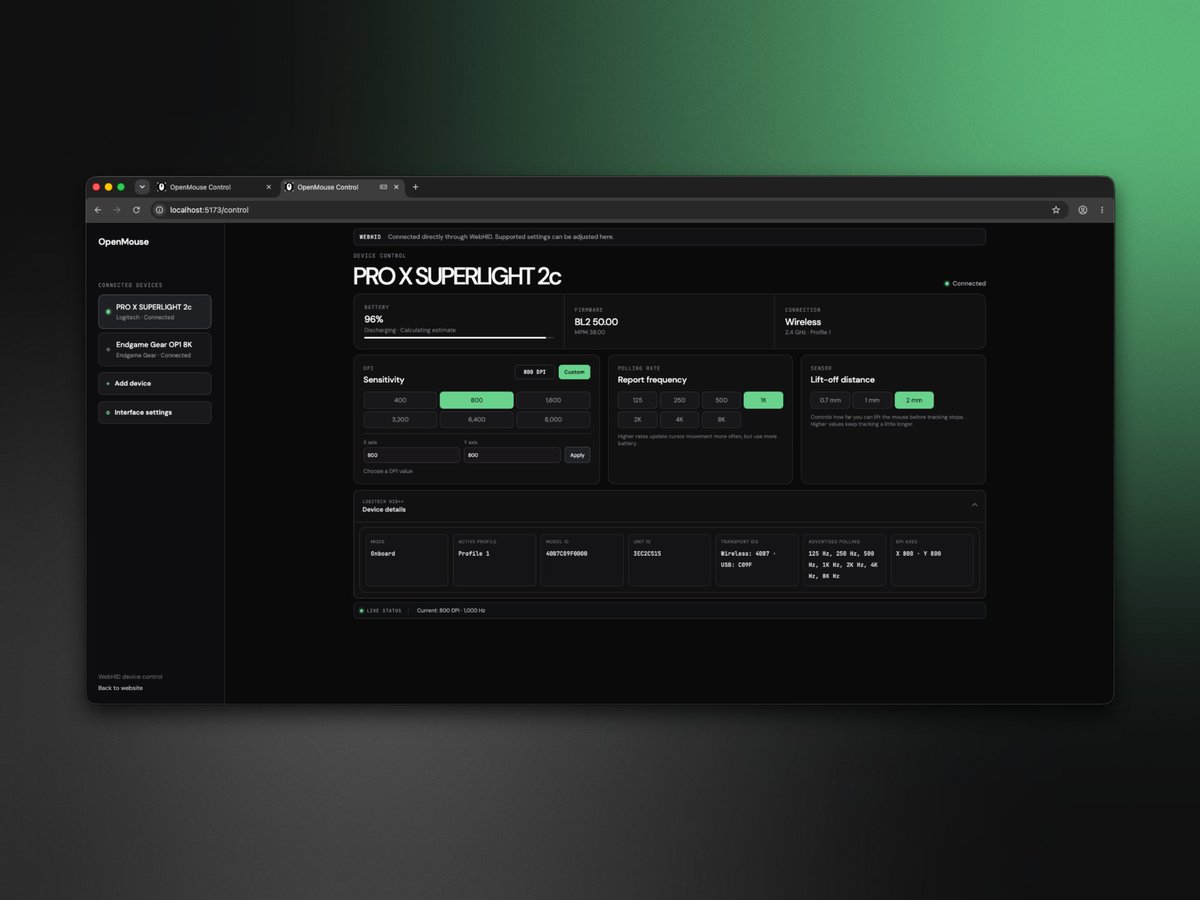
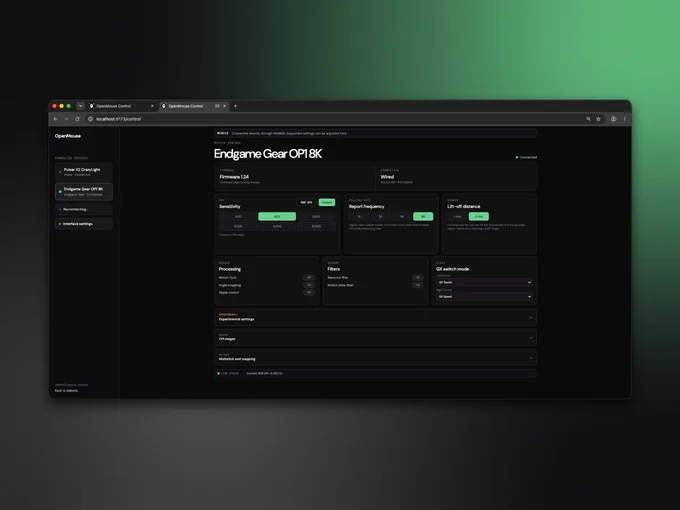
OpenMouse is an open-source, browser-based control panel designed to configure gaming mice across Windows, macOS, and Linux without installing proprietary software. Operating via WebHID in Chromium-based browsers, the tool aims to provide universal control over hardware settings for multiple brands.
Although OpenMouse (via TechPowerUP) remains in early access and is not yet publicly available, the team claims initial support for brands like WLMouse (Beast G/X and Huan), Endgame Gear (OP1we and OP1 8K), Pulsar (X2 CrazyLight), Logitech (Superlight 2(C) and Superstrike), and Orbital (Pathfinder). Specific hardware support includes the Logitech G Pro X2 Superstrike, with the team noting that integration for Logitech's HITS inductive switch and haptics technology is currently in development. Support for Finalmouse models and the Hitscan Hyperlight are also in development.
To prevent damage, the software deliberately limits its scope to safe settings. The current demo interface displays battery levels, firmware versions, and active connectivity modes. Users can adjust DPI, report rate, lift-off distance, and motion sync settings, while dedicated tabs for performance, buttons, and profiles are still under construction. Future updates plan to introduce wireless configuration options and offline functionality similar to Wooting's Wootility.
An early access test launch is scheduled for the near future. Community members can submit feature requests via Discord or track ongoing progress on GitHub.
KitGuru says: A lightweight, browser-based tool to adjust mouse settings across multiple operating systems could be a great alternative to heavy proprietary software packages. Do you have any of the supported mice? Will you be trying it out when it becomes available?
In May of this year, Microsoft said that 32GB of RAM is now the future-proof “no worries” configuration if you’re a gaming enthusiast, and that 16GB of RAM is now the new “practical starting point” if you want to have a smooth experience with Windows 11. However, it seems that the company is backtracking on this announcement as it removes all references to the post on the Windows Learning Center website, according to Windows Latest.
Microsoft previously posted a blog titled “How to optimize your gaming PC setup” in November 2025, where it said that 32GB is the ideal capacity for hardcore gamers who demand the best possible quality for AAA games or use mods a lot. However, this page is no longer available, and people who attempt to visit the link are automatically redirected to the Learning Center Homepage.
Even though Windows 11’s minimum specifications just require 4GB, the prevalence of many web-based apps and interfaces on the OS use up a lot of memory on many systems. While using web-based React and WebView2 is easier for developers, they’re not as efficient as apps that are built to run natively on Windows. This wasn’t a problem when memory was cheap and plentiful, as people could just spend a few dollars to upgrade their Windows PCs. However, now that memory modules are expensive and it’s hard to find the best prices for DDR5 and DDR4 kits, developers are going to be forced to optimize their software to use as little memory as possible.
This was actually what Windows programmers had to do in the 1980s and 1990s, when every Microsoft engineer had a stopwatch to ensure that their work remained fast, even on the limited hardware of the time. Even the original Task Manager, which was built by the same person who integrated ZIP file support into Windows, was only 80KB big so that it could run smoothly on “potato” hardware.
Hopefully, both Microsoft and app developers will rise to the challenge brought about by the memory shortage and make Windows efficient once more. This is especially true as Microsoft is now facing some competition from macOS and Linux (although Windows is, by far, still the most popular operating system today).
Some of Windows 11's tools, like Control Panel, File Explorer, Registry Editor, and others, look unchanged from Windows 10 and Windows 7. Seeing as these lack of changes look out of place for a modernized OS, a Microsoft executive explains why it’s taking so long for the company. It’s not that the software giant doesn’t want to incorporate a change, but it wants to ensure that functionality is maintained. Changing the Control Panel is “tricky,” according to a Microsoft executive, but says that “we are pushing really hard to try to modernize” Corporate Vice President of Design and Research Marcus […]
Per module temperature monitoring is now going to become common for both AMD and NVIDIA GPUs through third-party monitoring tools. HWiNFO Adds Per-Chip VRAM Temperature Monitoring for AMD Navi GPUs; Also Adds the Same Feature for NVIDIA RTX GPUs With GDDR6X/GDDR7 Chips Not long ago, we had some modders unlock per-chip VRAM temperature monitoring on NVIDIA RTX cards with GDDR6 and GDDR6X VRAM. It was followed by a similar development for the RTX 50 series, which utilizes the latest GDDR7 memory. Popular hardware monitoring utilities quickly followed the same path and added the feature, and it appears that AMD GPUs […]
CTERA, a player in intelligent data management, announced support for Microsoft Copilot, enabling organizations to securely extend Microsoft 365 Copilot and Teams Copilot beyond Microsoft 365 repositories to governed enterprise file data managed by CTERA across edge locations, data centers, and cloud environments.The CTERA Intelligent Data Platform securely connects Microsoft Copilot to enterprise file data […]

 Login
Login