Reading view

There are new articles available, click to refresh the page.

BIWIN M560 2TB Gen5 SSD Review

INTRODUCTION


biwin m560 2tb review a


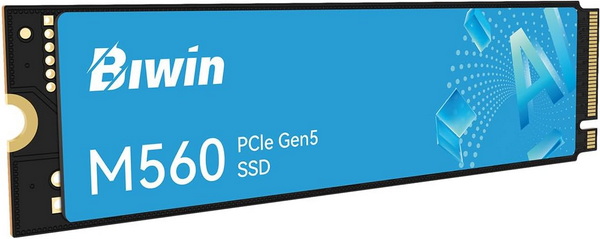
    PCIe M.2 NVMe SSDs pushed storage far beyond the limits of mechanical drives, with each generation multiplying bandwidth and shrinking load times. PCIe Gen3 established NVMe as the mainstream standard—reliable, cool‑running, and still perfectly adequate for everyday workloads. PCIe Gen4 doubled the available bandwidth, delivering noticeably faster game loading, smoother content‑creation pipelines, and stronger sustained transfers without demanding exotic cooling. PCIe Gen5 SSDs raised the ceiling again, offering massive throughput for high‑end systems, workstation‑level transfers, and next‑generation game engines. Initially that jump came with trade‑offs, higher thermals, mandatory heatsinks, stricter motherboard compatibility, and real‑world gains that vary depending on workload. Today most thermal related concerns have been resolved and so Gen5 drives bring undeniable advantages, blistering sequential speeds, improved parallelism, and headroom for future software and DirectStorage‑heavy titles. The M560 is the latest Gen5 model released by BIWIN and that's what I've been testing for a while now.


    For decades, BIWIN Storage Technology has made the critical storage and memory in many of the leading digital devices that have defined our digital world. The Biwin consumer brand offers the best of BIWIN’s experience, a range of SSDs, DRAM, memory cards and related accessories that will help you get the most out of your devices. Biwin, Built to Win. For more about Biwin, please visit www.biwintech.com


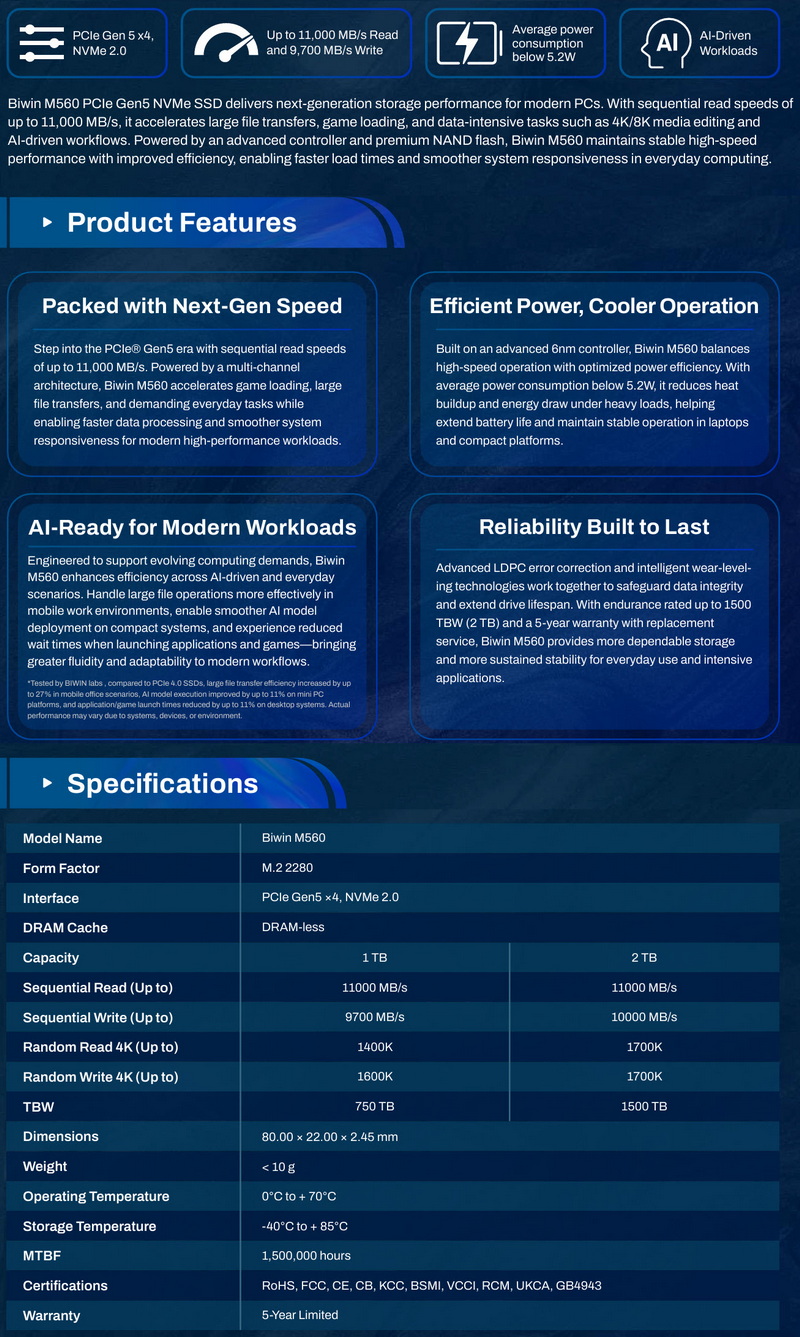
    The new M560 line of Gen5 M.2 NVMe SSDs by BIWIN currently includes only two capacities (1/2TB) both of which are based on the latest SM2504XTF DRAM-less flash controller by Silicon Motion which this time is paired with 218-layer 3D TLC NAND flash memory (BiCS 8) by Kioxia. The SM2504XTF is an 6nm, 4-channel NAND flash controller (tri-core Arm Cortex-R8 processor) with a speed of up to 3600MT/s per channel (16CE) that follows the NVMe 2.0 (Non-Volatile Memory Express) standard and packs technologies like NANDXtend 4K+ LDPC engine with end-to-end data path protection, SRAM ECC & CRC parity, real time AES 256-bit encryption, Host Memory Buffer (HMB) architecture (uses a fraction of your PC's system memory to cache mapping tables), ONFI 5.1 and Toggle 5.0 support and TCG Opal 2.0 compliance. Moving to warranty BIWIN covers the entire 560 Gen5 M.2 NVMe SSD line with a 5-year limited one and as for durability they report an MTBF (mean time between failures) of 1.5 million hours and TBW (terra bytes written) of 750/1500 for the 1/2TB models respectively.


SPECIFICATIONS AND FEATURES


PACKAGING AND CONTENTS


biwin m560 2tb review 1t

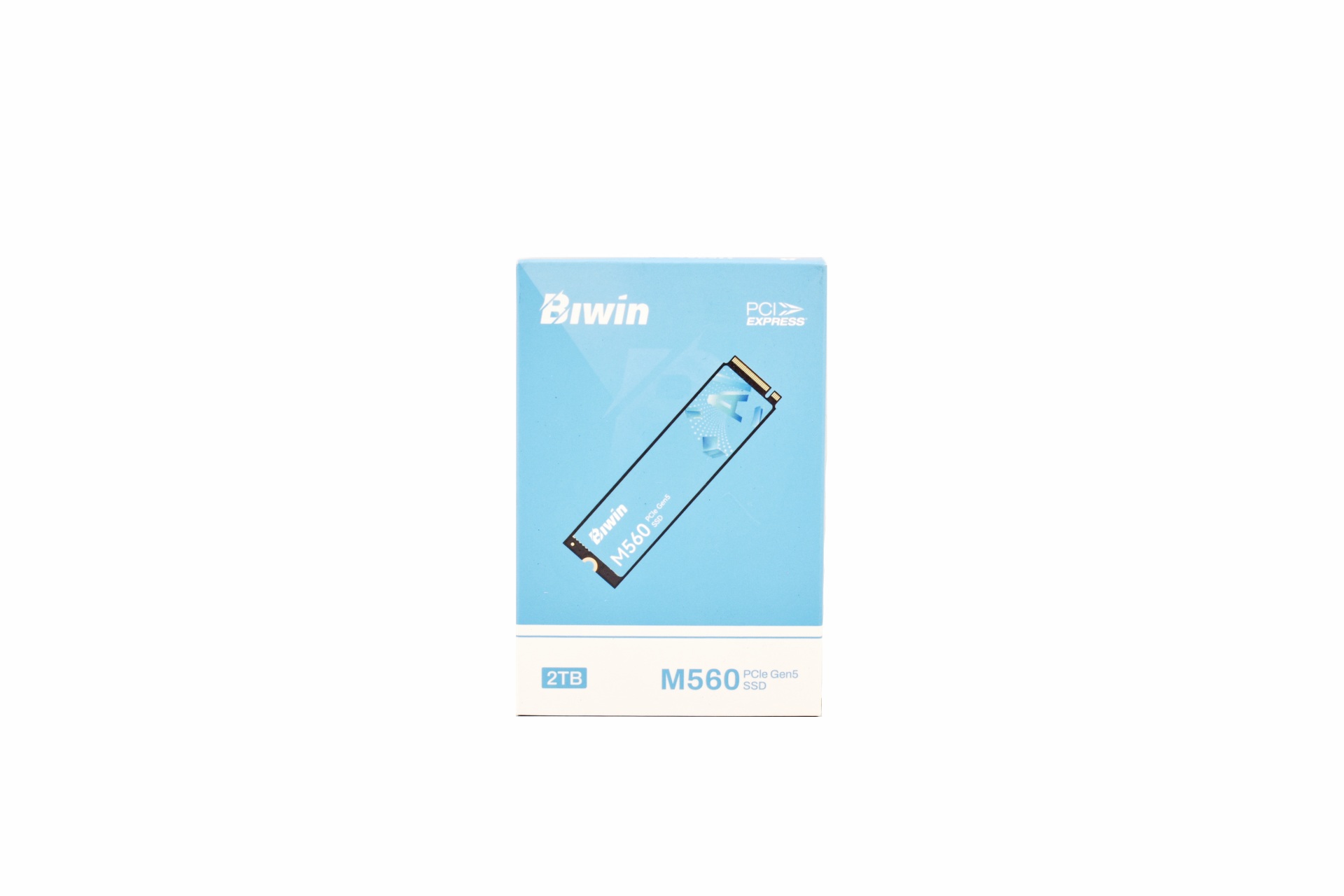
The M560 is placed inside a small light blue and white box that has a product picture at the front right under the company logo and above its capacity.
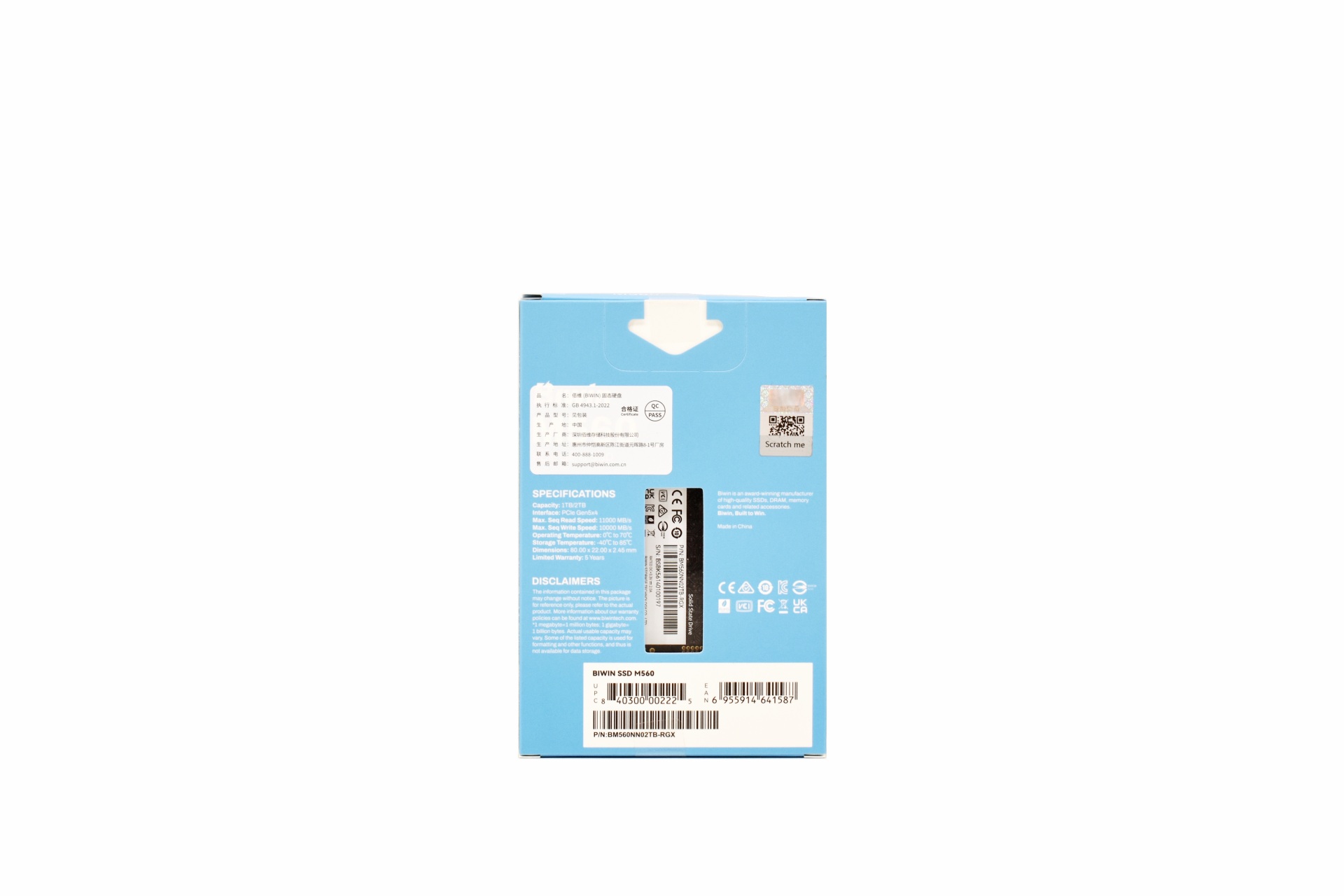


At the rear we find the product specifications, serial numbers and barcodes and an opening from where you can see the rear of the drive itself.
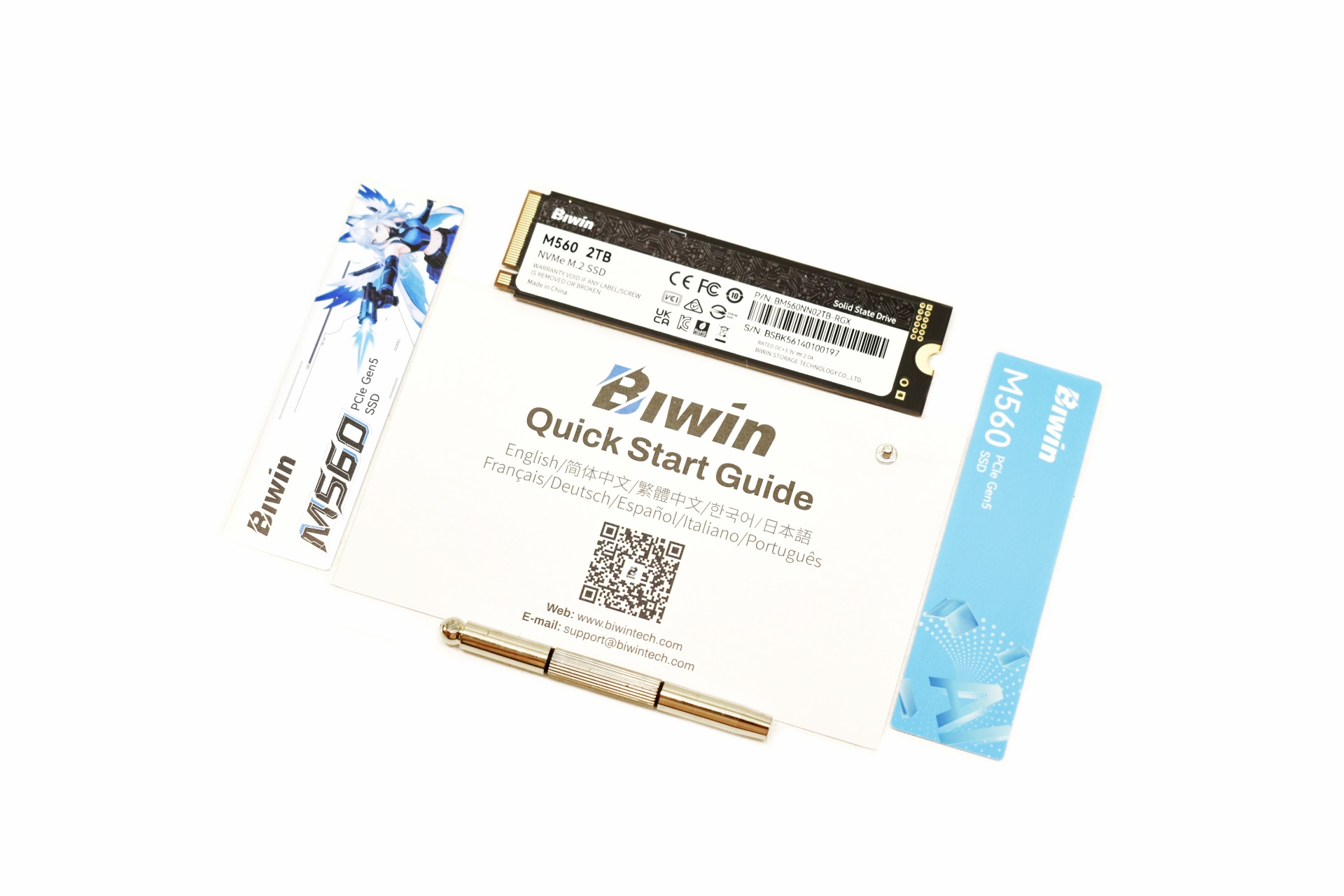


Contained inside the box are the M560 2TB SSD, two stickers (you can use whichever fits your case more), quick start guide, mounting tool and a mounting screw.


THE M560 2TB
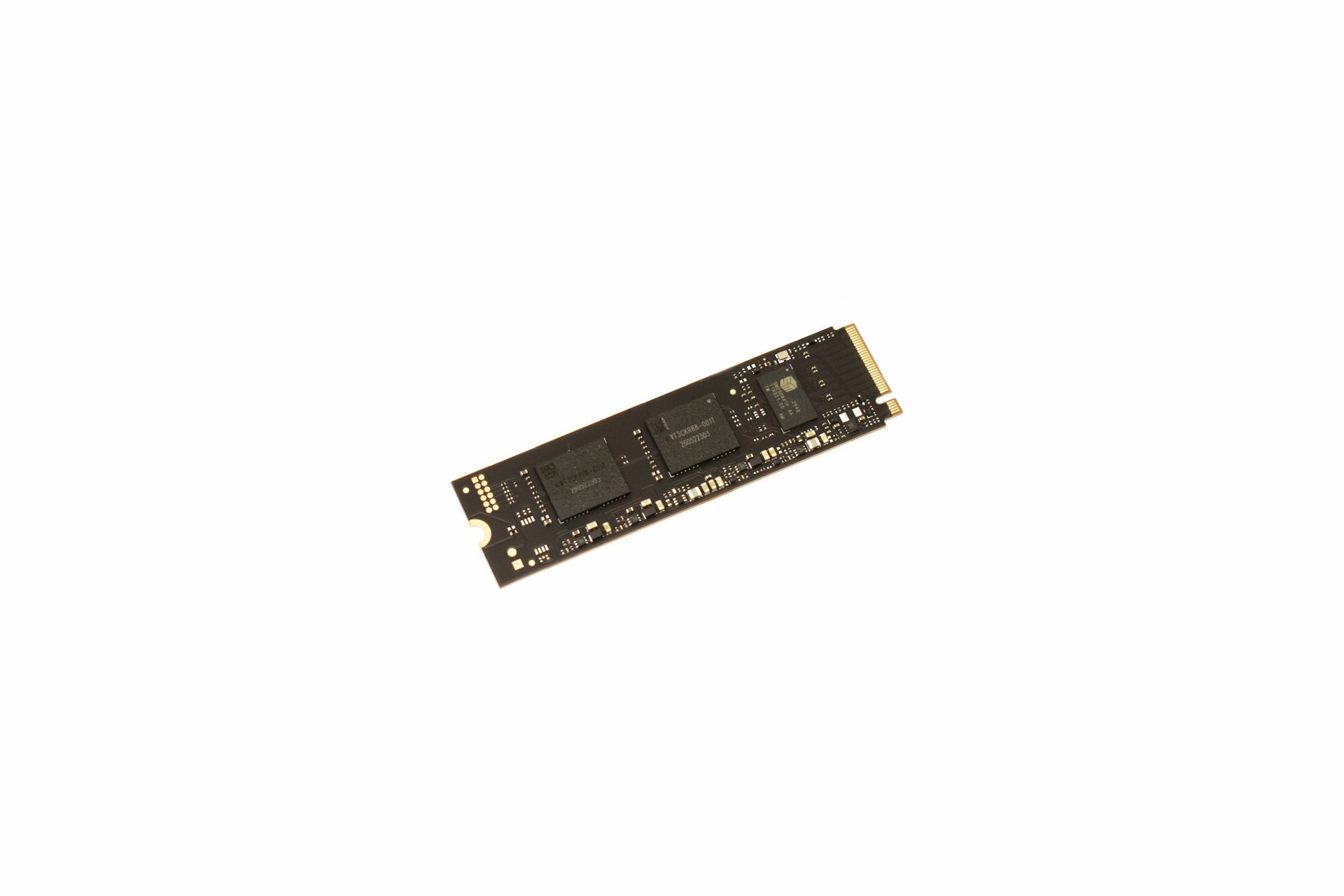


As a DRAM-less drive the M560 is quite simple and so on one side we just find the SM2504XTF NAND flash controller and two BiCS 8 NAND flash modules.


On the other side we see the same sticker visible from the rear of the box.


thermal idlet

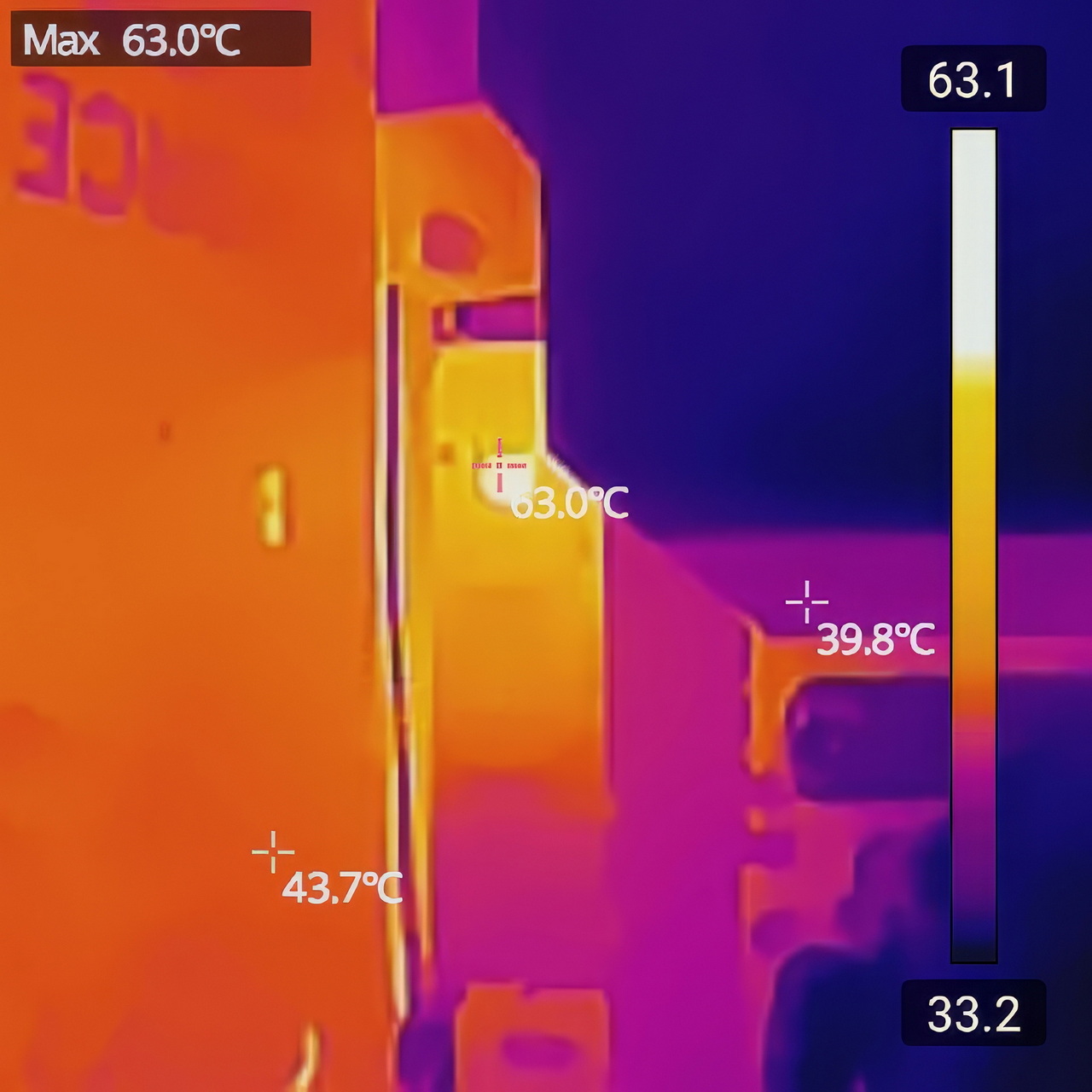
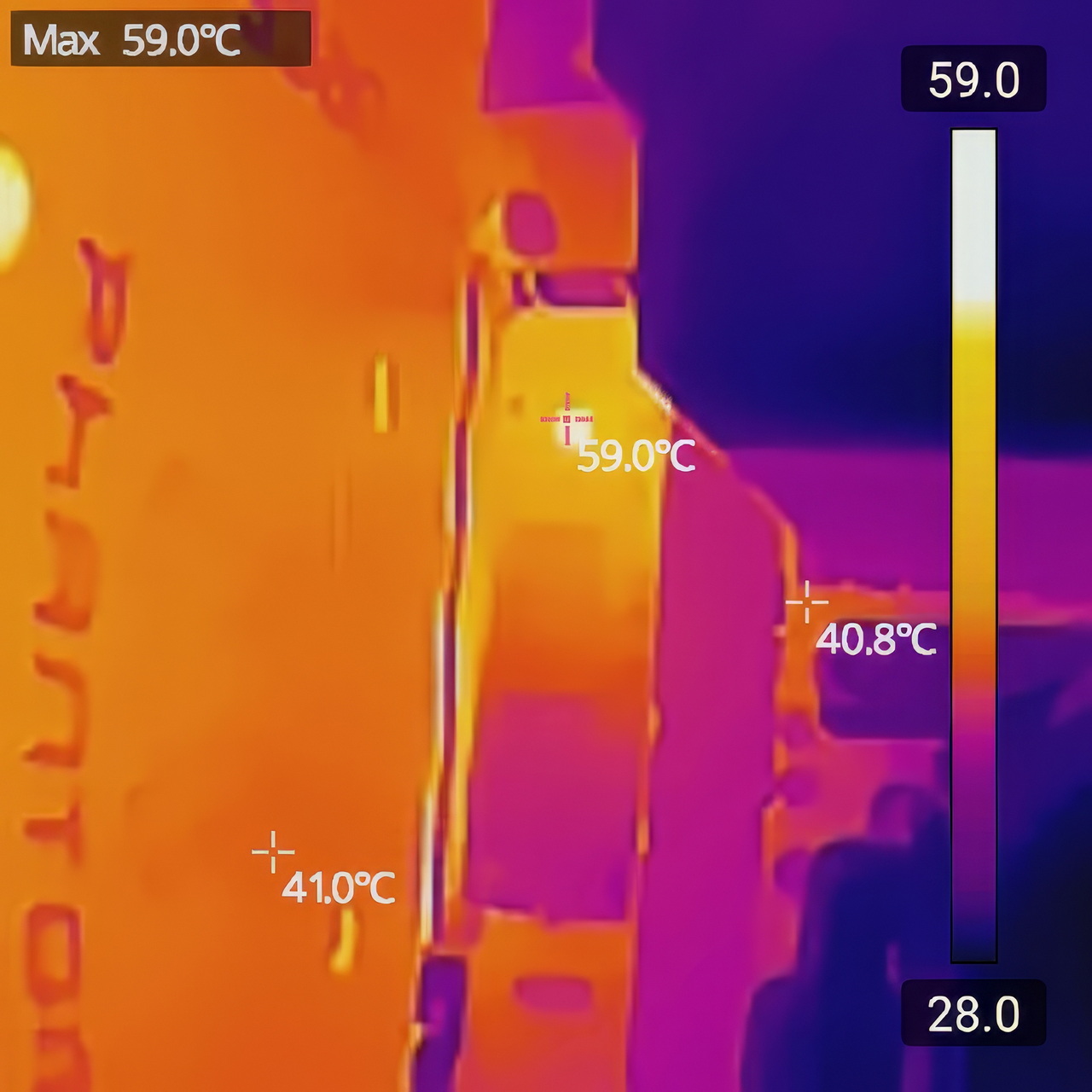
Although I perform all tests with the motherboard heatsink installed (unless a drive comes ready with its very own heatsink), I wanted to check and see if thermal issues on the new Gen5 controllers was a thing of the past and as you can all see from the thermal images above, even at load the SM2504XTF didn't surpass 63 degrees Celsius (59 degrees in idle - 23 degrees ambient room temperature).


BIWIN INTELLIGENCE


To monitor the drive and perform several functions you should download the Intelligence tool by BIWIN.

biwin intelligence 1t

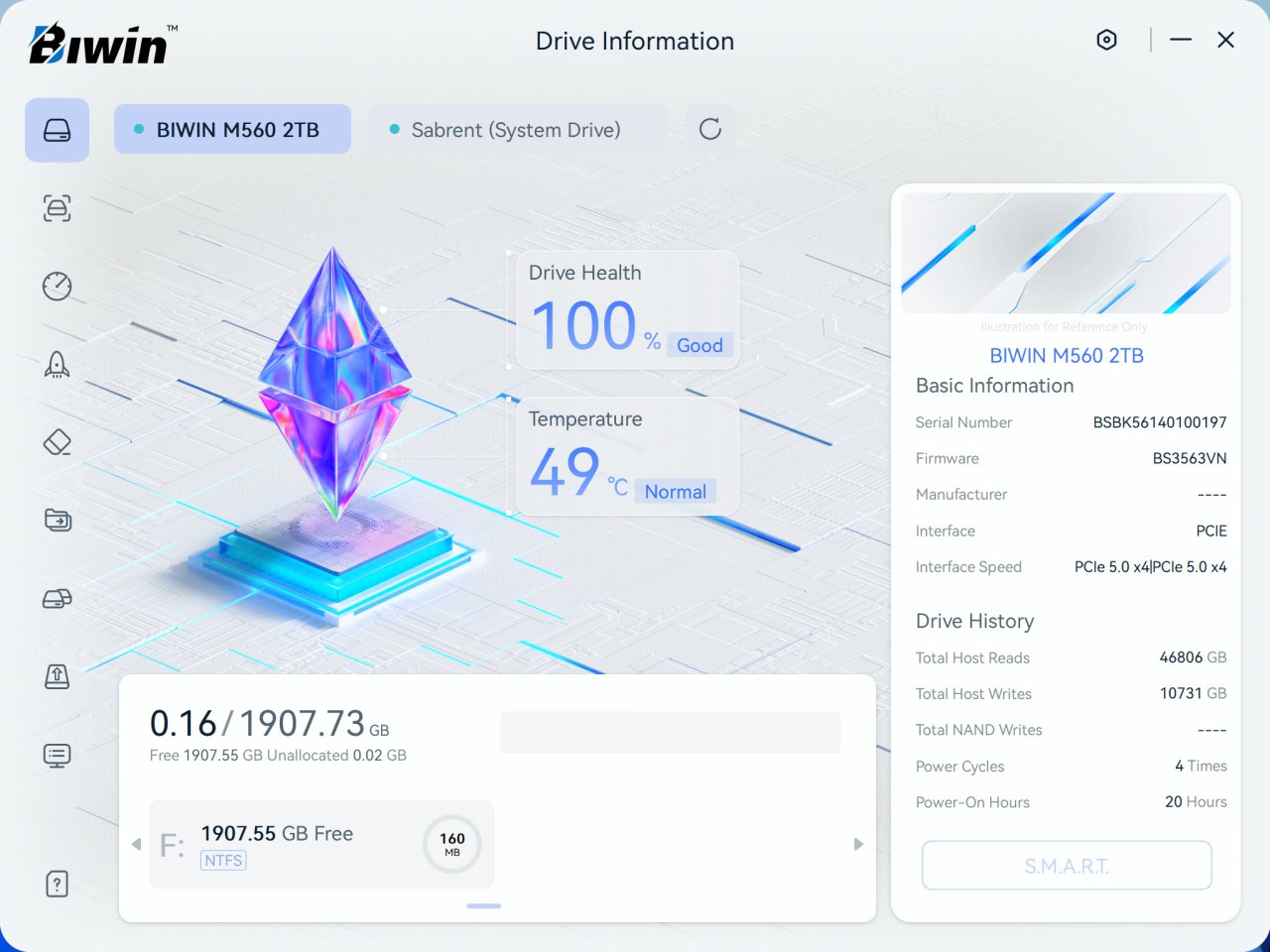
Drive health, temperature, SMART details, and history are the things displayed on the main tab.


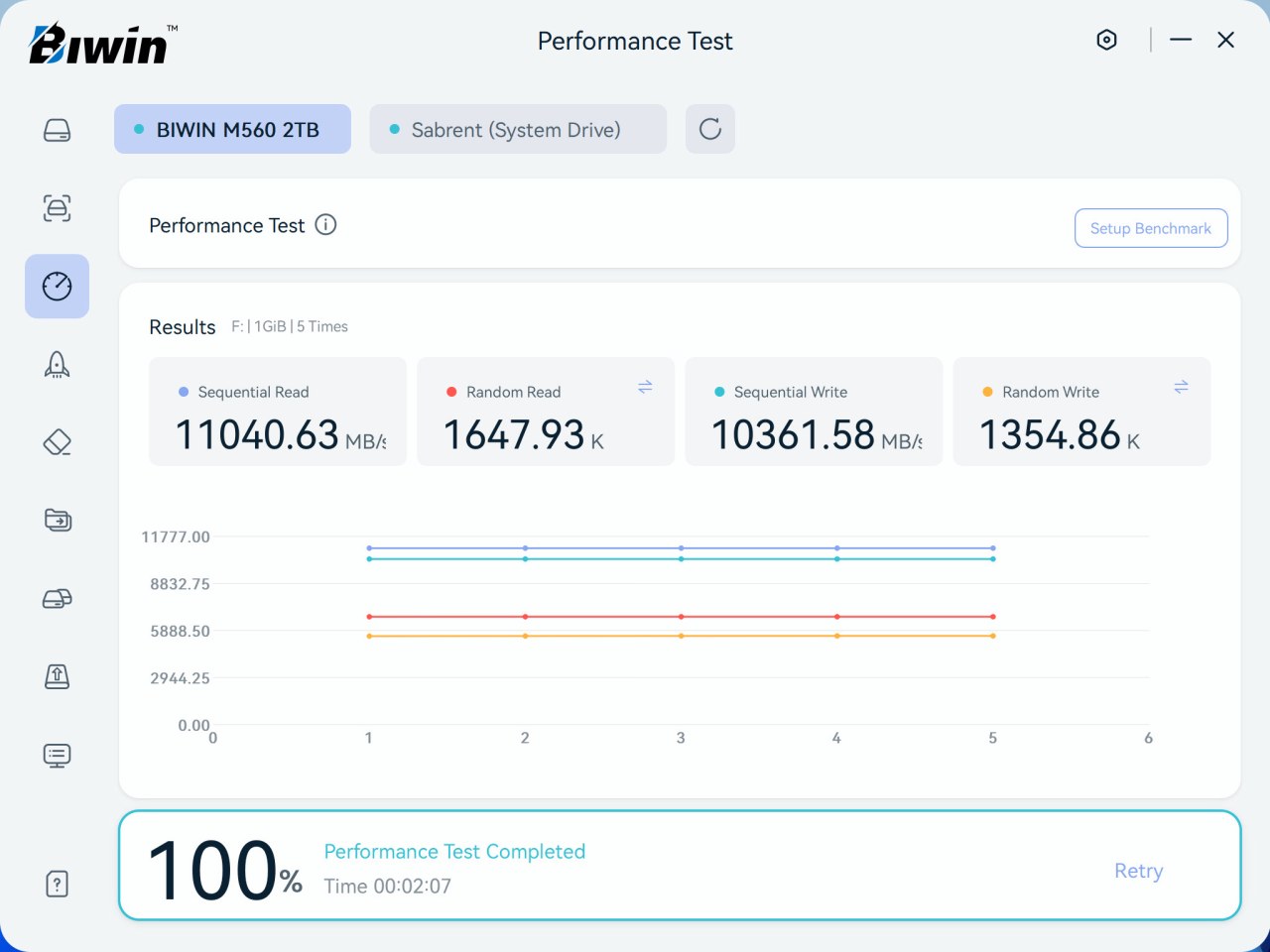
You can perform an error scan and even a performance test on the drive (as long as there's a partition on it).


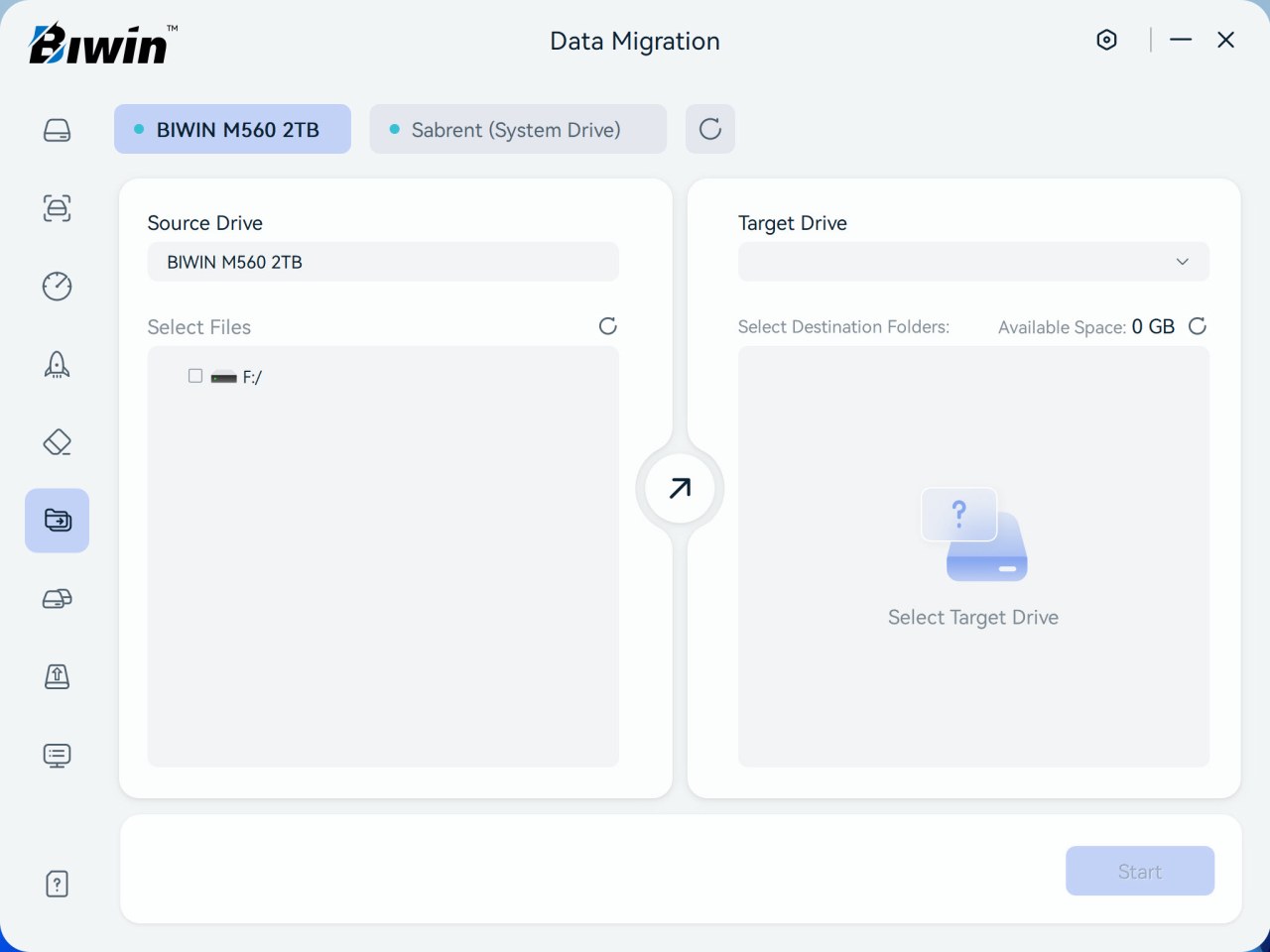
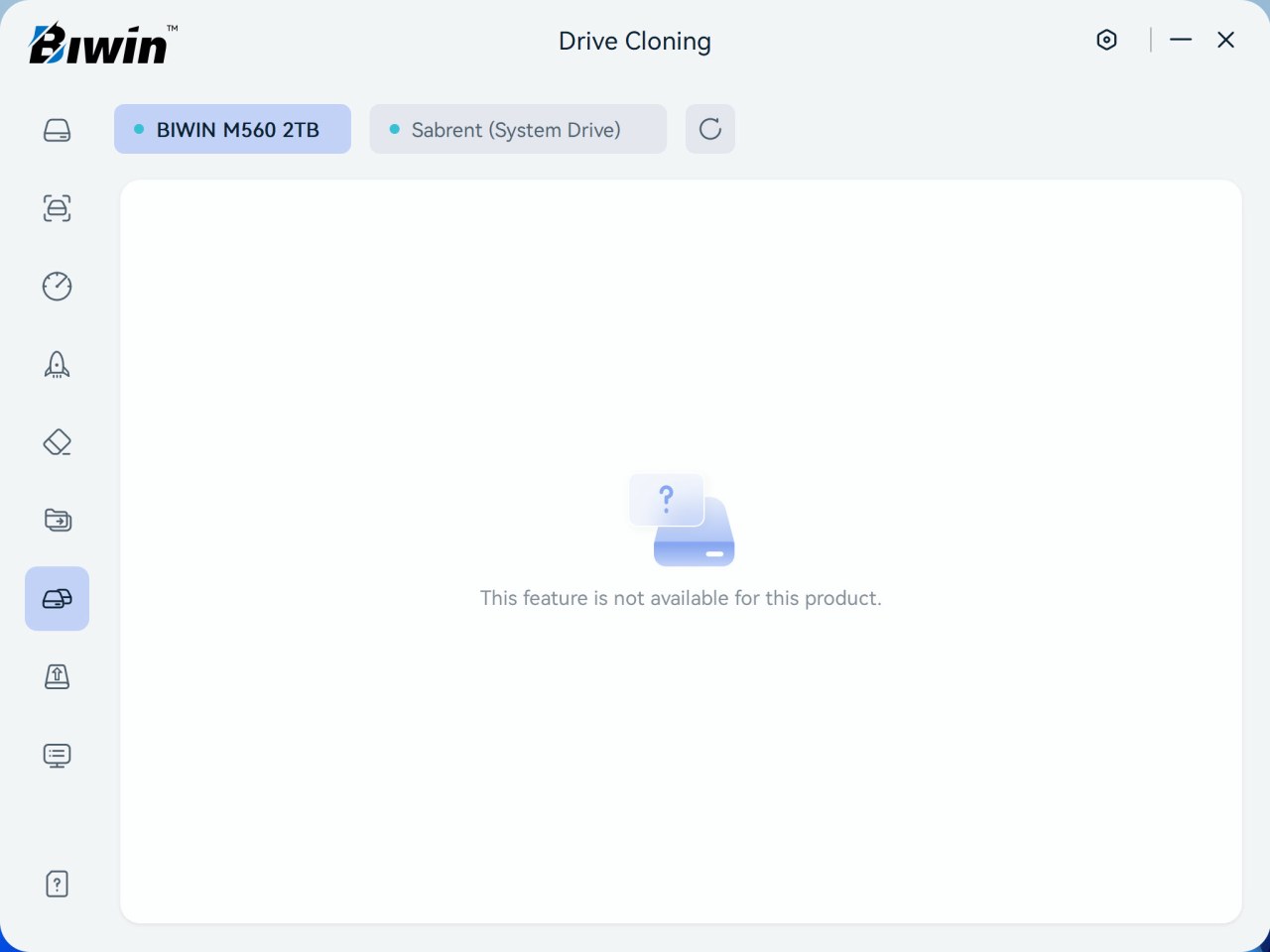
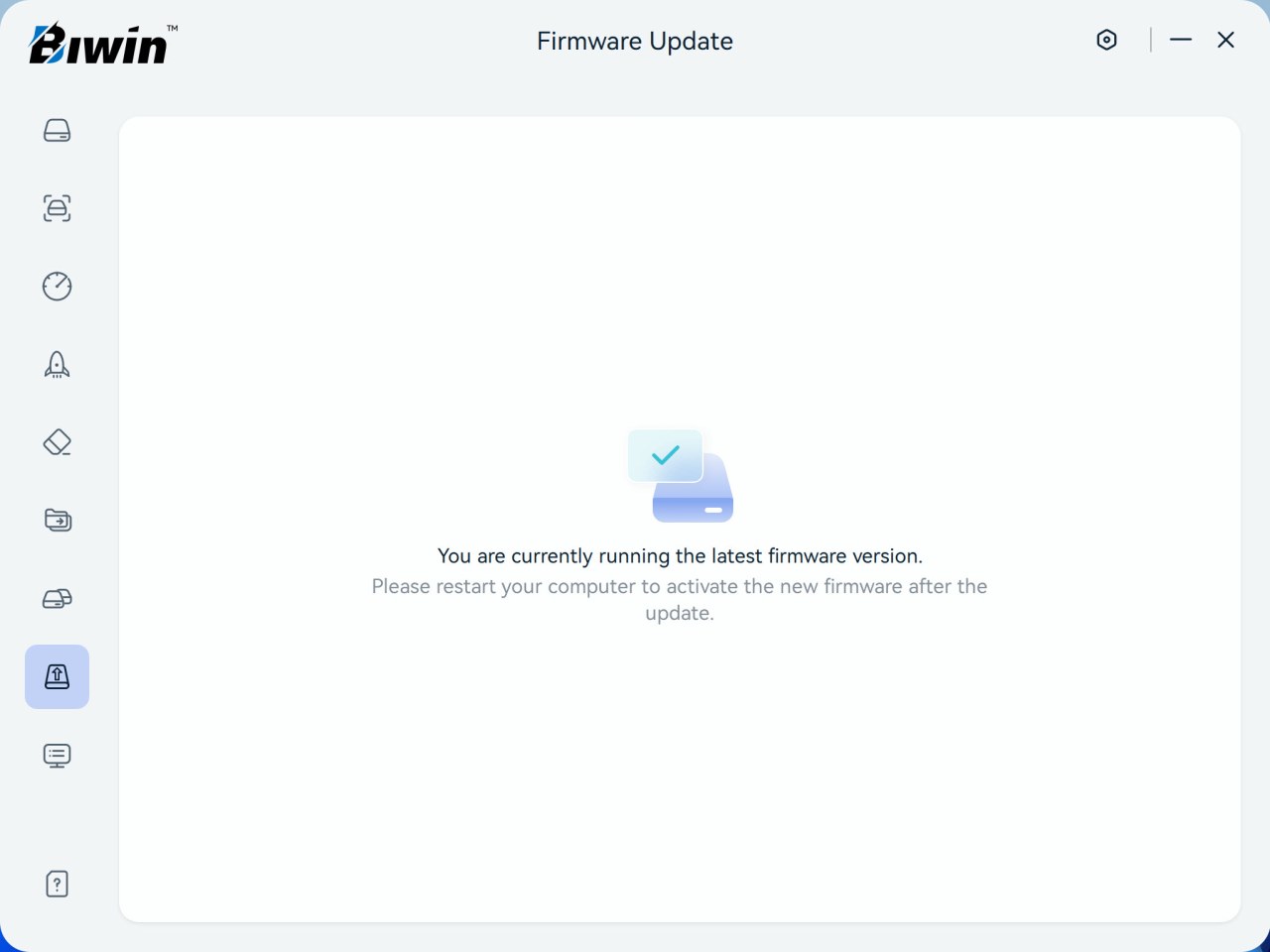
This software also allows you to enable/disable TRIM, erase the drive, migrate data, and check for firmware updates (drive cloning was greyed out).


Version 4.0.0.4 was used for this review.


TEST BED


cpuza


TESTING METHODOLOGY


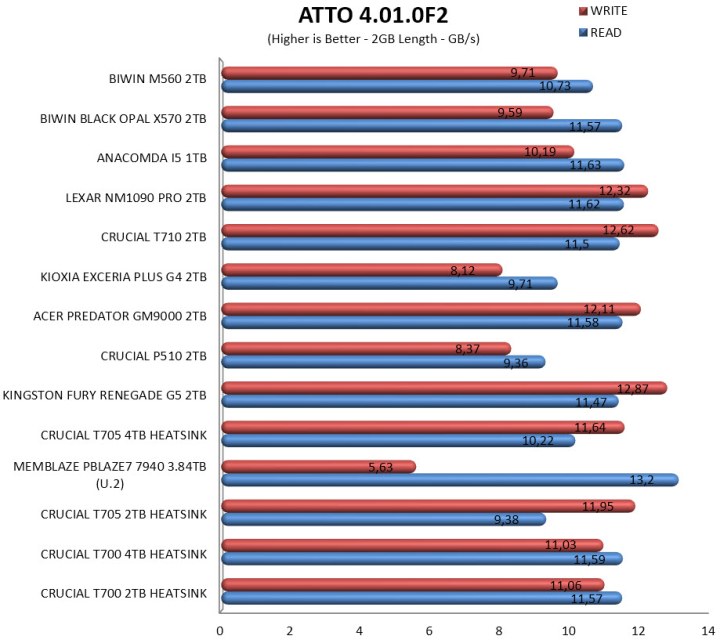
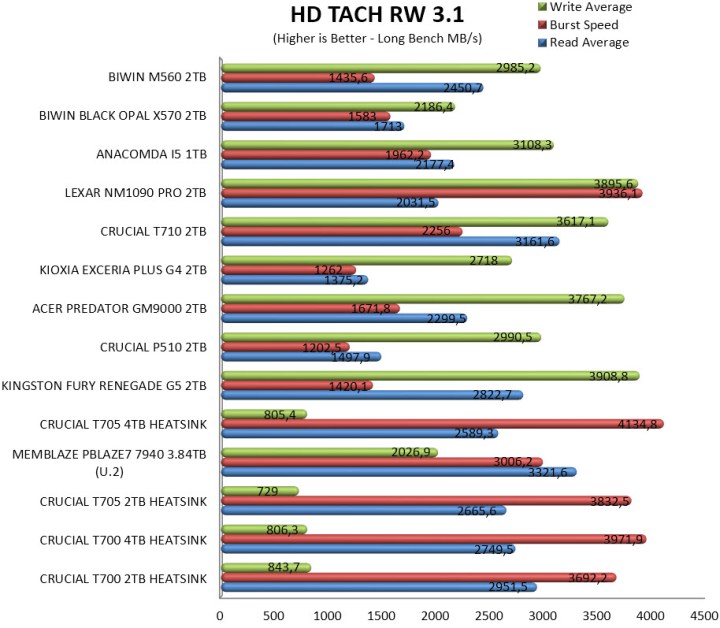
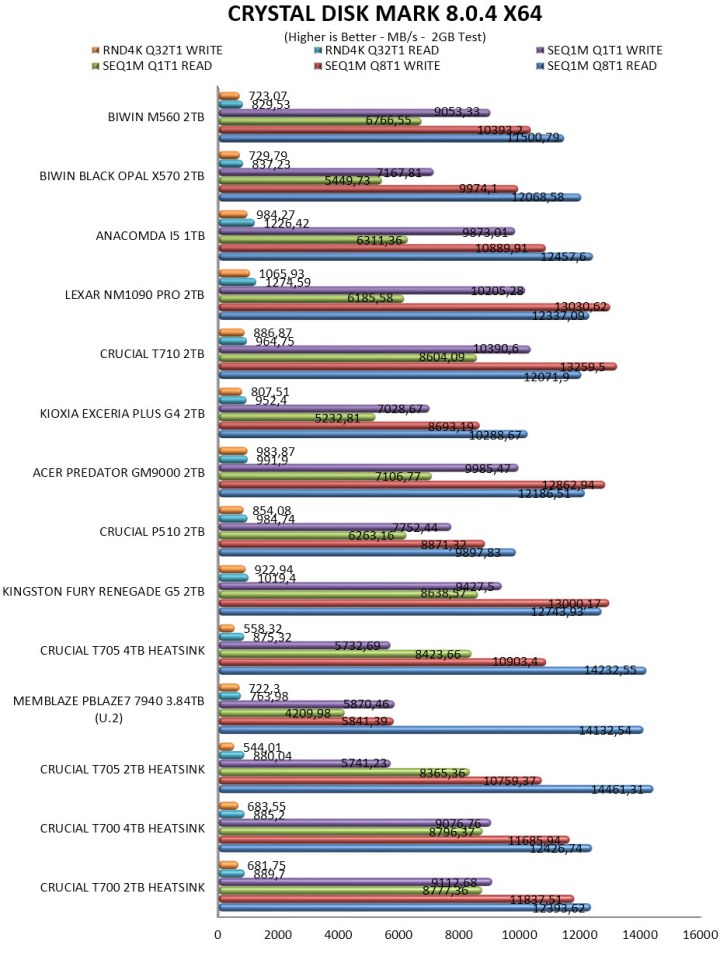
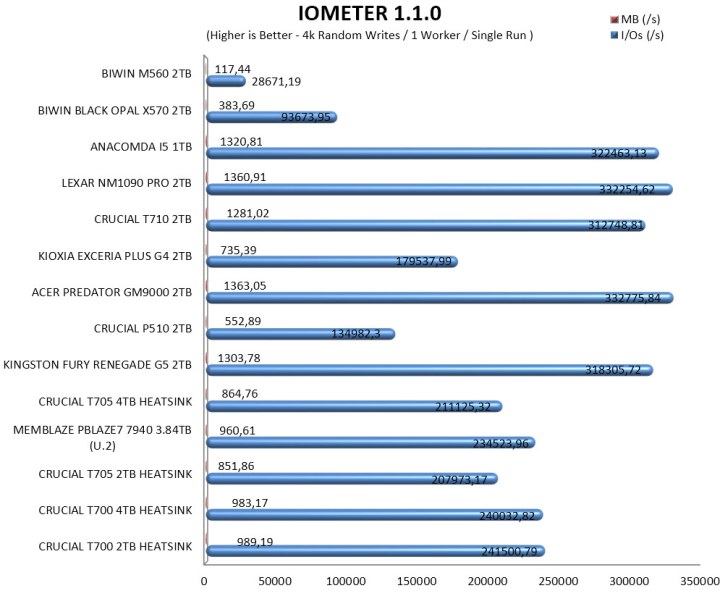
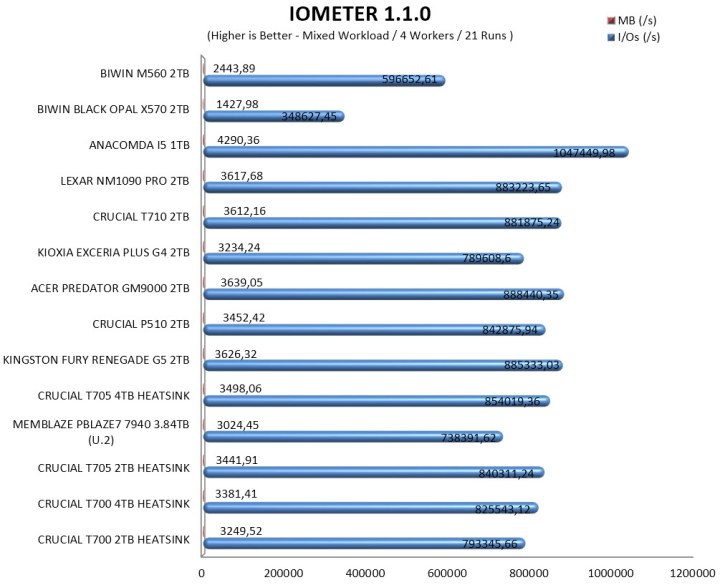
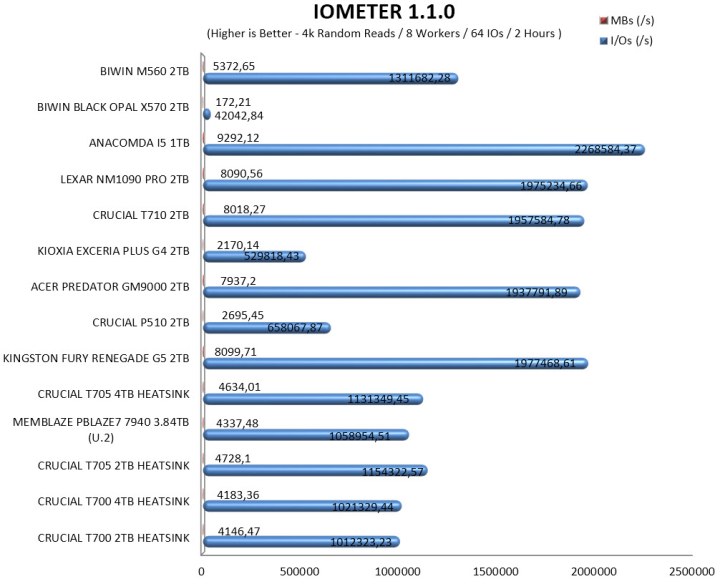
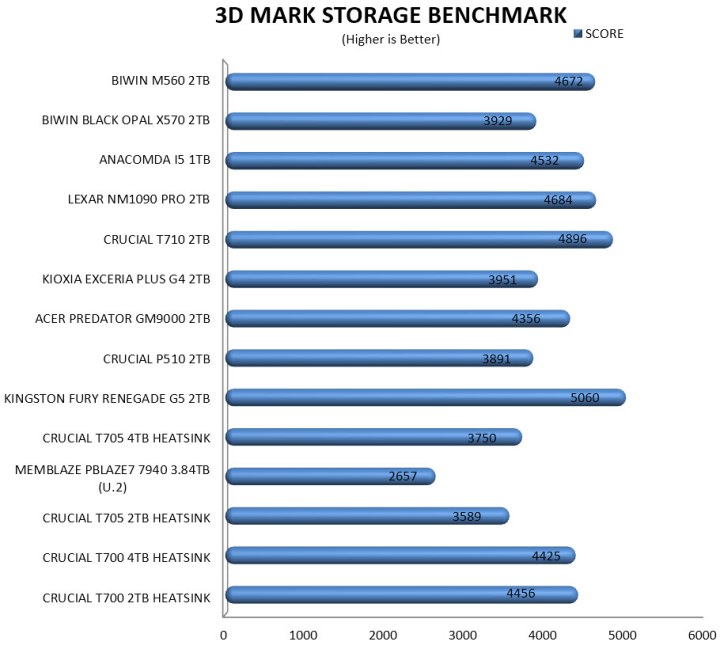
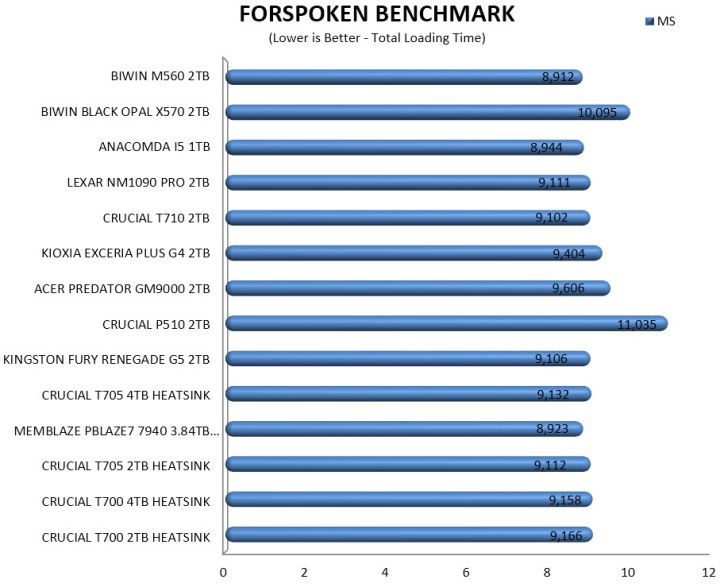
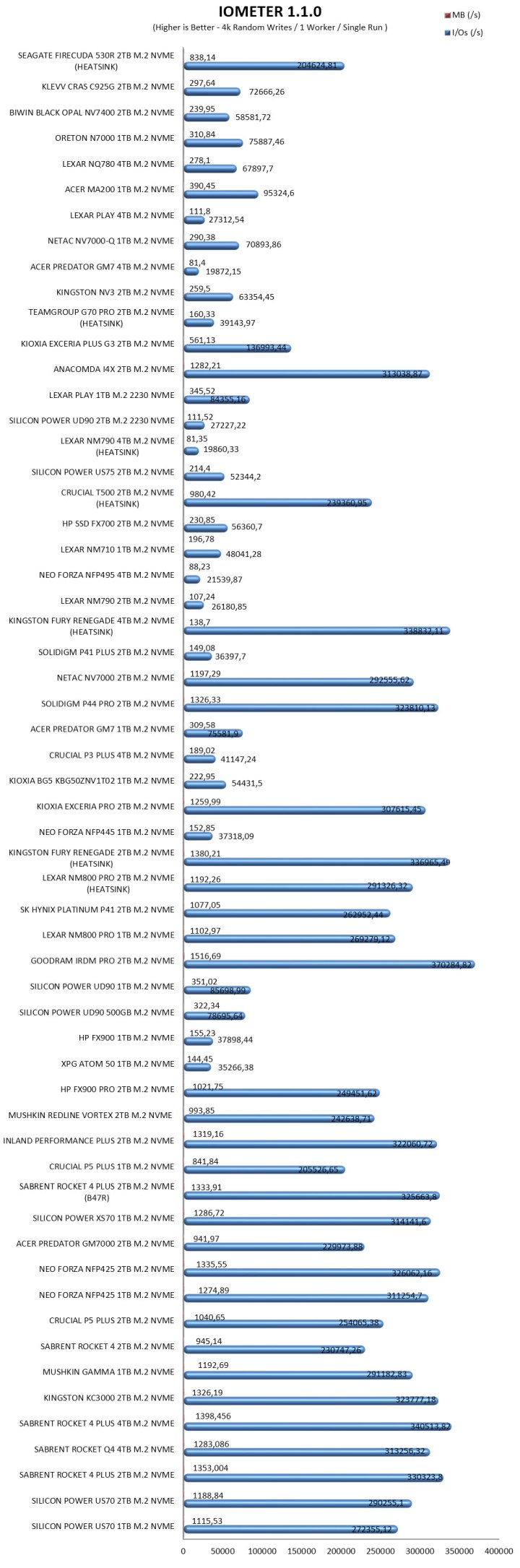
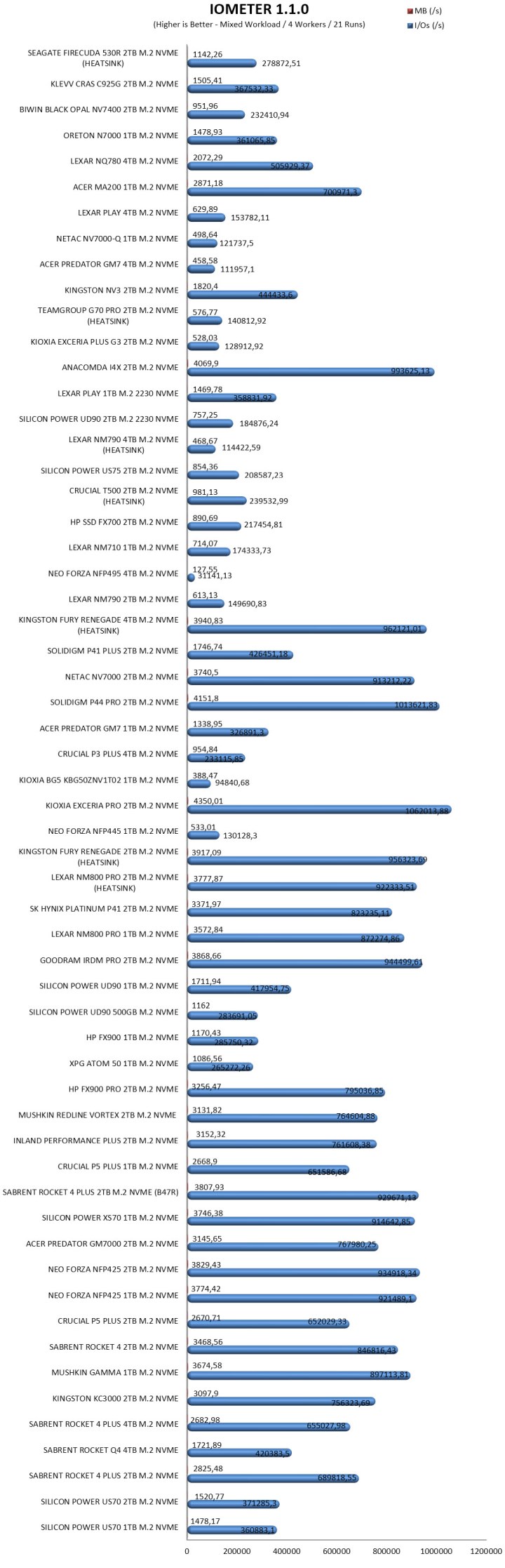
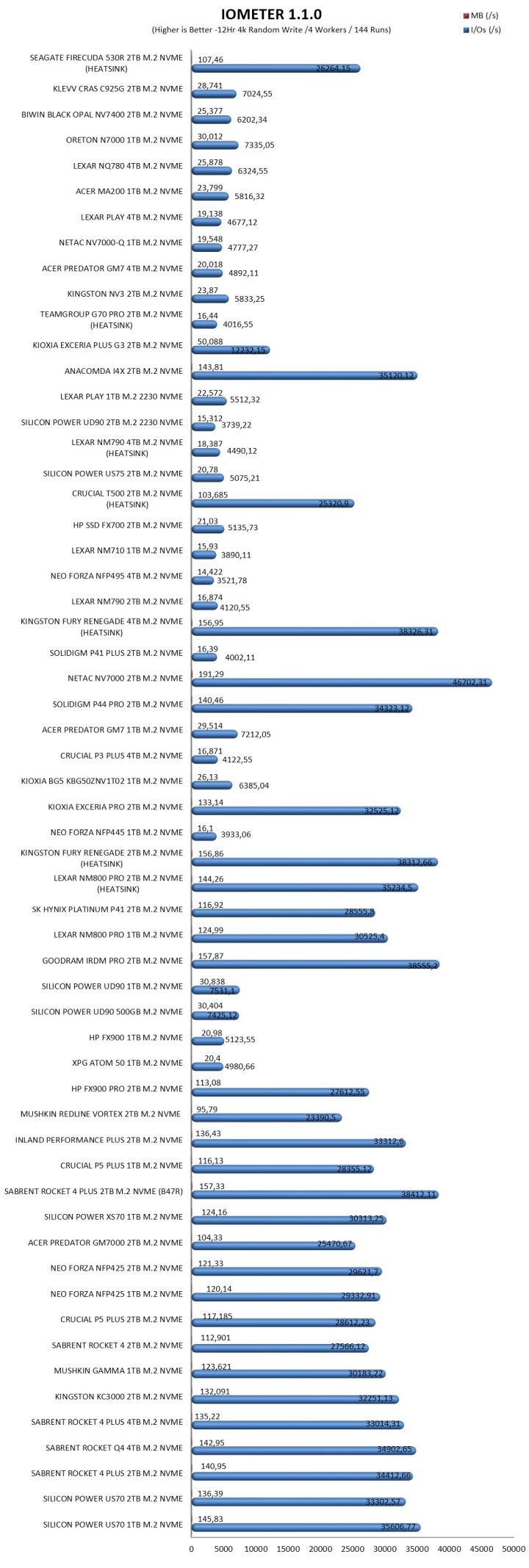
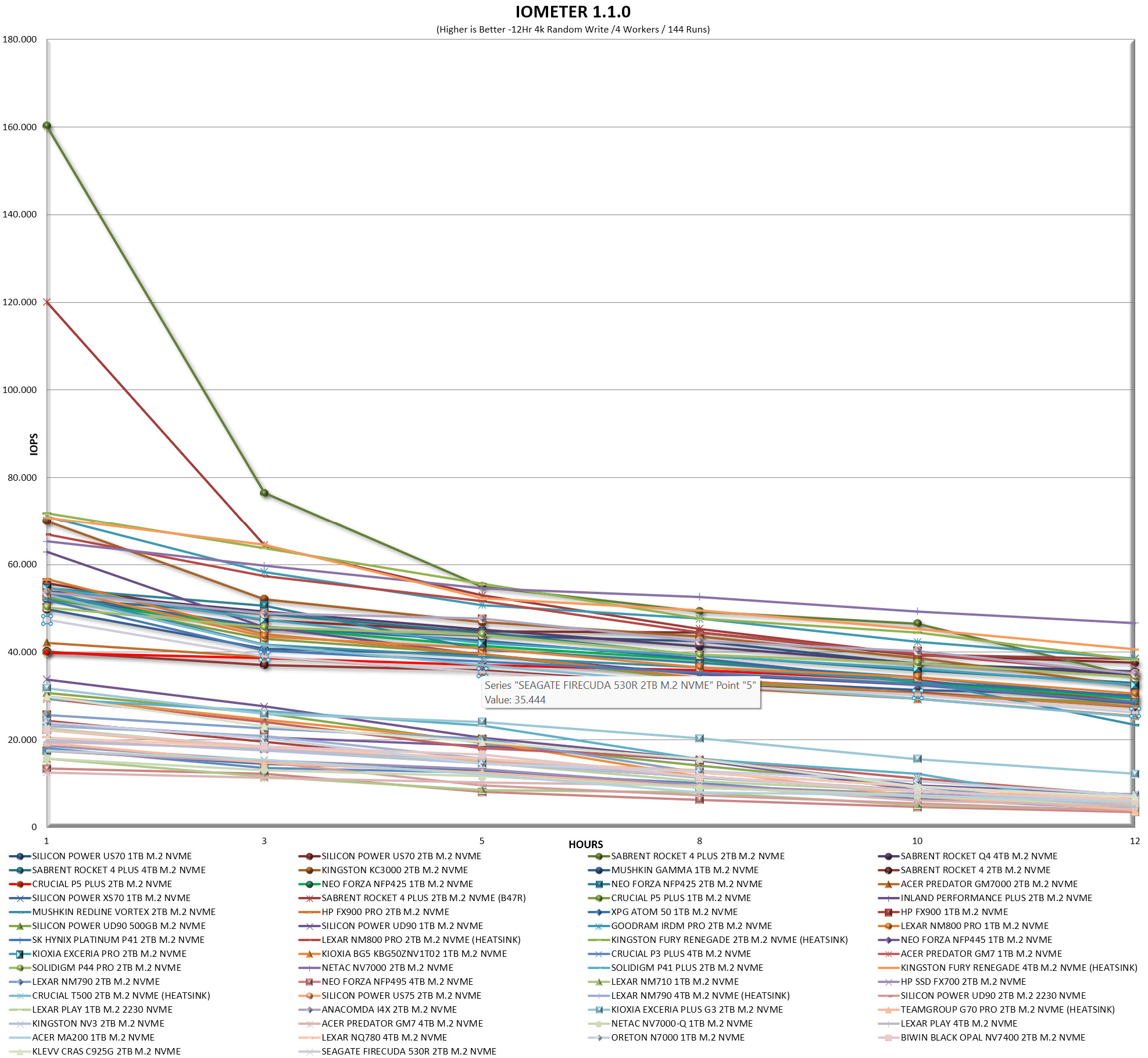
   I've been using pretty much the same testing methodology for PCIe 3.0 Gen3 and PCIe 4.0 Gen4 SSDs for far too many years now, so I decided to "tweak" it for PCIe 5.0 Gen5 models. Needless to say, Gen5 M.2 NVMe SSDs will be tested using one of my latest test rigs (Intel Core Ultra 285K / ASRock Z890 Taichi Lite) and unlike with both Gen3 and Gen4 SSDs I will not be using the SNIA (Storage Networking Industry Association) 12 hour IOMeter benchmark since it proved to be rather heavy for early Gen5 SSDs (temperature issues). Instead, I decided to use the latest versions of 3D Mark, AIDA64, AS SSD, ATTO, Crystal Disk Mark, HD Tune Pro, HD Tach RW, Performance Test, IOMeter (4k Random Writes / 4k Random Reads – since September 2024 / SNIA Mixed) and Sandra Titanium for performance measuring and ForSpoken for all of you who might be wondering just how well Gen5 SSDs do in regard to Microsoft's DirectStorage API/Technology. Each test will be run a total of 5 times after which the average number will be recorded in each chart.


TEST RESULTS - AIDA64 / ATTO


aida64


TEST RESULTS - HD TUNE PRO / HD TACH RW


TEST RESULTS - AS SSD / CRYSTAL DISK MARK


TEST RESULTS - SANDRA TITANIUM / IOMETER


TEST RESULTS - PERFORMANCE TEST / 3D MARK / FORSPOKEN


CONCLUSION


biwin m560 2tb review c


    The BIWIN M560 2TB stands out for its strong performance, especially its write speeds, which remain consistently high even under sustained workloads (BIWIN is actually underreporting write performance). Thermal behavior is another clear advantage since the SM2504XTF NAND controller by Silicon Motion never exceeded 63°C in my testing, making this one of the cooler Gen5 drives in its class. The included bundle adds practical value, rounding out the package for users who want a straightforward, ready‑to‑install solution. On the downside, the drive tops out at 2TB, leaving no higher‑capacity option for heavier workflows, and its IO performance, while adequate, doesn’t quite match the best‑in‑class Gen5 competitors (although it does surpass that of the X570 model in most).


    Right now, the M560 2TB PCIe 5.0 Gen5 M.2 NVMe SSD by BIWIN currently retails for 291.76Euros inside the EU (Amazon.de) meaning it’s priced the same as for example their very own X570 Pro model (USA availability is limited at best). Price aside however the M560 2TB SSD was a pleasant surprise, it surpassed many other Gen5 models in several tests, experienced no thermal throttling during my tests and in terms of durability it’s a tad higher than much of its competition right now so with all these in mind the Golden Award is in order.

PROS


- Quality
- Very Good Performance
- Endurance (1.5 Million Hours MTBF / 1500TBW)
- 5 Year Limited Warranty
- Bundle
- Intelligence Software


CONS


- Current USA Availability
- IOMeter Performance (In My Tests)
- Available Capacities (Up To 2TB)


BIWIN M560 2TB Gen5 SSD Review

INTRODUCTION


biwin m560 2tb review a


    PCIe M.2 NVMe SSDs pushed storage far beyond the limits of mechanical drives, with each generation multiplying bandwidth and shrinking load times. PCIe Gen3 established NVMe as the mainstream standard—reliable, cool‑running, and still perfectly adequate for everyday workloads. PCIe Gen4 doubled the available bandwidth, delivering noticeably faster game loading, smoother content‑creation pipelines, and stronger sustained transfers without demanding exotic cooling. PCIe Gen5 SSDs raised the ceiling again, offering massive throughput for high‑end systems, workstation‑level transfers, and next‑generation game engines. Initially that jump came with trade‑offs, higher thermals, mandatory heatsinks, stricter motherboard compatibility, and real‑world gains that vary depending on workload. Today most thermal related concerns have been resolved and so Gen5 drives bring undeniable advantages, blistering sequential speeds, improved parallelism, and headroom for future software and DirectStorage‑heavy titles. The M560 is the latest Gen5 model released by BIWIN and that's what I've been testing for a while now.


    For decades, BIWIN Storage Technology has made the critical storage and memory in many of the leading digital devices that have defined our digital world. The Biwin consumer brand offers the best of BIWIN’s experience, a range of SSDs, DRAM, memory cards and related accessories that will help you get the most out of your devices. Biwin, Built to Win. For more about Biwin, please visit www.biwintech.com


    The new M560 line of Gen5 M.2 NVMe SSDs by BIWIN currently includes only two capacities (1/2TB) both of which are based on the latest SM2504XTF DRAM-less flash controller by Silicon Motion which this time is paired with 218-layer 3D TLC NAND flash memory (BiCS 8) by Kioxia. The SM2504XTF is an 6nm, 4-channel NAND flash controller (tri-core Arm Cortex-R8 processor) with a speed of up to 3600MT/s per channel (16CE) that follows the NVMe 2.0 (Non-Volatile Memory Express) standard and packs technologies like NANDXtend 4K+ LDPC engine with end-to-end data path protection, SRAM ECC & CRC parity, real time AES 256-bit encryption, Host Memory Buffer (HMB) architecture (uses a fraction of your PC's system memory to cache mapping tables), ONFI 5.1 and Toggle 5.0 support and TCG Opal 2.0 compliance. Moving to warranty BIWIN covers the entire 560 Gen5 M.2 NVMe SSD line with a 5-year limited one and as for durability they report an MTBF (mean time between failures) of 1.5 million hours and TBW (terra bytes written) of 750/1500 for the 1/2TB models respectively.


SPECIFICATIONS AND FEATURES


PACKAGING AND CONTENTS


biwin m560 2tb review 1t

The M560 is placed inside a small light blue and white box that has a product picture at the front right under the company logo and above its capacity.


At the rear we find the product specifications, serial numbers and barcodes and an opening from where you can see the rear of the drive itself.


Contained inside the box are the M560 2TB SSD, two stickers (you can use whichever fits your case more), quick start guide, mounting tool and a mounting screw.


THE M560 2TB
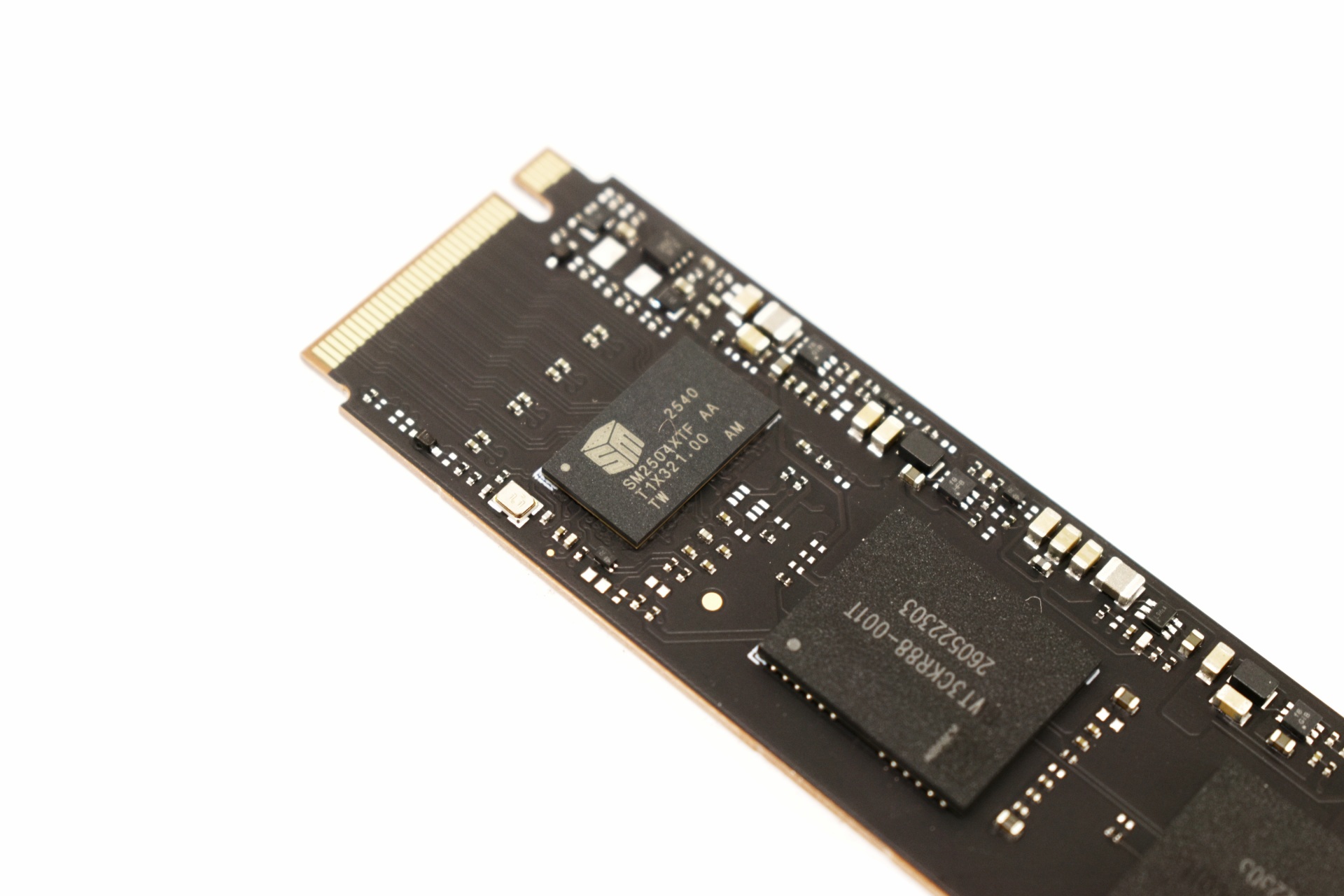


As a DRAM-less drive the M560 is quite simple and so on one side we just find the SM2504XTF NAND flash controller and two BiCS 8 NAND flash modules.


On the other side we see the same sticker visible from the rear of the box.


thermal idlet

Although I perform all tests with the motherboard heatsink installed (unless a drive comes ready with its very own heatsink), I wanted to check and see if thermal issues on the new Gen5 controllers was a thing of the past and as you can all see from the thermal images above, even at load the SM2504XTF didn't surpass 63 degrees Celsius (59 degrees in idle - 23 degrees ambient room temperature).


BIWIN INTELLIGENCE


To monitor the drive and perform several functions you should download the Intelligence tool by BIWIN.

biwin intelligence 1t

Drive health, temperature, SMART details, and history are the things displayed on the main tab.


You can perform an error scan and even a performance test on the drive (as long as there's a partition on it).


This software also allows you to enable/disable TRIM, erase the drive, migrate data, and check for firmware updates (drive cloning was greyed out).


Version 4.0.0.4 was used for this review.


TEST BED


cpuza


TESTING METHODOLOGY


   I've been using pretty much the same testing methodology for PCIe 3.0 Gen3 and PCIe 4.0 Gen4 SSDs for far too many years now, so I decided to "tweak" it for PCIe 5.0 Gen5 models. Needless to say, Gen5 M.2 NVMe SSDs will be tested using one of my latest test rigs (Intel Core Ultra 285K / ASRock Z890 Taichi Lite) and unlike with both Gen3 and Gen4 SSDs I will not be using the SNIA (Storage Networking Industry Association) 12 hour IOMeter benchmark since it proved to be rather heavy for early Gen5 SSDs (temperature issues). Instead, I decided to use the latest versions of 3D Mark, AIDA64, AS SSD, ATTO, Crystal Disk Mark, HD Tune Pro, HD Tach RW, Performance Test, IOMeter (4k Random Writes / 4k Random Reads – since September 2024 / SNIA Mixed) and Sandra Titanium for performance measuring and ForSpoken for all of you who might be wondering just how well Gen5 SSDs do in regard to Microsoft's DirectStorage API/Technology. Each test will be run a total of 5 times after which the average number will be recorded in each chart.


TEST RESULTS - AIDA64 / ATTO


aida64


TEST RESULTS - HD TUNE PRO / HD TACH RW


TEST RESULTS - AS SSD / CRYSTAL DISK MARK


TEST RESULTS - SANDRA TITANIUM / IOMETER


TEST RESULTS - PERFORMANCE TEST / 3D MARK / FORSPOKEN


CONCLUSION


biwin m560 2tb review c


    The BIWIN M560 2TB stands out for its strong performance, especially its write speeds, which remain consistently high even under sustained workloads (BIWIN is actually underreporting write performance). Thermal behavior is another clear advantage since the SM2504XTF NAND controller by Silicon Motion never exceeded 63°C in my testing, making this one of the cooler Gen5 drives in its class. The included bundle adds practical value, rounding out the package for users who want a straightforward, ready‑to‑install solution. On the downside, the drive tops out at 2TB, leaving no higher‑capacity option for heavier workflows, and its IO performance, while adequate, doesn’t quite match the best‑in‑class Gen5 competitors (although it does surpass that of the X570 model in most).


    Right now, the M560 2TB PCIe 5.0 Gen5 M.2 NVMe SSD by BIWIN currently retails for 291.76Euros inside the EU (Amazon.de) meaning it’s priced the same as for example their very own X570 Pro model (USA availability is limited at best). Price aside however the M560 2TB SSD was a pleasant surprise, it surpassed many other Gen5 models in several tests, experienced no thermal throttling during my tests and in terms of durability it’s a tad higher than much of its competition right now so with all these in mind the Golden Award is in order.

PROS


- Quality
- Very Good Performance
- Endurance (1.5 Million Hours MTBF / 1500TBW)
- 5 Year Limited Warranty
- Bundle
- Intelligence Software


CONS


- Current USA Availability
- IOMeter Performance (In My Tests)
- Available Capacities (Up To 2TB)


BIWIN M560 2TB Gen5 SSD Review

INTRODUCTION


biwin m560 2tb review a


    PCIe M.2 NVMe SSDs pushed storage far beyond the limits of mechanical drives, with each generation multiplying bandwidth and shrinking load times. PCIe Gen3 established NVMe as the mainstream standard—reliable, cool‑running, and still perfectly adequate for everyday workloads. PCIe Gen4 doubled the available bandwidth, delivering noticeably faster game loading, smoother content‑creation pipelines, and stronger sustained transfers without demanding exotic cooling. PCIe Gen5 SSDs raised the ceiling again, offering massive throughput for high‑end systems, workstation‑level transfers, and next‑generation game engines. Initially that jump came with trade‑offs, higher thermals, mandatory heatsinks, stricter motherboard compatibility, and real‑world gains that vary depending on workload. Today most thermal related concerns have been resolved and so Gen5 drives bring undeniable advantages, blistering sequential speeds, improved parallelism, and headroom for future software and DirectStorage‑heavy titles. The M560 is the latest Gen5 model released by BIWIN and that's what I've been testing for a while now.


    For decades, BIWIN Storage Technology has made the critical storage and memory in many of the leading digital devices that have defined our digital world. The Biwin consumer brand offers the best of BIWIN’s experience, a range of SSDs, DRAM, memory cards and related accessories that will help you get the most out of your devices. Biwin, Built to Win. For more about Biwin, please visit www.biwintech.com


    The new M560 line of Gen5 M.2 NVMe SSDs by BIWIN currently includes only two capacities (1/2TB) both of which are based on the latest SM2504XTF DRAM-less flash controller by Silicon Motion which this time is paired with 218-layer 3D TLC NAND flash memory (BiCS 8) by Kioxia. The SM2504XTF is an 6nm, 4-channel NAND flash controller (tri-core Arm Cortex-R8 processor) with a speed of up to 3600MT/s per channel (16CE) that follows the NVMe 2.0 (Non-Volatile Memory Express) standard and packs technologies like NANDXtend 4K+ LDPC engine with end-to-end data path protection, SRAM ECC & CRC parity, real time AES 256-bit encryption, Host Memory Buffer (HMB) architecture (uses a fraction of your PC's system memory to cache mapping tables), ONFI 5.1 and Toggle 5.0 support and TCG Opal 2.0 compliance. Moving to warranty BIWIN covers the entire 560 Gen5 M.2 NVMe SSD line with a 5-year limited one and as for durability they report an MTBF (mean time between failures) of 1.5 million hours and TBW (terra bytes written) of 750/1500 for the 1/2TB models respectively.


SPECIFICATIONS AND FEATURES


PACKAGING AND CONTENTS


biwin m560 2tb review 1t

The M560 is placed inside a small light blue and white box that has a product picture at the front right under the company logo and above its capacity.


At the rear we find the product specifications, serial numbers and barcodes and an opening from where you can see the rear of the drive itself.


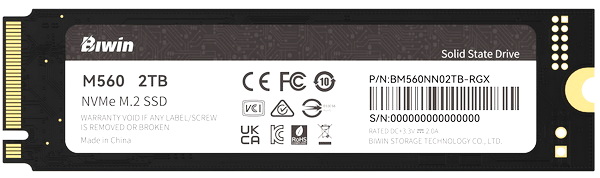
Contained inside the box are the M560 2TB SSD, two stickers (you can use whichever fits your case more), quick start guide, mounting tool and a mounting screw.


THE M560 2TB
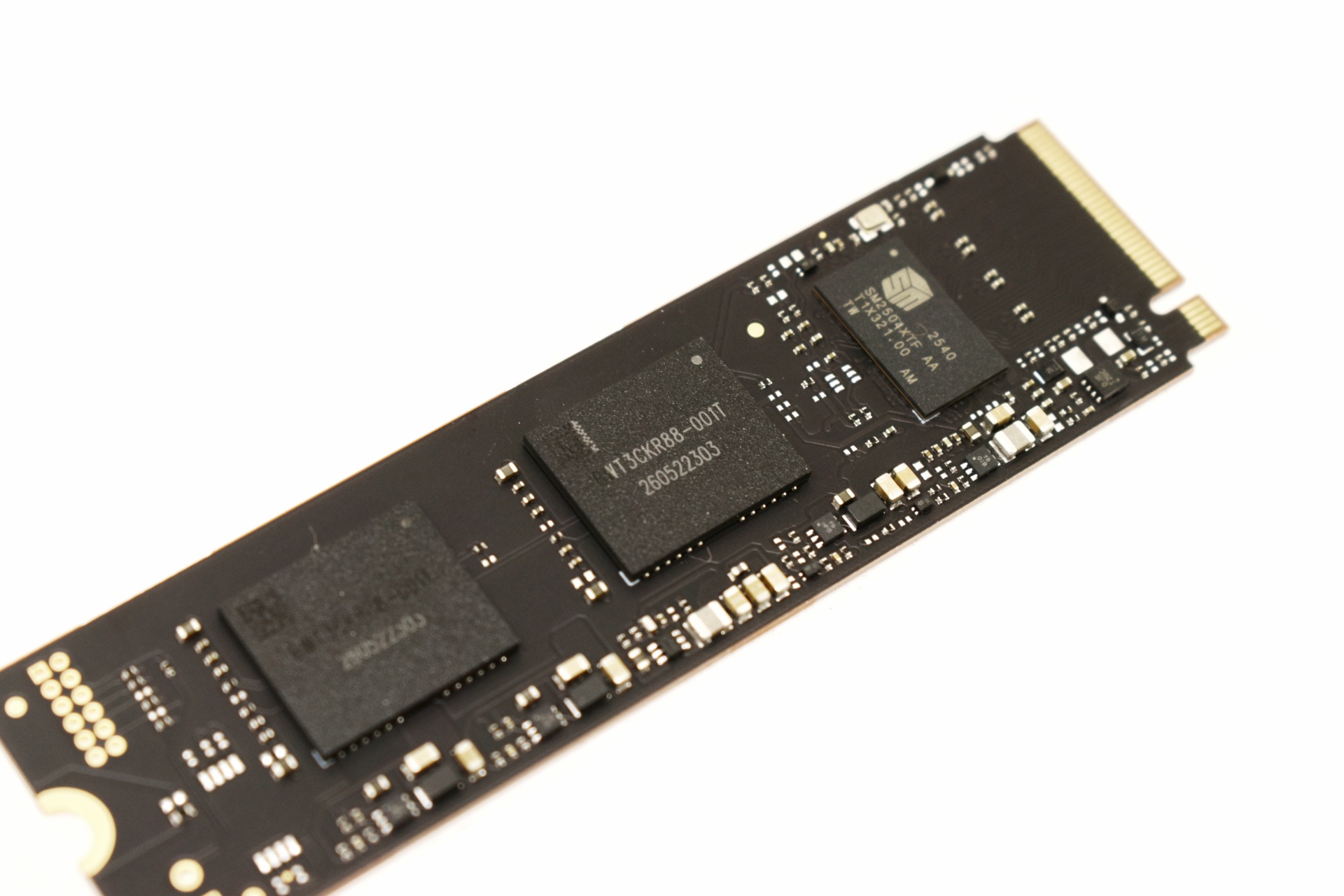


As a DRAM-less drive the M560 is quite simple and so on one side we just find the SM2504XTF NAND flash controller and two BiCS 8 NAND flash modules.
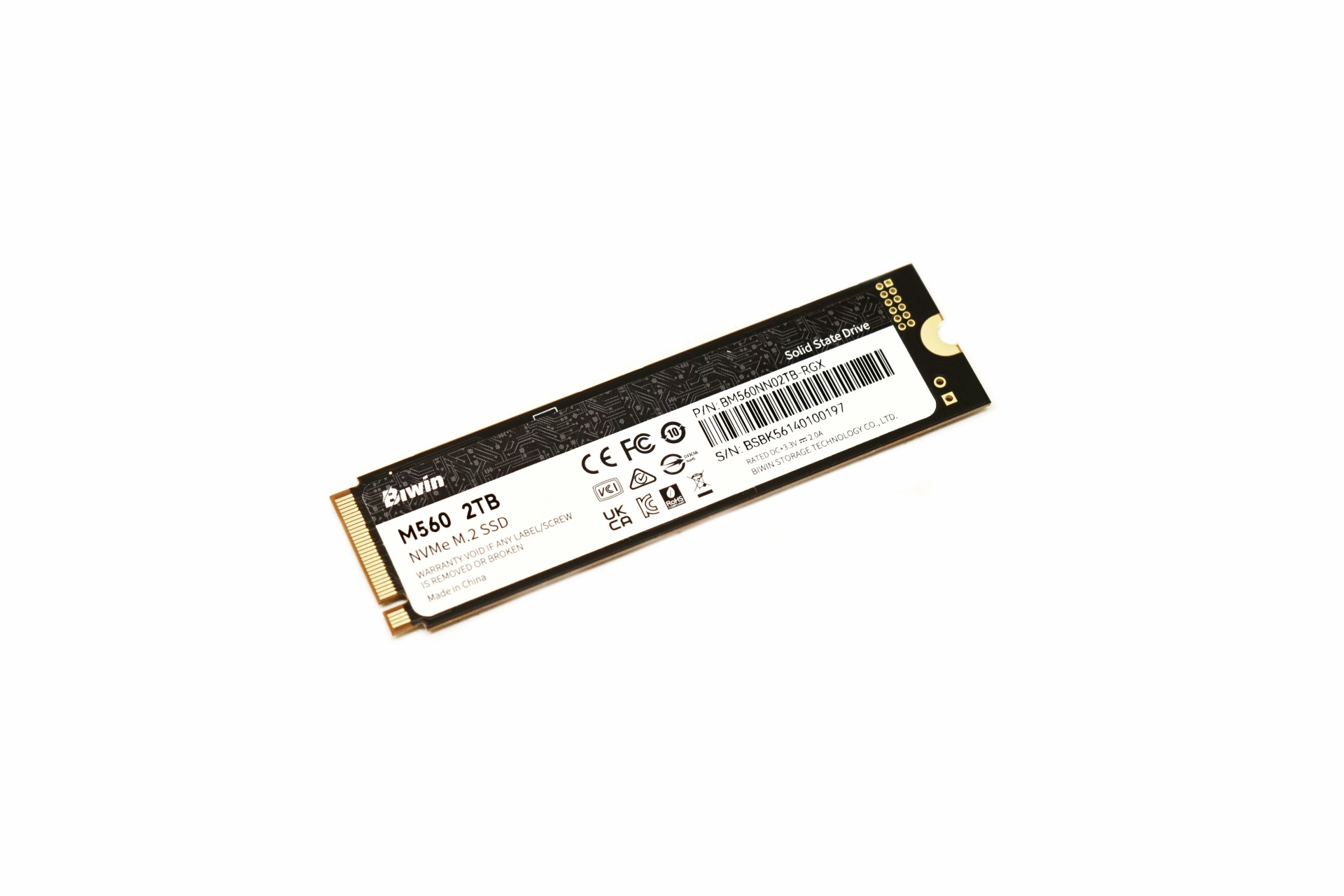


On the other side we see the same sticker visible from the rear of the box.


thermal idlet

Although I perform all tests with the motherboard heatsink installed (unless a drive comes ready with its very own heatsink), I wanted to check and see if thermal issues on the new Gen5 controllers was a thing of the past and as you can all see from the thermal images above, even at load the SM2504XTF didn't surpass 63 degrees Celsius (59 degrees in idle - 23 degrees ambient room temperature).


BIWIN INTELLIGENCE


To monitor the drive and perform several functions you should download the Intelligence tool by BIWIN.
biwin intelligence 1t

Drive health, temperature, SMART details, and history are the things displayed on the main tab.
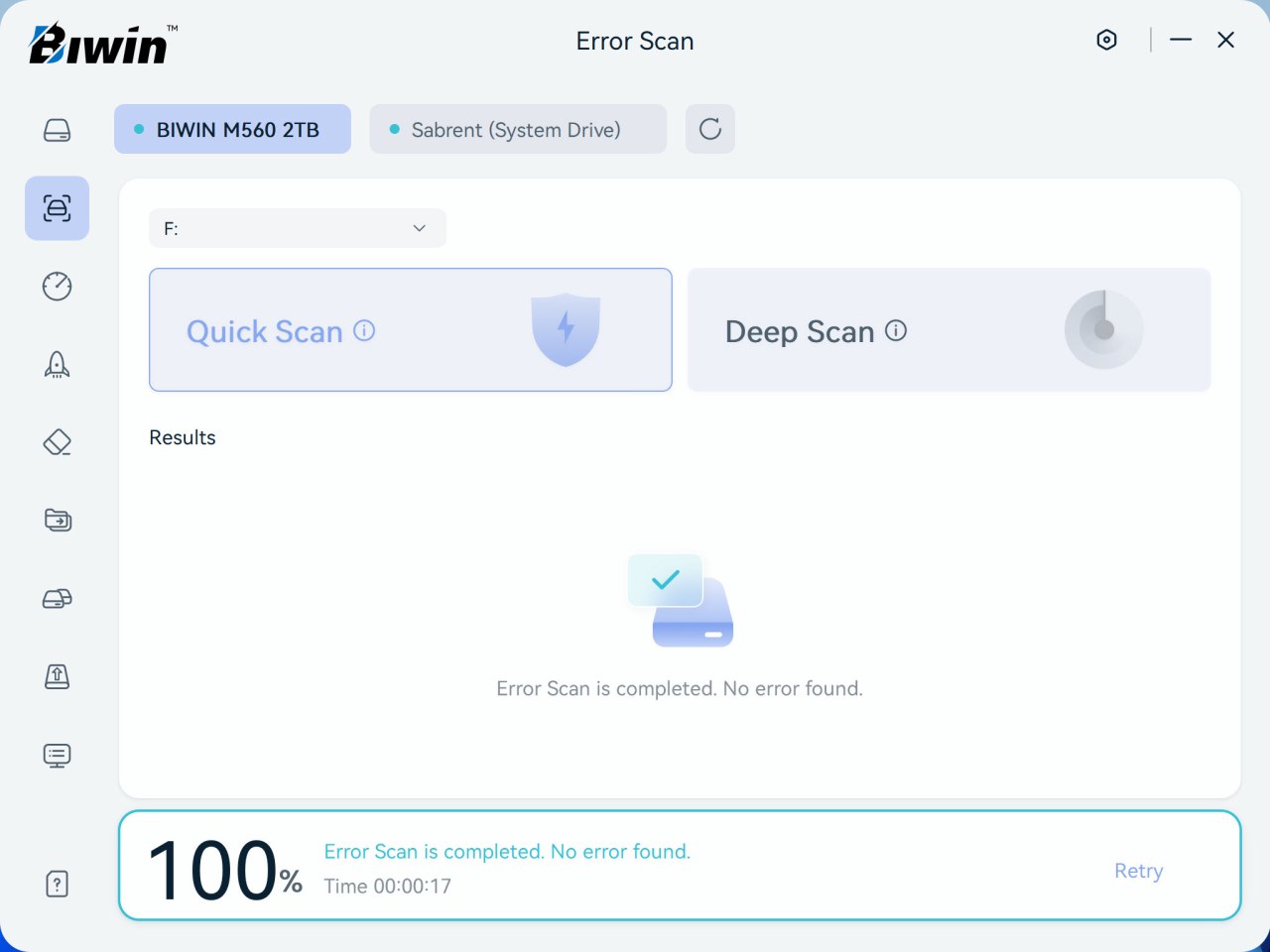


You can perform an error scan and even a performance test on the drive (as long as there's a partition on it).
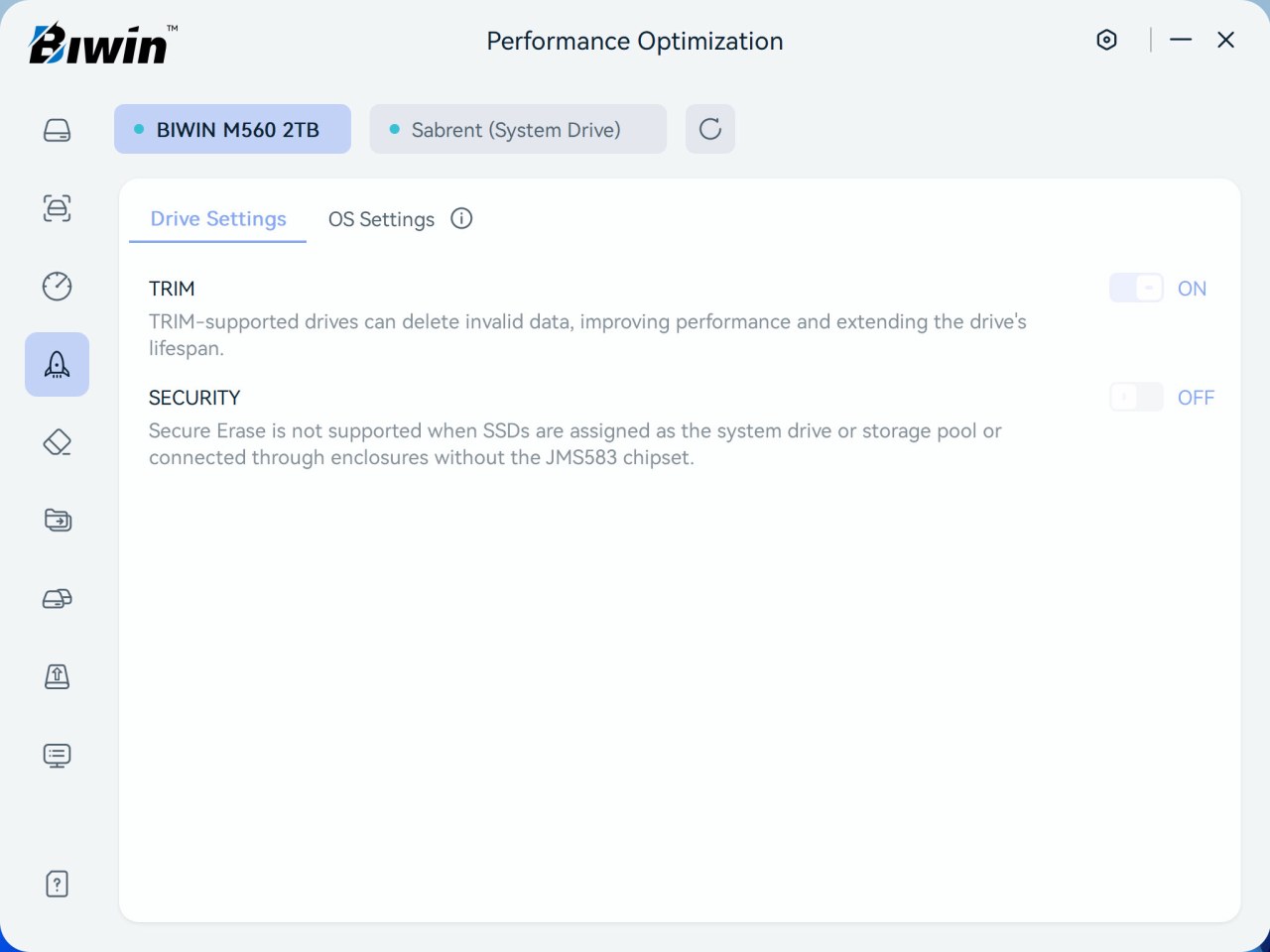
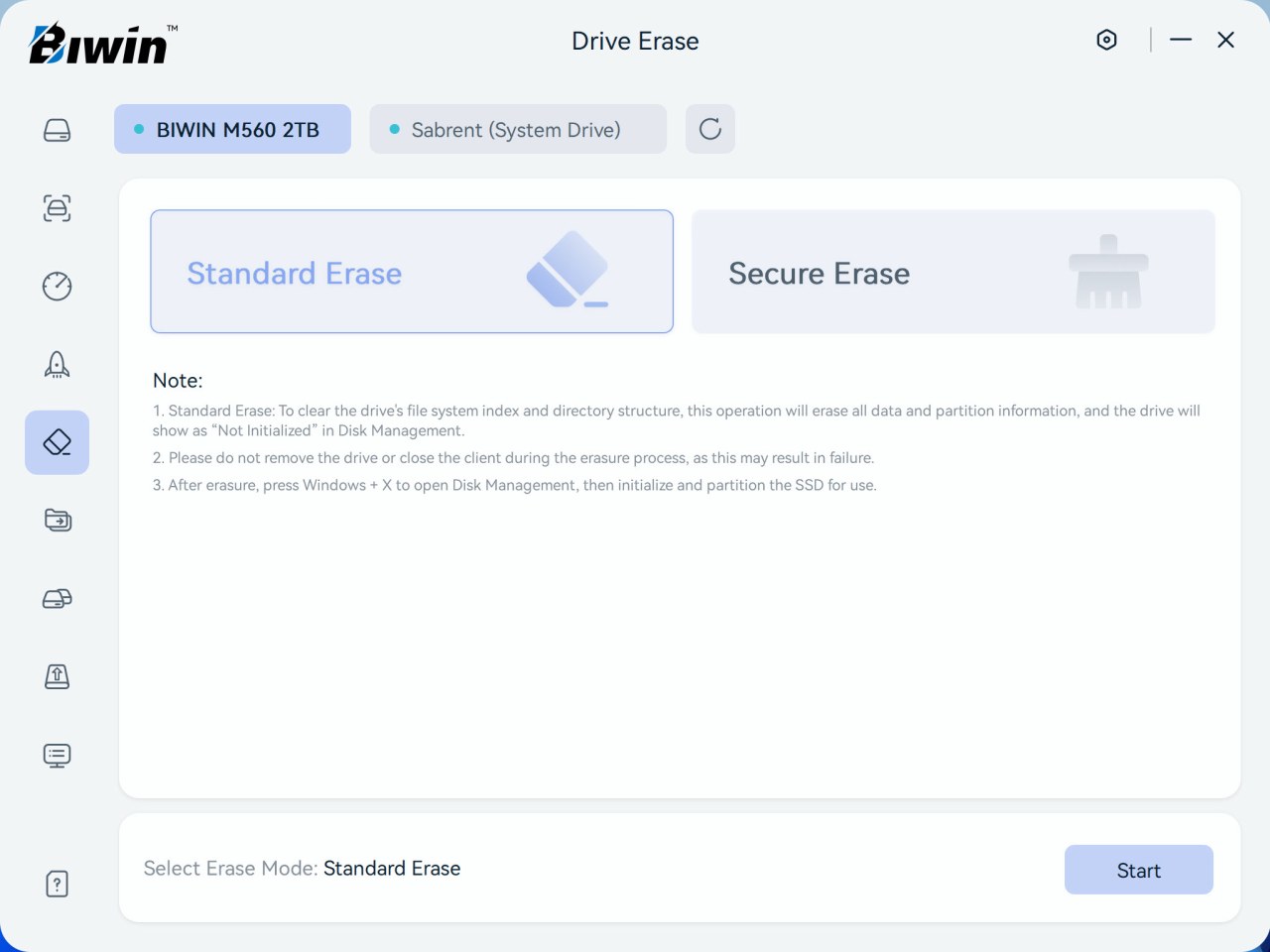


This software also allows you to enable/disable TRIM, erase the drive, migrate data, and check for firmware updates (drive cloning was greyed out).
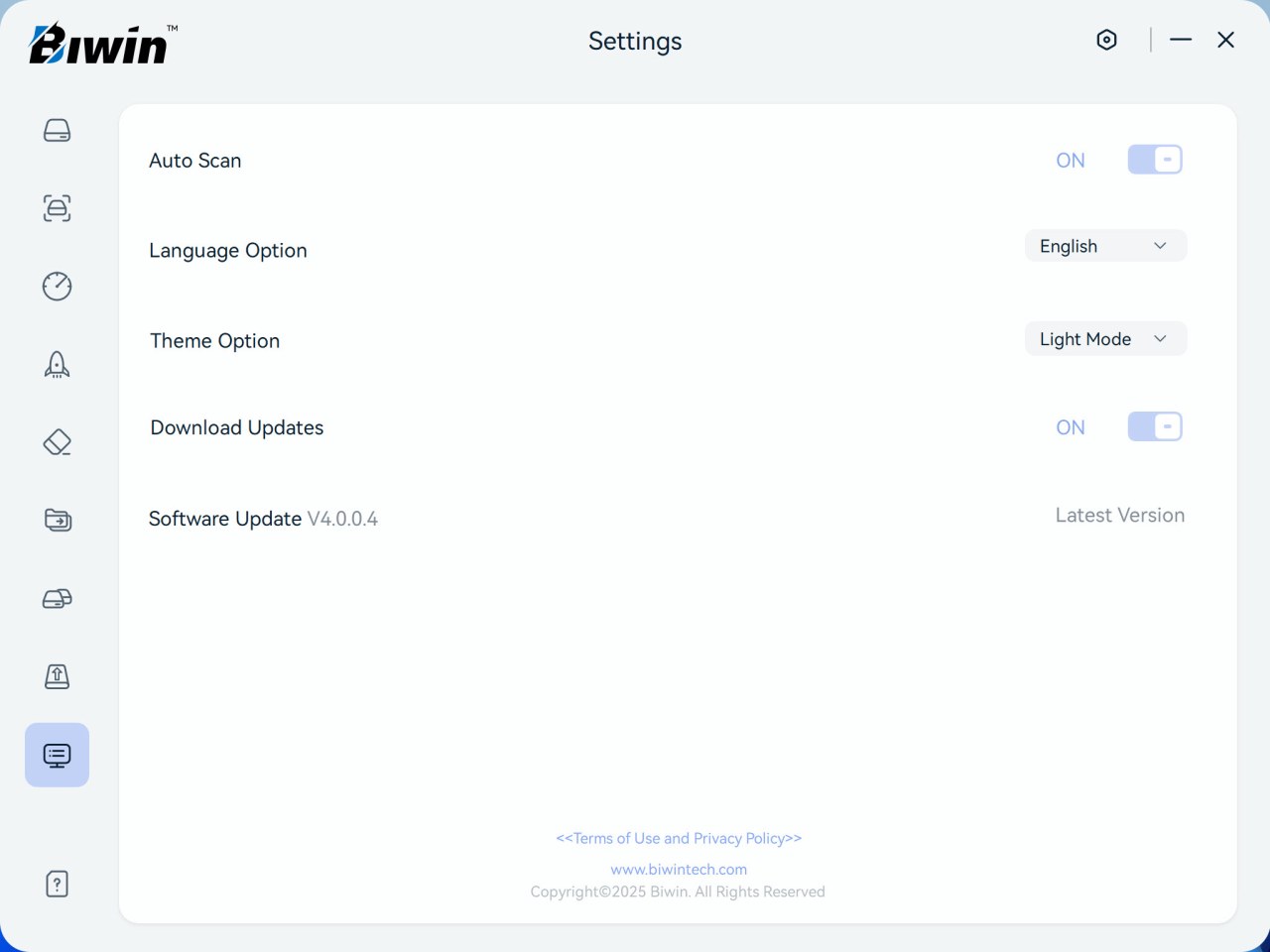


Version 4.0.0.4 was used for this review.


TEST BED
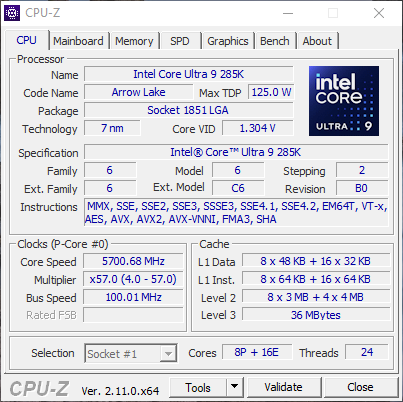


cpuza


TESTING METHODOLOGY


   I've been using pretty much the same testing methodology for PCIe 3.0 Gen3 and PCIe 4.0 Gen4 SSDs for far too many years now, so I decided to "tweak" it for PCIe 5.0 Gen5 models. Needless to say, Gen5 M.2 NVMe SSDs will be tested using one of my latest test rigs (Intel Core Ultra 285K / ASRock Z890 Taichi Lite) and unlike with both Gen3 and Gen4 SSDs I will not be using the SNIA (Storage Networking Industry Association) 12 hour IOMeter benchmark since it proved to be rather heavy for early Gen5 SSDs (temperature issues). Instead, I decided to use the latest versions of 3D Mark, AIDA64, AS SSD, ATTO, Crystal Disk Mark, HD Tune Pro, HD Tach RW, Performance Test, IOMeter (4k Random Writes / 4k Random Reads – since September 2024 / SNIA Mixed) and Sandra Titanium for performance measuring and ForSpoken for all of you who might be wondering just how well Gen5 SSDs do in regard to Microsoft's DirectStorage API/Technology. Each test will be run a total of 5 times after which the average number will be recorded in each chart.


TEST RESULTS - AIDA64 / ATTO
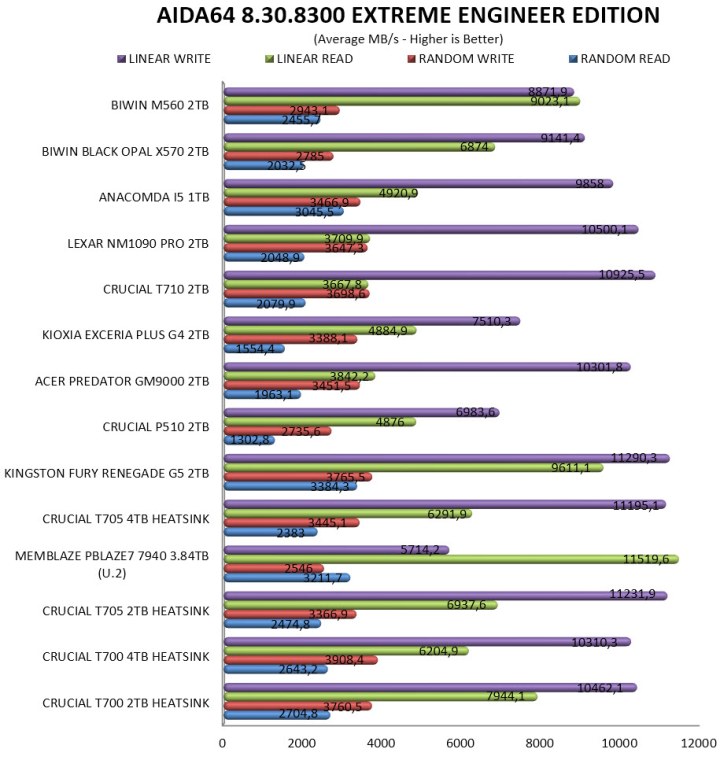


aida64


TEST RESULTS - HD TUNE PRO / HD TACH RW
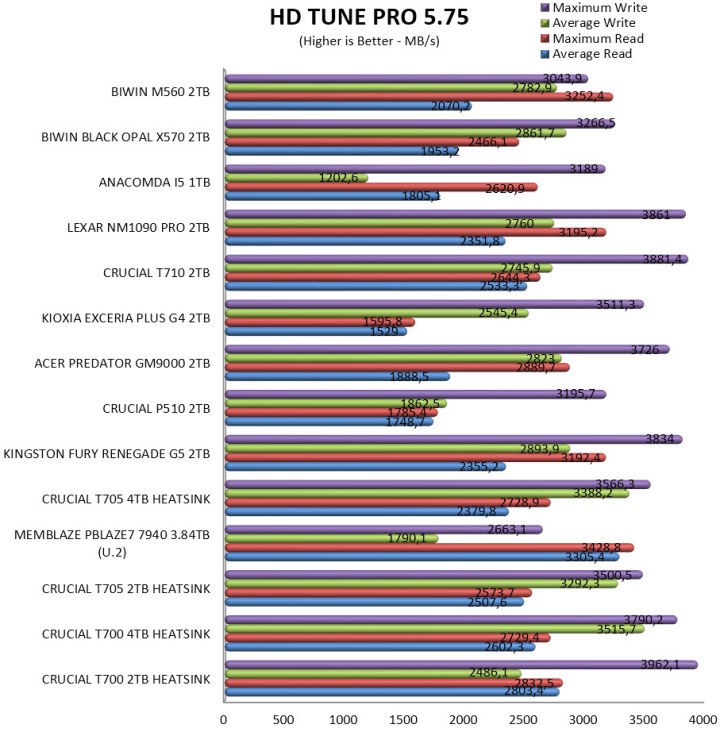


TEST RESULTS - AS SSD / CRYSTAL DISK MARK
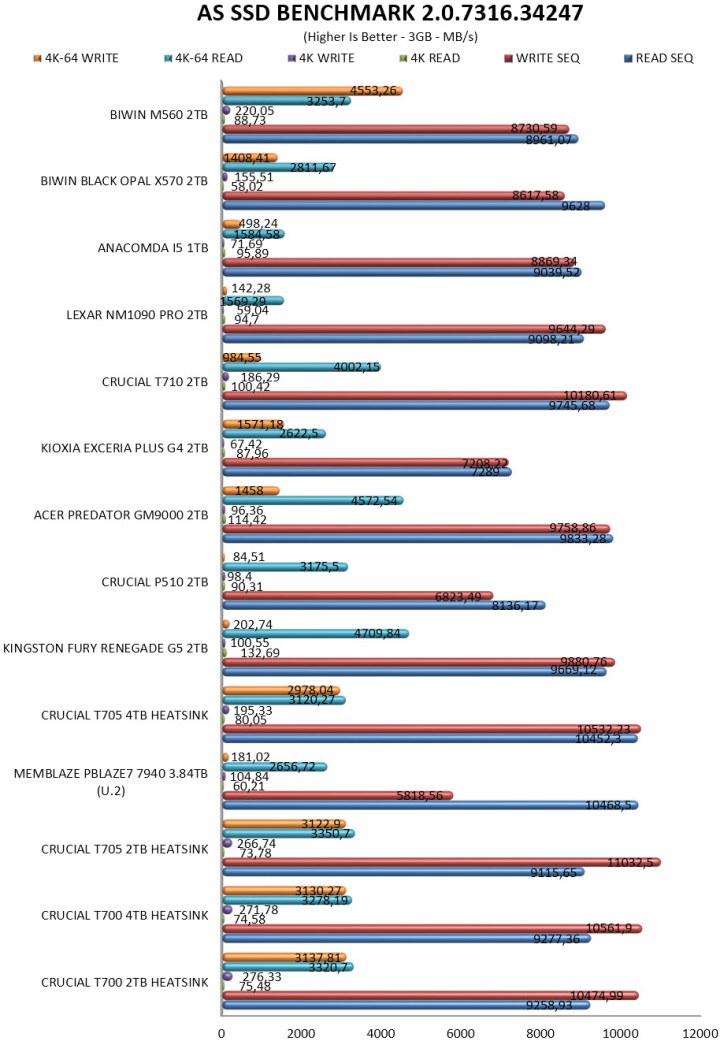


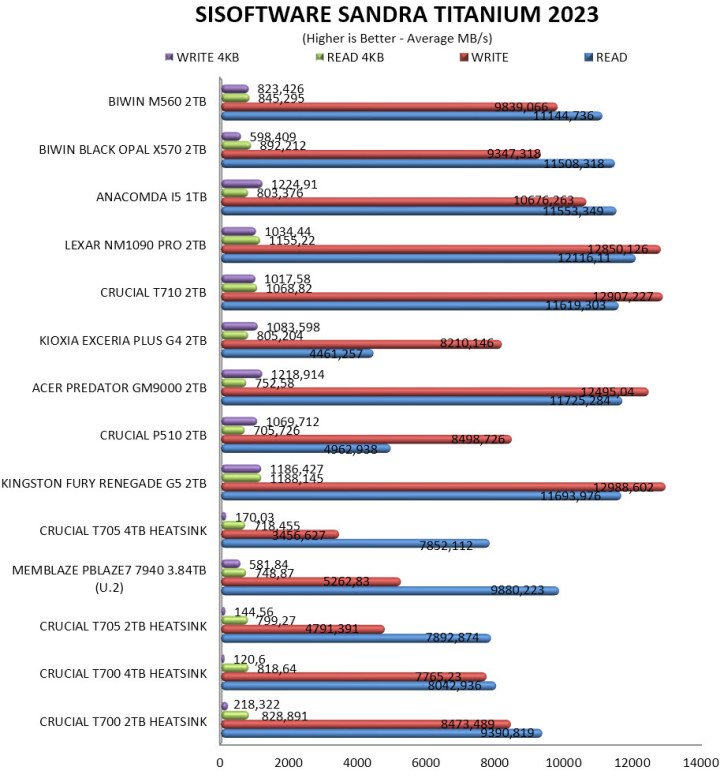
TEST RESULTS - SANDRA TITANIUM / IOMETER


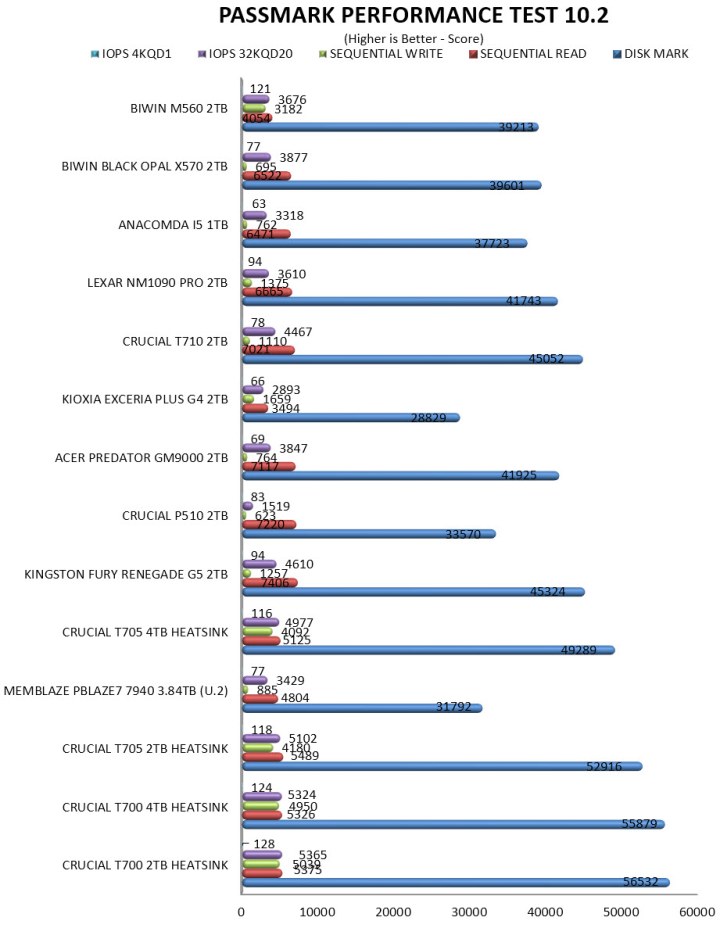
TEST RESULTS - PERFORMANCE TEST / 3D MARK / FORSPOKEN


CONCLUSION


biwin m560 2tb review c


    The BIWIN M560 2TB stands out for its strong performance, especially its write speeds, which remain consistently high even under sustained workloads (BIWIN is actually underreporting write performance). Thermal behavior is another clear advantage since the SM2504XTF NAND controller by Silicon Motion never exceeded 63°C in my testing, making this one of the cooler Gen5 drives in its class. The included bundle adds practical value, rounding out the package for users who want a straightforward, ready‑to‑install solution. On the downside, the drive tops out at 2TB, leaving no higher‑capacity option for heavier workflows, and its IO performance, while adequate, doesn’t quite match the best‑in‑class Gen5 competitors (although it does surpass that of the X570 model in most).


    Right now, the M560 2TB PCIe 5.0 Gen5 M.2 NVMe SSD by BIWIN currently retails for 291.76Euros inside the EU (Amazon.de) meaning it’s priced the same as for example their very own X570 Pro model (USA availability is limited at best). Price aside however the M560 2TB SSD was a pleasant surprise, it surpassed many other Gen5 models in several tests, experienced no thermal throttling during my tests and in terms of durability it’s a tad higher than much of its competition right now so with all these in mind the Golden Award is in order.

PROS


- Quality
- Very Good Performance
- Endurance (1.5 Million Hours MTBF / 1500TBW)
- 5 Year Limited Warranty
- Bundle
- Intelligence Software


CONS


- Current USA Availability
- IOMeter Performance (In My Tests)
- Available Capacities (Up To 2TB)


Seagate FireCuda 530R With Heatsink 2TB M.2 NVMe SSD Review

INTRODUCTION


seagate firecuda 530r 2tb review a


    SSDs transformed system performance by removing mechanical limits and delivering instant responsiveness. PCIe Gen3 drives were the first big jump, offering reliable NVMe speeds that still hold up for everyday use. Then PCIe Gen4 SSDs arrived and doubled the available bandwidth, giving users noticeably faster game loading, smoother content‑creation workflows, and stronger sustained performance. They quickly became the practical performance tier-mature controllers, manageable thermals, and speeds that feel genuinely fast in real‑world tasks. PCIe Gen5 SSDs may push headline numbers even higher, but the trade‑offs are hard to ignore, hotter operation, mandatory heatsinks, inconsistent gains in everyday workloads, and pricing that doesn’t always match the real‑world benefit. For most users, PCIe Gen4 remains the smarter balance, fast enough to feel instant, stable enough for long sessions, and affordable enough to fit into mainstream builds without compromise. Sitting right in that sweet spot is Seagate’s FireCuda 530R with Heatsink 2TB, a PCIe Gen4 M.2 NVMe model built for dependable throughput and strong endurance.


    Seagate is a global leader in mass-capacity data storage, having delivered over 4.5 billion terabytes of capacity over four decades. From edge to core to cloud, Seagate builds trust in data by delivering scalable, sustainable, and secure storage solutions. Learn more at www.seagate.com.


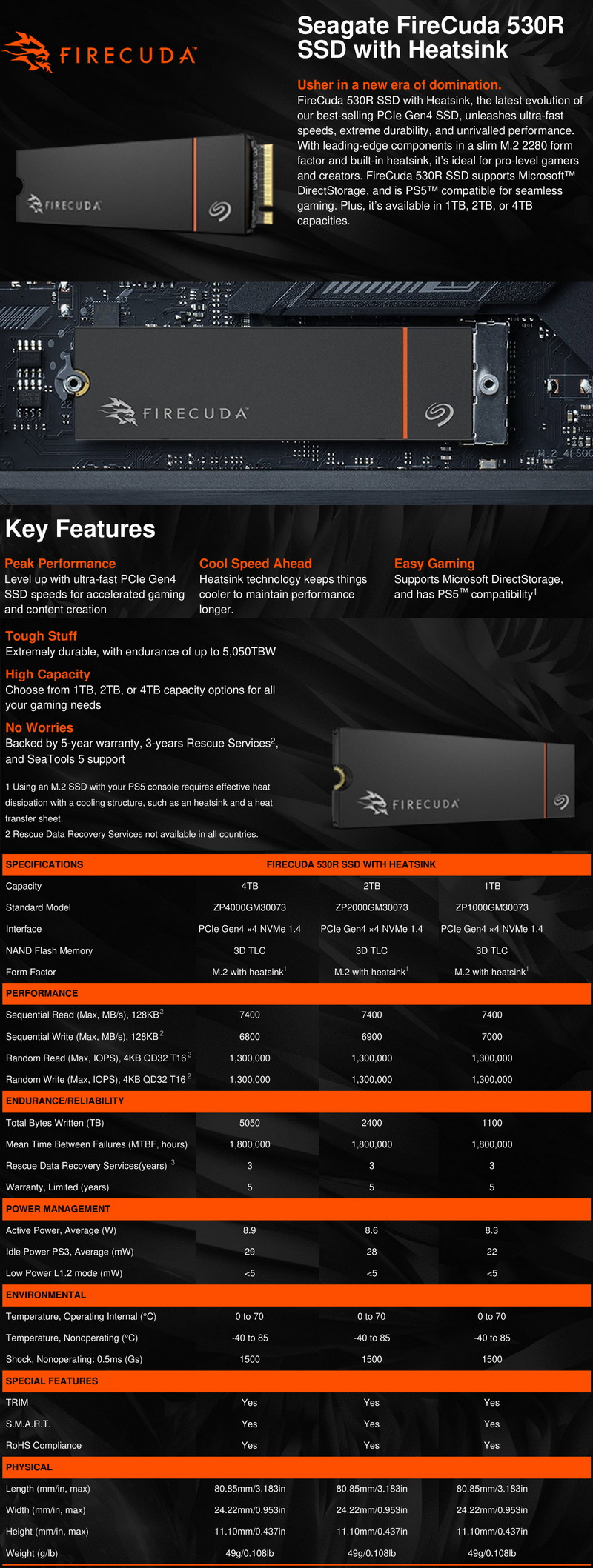
  The FireCuda 530R line of PCIe 4.0 Gen4 SSDs includes models both with and without an aluminum heatsink (PS5 compatible) and in 3 different capacities (1/2/4TB). Under the hood of the FireCuda 530R 2TB variant, we find the 8-channel tri-core (32-bit ARM Cortex R5 CPUs) PS5018-E18 NVMe v1.4 compatible NAND flash controller by PHISON paired with 162-layer 3D TLC NAND flash by Kioxia (BiCS6) and 2GB of DDR4L SDRAM by SK hynix. The PS5018-E18 NAND flash controller by PHISON features their 4th Gen LDPC engine (low-density parity check) along with end-to-end data path protection, wear levelling, thermal throttling (70 degrees Celsius limit), TRIM, bad block management, dynamic range SLC cache and SmartECC (RAID ECC). Finally, as for endurance Seagate reports a TBW of 1100/2400/5050 for the 1/2/4TB models respectively and covers the entire FireCuda 530R line with a 5-year limited warranty.


SPECIFICATIONS AND FEATURES


PACKAGING AND CONTENTS


seagate firecuda 530r 2tb review 1t

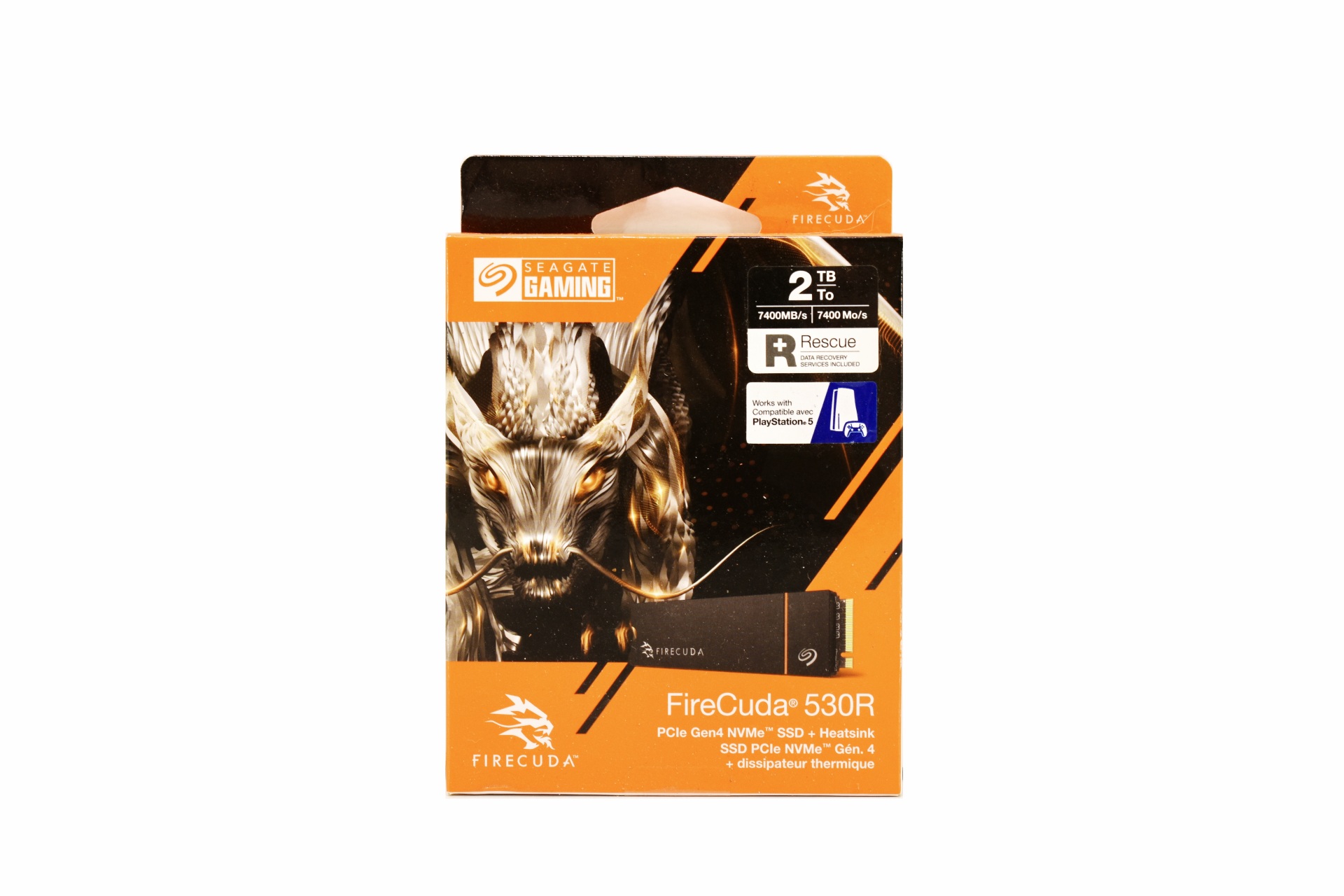
The FireCuda 530R is placed inside a box that has a product picture at the front next to the drawing of an animal, company logo, capacity, performance numbers, PS5 compatibility and the included data recovery service.


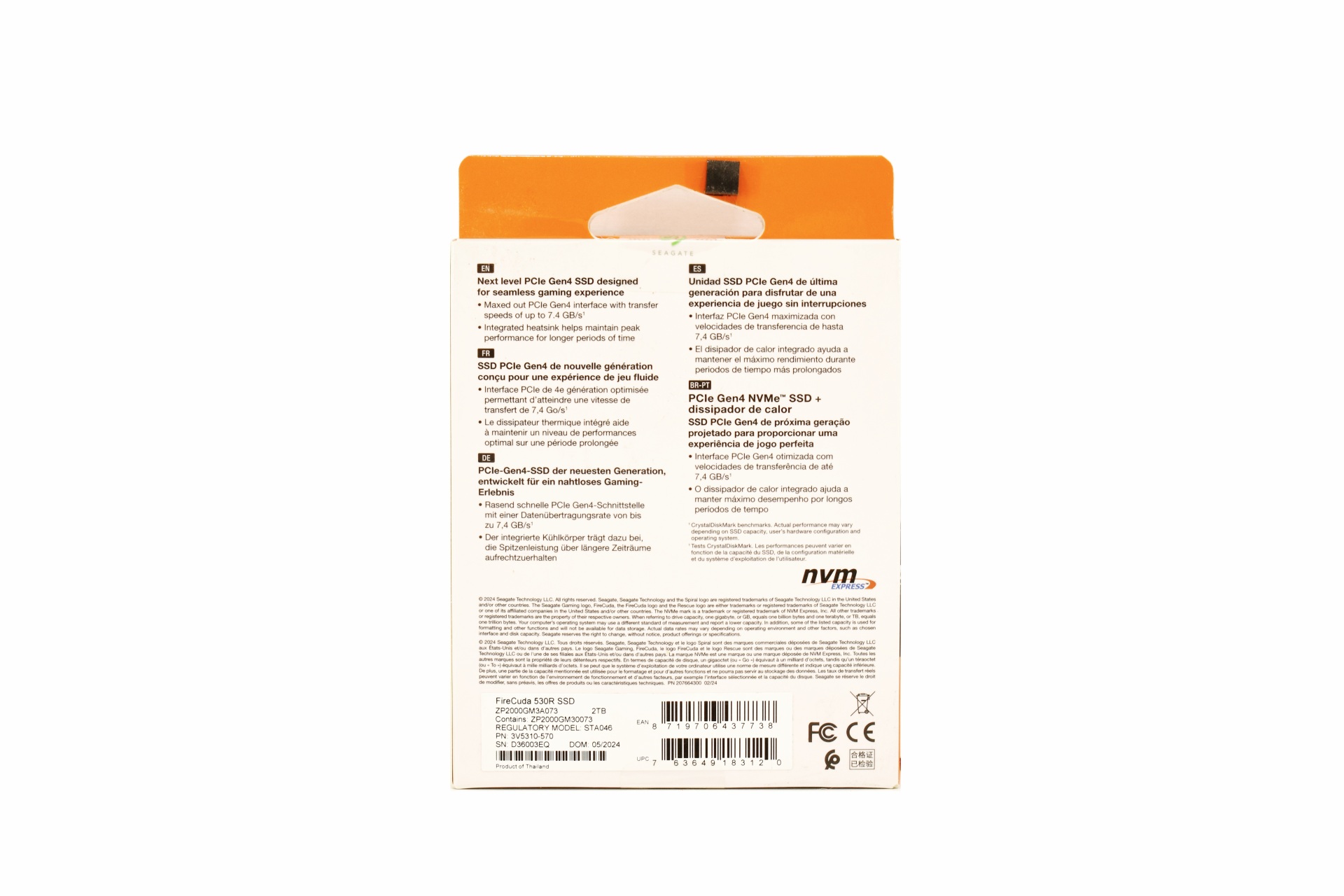
A few words about the product are printed at the rear in 5 languages and just over information about Seagate.


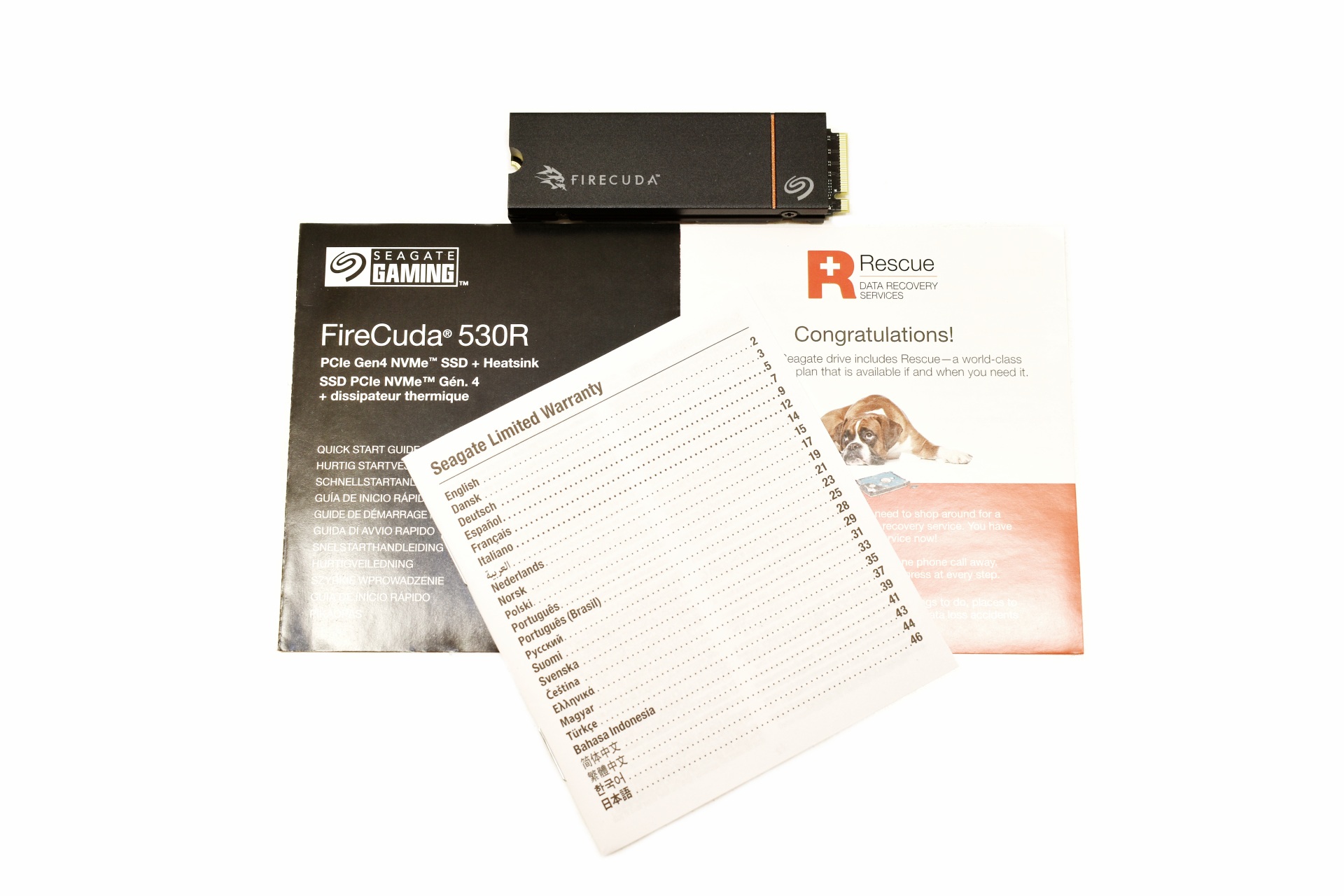
Inside the box Seagate has placed the FireCuda 530R SSD, Rescue Data Recovery Services paper, limited warranty paper and a quick start guide.


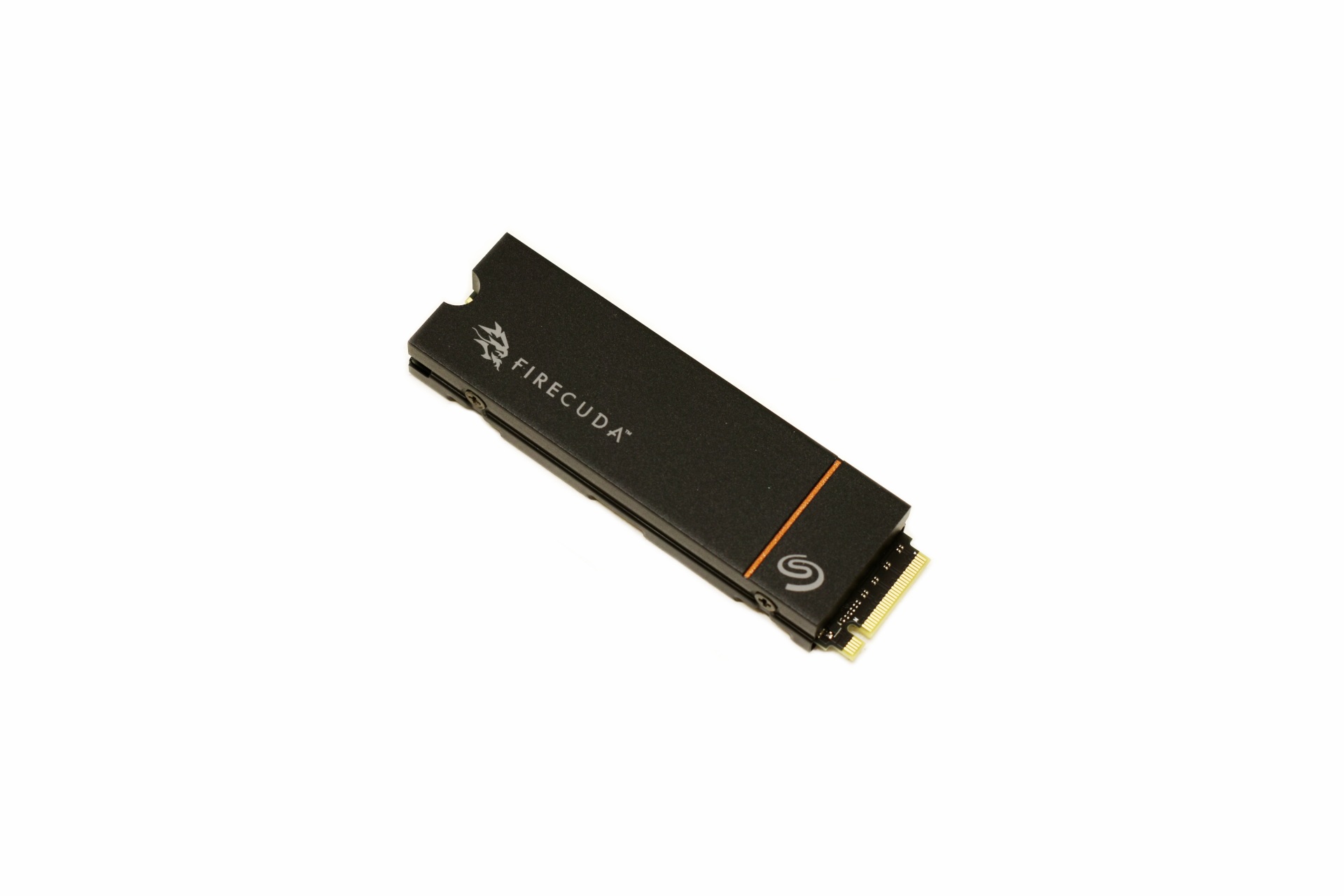
THE FIRECUDA 530R WITH HEATSINK 2TB


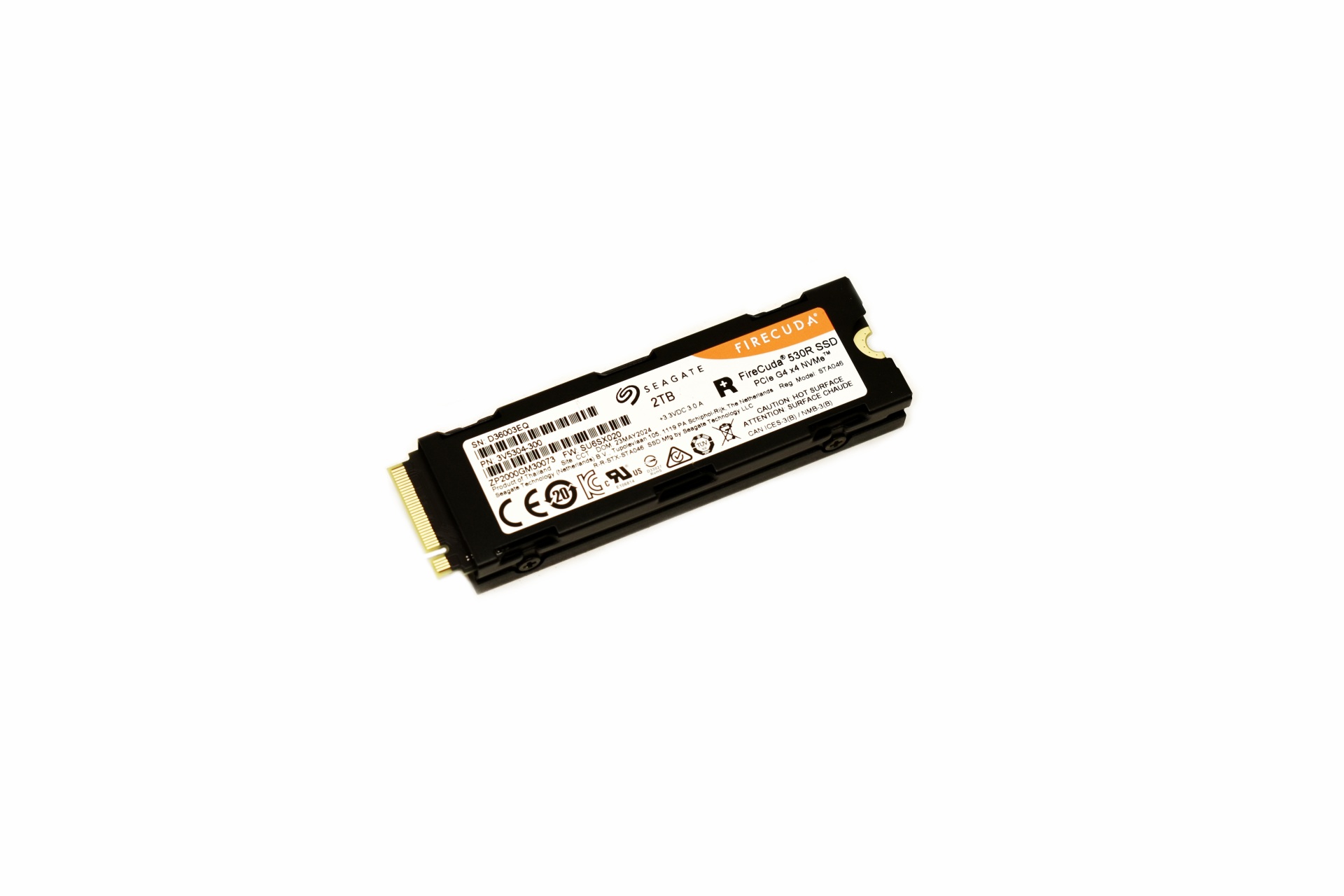
The FireCuda 530R Heatsink edition measures 80.85mm in length, 24.22mm in width and 11.10mm in thickness.


A sticker with the serial number and barcodes along with other details is placed at the base of the heatsink.


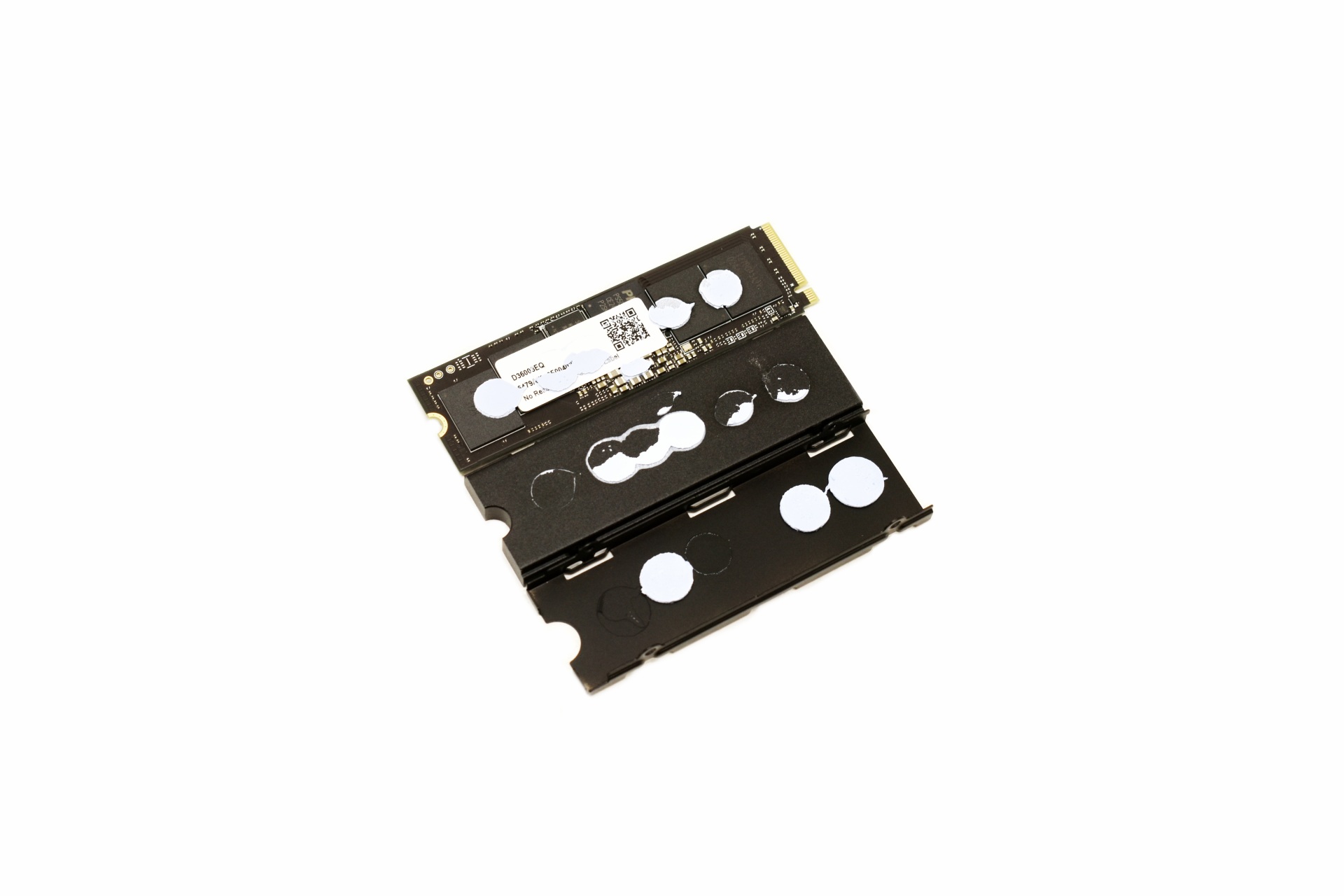
The heatsink is held in place with 4 screws so it's easy to remove.


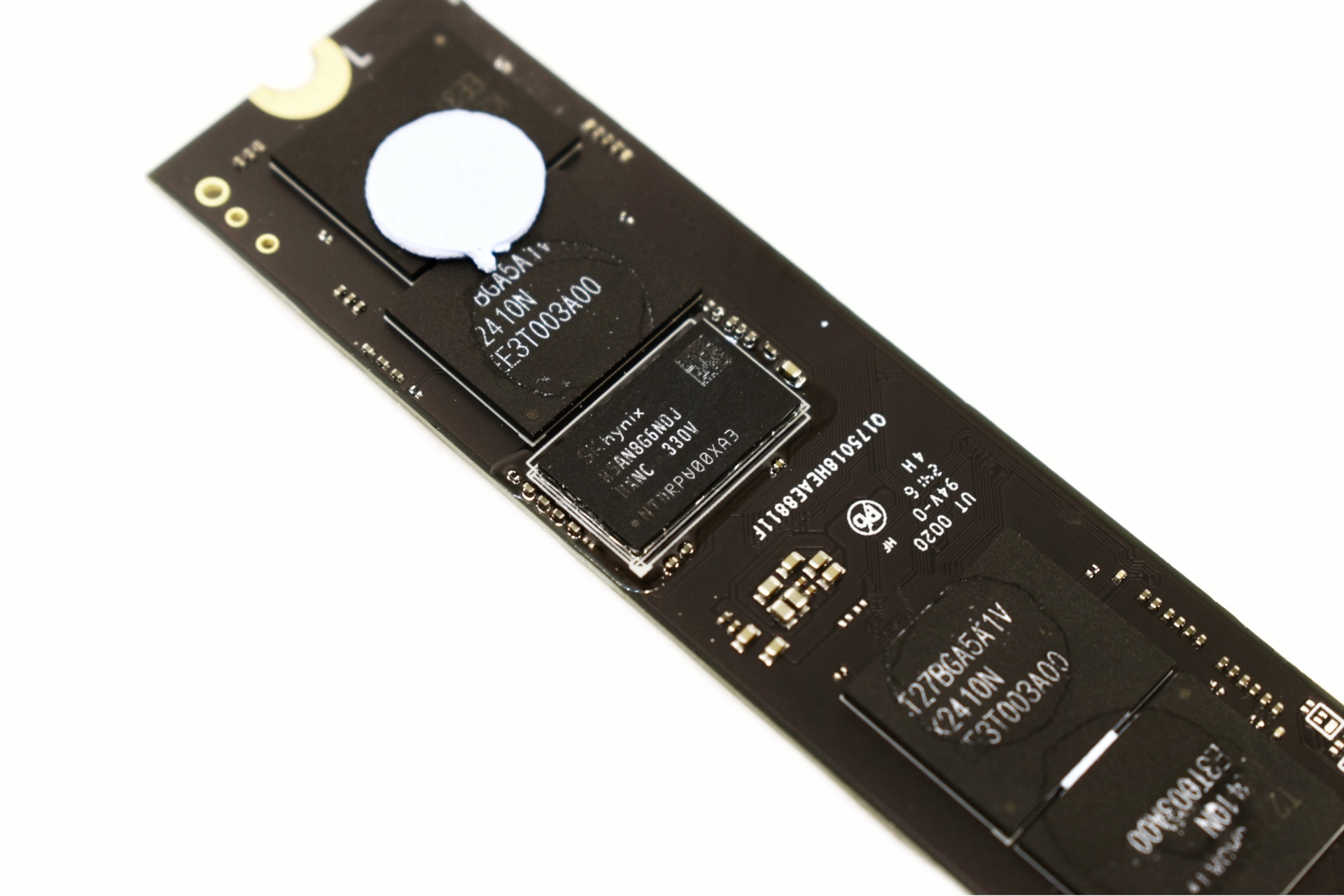
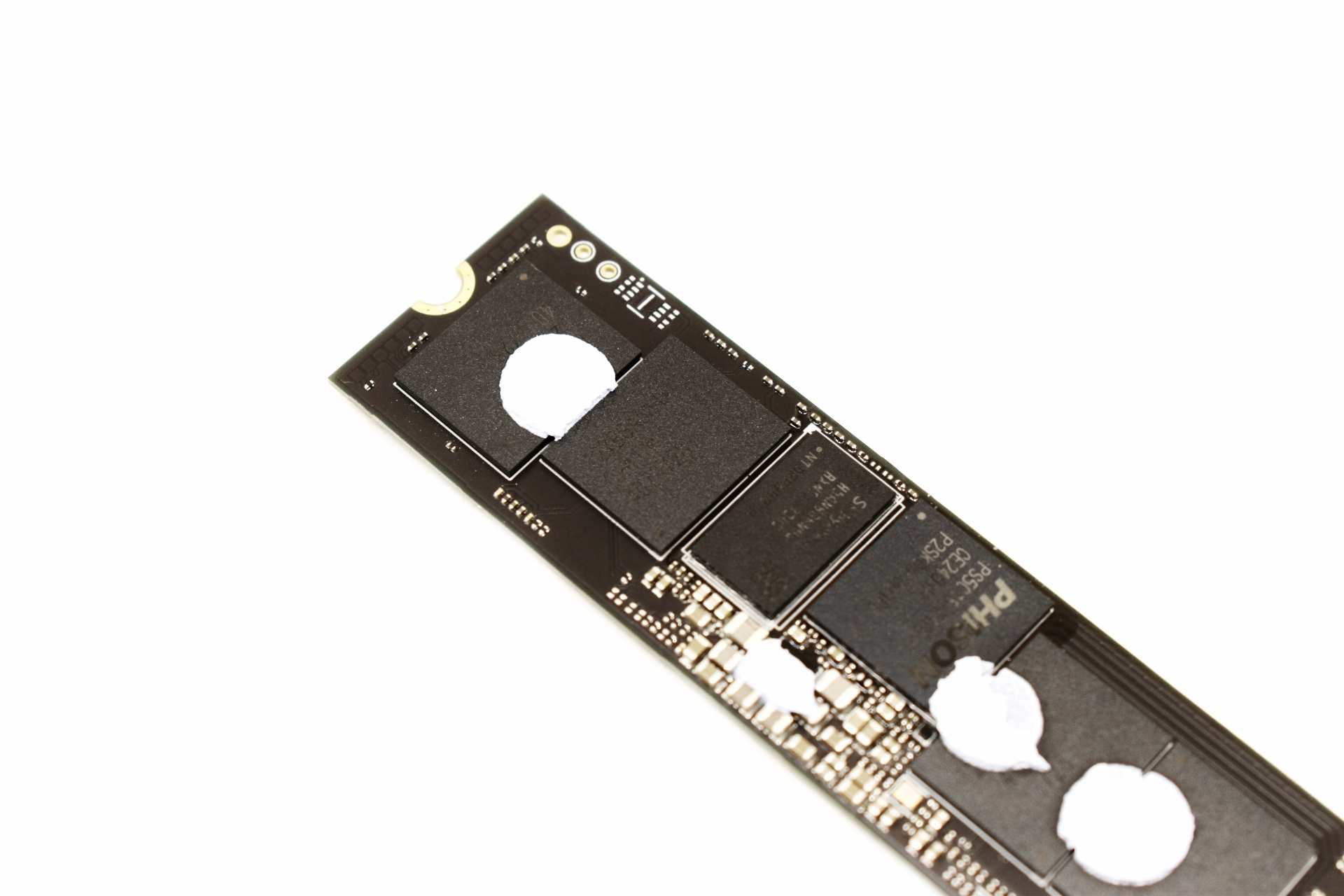
On the top side we find a 1GB DRAM module by SK Hynix and four Kioxia 162-layer 3D TLC NAND flash modules.


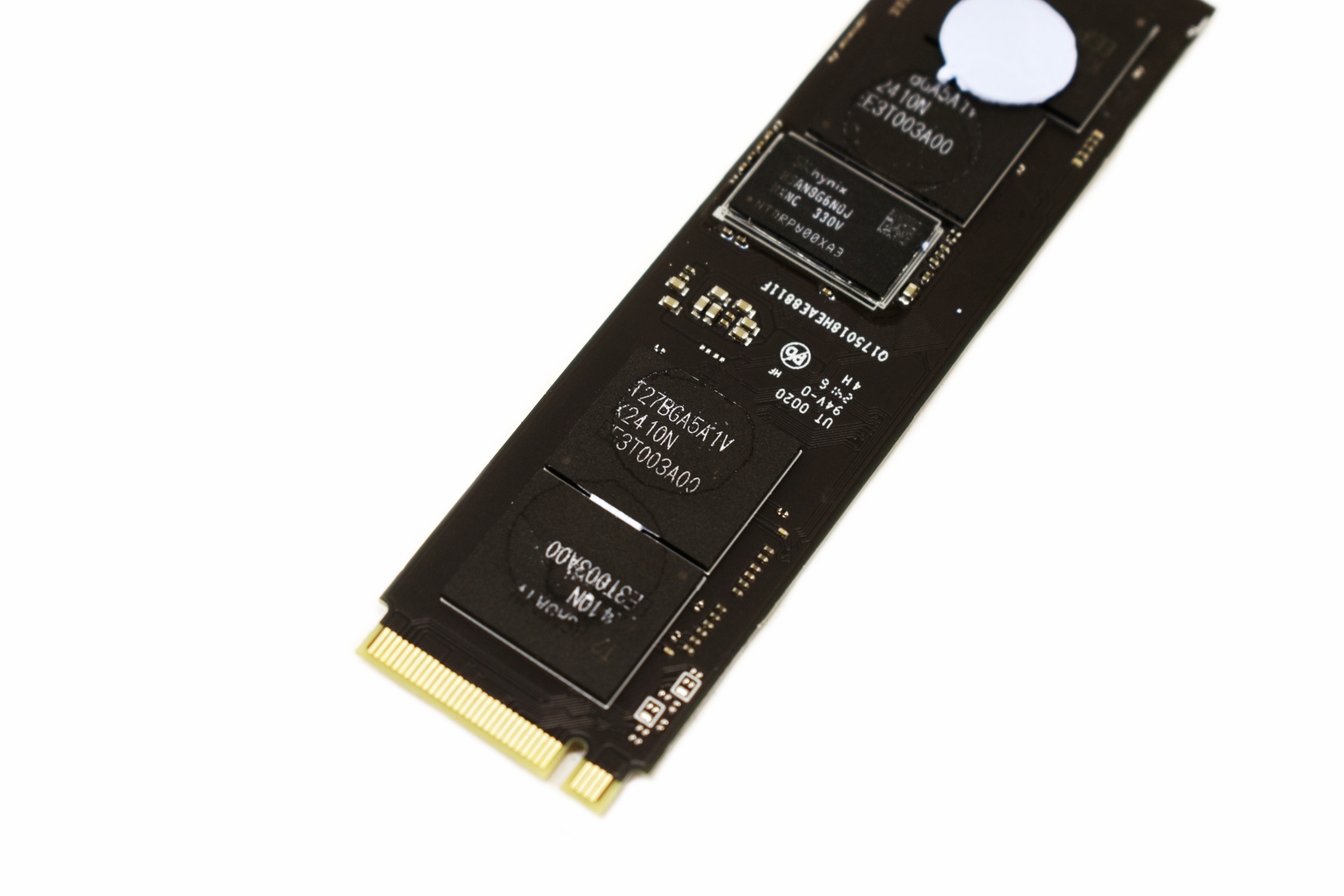
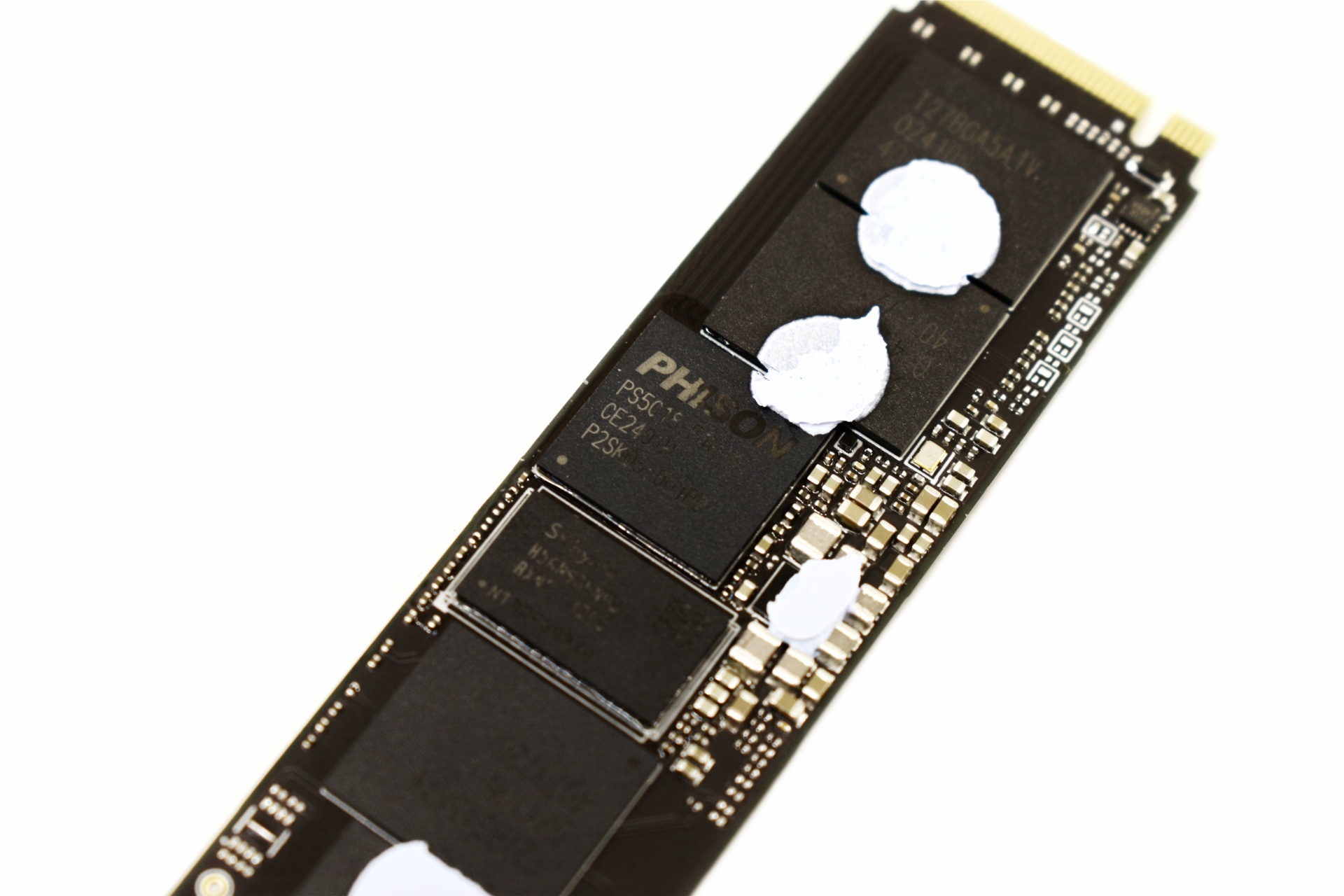
Moving to the other side we find the PS5018-E18 NAND flash controller by Phison, 1GB DRAM module by SK hynix and 4 Kioxia 162-layer 3D TLC NAND flash modules.


SEATOOLS SOFTWARE


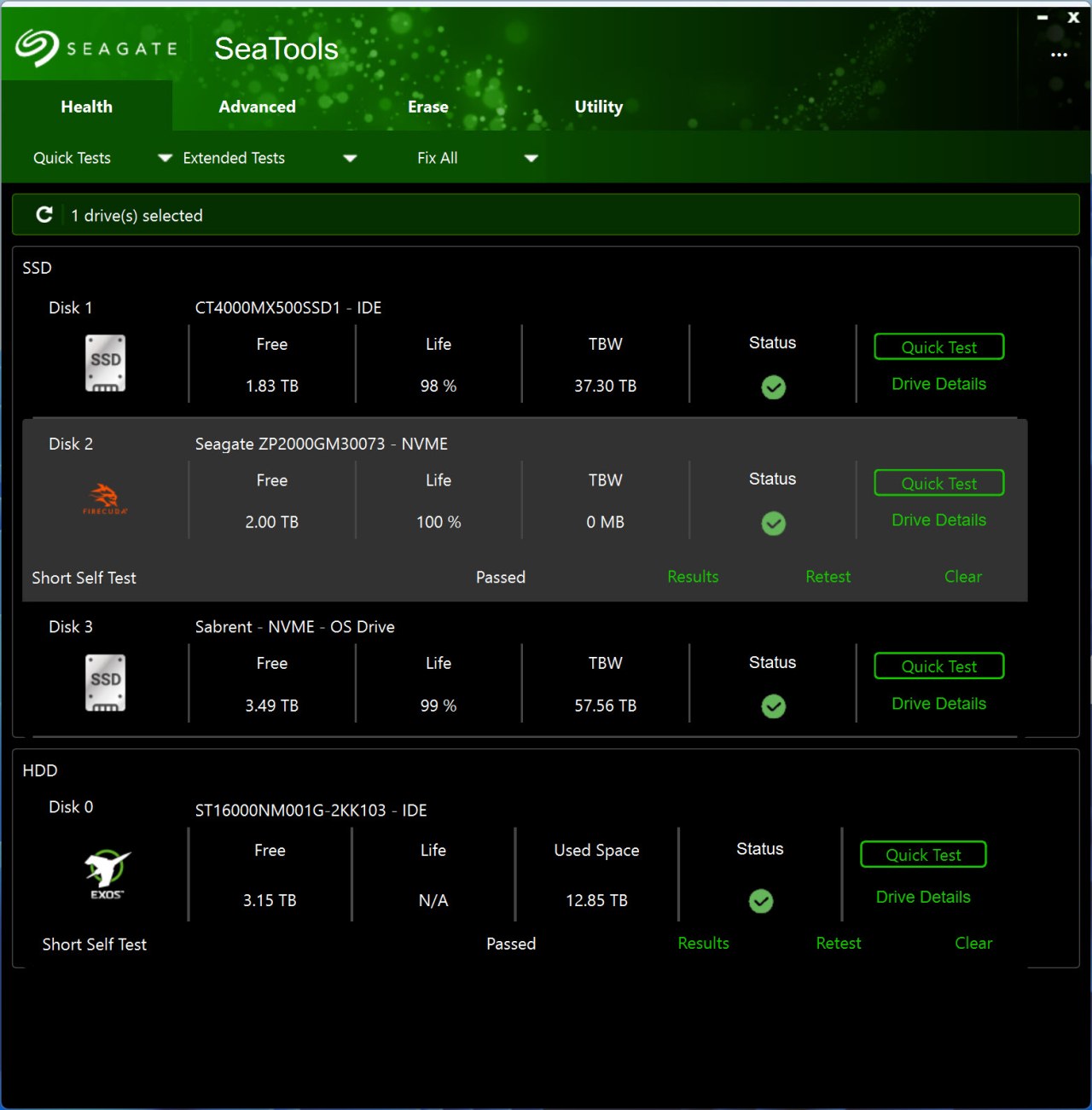
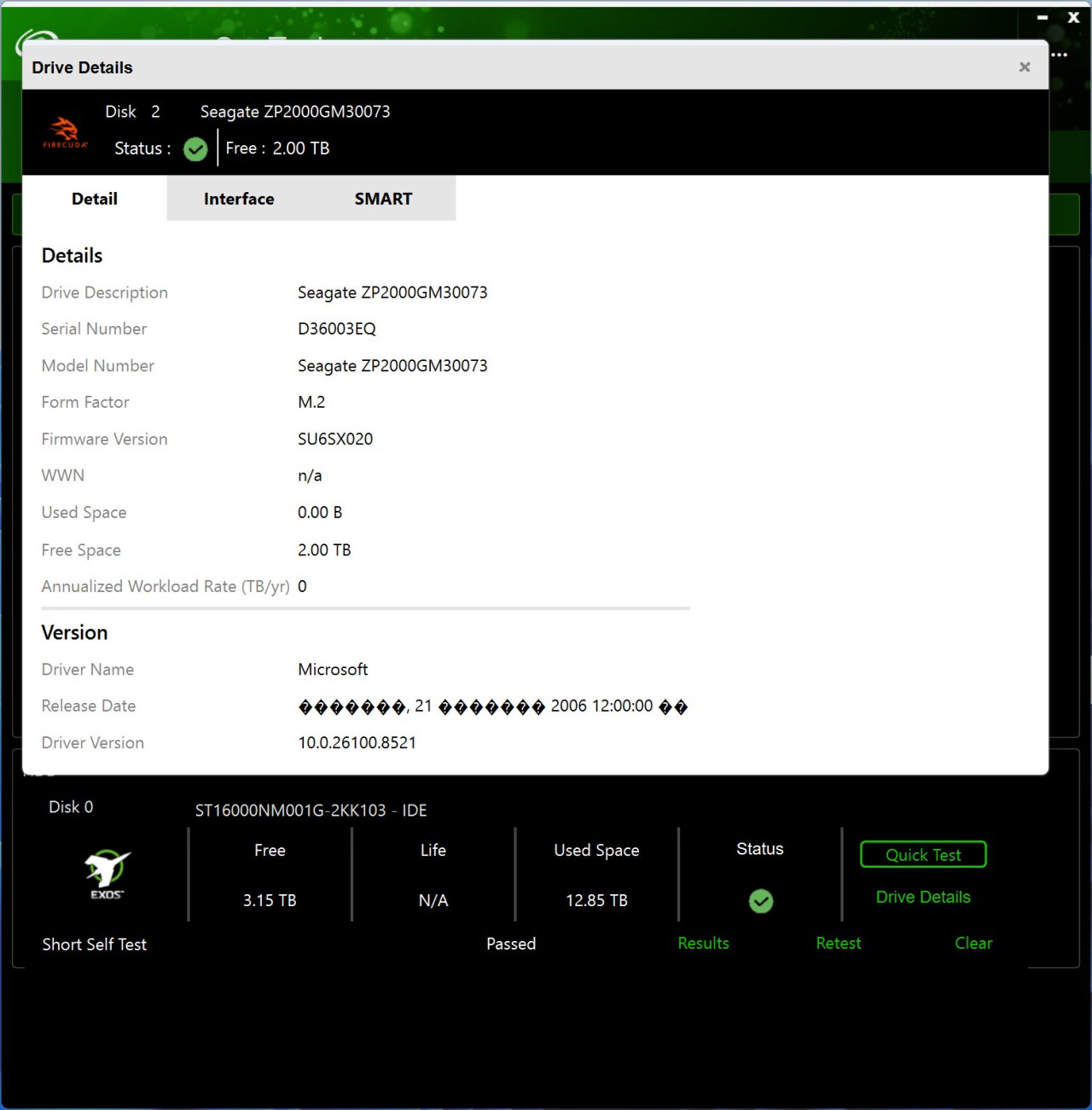
Seagate doesn't have a dedicated software for their SSDs, instead you can use their "unified" SeaTools suite.

seagate seatools 1t

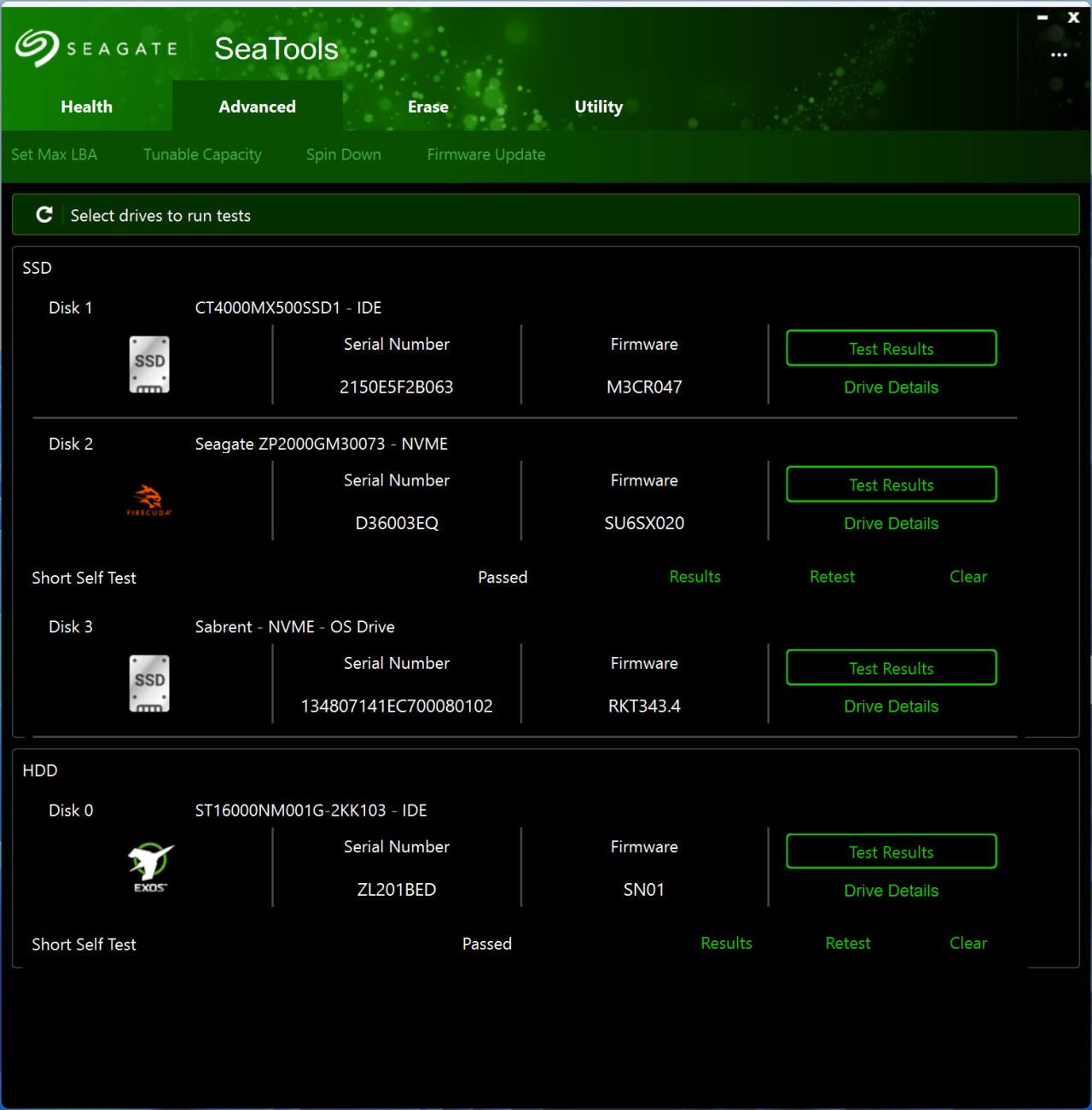
The health tab detects all available drives and allows you to run quick/extended tests and fixes (make sure to only use Seatools with Seagate drives - using it with other models may result in data loss) and check their SMART pages.


From the Advanced tab you can perform certain drive tweaks (mostly for mechanical models) and firmware updates (manual ones).


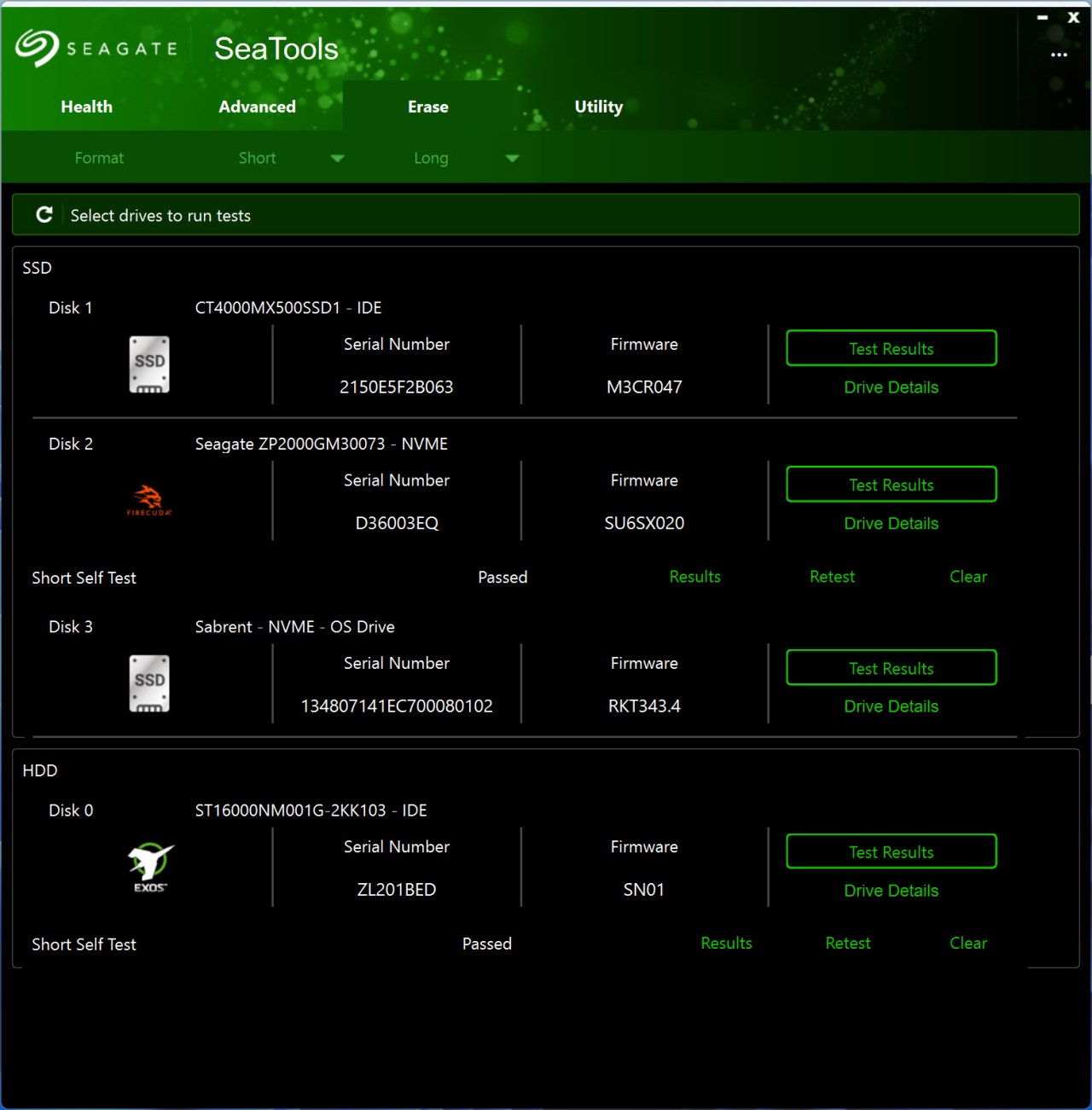
You can also securely erase your drives from the erase tab.


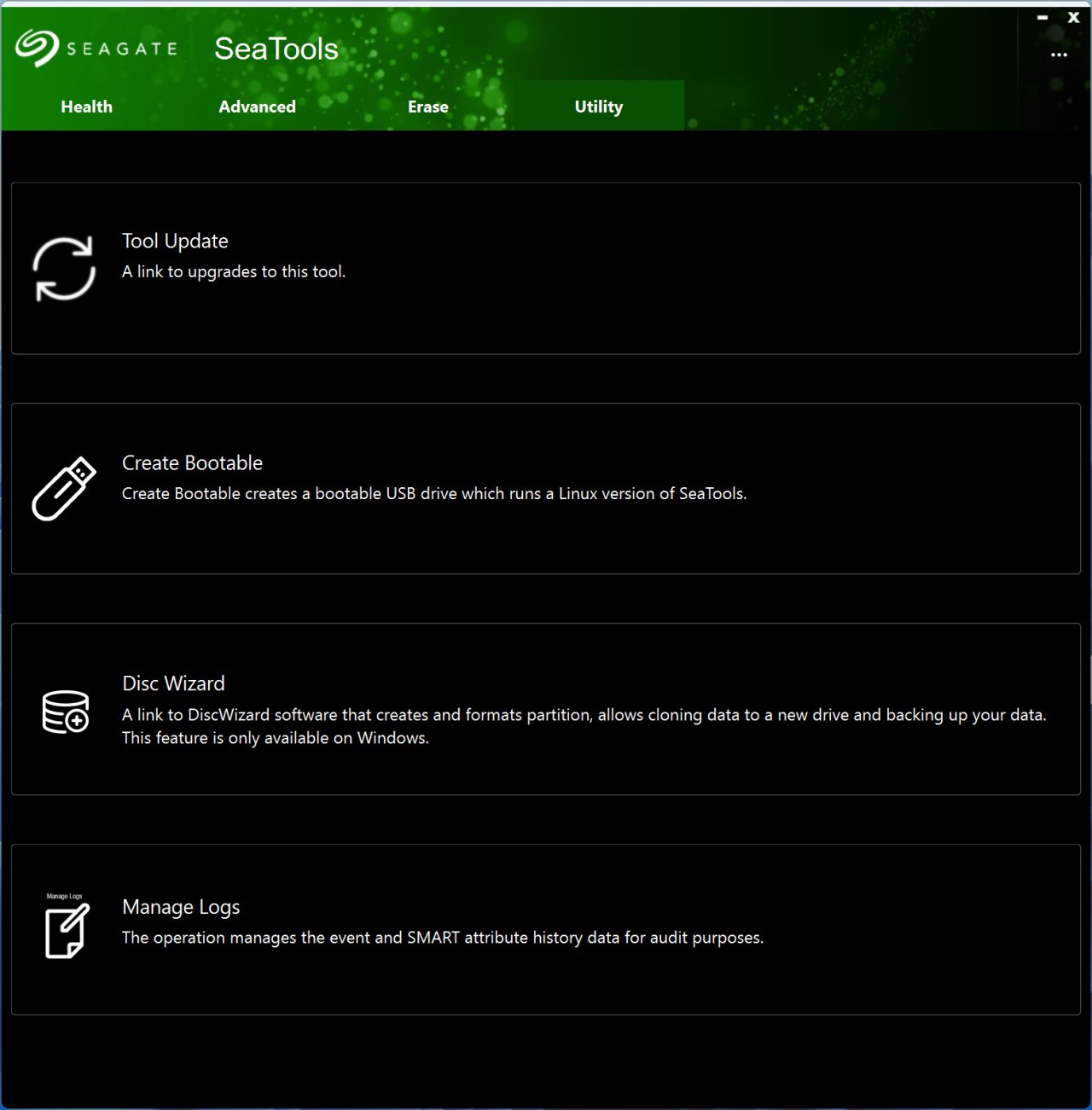
Inside the utility tab Seagate has placed a link from where you can check for updates for their SeaTools software, bootable Seatools feature, link to their Disc Wizard software and logs management.


TEST BED


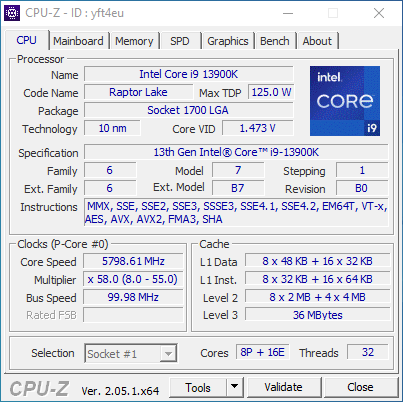
13900k


TESTING METHODOLOGY


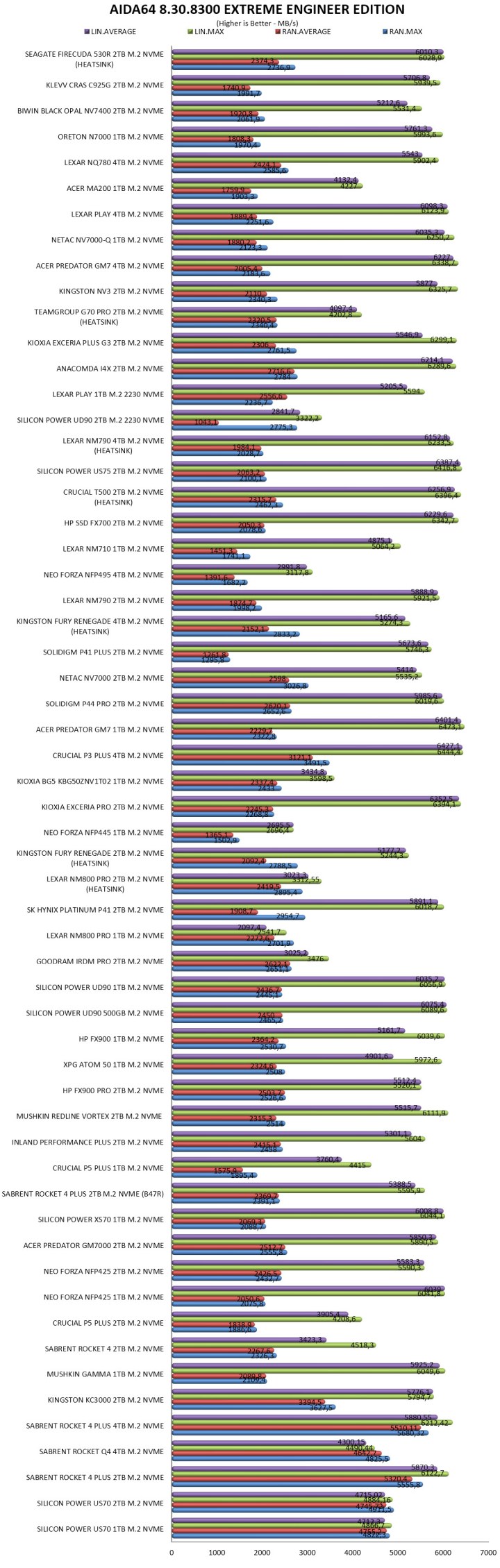
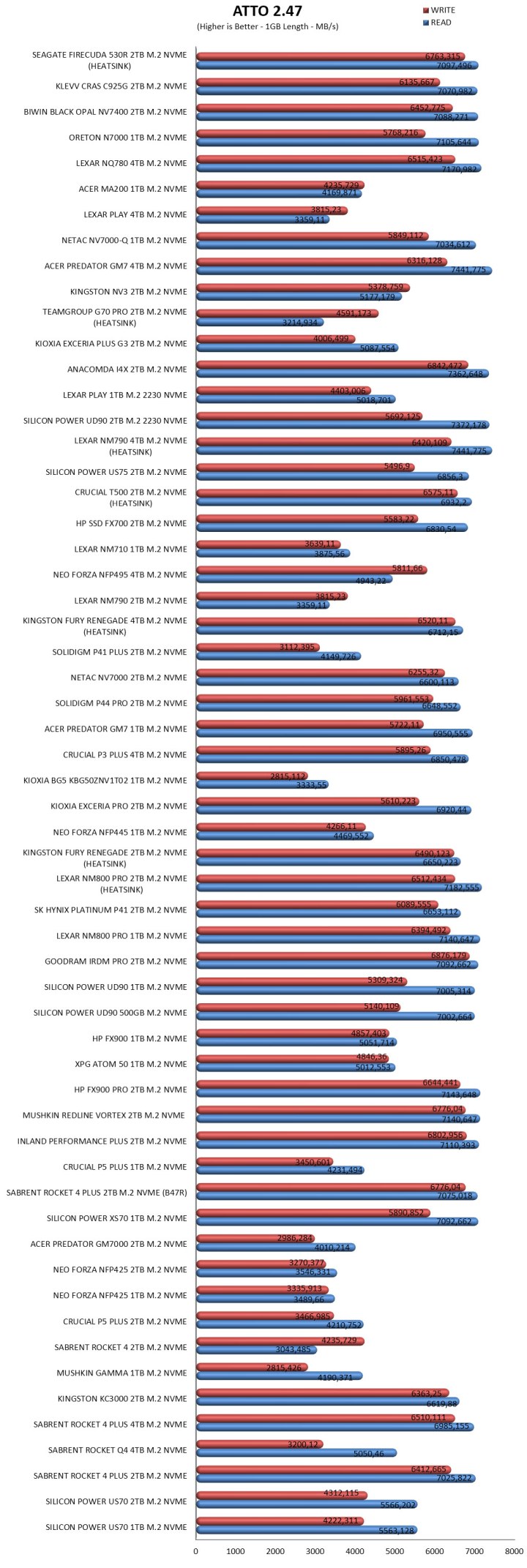
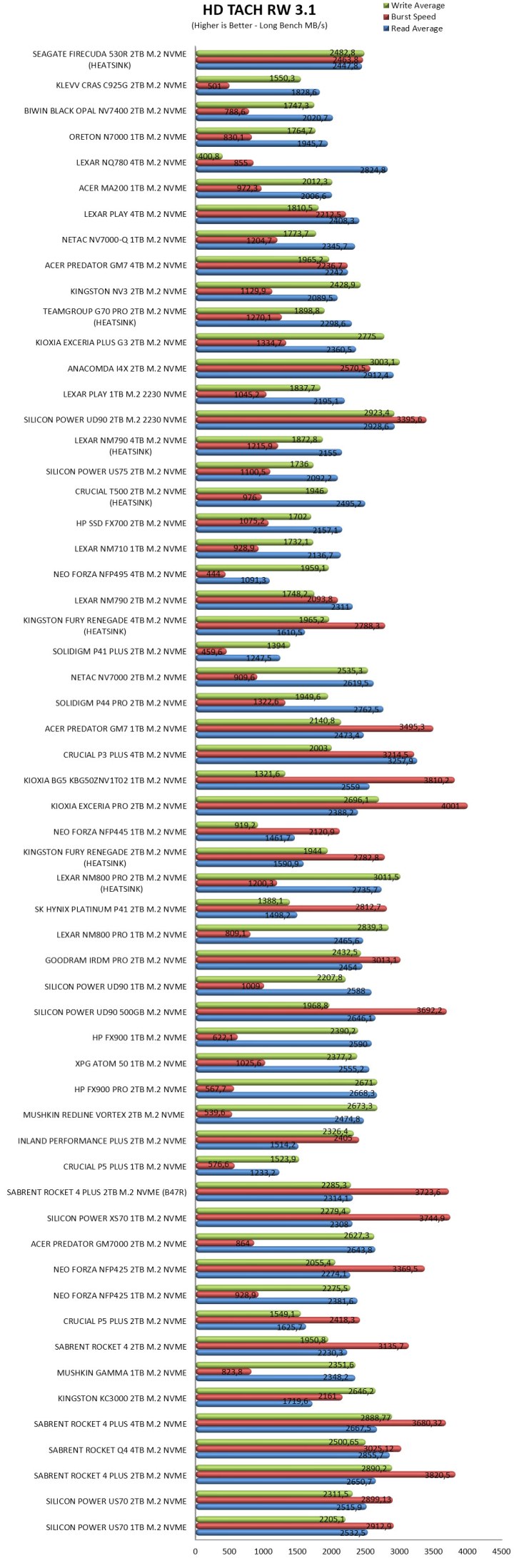
   Not long after I first started testing SSDs back in 2008, I concluded that it's almost impossible for any single benchmark suite to accurately measure their performance and that's why in certain benchmark suites we see amazing read/write performance numbers with some drives while in other things are quite different. The reason behind this is that some benchmarking suites are configured to read and write random chunks of data while others read and write constant (sequential) ones. So that's why i always use a very wide selection of benchmarking suites including AIDA64, HD Tach RW, HD Tune Pro, Crystal Disk Mark, Sisoftware Sandra Pro, AS SSD, IOmeter and ATTO. To get the most accurate results each test gets repeated a total of 6 times with the average performance numbers recorded into the charts. Also, as of February 25th, 2015, our results will also include the Storage Networking Industry Association’s (SNIA) IOMeter tests. These tests include a 12 Hour write test used to “simulate” performance degradation over time and a mixed workload test which basically shows what you can expect when using an SSD continuously for roughly two hours. Unfortunately, due to the time required for these tests they get repeated a total of 3 times and not 6 as the above.


   Many people have made inquiries about our charts in the past so once again please do keep in mind that the Charts have the average performance numbers of each drive recorded and not the peak (highest) ones. Also, although every single one of these programs can help potential buyers choose the right drive for their needs you should also remember that from any kind of benchmark up to real world usage the gap is not small (and usually most differences will go unnoticed by most people). All tests were performed in a fresh Windows 10 Pro x64 installation complete with every update up to the date of this review.


* As of January 2025, Gen4 SSDs will be tested on the 13900K/Z790 system while Gen5 SSDs will be tested on the 285K/Z890 system.


TEST RESULTS - AIDA64 / ATTO


aida64


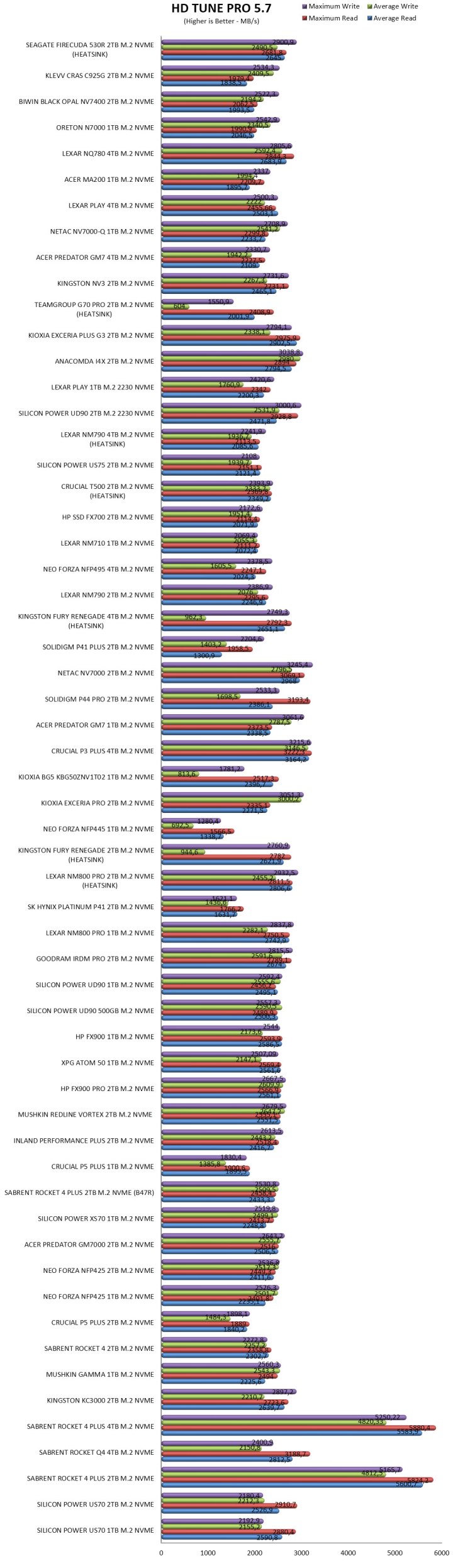
TEST RESULTS - HD TACH RW / HD TUNE PRO


hdtachrw


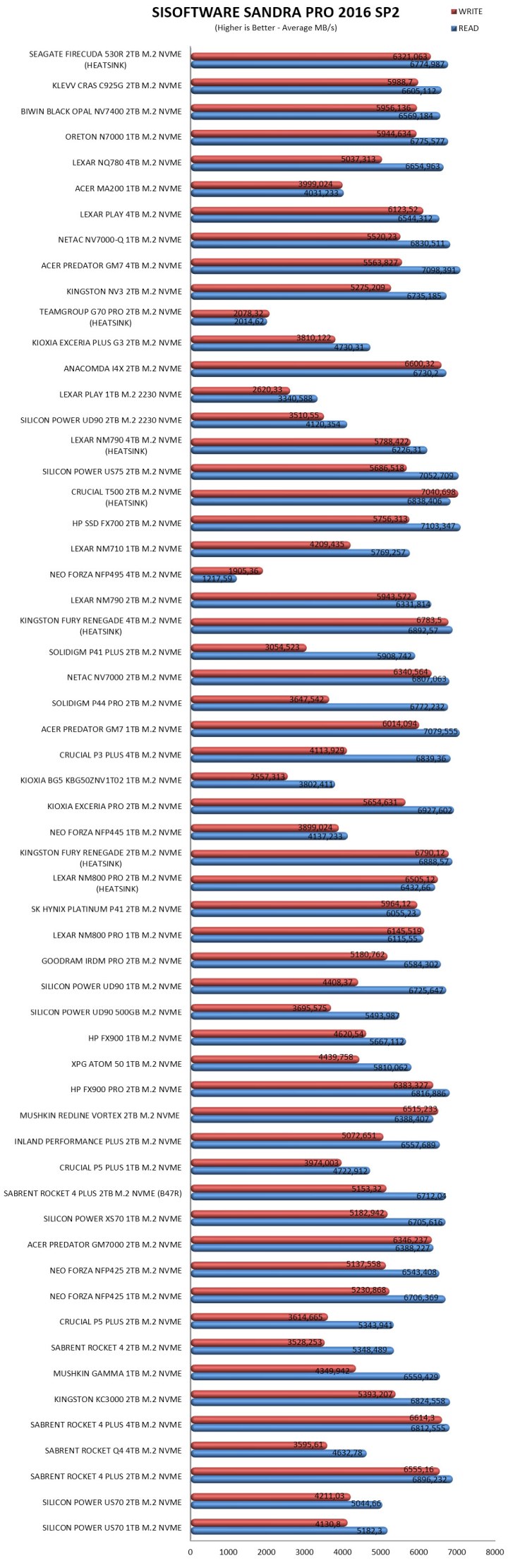
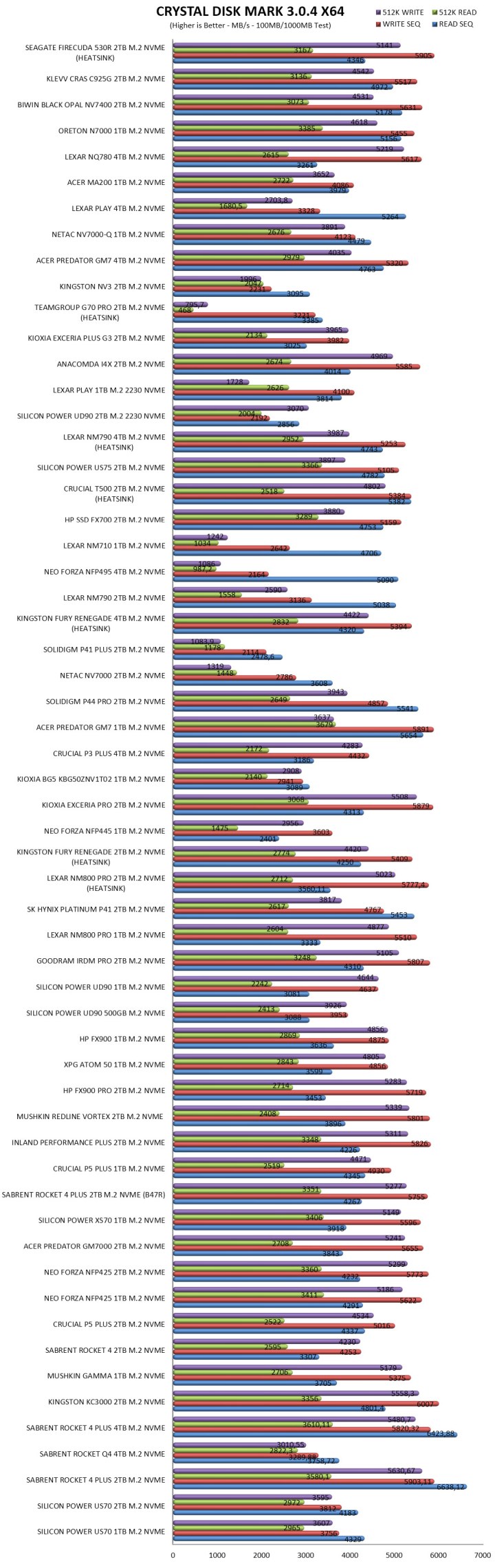
TEST RESULTS - SISOFTWARE SANDRA PRO / CRYSTAL DISK MARK


sandra


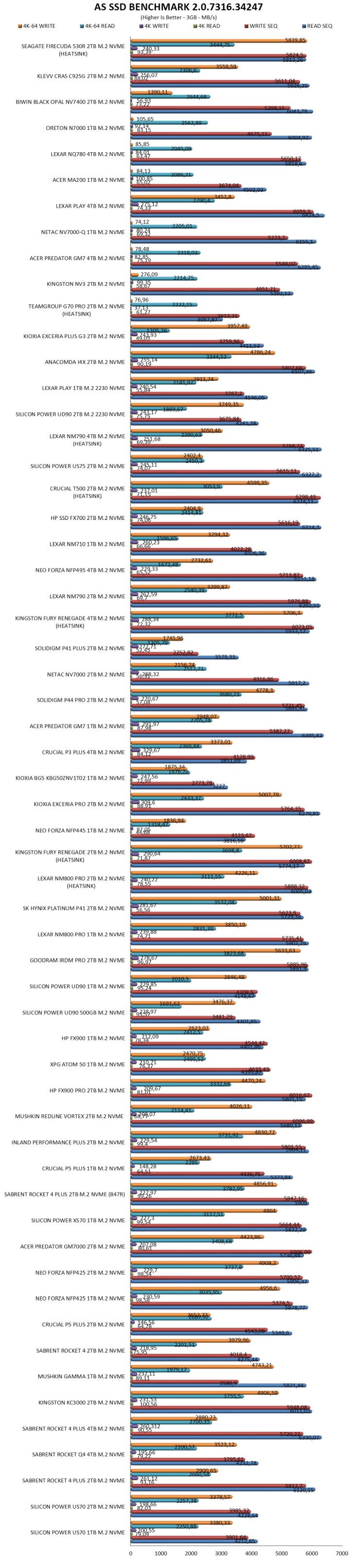
TEST RESULTS - AS SSD / IOMETER


asssd


TEST RESULTS - IOMETER SNIA


iometermixed

iometer12hrgrapht


CONCLUSION


seagate firecuda 530r 2tb review b


    The Seagate FireCuda 530R delivers exactly what a top‑tier Gen4 SSD should, excellent real‑world speed, stable thermals, and long‑term reliability. At its core is the Phison PS5018‑E18 controller, one of the most proven Gen4 controllers on the market (that unfortunate incident with the Windows update is no longer a concern), known for sustaining high sequential performance without the thermal throttling issues seen in earlier Gen4 designs. Needless to say, both the 2GB SK hynix DRAM and Kioxia’s 162‑layer 3D TLC NAND (BiCS6) help with the drive’s low-latency, consistent performance, strong TBW ratings and long‑term stability. The included low‑profile heatsink keeps temperatures comfortably in check, making the FireCuda 530R a clean, drop‑in upgrade for PS5 users who want fast storage without worrying about thermal overhead. Endurance remains a highlight, with the 2TB model rated for 2400TBW and backed by a 5‑year warranty plus Rescue Data Recovery Services. The drawbacks are practical, there’s no 8TB option for users who need extreme capacity, and while SeaTools works reliably for monitoring but doesn’t offer the deeper tuning, firmware controls, or advanced settings found in competing brand utilities. Even so, the FireCuda 530R by Seagate stands as one of the strongest Gen4 offerings available, combining high‑end components with dependable thermals and endurance.


    At around USD499.99 inside the USA (Amazon.com) and for 218.62Euros inside the EU (Amazon.de) the 2TB capacity of the FireCuda 530R with heatsink by Seagate is priced well, at least on this side of the Atlantic. Leaving cost out of the equation the FireCuda 530R with heatsink Gen4 SSD by Seagate delivers on everything from speed and endurance to low temperatures, PS5 compatibility and even probably the best all-around warranty and for that it deserves the Golden Award.

PROS


- Excellent Gen4 Performance
- Heatsink Version (PS5 Compatible)
- Endurance (2400TBW)
- 5 Year Limited Warranty & Rescue Data Recovery Services
- Price (EU)


CONS


- Price (USA)
- Only Up To 4TB


Seagate FireCuda 530R With Heatsink 2TB M.2 NVMe SSD Review

INTRODUCTION


seagate firecuda 530r 2tb review a


    SSDs transformed system performance by removing mechanical limits and delivering instant responsiveness. PCIe Gen3 drives were the first big jump, offering reliable NVMe speeds that still hold up for everyday use. Then PCIe Gen4 SSDs arrived and doubled the available bandwidth, giving users noticeably faster game loading, smoother content‑creation workflows, and stronger sustained performance. They quickly became the practical performance tier-mature controllers, manageable thermals, and speeds that feel genuinely fast in real‑world tasks. PCIe Gen5 SSDs may push headline numbers even higher, but the trade‑offs are hard to ignore, hotter operation, mandatory heatsinks, inconsistent gains in everyday workloads, and pricing that doesn’t always match the real‑world benefit. For most users, PCIe Gen4 remains the smarter balance, fast enough to feel instant, stable enough for long sessions, and affordable enough to fit into mainstream builds without compromise. Sitting right in that sweet spot is Seagate’s FireCuda 530R with Heatsink 2TB, a PCIe Gen4 M.2 NVMe model built for dependable throughput and strong endurance.


    Seagate is a global leader in mass-capacity data storage, having delivered over 4.5 billion terabytes of capacity over four decades. From edge to core to cloud, Seagate builds trust in data by delivering scalable, sustainable, and secure storage solutions. Learn more at www.seagate.com.


  The FireCuda 530R line of PCIe 4.0 Gen4 SSDs includes models both with and without an aluminum heatsink (PS5 compatible) and in 3 different capacities (1/2/4TB). Under the hood of the FireCuda 530R 2TB variant, we find the 8-channel tri-core (32-bit ARM Cortex R5 CPUs) PS5018-E18 NVMe v1.4 compatible NAND flash controller by PHISON paired with 162-layer 3D TLC NAND flash by Kioxia (BiCS6) and 2GB of DDR4L SDRAM by SK hynix. The PS5018-E18 NAND flash controller by PHISON features their 4th Gen LDPC engine (low-density parity check) along with end-to-end data path protection, wear levelling, thermal throttling (70 degrees Celsius limit), TRIM, bad block management, dynamic range SLC cache and SmartECC (RAID ECC). Finally, as for endurance Seagate reports a TBW of 1100/2400/5050 for the 1/2/4TB models respectively and covers the entire FireCuda 530R line with a 5-year limited warranty.


SPECIFICATIONS AND FEATURES


PACKAGING AND CONTENTS


seagate firecuda 530r 2tb review 1t

The FireCuda 530R is placed inside a box that has a product picture at the front next to the drawing of an animal, company logo, capacity, performance numbers, PS5 compatibility and the included data recovery service.


A few words about the product are printed at the rear in 5 languages and just over information about Seagate.


Inside the box Seagate has placed the FireCuda 530R SSD, Rescue Data Recovery Services paper, limited warranty paper and a quick start guide.


THE FIRECUDA 530R WITH HEATSINK 2TB


The FireCuda 530R Heatsink edition measures 80.85mm in length, 24.22mm in width and 11.10mm in thickness.


A sticker with the serial number and barcodes along with other details is placed at the base of the heatsink.


The heatsink is held in place with 4 screws so it's easy to remove.


On the top side we find a 1GB DRAM module by SK Hynix and four Kioxia 162-layer 3D TLC NAND flash modules.


Moving to the other side we find the PS5018-E18 NAND flash controller by Phison, 1GB DRAM module by SK hynix and 4 Kioxia 162-layer 3D TLC NAND flash modules.


SEATOOLS SOFTWARE


Seagate doesn't have a dedicated software for their SSDs, instead you can use their "unified" SeaTools suite.

seagate seatools 1t

The health tab detects all available drives and allows you to run quick/extended tests and fixes (make sure to only use Seatools with Seagate drives - using it with other models may result in data loss) and check their SMART pages.


From the Advanced tab you can perform certain drive tweaks (mostly for mechanical models) and firmware updates (manual ones).


You can also securely erase your drives from the erase tab.


Inside the utility tab Seagate has placed a link from where you can check for updates for their SeaTools software, bootable Seatools feature, link to their Disc Wizard software and logs management.


TEST BED


13900k


TESTING METHODOLOGY


   Not long after I first started testing SSDs back in 2008, I concluded that it's almost impossible for any single benchmark suite to accurately measure their performance and that's why in certain benchmark suites we see amazing read/write performance numbers with some drives while in other things are quite different. The reason behind this is that some benchmarking suites are configured to read and write random chunks of data while others read and write constant (sequential) ones. So that's why i always use a very wide selection of benchmarking suites including AIDA64, HD Tach RW, HD Tune Pro, Crystal Disk Mark, Sisoftware Sandra Pro, AS SSD, IOmeter and ATTO. To get the most accurate results each test gets repeated a total of 6 times with the average performance numbers recorded into the charts. Also, as of February 25th, 2015, our results will also include the Storage Networking Industry Association’s (SNIA) IOMeter tests. These tests include a 12 Hour write test used to “simulate” performance degradation over time and a mixed workload test which basically shows what you can expect when using an SSD continuously for roughly two hours. Unfortunately, due to the time required for these tests they get repeated a total of 3 times and not 6 as the above.


   Many people have made inquiries about our charts in the past so once again please do keep in mind that the Charts have the average performance numbers of each drive recorded and not the peak (highest) ones. Also, although every single one of these programs can help potential buyers choose the right drive for their needs you should also remember that from any kind of benchmark up to real world usage the gap is not small (and usually most differences will go unnoticed by most people). All tests were performed in a fresh Windows 10 Pro x64 installation complete with every update up to the date of this review.


* As of January 2025, Gen4 SSDs will be tested on the 13900K/Z790 system while Gen5 SSDs will be tested on the 285K/Z890 system.


TEST RESULTS - AIDA64 / ATTO


aida64


TEST RESULTS - HD TACH RW / HD TUNE PRO


hdtachrw


TEST RESULTS - SISOFTWARE SANDRA PRO / CRYSTAL DISK MARK


sandra


TEST RESULTS - AS SSD / IOMETER


asssd


TEST RESULTS - IOMETER SNIA


iometermixed

iometer12hrgrapht


CONCLUSION


seagate firecuda 530r 2tb review b


    The Seagate FireCuda 530R delivers exactly what a top‑tier Gen4 SSD should, excellent real‑world speed, stable thermals, and long‑term reliability. At its core is the Phison PS5018‑E18 controller, one of the most proven Gen4 controllers on the market (that unfortunate incident with the Windows update is no longer a concern), known for sustaining high sequential performance without the thermal throttling issues seen in earlier Gen4 designs. Needless to say, both the 2GB SK hynix DRAM and Kioxia’s 162‑layer 3D TLC NAND (BiCS6) help with the drive’s low-latency, consistent performance, strong TBW ratings and long‑term stability. The included low‑profile heatsink keeps temperatures comfortably in check, making the FireCuda 530R a clean, drop‑in upgrade for PS5 users who want fast storage without worrying about thermal overhead. Endurance remains a highlight, with the 2TB model rated for 2400TBW and backed by a 5‑year warranty plus Rescue Data Recovery Services. The drawbacks are practical, there’s no 8TB option for users who need extreme capacity, and while SeaTools works reliably for monitoring but doesn’t offer the deeper tuning, firmware controls, or advanced settings found in competing brand utilities. Even so, the FireCuda 530R by Seagate stands as one of the strongest Gen4 offerings available, combining high‑end components with dependable thermals and endurance.


    At around USD499.99 inside the USA (Amazon.com) and for 218.62Euros inside the EU (Amazon.de) the 2TB capacity of the FireCuda 530R with heatsink by Seagate is priced well, at least on this side of the Atlantic. Leaving cost out of the equation the FireCuda 530R with heatsink Gen4 SSD by Seagate delivers on everything from speed and endurance to low temperatures, PS5 compatibility and even probably the best all-around warranty and for that it deserves the Golden Award.

PROS


- Excellent Gen4 Performance
- Heatsink Version (PS5 Compatible)
- Endurance (2400TBW)
- 5 Year Limited Warranty & Rescue Data Recovery Services
- Price (EU)


CONS


- Price (USA)
- Only Up To 4TB


Seagate FireCuda 530R With Heatsink 2TB M.2 NVMe SSD Review

INTRODUCTION


seagate firecuda 530r 2tb review a


    SSDs transformed system performance by removing mechanical limits and delivering instant responsiveness. PCIe Gen3 drives were the first big jump, offering reliable NVMe speeds that still hold up for everyday use. Then PCIe Gen4 SSDs arrived and doubled the available bandwidth, giving users noticeably faster game loading, smoother content‑creation workflows, and stronger sustained performance. They quickly became the practical performance tier-mature controllers, manageable thermals, and speeds that feel genuinely fast in real‑world tasks. PCIe Gen5 SSDs may push headline numbers even higher, but the trade‑offs are hard to ignore, hotter operation, mandatory heatsinks, inconsistent gains in everyday workloads, and pricing that doesn’t always match the real‑world benefit. For most users, PCIe Gen4 remains the smarter balance, fast enough to feel instant, stable enough for long sessions, and affordable enough to fit into mainstream builds without compromise. Sitting right in that sweet spot is Seagate’s FireCuda 530R with Heatsink 2TB, a PCIe Gen4 M.2 NVMe model built for dependable throughput and strong endurance.


    Seagate is a global leader in mass-capacity data storage, having delivered over 4.5 billion terabytes of capacity over four decades. From edge to core to cloud, Seagate builds trust in data by delivering scalable, sustainable, and secure storage solutions. Learn more at www.seagate.com.


  The FireCuda 530R line of PCIe 4.0 Gen4 SSDs includes models both with and without an aluminum heatsink (PS5 compatible) and in 3 different capacities (1/2/4TB). Under the hood of the FireCuda 530R 2TB variant, we find the 8-channel tri-core (32-bit ARM Cortex R5 CPUs) PS5018-E18 NVMe v1.4 compatible NAND flash controller by PHISON paired with 162-layer 3D TLC NAND flash by Kioxia (BiCS6) and 2GB of DDR4L SDRAM by SK hynix. The PS5018-E18 NAND flash controller by PHISON features their 4th Gen LDPC engine (low-density parity check) along with end-to-end data path protection, wear levelling, thermal throttling (70 degrees Celsius limit), TRIM, bad block management, dynamic range SLC cache and SmartECC (RAID ECC). Finally, as for endurance Seagate reports a TBW of 1100/2400/5050 for the 1/2/4TB models respectively and covers the entire FireCuda 530R line with a 5-year limited warranty.


SPECIFICATIONS AND FEATURES


PACKAGING AND CONTENTS


seagate firecuda 530r 2tb review 1t

The FireCuda 530R is placed inside a box that has a product picture at the front next to the drawing of an animal, company logo, capacity, performance numbers, PS5 compatibility and the included data recovery service.


A few words about the product are printed at the rear in 5 languages and just over information about Seagate.


Inside the box Seagate has placed the FireCuda 530R SSD, Rescue Data Recovery Services paper, limited warranty paper and a quick start guide.


THE FIRECUDA 530R WITH HEATSINK 2TB


The FireCuda 530R Heatsink edition measures 80.85mm in length, 24.22mm in width and 11.10mm in thickness.


A sticker with the serial number and barcodes along with other details is placed at the base of the heatsink.


The heatsink is held in place with 4 screws so it's easy to remove.


On the top side we find a 1GB DRAM module by SK Hynix and four Kioxia 162-layer 3D TLC NAND flash modules.


Moving to the other side we find the PS5018-E18 NAND flash controller by Phison, 1GB DRAM module by SK hynix and 4 Kioxia 162-layer 3D TLC NAND flash modules.


SEATOOLS SOFTWARE


Seagate doesn't have a dedicated software for their SSDs, instead you can use their "unified" SeaTools suite.

seagate seatools 1t

The health tab detects all available drives and allows you to run quick/extended tests and fixes (make sure to only use Seatools with Seagate drives - using it with other models may result in data loss) and check their SMART pages.


From the Advanced tab you can perform certain drive tweaks (mostly for mechanical models) and firmware updates (manual ones).


You can also securely erase your drives from the erase tab.


Inside the utility tab Seagate has placed a link from where you can check for updates for their SeaTools software, bootable Seatools feature, link to their Disc Wizard software and logs management.


TEST BED


13900k


TESTING METHODOLOGY


   Not long after I first started testing SSDs back in 2008, I concluded that it's almost impossible for any single benchmark suite to accurately measure their performance and that's why in certain benchmark suites we see amazing read/write performance numbers with some drives while in other things are quite different. The reason behind this is that some benchmarking suites are configured to read and write random chunks of data while others read and write constant (sequential) ones. So that's why i always use a very wide selection of benchmarking suites including AIDA64, HD Tach RW, HD Tune Pro, Crystal Disk Mark, Sisoftware Sandra Pro, AS SSD, IOmeter and ATTO. To get the most accurate results each test gets repeated a total of 6 times with the average performance numbers recorded into the charts. Also, as of February 25th, 2015, our results will also include the Storage Networking Industry Association’s (SNIA) IOMeter tests. These tests include a 12 Hour write test used to “simulate” performance degradation over time and a mixed workload test which basically shows what you can expect when using an SSD continuously for roughly two hours. Unfortunately, due to the time required for these tests they get repeated a total of 3 times and not 6 as the above.


   Many people have made inquiries about our charts in the past so once again please do keep in mind that the Charts have the average performance numbers of each drive recorded and not the peak (highest) ones. Also, although every single one of these programs can help potential buyers choose the right drive for their needs you should also remember that from any kind of benchmark up to real world usage the gap is not small (and usually most differences will go unnoticed by most people). All tests were performed in a fresh Windows 10 Pro x64 installation complete with every update up to the date of this review.


* As of January 2025, Gen4 SSDs will be tested on the 13900K/Z790 system while Gen5 SSDs will be tested on the 285K/Z890 system.


TEST RESULTS - AIDA64 / ATTO


aida64


TEST RESULTS - HD TACH RW / HD TUNE PRO


hdtachrw


TEST RESULTS - SISOFTWARE SANDRA PRO / CRYSTAL DISK MARK


sandra


TEST RESULTS - AS SSD / IOMETER


asssd


TEST RESULTS - IOMETER SNIA


iometermixed

iometer12hrgrapht


CONCLUSION


seagate firecuda 530r 2tb review b


    The Seagate FireCuda 530R delivers exactly what a top‑tier Gen4 SSD should, excellent real‑world speed, stable thermals, and long‑term reliability. At its core is the Phison PS5018‑E18 controller, one of the most proven Gen4 controllers on the market (that unfortunate incident with the Windows update is no longer a concern), known for sustaining high sequential performance without the thermal throttling issues seen in earlier Gen4 designs. Needless to say, both the 2GB SK hynix DRAM and Kioxia’s 162‑layer 3D TLC NAND (BiCS6) help with the drive’s low-latency, consistent performance, strong TBW ratings and long‑term stability. The included low‑profile heatsink keeps temperatures comfortably in check, making the FireCuda 530R a clean, drop‑in upgrade for PS5 users who want fast storage without worrying about thermal overhead. Endurance remains a highlight, with the 2TB model rated for 2400TBW and backed by a 5‑year warranty plus Rescue Data Recovery Services. The drawbacks are practical, there’s no 8TB option for users who need extreme capacity, and while SeaTools works reliably for monitoring but doesn’t offer the deeper tuning, firmware controls, or advanced settings found in competing brand utilities. Even so, the FireCuda 530R by Seagate stands as one of the strongest Gen4 offerings available, combining high‑end components with dependable thermals and endurance.


    At around USD499.99 inside the USA (Amazon.com) and for 218.62Euros inside the EU (Amazon.de) the 2TB capacity of the FireCuda 530R with heatsink by Seagate is priced well, at least on this side of the Atlantic. Leaving cost out of the equation the FireCuda 530R with heatsink Gen4 SSD by Seagate delivers on everything from speed and endurance to low temperatures, PS5 compatibility and even probably the best all-around warranty and for that it deserves the Golden Award.

PROS


- Excellent Gen4 Performance
- Heatsink Version (PS5 Compatible)
- Endurance (2400TBW)
- 5 Year Limited Warranty & Rescue Data Recovery Services
- Price (EU)


CONS


- Price (USA)
- Only Up To 4TB


The SSD Review/Technology X Will Be at Computex 2026 and Sponsored by SMI

Less than a week from now The SSD  Review/Technology X is off to Computex Taipei!  This has been a staple in our business attendance for some 14 years now and we are looking forward to the trip, this year sponsored by our friends at Silicon Motion once again.  It will be great to touch base …

The post The SSD Review/Technology X Will Be at Computex 2026 and Sponsored by SMI appeared first on The SSD Review.

❌