Login
LoginWHY IS PLEX A BIT S#!t NOW? IS 2026 JELLYFIN TIME? (RAID Room)


INTRODUCTION

If you’ve built a PC in the last few years, you know cases aren’t just boxes anymore. They dictate airflow, cable sanity, and whether your CPU and GPU cook themselves or breathe freely. Some cases look great but run hot, others cool well but look way to plain and/or feel like working inside a toolbox. Finding the right balance is the real challenge for most people. This is one of the reasons as to the why new designs always catch my attention. Lian Li’s latest aims straight at the airflow crowd. The Lancool 217 INF is their new take on intake‑driven cooling and today we’re putting it under the microscope.
Lian Li Industrial Co., LTD, found in 1983, is the largest and most reputable family-owned and run designers and manufacturer of high-quality PC cases and accessories. With nearly 25 years in the PC industry, Lian Li has seen many trends come and go, but has persisted in its philosophy that its products should stand out from everything else, that, with the touch of every Lian Li product, you should feel the difference. Even at times where the norm in the industry was to cut cost, Lian Li persisted in being the top choice for anyone that builds a PC system.
The Lian Li Lancool 217 INF is available in two colors (black and white) comes in as an airflow‑driven mid‑tower built around two massive 170mm front intake fans and a 140mm rear exhaust, pushing high‑volume cooling through a chassis designed for pressure‑optimized flow. Its standout feature is the tempered‑glass infinity‑mirror front panel, adding depth and lighting effects without blocking the intake path. The case supports L‑Connect 3 wireless fan and ARGB control (with the L‑Wireless controller) and offers back‑connect motherboard compatibility for cleaner cable routing. On the sizing front, the Lancool 217 INF supports GPUs up to 380mm long, CPU coolers up to 180mm tall, and PSUs up to 220mm long (180mm when rotated 90 degrees). Cooling expandability is broad, while it includes only the three stock fans, the chassis can accommodate up to 12 fans total, including optional 120mm or 140mm bottom fans for direct GPU intake. Radiator support includes a 360mm mount at the top and an 360mm mount at the front (requires removing the 170mm fans), giving builders multiple liquid‑cooling paths.
SPECIFICATIONS AND FEATURES

PACKAGING AND CONTENTS

The Lancool 217 INF gets shipped inside a plain cardboard box that has a product picture at the front right under the company logo.

Two product drawings at the rear are used to showcase its size.

Typically, the case is wrapped inside a plastic bag and placed between two foam spacers.

Inside the box you’ll also find an PSU shroud bracket, PSU shroud cover, I/O cover, installation guide and a plastic box with screws, anti-vibration rings and stand-offs.
THE LANCOOL 217 INF EXTERIOR

The Lancool 217 INF measures 503mm in height, 482mm in length/depth and 238 in width/thickness.


The right side features a tempered glass panel held in placed with clips (so you just need to pull it from the rear to remove it).

The case has the connectors of its I/O located on the lower end of the right side (two USB-A ports, single USB-C port and a headphones 3.5mm plug).

At the front we find the infinity mirror panel and two 170mm FDB ARGB fans featuring removable mesh dust covers (short video showcasing the Lancool 217 INF is available on TiKTok and YouTube).

At the top we find the lighting mode buttons for the infinity mirror panel (M1) and the fans (M2) and the on/off button.


As expected, the top features a removable perforated panel as seen above under which you can mount either three 120mm fans, two 140mm fans or a 280/360mm radiator (fan/radiator bracket can also be removed).

The left side panel is perforated on its lower end.


Moving at the rear we see the 140mm exhaust fan, 7 PCI expansion slots and the PSU area.

4 rubber feet and a removable dust filter are placed at the base of the case.
THE LANCOOL 217 INF INTERIOR

Interior layout is similar to what we’ve seen many times lately so you can expect plenty of space inside the Lancool 217 INF.

The two 170mm FDB ARGB fans certainly steal the show.

Lian Li has also placed a GPU support bracket in the case (always a welcome feature).

You can mount a 2.5mm HDD/SSD and/or three 120mm fans on the PSU shroud/compartment as seen above.
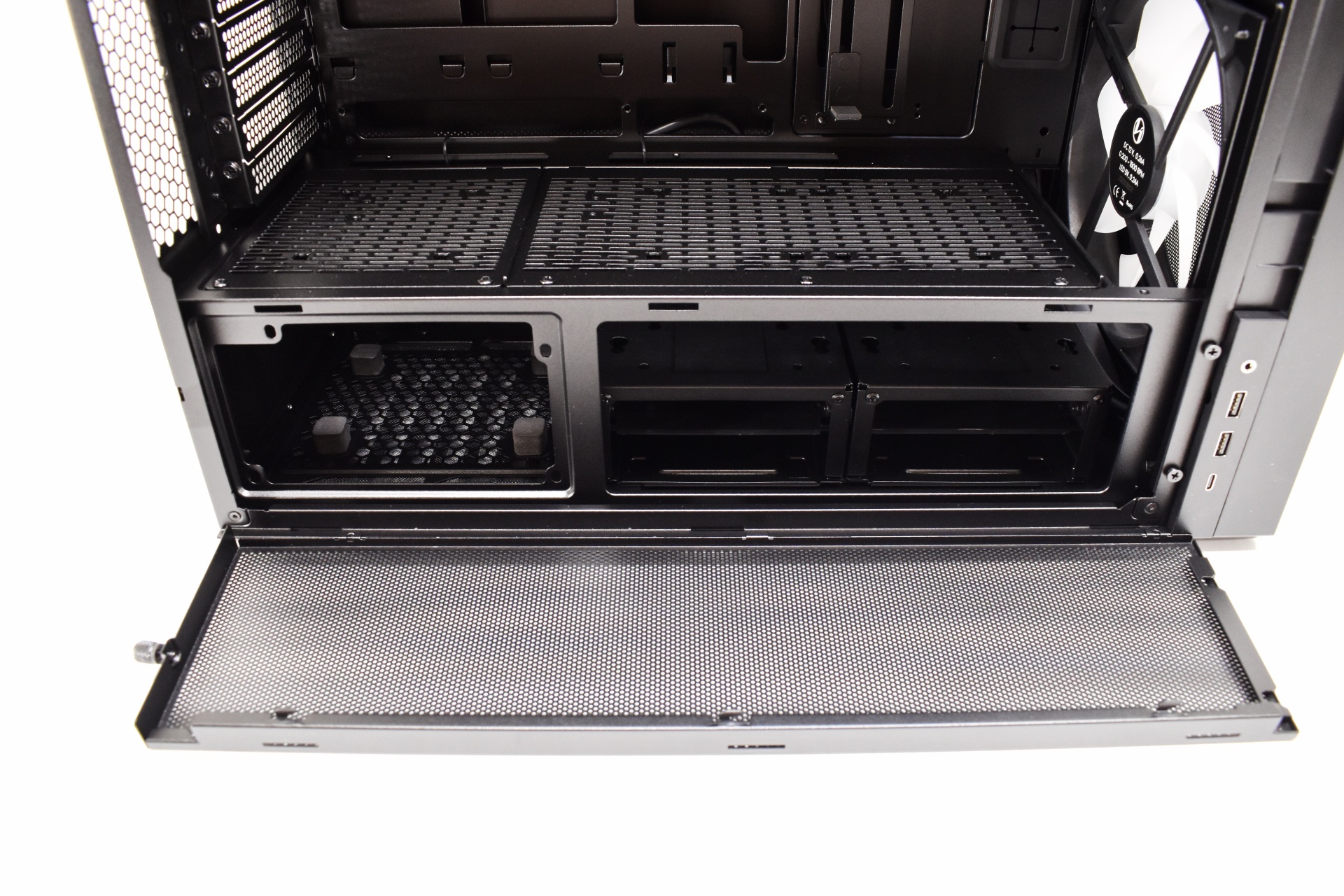
The front drops allowing you to access the PSU and drive area (if you want easy access to the modular power ports of your PSU it needs to face this side).

The motherboard tray with the PSU shroud have a total of 16 cut outs (17 with the CPU one) three of which feature rubber grommets.


Taking a look at the left side, we find the fan controller, two vertical drive mounts (3.5”), two removable drive cages (2x3.5”, 4x2.5”) and the PSU area.
BUILDING THE SYSTEM
As always, the purpose of this section is not to build a functional system but rather to showcase what you can expect from the case at hand in terms of interior space.
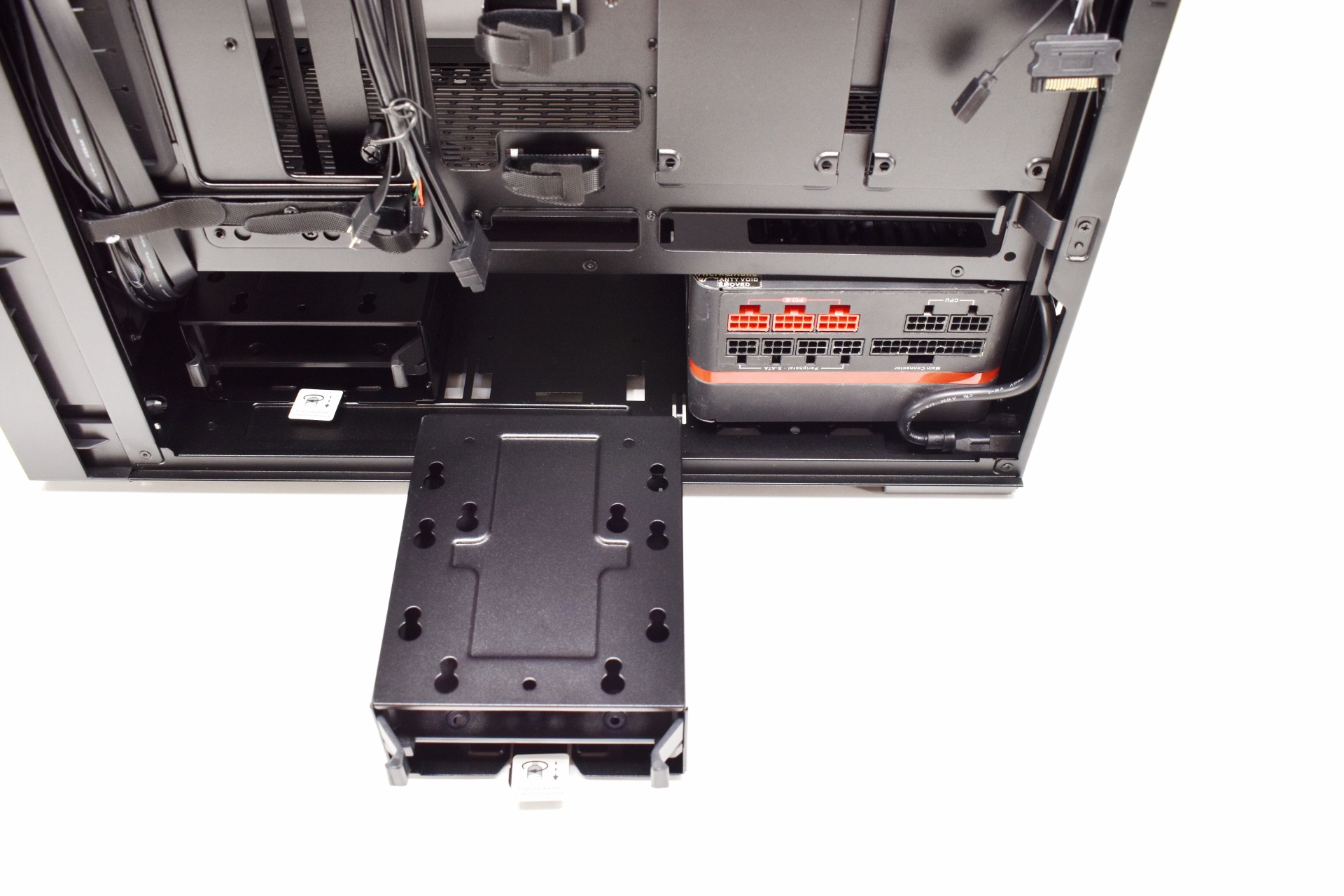
Depending on PSU orientation you may need to remove one of the two drive cages as seen above (the PSU ports should either be facing the cages or the shroud, facing backwards like I placed them is not ideal).

The Lancool 217 INF is an E-ATX compatible case so ATX boards leave plenty of room around them.
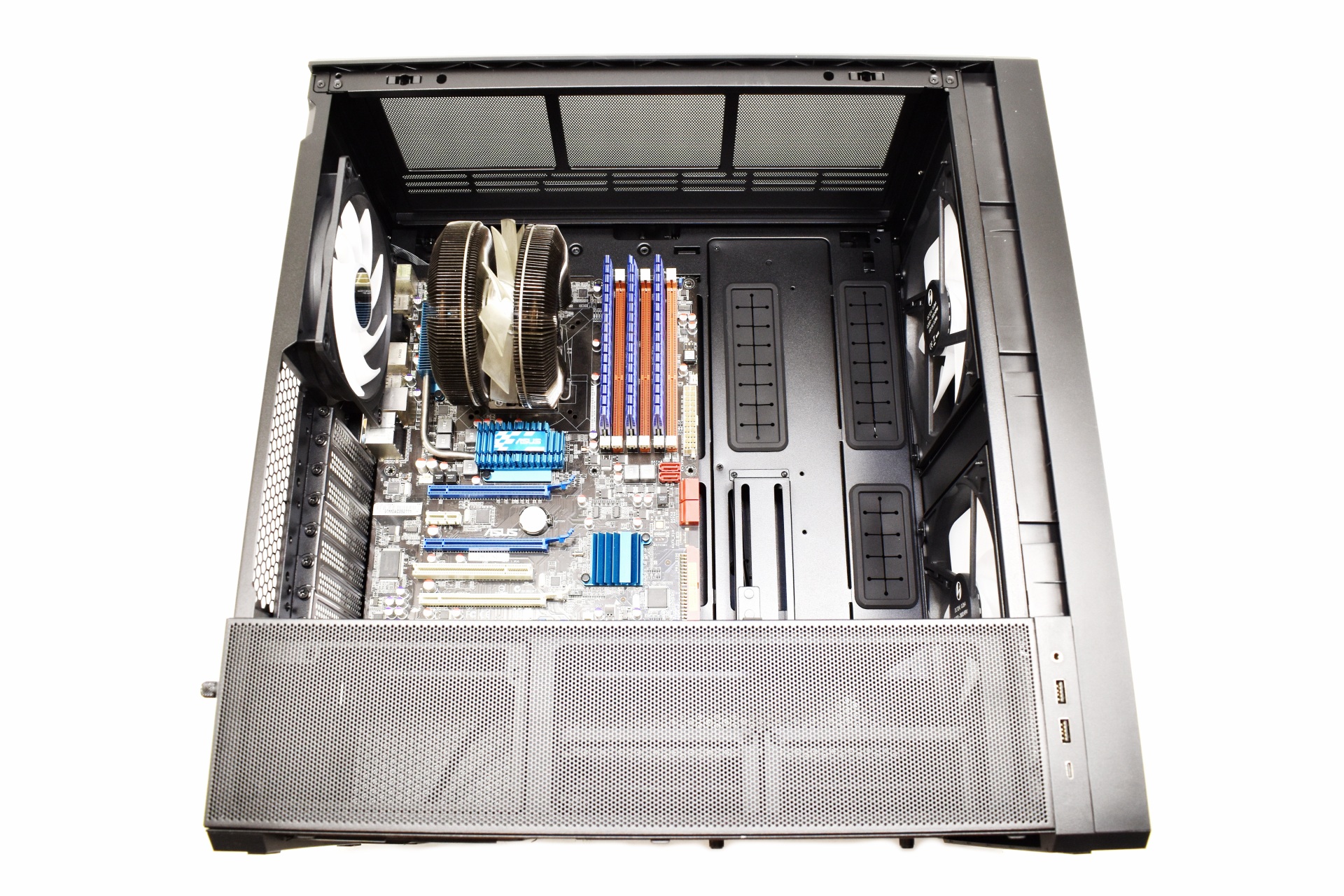
With enough headroom for CPU coolers up to 180mm tall you should be able to fit most available models in the market.
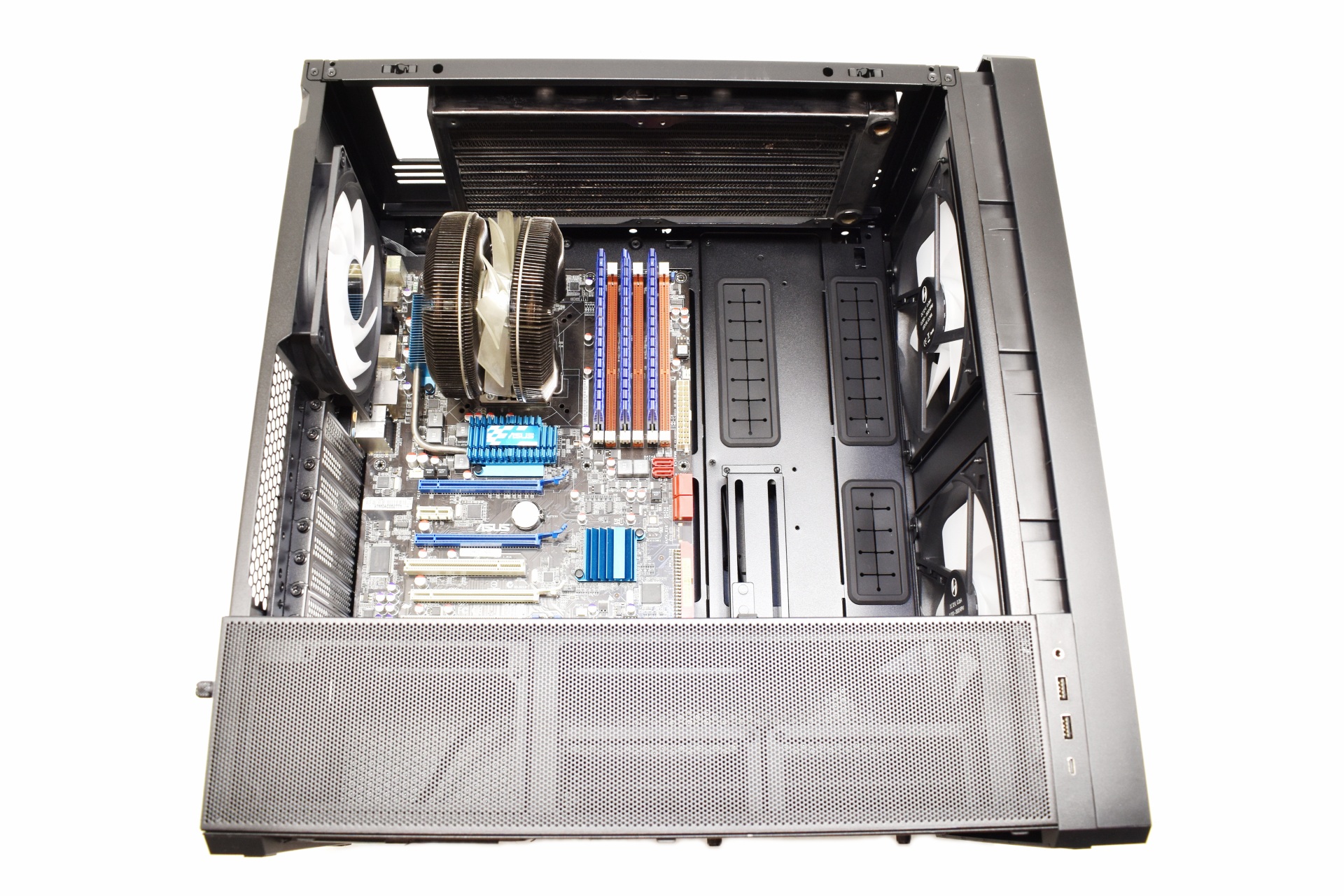
At the top you can mount either an 280mm or an 360mm radiator (I mounted an 280mm one for this review).

With most GPUs currently at around 300-340mm long having space for an 380mm model means you can fit anything inside the Lancool 217 INF.
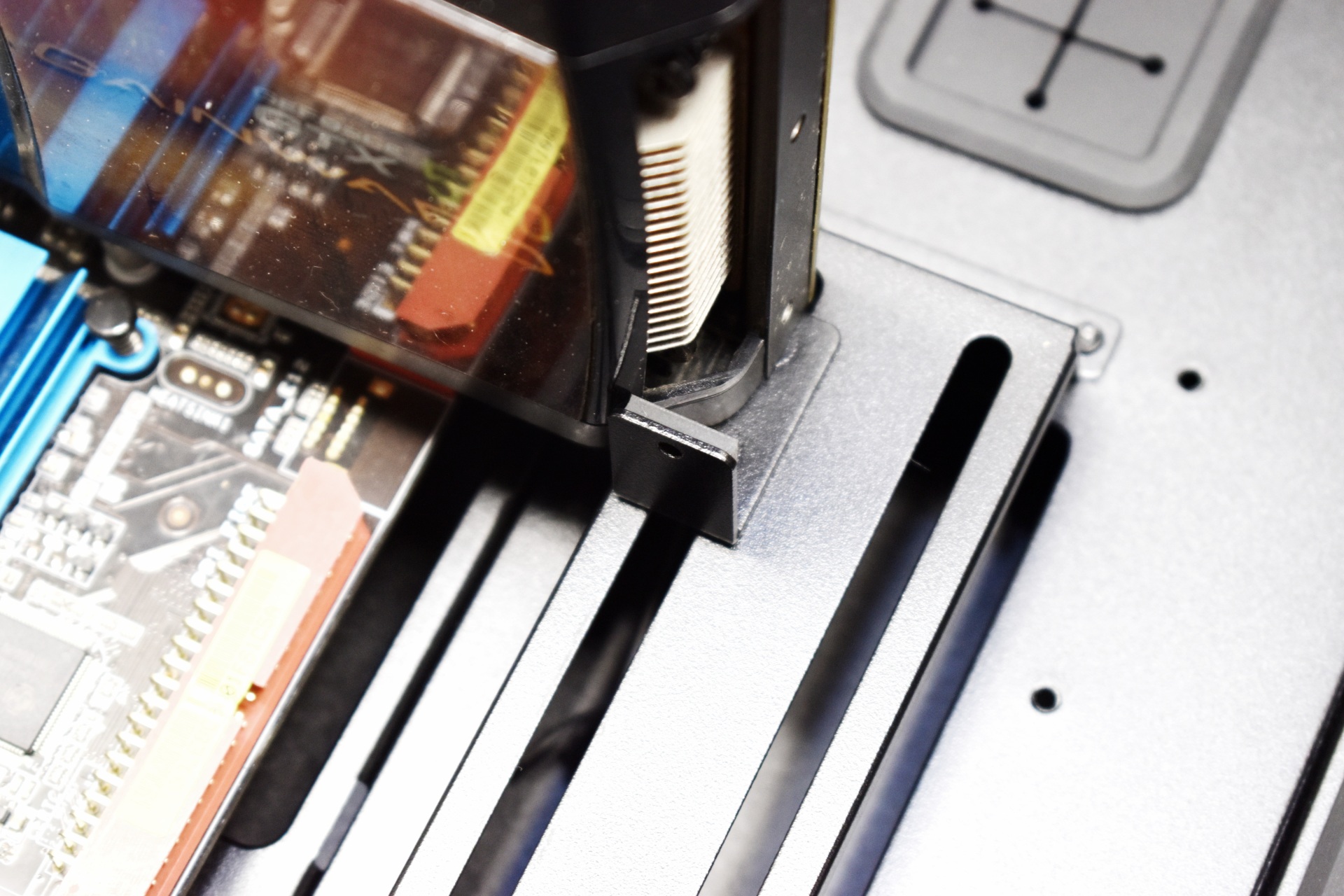
The GPU support bracket is mostly aimed towards cards that are 300mm long and above.
NOISE LEVEL TEST

After giving it much thought we decided on performing noise tests with each PC Case we receive by placing our ExTech HD600 vertically on top of each case to measure the noise levels emanating from the pre-installed fans at both 50% and 100% with the help of a fan controller (if the case doesn't have one, we use our own).
CONCLUSION

The Lancool 217 INF ends up feeling like a case built with a very clear purpose. Visually, it stands out without drifting into gimmicks, the infinity‑mirror front panel gives it presence, but the open intake design keeps it from becoming a showpiece at the expense of performance. Airflow is unquestionably its strongest card, the dual 170mm fans move a huge amount of air with less noise than smaller, faster spinners, and the layout keeps the path from intake to exhaust clean and direct. Inside, the space is generous without being oversized, giving high‑end GPUs, tall air coolers, and full‑length PSUs room to breathe while still leaving options for radiators and extra fans. It’s a chassis that balances style with substance, and if airflow is high on your priority list, the Lancool 217 INF by Lian Li makes a convincing case for itself. My sole issue with this case has been having to get the extra wireless adapter to have access to the L-Connect 3 fan (speed and ARGB lighting control) and infinity mirror control software by Lian Li (nitpicking probably, but has to be pointed out).
With a price tag currently set at USD124 inside the USA (Amazon.com) and at 154.16Euros inside the EU (Amazon.de) the Lancool 217 INF by Lian Li is priced well. At the end of the day the Lancool 217 INF may not be the best PC case ever released by Lian Li but it does deliver as advertised and where it counts so it deserves the Golden Award.

PROS
- Good Build Quality
- Infinity Fascia
- Two Front 170mm ARGB Fans
- 2 PSU Mounting Spots
- Vertical GPU Placement
- GPU Support Bracket
- Space For E-ATX Motherboards, 180mm Tall CPU Coolers, 220mm Long PSUs, 380mm Long Graphics Cards & A Single Radiator (280/360mm)
- Removable Dust Filters (Front/Bottom)
- Available In Black & White Colors
CONS
- Single Radiator (For Some)
- Control Software Wireless Adapter (Extra)










Microsoft loves to promote Windows 11 25H2's AI features and other improvements, but can it actually game faster than Windows 10? We tested 14 modern titles to find out if the upgrade is worth it.