Reading view

There are new articles available, click to refresh the page.

Anthropic Signs SpaceX Colossus 1 Deal For Major Claude Compute Expansion

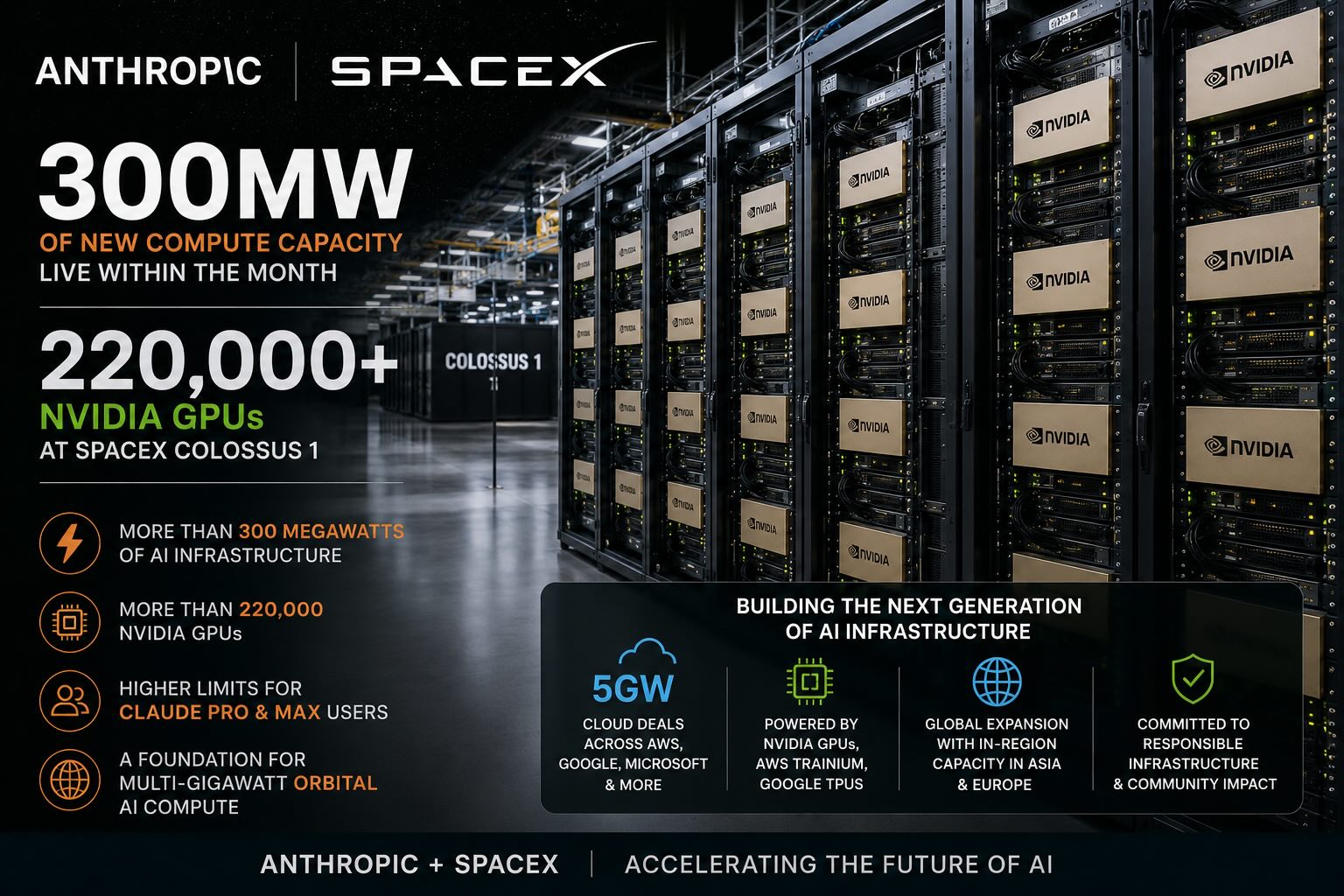
Anthropic’s new compute agreement with SpaceX gives the AI company access to all compute capacity at SpaceX’s Colossus 1 data center, adding more than 300 megawatts of capacity and more than 220,000 NVIDIA GPUs within the month. While the immediate impact is higher capacity for Claude users, the deal also stands out as a major utilization win for SpaceX’s AI infrastructure ambitions.

The agreement comes as AI companies continue to lock down large-scale compute wherever they can find it. For Anthropic, the SpaceX capacity will directly improve availability for Claude Pro and Claude Max subscribers and support broader growth across Claude Code and the Claude API. For SpaceX, the partnership brings a major external AI workload into Colossus 1, giving the facility an immediate customer for a large block of capacity.

anthropic spacex deal summary

SpaceX Deal Adds More Than 300 Megawatts of Capacity

Under the agreement, Anthropic will use all compute capacity at SpaceX’s Colossus 1 data center. The company says this gives it access to more than 300 megawatts of new capacity within the month, including more than 220,000 NVIDIA GPUs.

The added capacity is expected to directly improve service for Claude Pro and Claude Max subscribers, and it also gives Anthropic another major compute resource at a time when AI model providers are competing aggressively for power, GPUs, and data center access.

There is also a broader strategic angle for SpaceX, as Industry chatter has suggested that AI data center capacity tied to Elon Musk’s companies, including xAI, may not have been fully utilized at certain points. Anthropic’s agreement gives SpaceX a major customer for Colossus 1 capacity, which could help demonstrate demand for large-scale AI infrastructure connected to Musk’s broader compute ecosystem.

SpaceX has also been linked to future space-based data center ambitions, and Anthropic says it has expressed interest in partnering with SpaceX to develop multiple gigawatts of orbital AI compute capacity. No timeline or technical details were provided, but the agreement gives both companies a practical starting point for a much larger compute relationship.

Compute Demand Moves Beyond Traditional Cloud Deals

The SpaceX agreement joins several other compute arrangements already underway at Anthropic. The company has an agreement with Amazon for up to 5 gigawatts of capacity, including nearly 1 gigawatt of new capacity by the end of 2026. It also has a 5-gigawatt agreement with Google and Broadcom that will begin coming online in 2027, a strategic partnership with Microsoft and NVIDIA that includes $30 billion in Azure capacity, and a $50 billion investment in American AI infrastructure with Fluidstack.

Claude runs on a range of AI hardware, including AWS Trainium, Google TPUs, and NVIDIA GPUs. The SpaceX agreement adds another large NVIDIA GPU deployment to that mix, expanding Anthropic’s access to AI infrastructure outside the usual hyperscaler channels.

The deal could also play well for SpaceX as it looks to show that its infrastructure can support more than launch, satellite, and communications businesses. If SpaceX moves toward an IPO, a large AI compute customer using hundreds of megawatts of capacity would be a useful proof point for investor discussions around future revenue lines and infrastructure demand. That remains speculative, but the Anthropic agreement provides SpaceX with a concrete example of external demand for its compute capacity.

International Expansion Remains Part of the Plan

Some of Anthropic’s capacity expansion will also take place outside the United States. Enterprise customers, especially those in regulated sectors such as financial services, healthcare, and government, increasingly need in-region infrastructure to meet compliance and data residency requirements. Anthropic’s collaboration with Amazon includes additional inference capacity in Asia and Europe.

Anthropic says it will be selective about where it adds international capacity, focusing on democratic countries with legal and regulatory frameworks that can support infrastructure investment at this scale. The company is also weighing supply chain security, including the hardware, networking, and facilities needed to support AI compute.

Anthropic recently committed to covering any increases in consumer electricity prices caused by its data centers in the United States. As it expands internationally, the company is exploring ways to extend that commitment to new jurisdictions and work with local leaders on investments in communities that host its facilities.

For Anthropic, the SpaceX agreement is a near-term capacity boost for Claude. For SpaceX, it is a large-scale AI infrastructure customer at a time when compute demand, data center utilization, and future orbital compute plans are becoming more important to the company’s broader story.

The post Anthropic Signs SpaceX Colossus 1 Deal For Major Claude Compute Expansion appeared first on StorageReview.com.

AMD Instinct MI350P: Enterprise PCIe AI Inference Returns to Standard Servers

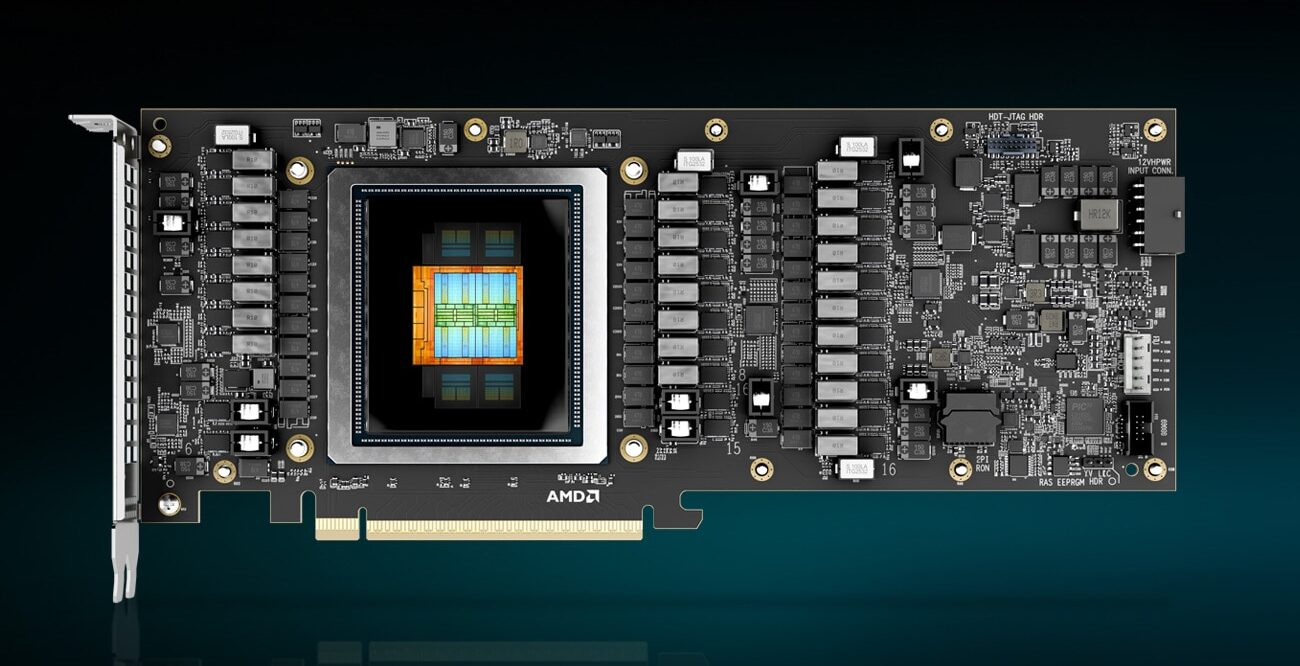
AMD has announced the Instinct MI350P, a PCIe accelerator aimed at enterprises that want on-premises AI inference without rebuilding their data center. The card is a dual-slot, full-height, full-length design built for standard air-cooled servers. It is also the first time in nearly four years that AMD has put a current-generation Instinct chip into a form factor that drops into a normal server.

AMD Instinct MI350P

The PCIe Instinct line had effectively gone quiet after the MI210 shipped in early 2022. Every generation since (MI300X, MI325X, and the OAM MI350X) has been an OAM socketed module on a Universal Baseboard, requiring a purpose-built chassis with the power delivery and airflow for eight 1,000W-class accelerators in a single tray. That works for hyperscalers buying GPUs by the rack. It does not work for an enterprise that wants on-prem inference but cannot or will not commit to a custom AI rack. The MI350P fits that gap, and at the moment, NVIDIA does not have a flagship-tier server PCIe card in the same class, so AMD has the segment to itself for now.

Hardware: MI350P vs. MI350X OAM

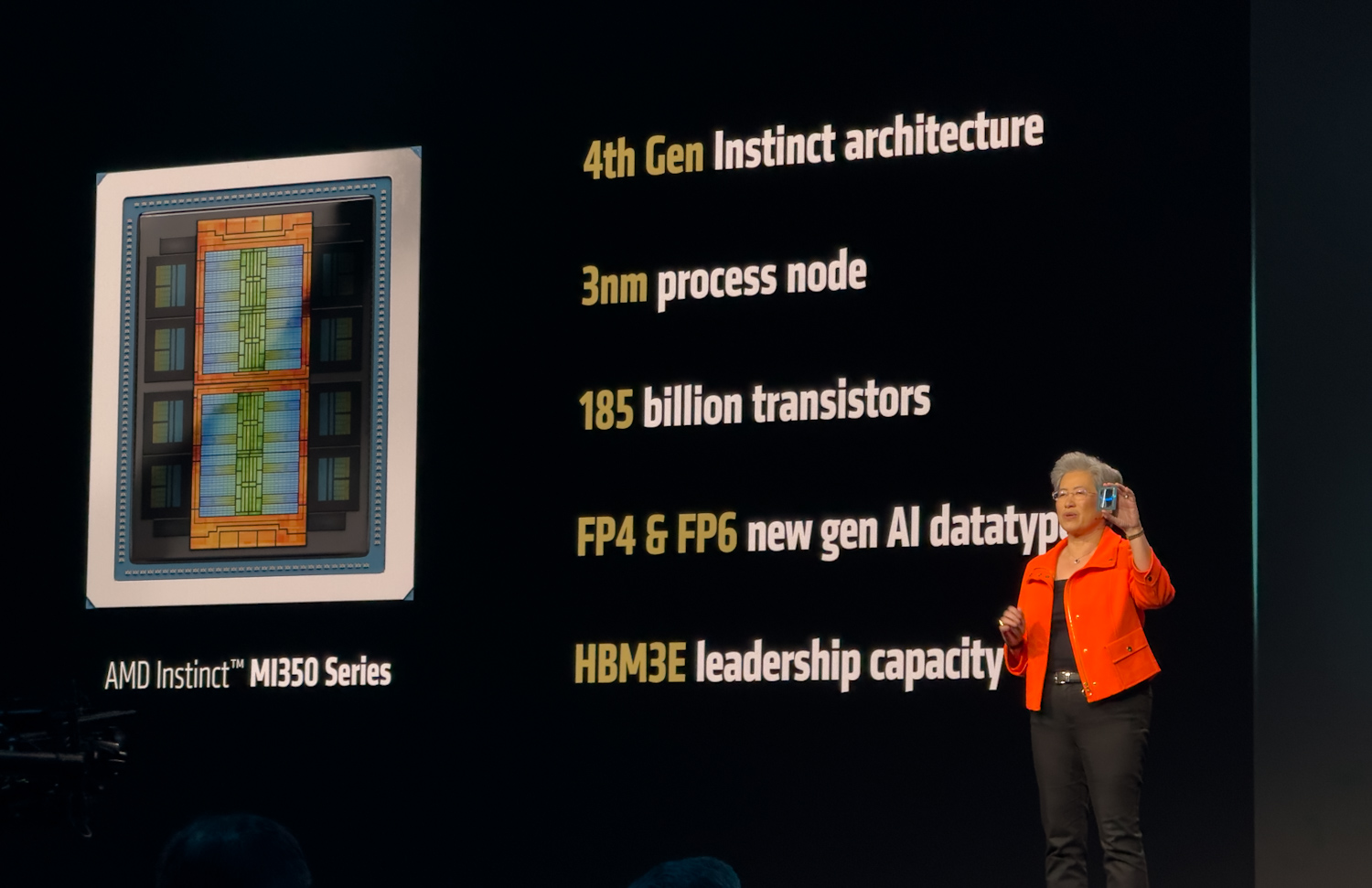
The MI350P is not a binned MI350X. AMD designed a smaller chip for it. The MI350X carries two I/O dies, each with four accelerator complex dies (XCDs), for a total of eight XCDs and 256 compute units. The MI350P has a single I/O die with four XCDs and 128 compute units, half the silicon, running at the same 2.2 GHz peak clock as its larger sibling. Memory follows the same pattern. Four HBM3E stacks instead of eight. A 4,096-bit bus instead of an 8,192-bit bus. 144GB at 4 TB/s instead of 288GB at 8 TB/s.

AMD Instinct MI350P architecture

Peak compute also halves. The MI350P tops out at 4,600 TFLOPS at MXFP4 against the MI350X’s 9.2 PFLOPS, and 2,300 TFLOPS at FP8 against 4.6 PFLOPS. BF16, FP16, and the rest of the precision stack scale the same way. It is refreshing to see AMD publish delivered numbers alongside peak. The delivered figures are 2,299 TFLOPS on MXFP4, 1,529 TFLOPS on FP8, and 713 TFLOPS on BF16. Those numbers reflect what the card can actually do inside a 600W envelope, where electrical and memory bandwidth limits eat into the theoretical peaks.

We took a look at the MI350X platform through Supermicro’s Jumpstart program and were genuinely impressed by its performance across inference workloads. We cannot wait to get the MI350P in for testing and see how the PCIe variant holds up in the more conventional server chassis for which it was designed.

AMD Instinct MI350P PCIe Card
Specification Delivered (FLOPS) Peak (TFLOPS)
Performance
BF16 713 1150
FP16 672 1150
FP8 1529 2300
MXFP8 1327 2300
MXFP6 1804 4600
MXFP4 2299 4600
Memory and Partitioning
Memory Capacity 144 GB HBM3E 144 GB HBM3E
Memory BW 3.6 TB/s 4.0 TB/s
GPU Instances Up to 4 @  36GB each Up to 4 @  36GB each
Platform
Video & JPEG Decode
GPU Scale-up Interconnect Not supported Not supported
Product FF FHFL dual-slot Air-cooled FHFL dual-slot Air-cooled
Max Total Board Power (TBP) 600W
(450W configurable)
600W
(450W configurable)
PCIe Host x16 PCIe Gen 5 at 128GB/s x16 PCIe Gen 5 at 128GB/s

Power does not quite halve. The MI350P is rated at 600W TBP, about 60% of the MI350X’s 1,000W. 600W is the ceiling defined by the PCIe CEM specification, so the card is running as hot as the slot allows. A 450W mode is available for chassis that cannot deliver the full power or cooling envelope, with some performance trimmed off. The 600W rating also places the MI350P in the same bracket as NVIDIA’s H200 NVL and the RTX Pro 6000 Server, which it will be cross-shopped against in this segment.

Unlike NVIDIA’s NVL4 offering with the H200, AMD does not expose the GPU’s Infinity Fabric links on the MI350P; all collective communications go through the PCIe Gen5 x16 (128 GB/s) link.

The Eight-GPU Air-Cooled Story

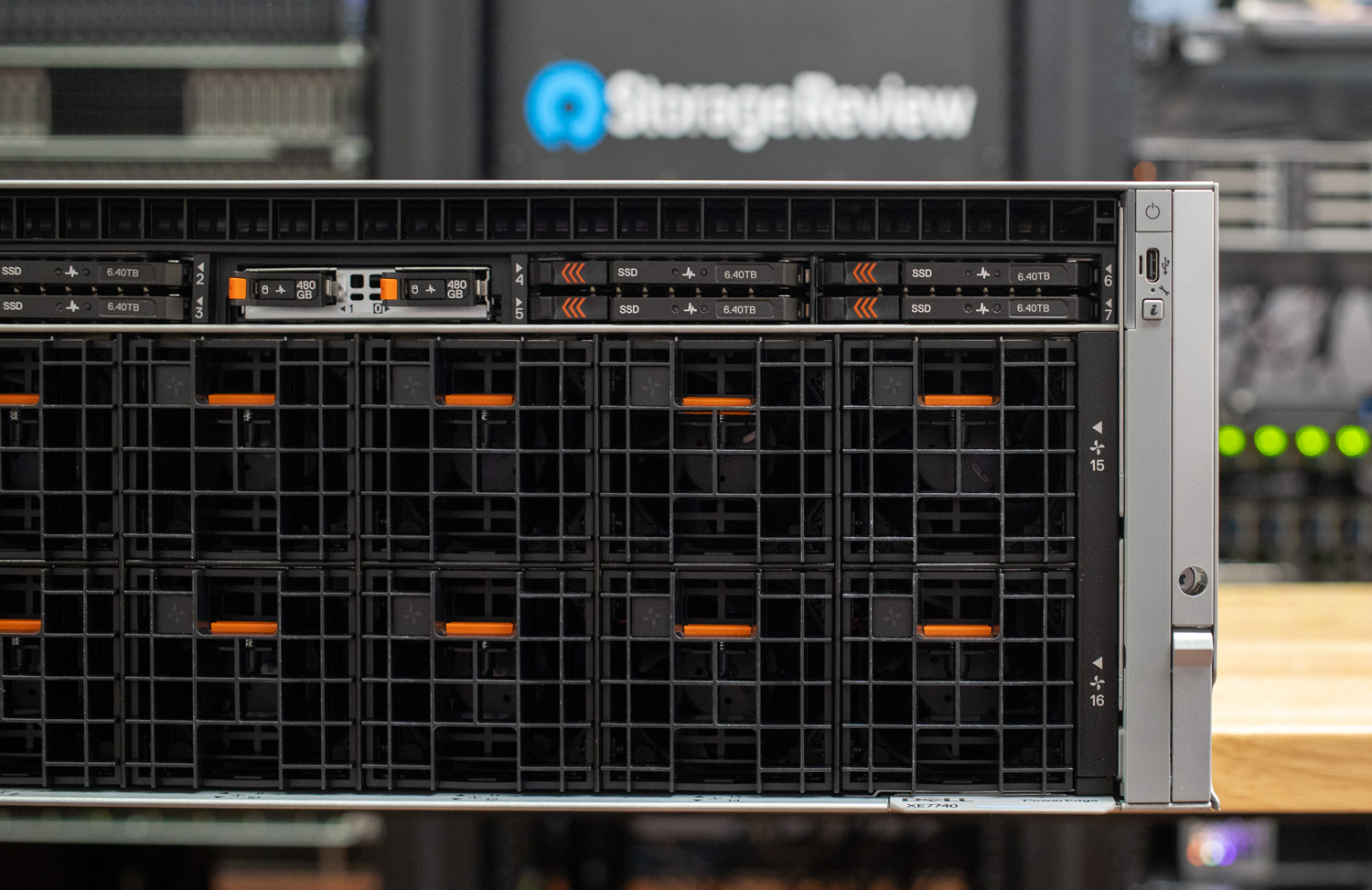
Because the MI350P is a standard dual-slot, full-height, full-length PCIe card, it fits into servers that enterprises already deploy and operate, including the dense eight-GPU air-cooled platforms now coming from the major OEMs. The Dell PowerEdge XE7740 and the HPE ProLiant DL380a Gen12, both of which we have reviewed previously, are the obvious targets. Each is built specifically to host eight dual-slot, FHFL accelerators in an air-cooled chassis with the power delivery and airflow already engineered for 600W-class cards. No custom rack, no liquid loop, no OAM baseboard.

An eight-card MI350P configuration in one of these systems puts 1,152GB of HBM3E and 32 TB/s of aggregate memory bandwidth into a single air-cooled box. For inference on large open-weight models, that is enough to host a trillion-parameter model on MXFP4 in a single chassis. But as we mentioned earlier, the trade-off is the absence of scale-up fabric. On the OAM MI350X, GPUs communicate over Infinity Fabric across the Universal Baseboard. On the MI350P, every GPU-to-GPU collective rides PCIe Gen5 x16 at 128 GB/s, the same path used to reach the host. For inference workloads, particularly with tensor-parallel sharding inside a node and pipeline or data parallelism across nodes, this is workable. For tightly coupled training where all-reduce bandwidth dominates step time, the OAM platform remains the right answer.

Precision Formats

Precision is worth covering, although none of the formats supported on the MI350P are new. The MI350X has the same set. The reason it still matters is that the OCP block-scaling data types (MXFP8, MXFP6, MXFP4) have become the standard for frontier model labs to train and ship models. These formats let labs train at lower precision with little to no loss in quality, and the inference benefits appear immediately afterward.

Lower precision is faster. MXFP4 runs more than twice as fast as FP8 and roughly four times as fast as BF16 at peak. That speedup shows up in real workloads. OpenAI’s gpt-oss release made the throughput uplift obvious, and frontier models like Kimi K2.6 are being natively quantization-aware-trained in INT4 from the start, rather than quantized after the fact. The other half of the story is memory. INT4 and MXFP4 weights take a quarter of the space of BF16. That math means trillion-parameter models can fit inside a single eight-GPU box. For an enterprise that wants to host a large open-weight model on-prem, the difference is one rack against a multi-node cluster with all the networking and orchestration that implies.

Bottom Line

Most enterprises evaluating on-prem AI run out of power, cooling, rack density, or budget before they run out of compute headroom. A PCIe Instinct that drops into a server estate they already operate sidesteps the worst of those constraints. NVIDIA does not currently have a flagship server PCIe card to compete with it, which gives AMD a clean run at the segment for as long as that holds.

Additional information is available on the AMD Instinct page.

The post AMD Instinct MI350P: Enterprise PCIe AI Inference Returns to Standard Servers appeared first on StorageReview.com.

VMware Cloud Foundation 9.1 Positions Private Cloud as the Home for Enterprise AI

Broadcom announced VMware Cloud Foundation 9.1, positioning the platform as a private cloud foundation optimized for production AI workloads. The release focuses on tighter integration of AI and Kubernetes, expanded hardware support across AMD, Intel, and NVIDIA, and embedded security capabilities designed for enterprise AI deployments. The update targets organizations running inference and emerging agentic AI applications, with an emphasis on cost control, infrastructure flexibility, and data governance.

VMware Cloud Foundation 9.1 stats

Radius Tech compiled the Private Cloud Outlook 2026 data in partnership with Broadcom. The global survey included 1,800 IT decision-makers in enterprise organizations.

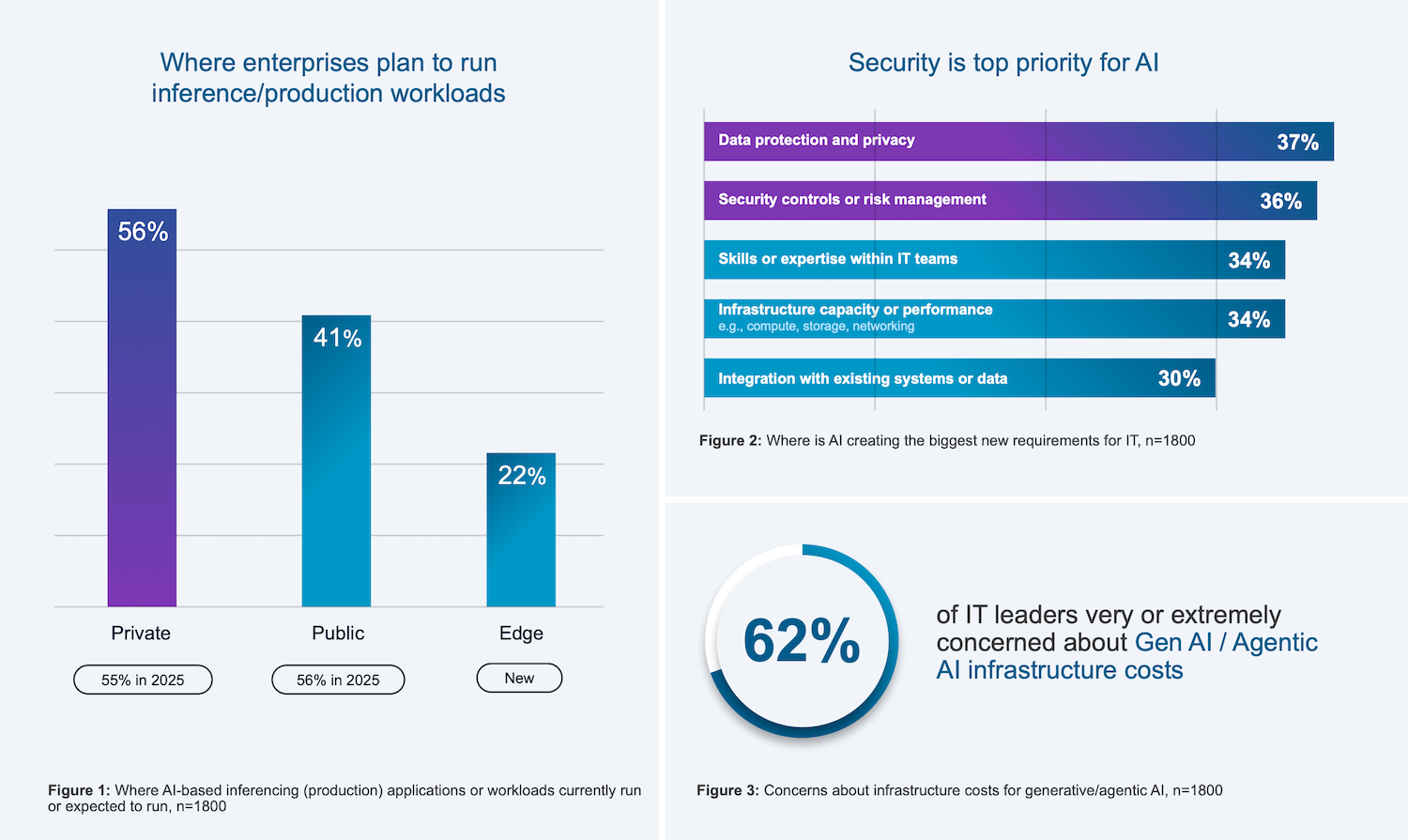
The company also shared early findings from its upcoming Private Cloud Outlook 2026 report, indicating a continued shift toward private cloud for production AI. According to the preview data, 56% of organizations are running or planning to run inference workloads in private environments, compared to 41% in the public cloud, a decline year over year. Cost concerns remain a primary driver, with 62% of IT leaders citing generative AI infrastructure costs as a major issue. Additionally, 36% report new requirements around data protection, privacy, and risk management driven by AI adoption.

Krish Prasad, senior vice president and general manager of VMware Cloud Foundation Division at Broadcom, highlighted three main challenges enterprises face when adopting AI: data and IP privacy concerns, rising infrastructure costs, and readiness for agentic AI. He emphasized that VCF 9.1 offers a unified platform that tackles these issues by providing advanced infrastructure for Private AI, enabling zero-trust security, optimizing costs through intelligent infrastructure choices, and supporting both agentic workflows and accelerated inferencing on a single platform.

Cost and Infrastructure Efficiency

VCF 9.1 introduces several infrastructure optimizations to improve resource efficiency for mixed AI and traditional workloads. Broadcom claims up to a 40% reduction in server costs through intelligent memory tiering, allowing higher workload density without additional hardware. Storage efficiency is also addressed through enhanced compression and deduplication techniques in AI data pipelines, reducing TCO by up to 39%.

Kubernetes operations are another focus area. The platform is designed to lower operational overhead by up to 38% while improving scalability and deployment speed. Broadcom also highlights operational improvements, including four-times-faster cluster upgrades and a doubling of fleet capacity, enabling enterprises to scale AI infrastructure more quickly across distributed environments.

Unified Platform for Mixed Workloads

VCF 9.1 continues VMware’s push toward a unified infrastructure model that supports virtual machines, containers, and AI workloads on the same platform. This includes support for both GPU-accelerated inference and CPU-heavy agentic workflows, reflecting the growing need to balance heterogeneous compute requirements.

The platform expands Kubernetes capabilities by offering greater cluster scale, faster deployment times, and shorter upgrade windows than earlier releases. These improvements are intended to support production-grade AI services that require continuous availability and minimal downtime.

Operational tooling has also been enhanced with new observability features that provide metrics such as time-to-first-token, token throughput, and GPU utilization across multiple accelerator types. This enables more granular performance tuning and capacity planning. Additionally, reusable application blueprints allow teams to standardize multi-VM and container-based deployments, reducing configuration drift across environments.

Hardware Flexibility and Ecosystem Integration

Broadcom VCF AMD partnership

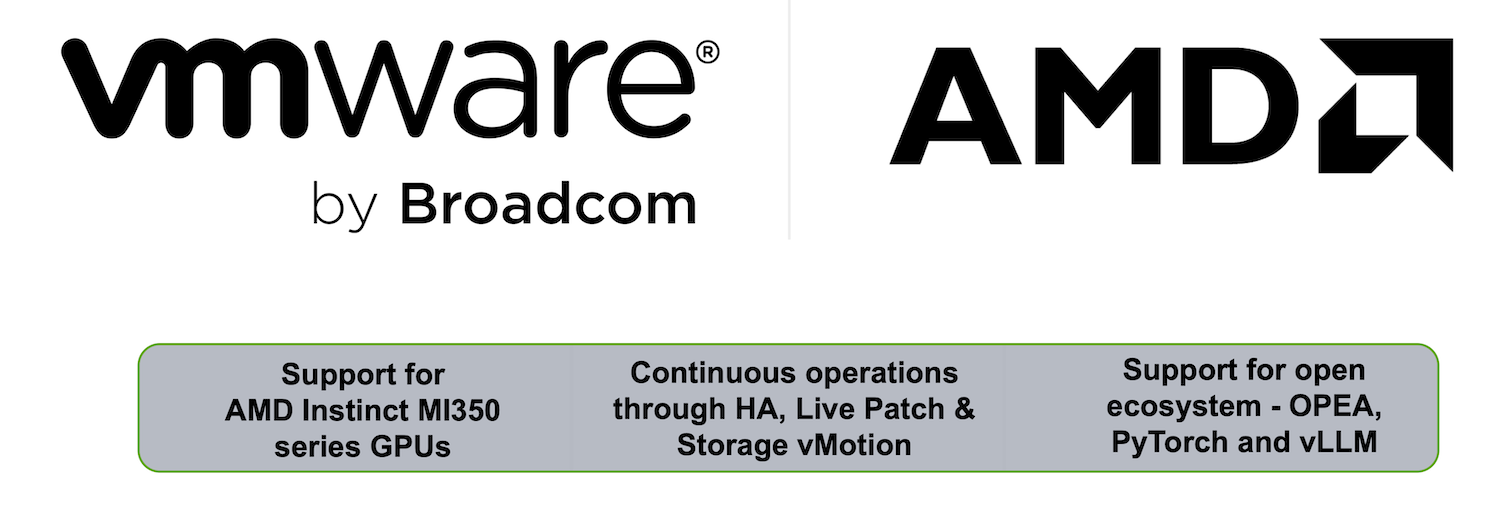
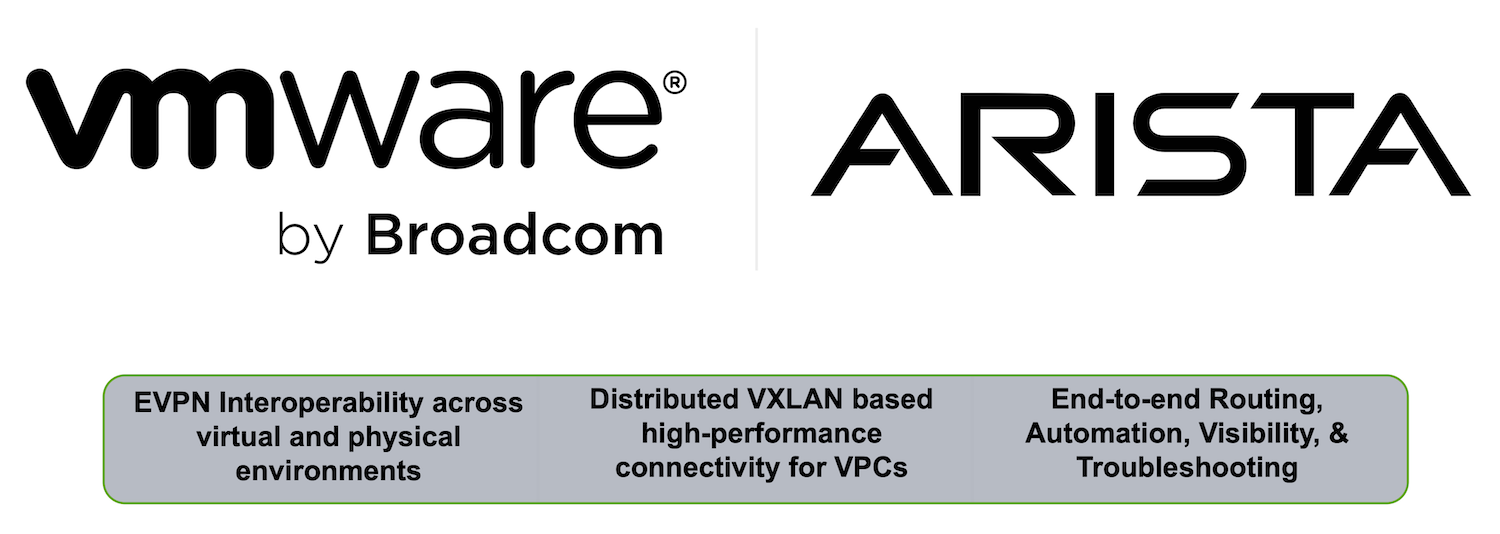
Broadcom emphasizes open ecosystem support in VCF 9.1, with multi-accelerator GPU compatibility spanning AMD and NVIDIA GPUs, as well as support for AMD and Intel CPUs. The platform also integrates with standards-based networking technologies such as EVPN and VXLAN, including interoperability with Arista Universal Cloud Network.

This approach allows enterprises to mix and match hardware based on workload requirements and availability, an important consideration given ongoing supply constraints in the GPU market.

Automation and Scalable Operations

Automation is a central theme of the release. VCF 9.1 extends fleet management capabilities to support up to 5,000 hosts and includes automated lifecycle operations that reduce manual intervention. Cluster upgrades are significantly accelerated, with support for distributed and air-gapped environments.

Multi-tenancy is also enhanced, enabling isolation of AI workloads across teams or customers while maintaining high utilization of shared GPU and CPU resources. This is especially relevant for service providers and large enterprises consolidating AI infrastructure.

The platform further reduces reliance on external appliances by integrating virtualized load balancing and security services via VMware Avi Load Balancer and vDefend. This helps reduce capital expenses while maintaining application resilience and lifecycle automation.

Integrated Security and Zero-Trust Architecture

Security is built into the VCF 9.1 infrastructure, with a focus on protecting AI models, training data, and inference pipelines. The platform implements zero-trust segmentation across workloads, including Kubernetes environments, and introduces distributed intrusion detection and prevention with high-throughput inspection.

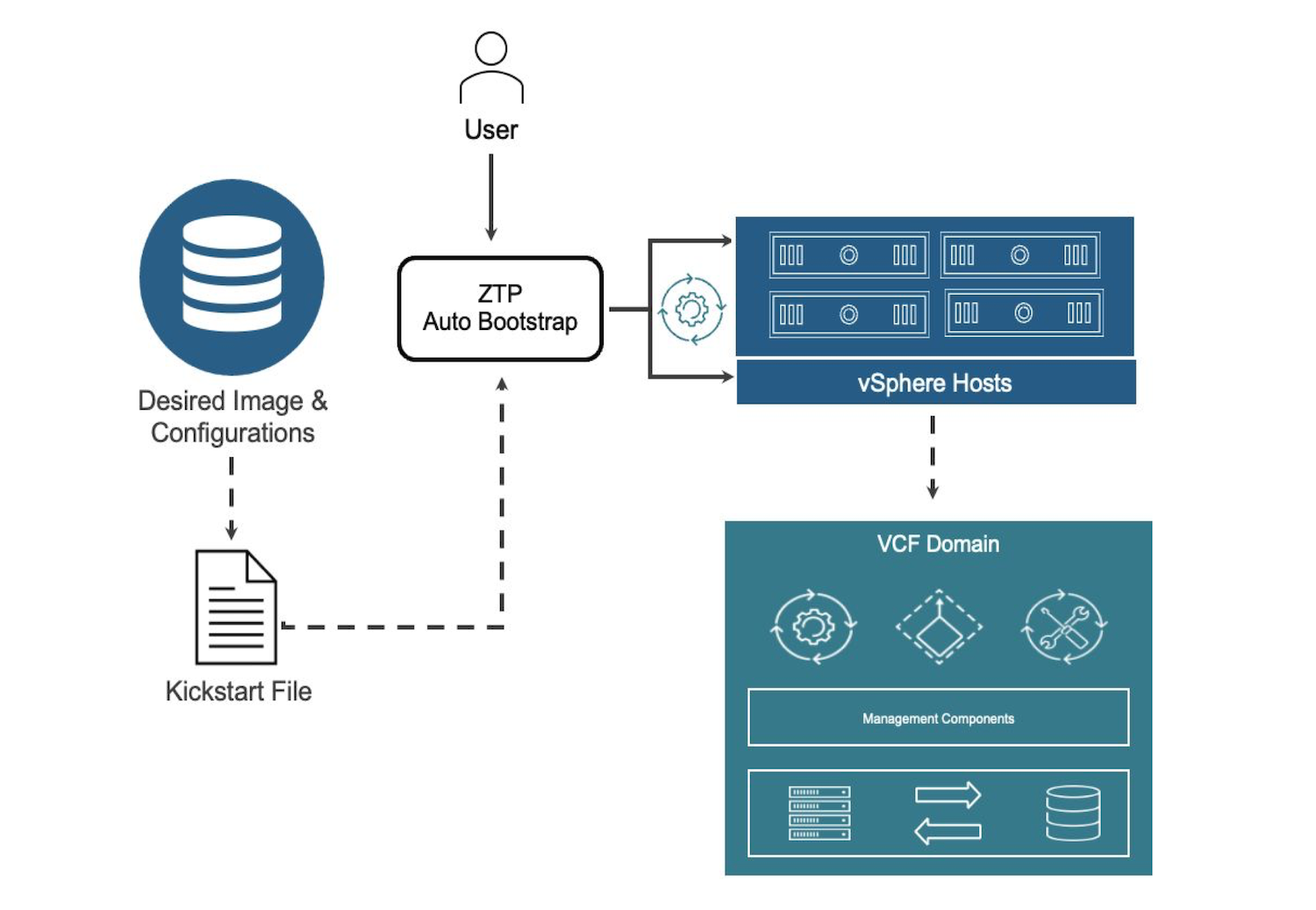
Broadcom VCF Zero Touch graphic

New ransomware recovery capabilities provide isolated recovery environments and validation tools, and integrate with CrowdStrike Falcon endpoint security. This approach is designed to protect high-value AI assets while keeping data localized to meet sovereignty requirements.

Continuous compliance features automate monitoring and remediation in line with defined policies, helping organizations maintain audit readiness without additional tooling. Live patching further reduces operational risk by enabling updates without downtime in most use cases, supporting always-on AI services.

Our Take: Strong Platform Evolution, But Not the Default AI Destination

VMware Cloud Foundation 9.1 is a logical step forward for Broadcom, especially as it tries to reposition VMware as a viable platform for enterprise AI. The emphasis on private cloud, integrated security, and unified operations across VMs, containers, and GPUs aligns with what many large organizations are asking for as they move inference workloads closer to their data.

Where the narrative gets more complicated is in how AI infrastructure is actually being deployed today. Modern distributed AI pipelines are being built around Kubernetes-first architectures, with increasingly modular infrastructure designs that prioritize flexibility and direct access to accelerated compute. In those environments, VMware is not typically the control plane, and in many cases becomes an additional layer rather than the foundation.

Cost is another factor that’s difficult to ignore. Broadcom is positioning VCF 9.1 as a way to reduce infrastructure spend through efficiency gains, but that argument runs into ongoing concerns from enterprise customers around VMware licensing and total cost of ownership. This tension is especially visible in smaller organizations, where teams that could benefit from a more integrated platform are often the most sensitive to licensing changes and platform lock-in. Larger enterprises, by contrast, are more likely to absorb those costs and invest in dedicated Kubernetes expertise to build and operate AI infrastructure at scale.

There is still a clear role for VCF 9.1. Enterprises that are already deeply invested in VMware, especially those prioritizing data governance, operational consistency, and private infrastructure, may find this approach compelling for inference and early-stage AI services. But for greenfield AI deployments, or teams moving at the pace of current AI frameworks, the center of gravity continues to sit with Kubernetes-native stacks and infrastructure designed specifically for distributed AI workloads.

The result is less about VMware becoming the destination for enterprise AI, and more about VMware ensuring it remains relevant as AI workloads begin to land inside the enterprise.

The post VMware Cloud Foundation 9.1 Positions Private Cloud as the Home for Enterprise AI appeared first on StorageReview.com.

Object First Fleet Manager for Distributed Ootbi Backup Environments is Generally Available

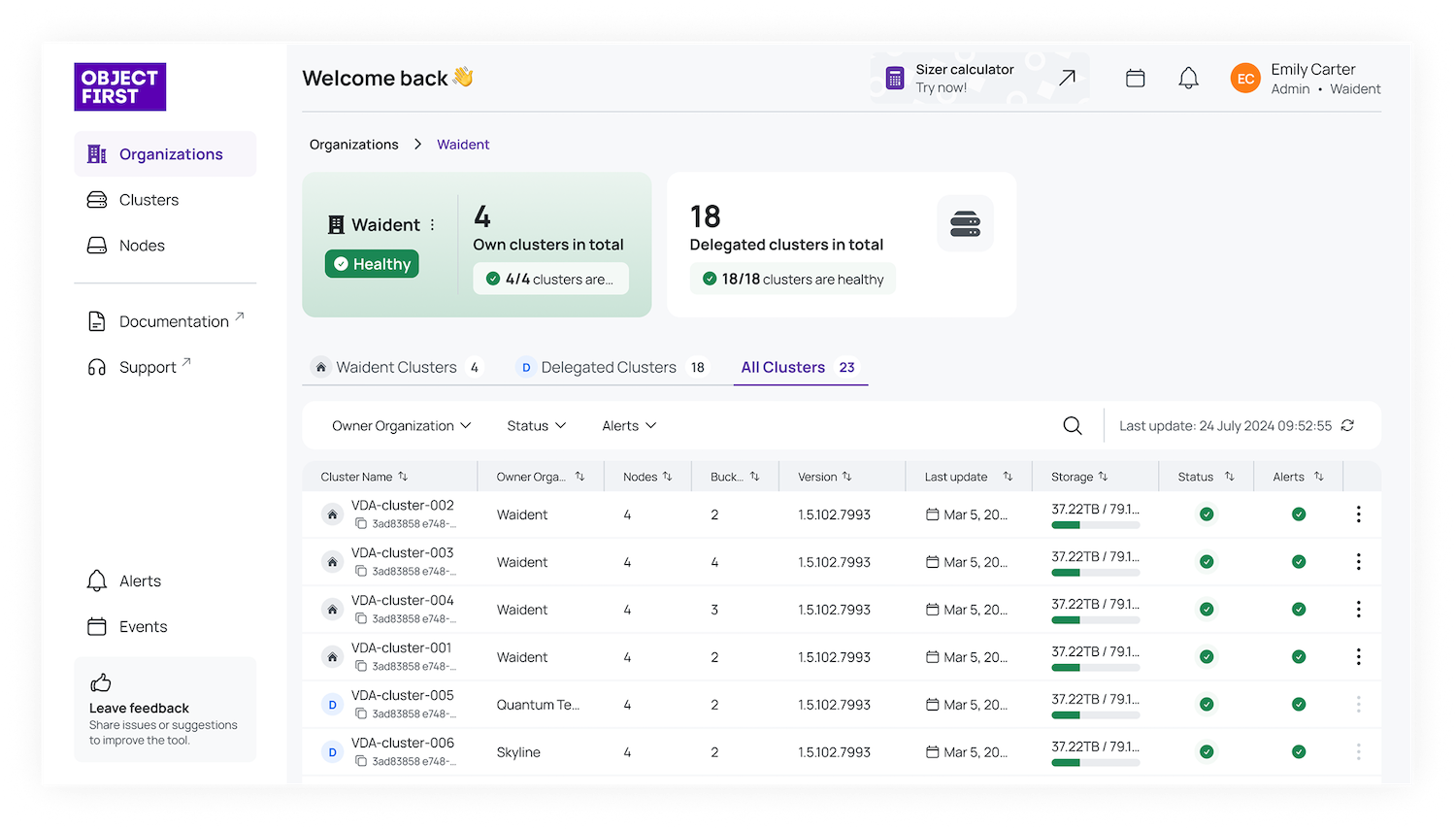
Object first Fleet Manager screenshot Object first Fleet Manager screenshot

Object First announced general availability of Fleet Manager, a cloud-based management service designed to simplify operations across distributed Ootbi backup storage deployments for Veeam environments. The service is included at no additional cost for customers with active support contracts and is targeted at enterprises and service providers managing multi-site backup infrastructure.

More on Object First:

As backup environments scale across locations and tenants, operational complexity and visibility gaps increase. Object First cites that the majority of ransomware attacks now target backup data, making centralized oversight and immutability critical to recovery readiness. Fleet Manager addresses this by aggregating telemetry from Ootbi clusters into a single management interface without accessing or modifying backup data. The platform follows a zero-trust design and aligns with CISA’s secure-by-design principles, ensuring that backup data remains immutable even from privileged administrators.

Object first Fleet Manager screenshot

Fleet Manager provides a centralized view of distributed backup infrastructure, enabling administrators to monitor cluster health, storage utilization, and system status across environments. Integrated alerting surfaces issues, such as anomalies detected by Object First’s honeypot capabilities, enabling faster responses to potential threats or operational issues.

The service also introduces secure remote access via a cloud-based control plane, requiring no additional hardware or software deployment. This reduces management overhead while maintaining strict separation between management telemetry and protected backup data.

For service providers and enterprises operating multi-tenant environments, Fleet Manager adds visibility across customer deployments. Administrators can monitor multiple clusters simultaneously, identify outages or capacity constraints, and track potential security events from a unified interface.

With Fleet Manager, Object First extends its Ootbi platform beyond immutable backup storage to include centralized fleet operations, addressing the growing need for visibility and control in distributed, ransomware-resilient backup architectures.

The post Object First Fleet Manager for Distributed Ootbi Backup Environments is Generally Available appeared first on StorageReview.com.

IBM Combines AI Operations, Sovereign Infrastructure, and Quantum Drug Discovery Progress at Think 2026

IBM Quantum Computers IBM Quantum Computers

At Think 2026, IBM made a broad set of announcements to show how it wants enterprises to operationalize AI across data, infrastructure, governance, and regulated environments. The company’s updates included a new enterprise AI operating model, the general availability of IBM Sovereign Core, and a separate quantum computing milestone with Cleveland Clinic and RIKEN, advancing biomolecular simulation to 12,635 atoms.

IBM Quantum Computers

Taken together, the announcements show IBM positioning AI as much as an infrastructure and operations problem as a model problem. The company’s message was that enterprise adoption now depends less on proving AI can work and more on building the control planes, data pipelines, and compliance frameworks needed to run it at scale.

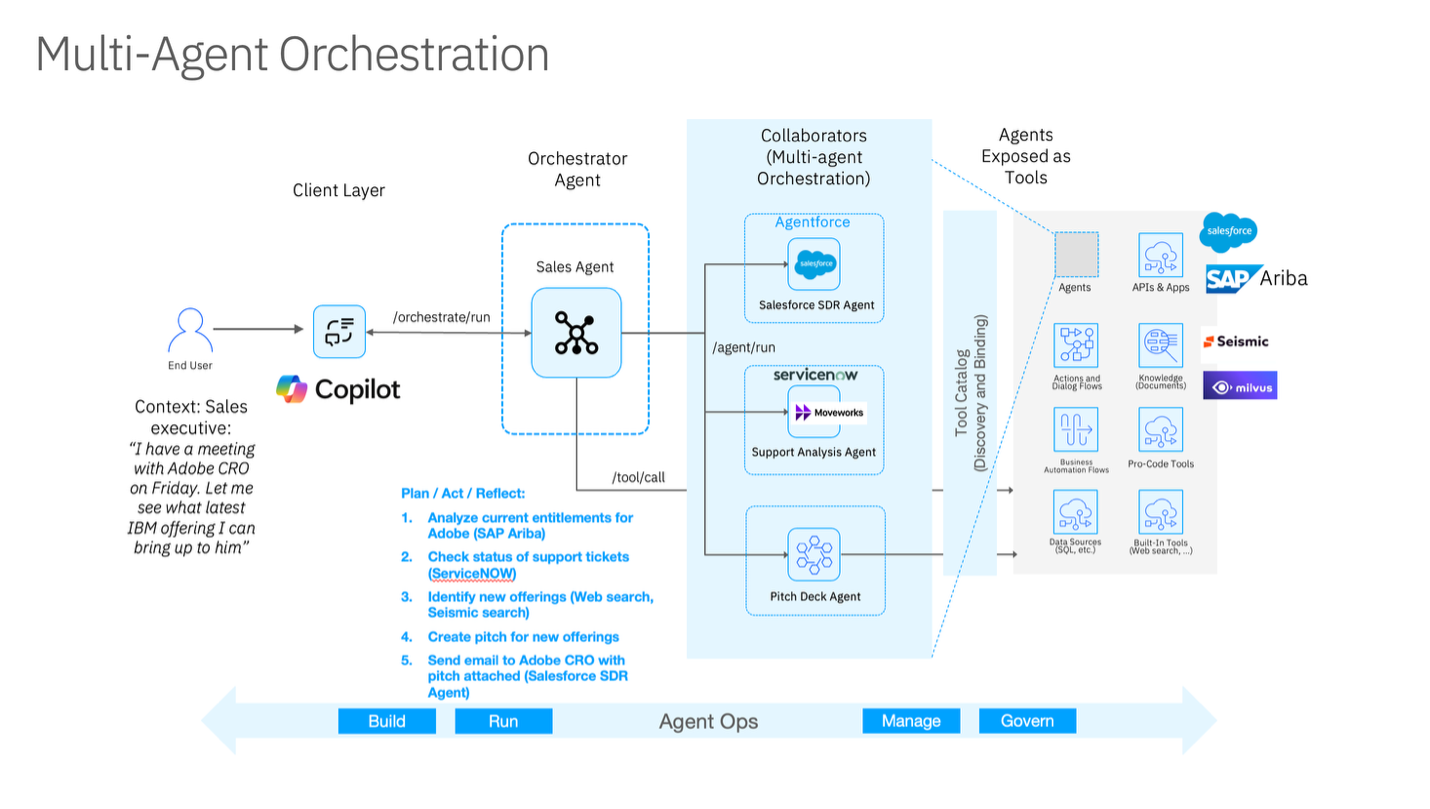
IBM framed this in terms of four layers: agents, data, automation, and hybrid operations. On the agent side, the company introduced the next-generation watsonx Orchestrate in private preview as a multi-agent control plane, enabling enterprises to deploy and govern agents from different sources under a common policy model. IBM also highlighted IBM Bob, now generally available, as an agentic development tool for enterprise developers, along with a Bob Premium Package for Z in private preview for mainframe environments.

IBM Multi-agent flow chart

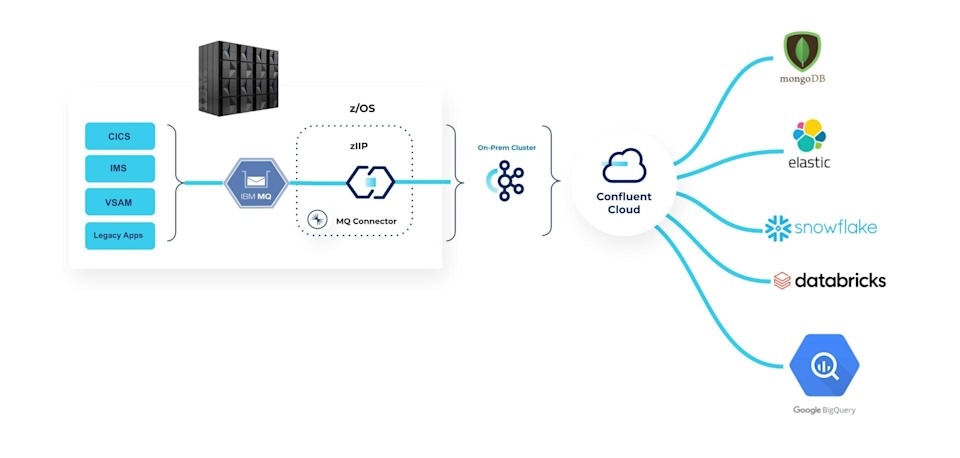
For the data layer, IBM emphasized the need for real-time, AI-ready context over static data silos. It tied that strategy to Confluent, which it described as part of its expanding real-time data foundation, and to new watsonx.data capabilities. Notable additions included a federated context layer in watsonx.data, new OpenRAG and OpenSearch capabilities, and integrations that connect real-time event streaming with batch analytics across hybrid environments. IBM also highlighted GPU-accelerated Presto in watsonx.data, which, in internal and proof-of-concept work, was positioned to improve price-performance for large enterprise data workloads.

IBM Confluent flow chart

IBM’s automation story focused on reducing the operational friction of running AI across fragmented infrastructure stacks. The new IBM Concert platform, now in public preview, is designed to correlate telemetry and operational signals across applications, infrastructure, and networks, creating a more unified operational view. IBM also used the event to expand its security automation portfolio, including Concert Secure Coder, Vault 2.0, and zSecure Secret Manager, all aimed at tightening the connection among development, remediation, secrets management, and hybrid operations.

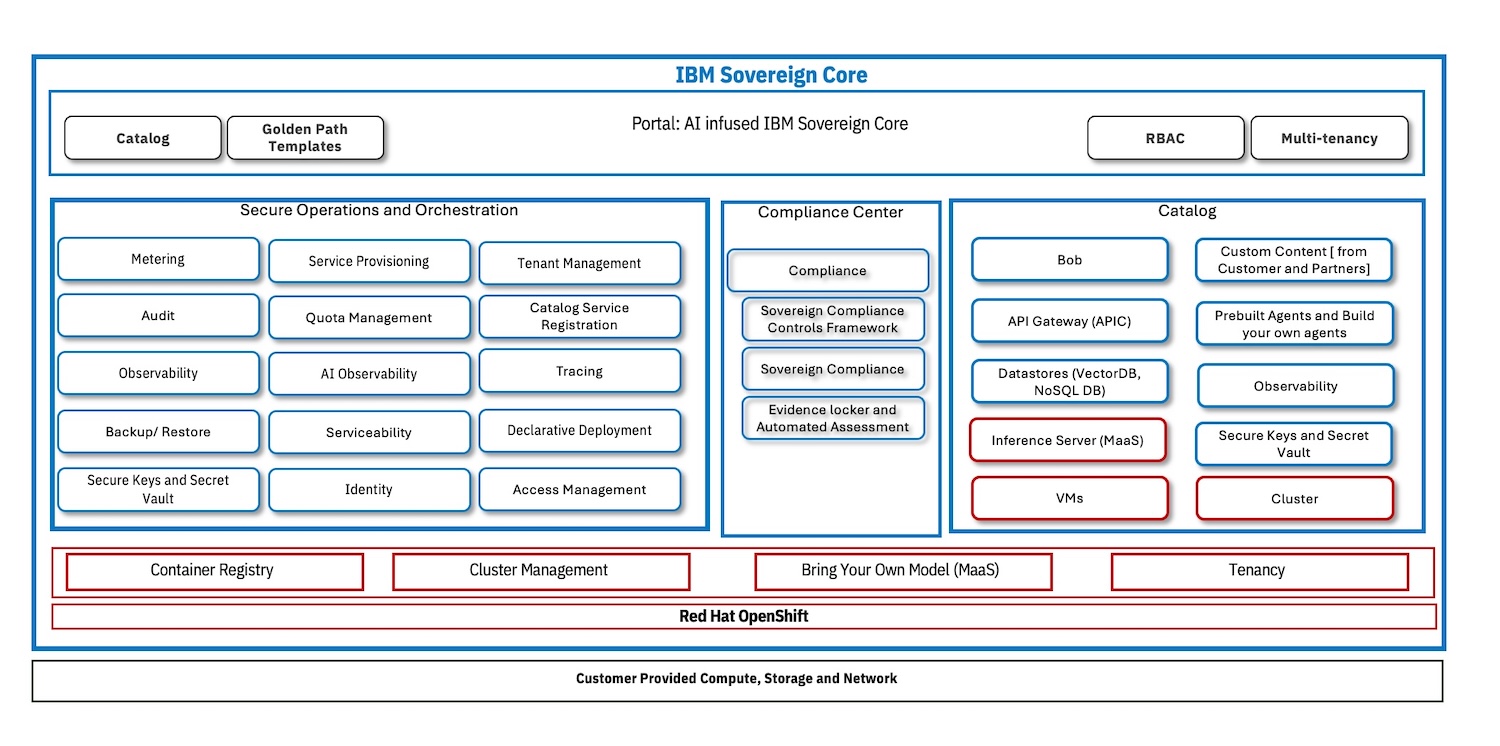
IBM Sovereign Core graphic

The sovereignty layer was among the more concrete product announcements. IBM Sovereign Core is now generally available as a software platform for building and operating AI-ready sovereign environments across hybrid infrastructure. IBM describes the platform as a way to move sovereignty from policy language to runtime enforcement, with controls spanning operations, data, technology architecture, and AI execution.

In practice, Sovereign Core packages a customer-operated control plane with in-boundary identity, encryption, logging, compliance monitoring, and AI execution. It also includes preloaded regulatory frameworks, automated evidence generation, and templates for CPU, GPU, and AI inference environments. The goal is to enable enterprises, governments, and service providers to demonstrate where workloads run, how they are governed, and whether they remain compliant over time. IBM also emphasized that the platform is built on open technologies such as Red Hat OpenShift and Red Hat AI, and that its ecosystem catalog includes partners such as AMD, Dell, Intel, MongoDB, Cloudera, Elastic, and Palo Alto Networks.

The Sovereign Core launch matters because AI governance increasingly clashes with regional regulations, data localization rules, and enterprise audit requirements. IBM’s position is that sovereignty must now include operational control over models, agents, and inference workflows, not just data residency. This is especially relevant for public-sector, regulated-industry, and service-provider deployments, where the compliance posture must be continuously demonstrated.

In addition to the Think infrastructure announcements, IBM also published a significant quantum computing update focused on drug discovery and molecular simulation. In collaboration with the Cleveland Clinic and RIKEN, IBM used quantum hardware and two major supercomputers to simulate protein complexes with up to 12,635 atoms. According to the release, these are the largest known simulations of biologically meaningful molecules performed on quantum hardware to date.

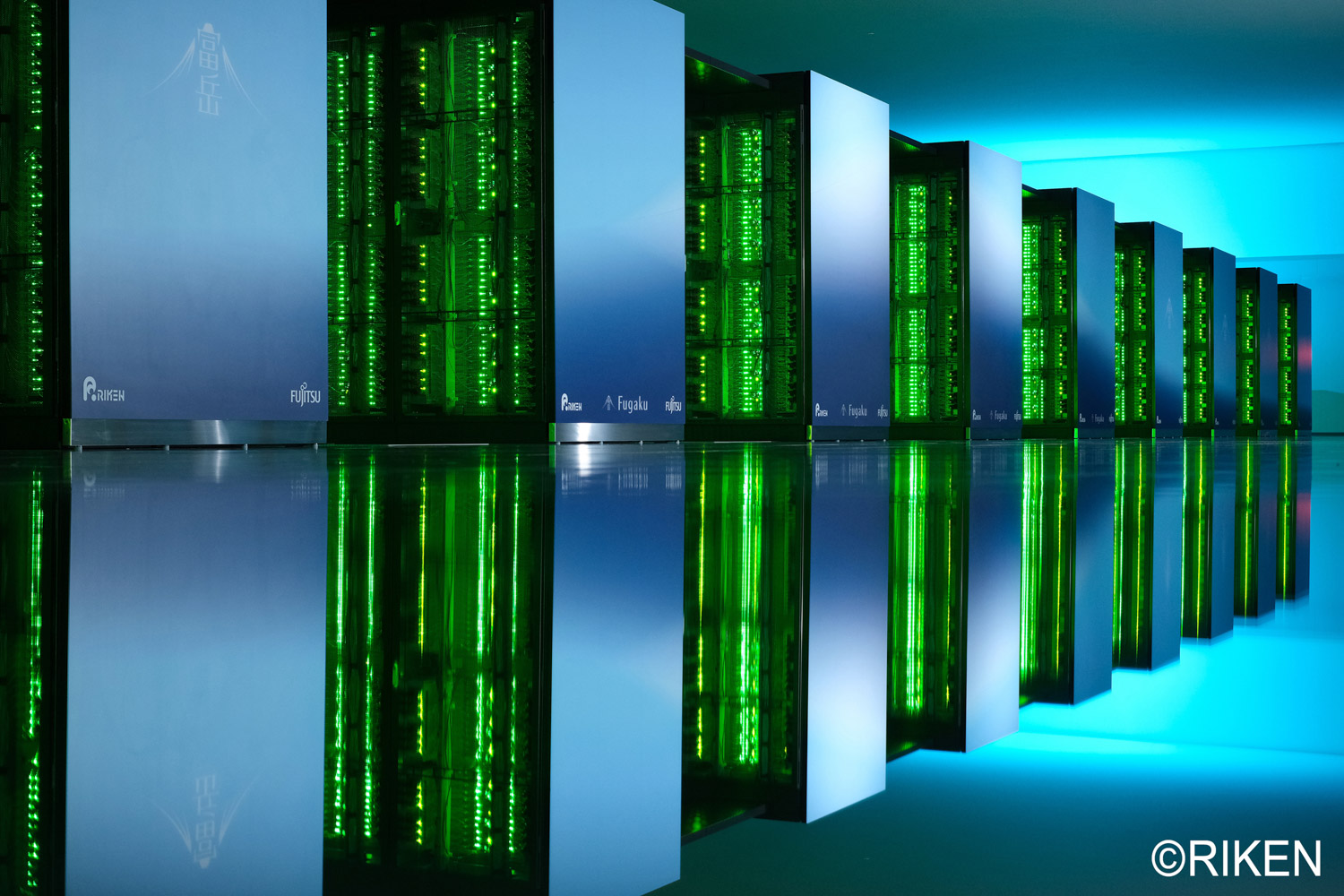
IBM Fugaku Riken supercomputer

The work used IBM’s 156-qubit Heron processors alongside the Fugaku and Miyabi-G supercomputers, with classical systems decomposing protein-ligand complexes into fragments and quantum systems calculating the quantum-mechanical behavior of those fragments. IBM said the workflow required up to 94 qubits and nearly 6,000 quantum operations at certain stages of the calculation. The team also introduced a hybrid algorithm called EWF-TrimSQD, which IBM said reduced computational overhead and broadened the range of molecules that could be modeled. Compared with results from six months earlier, the organizations reported roughly a 40x increase in the size of proteins addressed by the method and up to a 210x improvement in accuracy in a key workflow step.

IBM and its research partners cast the result as evidence that quantum-centric supercomputing is moving beyond benchmark science into practical scientific computing. The near-term implication is not that quantum systems replace classical HPC, but that they can begin contributing to energy calculations and molecular modeling workflows relevant to drug discovery, enzyme behavior, and protein interactions.

IBM is attempting to connect agent orchestration, real-time data, hybrid operations, and sovereignty controls into a single enterprise narrative. The quantum milestone is more forward-looking, but it reinforces the same theme: IBM wants advanced compute, AI, and governance to be seen as part of a single architectural continuum rather than as separate product silos.

According to messages from Think 2026, enterprises need more than models. They need governed data, observable infrastructure, enforceable sovereignty, and operational tooling that scales AI without compromising compliance or adding complexity beyond what teams can manage.

The post IBM Combines AI Operations, Sovereign Infrastructure, and Quantum Drug Discovery Progress at Think 2026 appeared first on StorageReview.com.

The MIT-IBM Computing Research Lab Expands Scope to Quantum, AI, and Algorithms

IBM and the Massachusetts Institute of Technology (MIT) have launched the MIT-IBM Computing Research Lab, a new joint research organization intended to advance foundational work in artificial intelligence, algorithms, and quantum computing, with an emphasis on computing methods that can extend beyond the practical limits of classical systems. The lab evolves from the MIT-IBM Watson AI Lab (founded in 2017 on MIT’s campus). It reflects a shift in the technology landscape, in which AI is now broadly deployed, and quantum computing is moving toward greater practical utility.

Leadership described the new lab as a vehicle for deeper co-development across modeling, algorithms, and system design, particularly at the intersection of AI and quantum. MIT leadership positioned the effort as a continuation of the partners’ prior decade of results and a mechanism for sustaining long-horizon research with academic rigor and industrial relevance.

Research Focus: AI, Algorithms, Quantum, and Hybrid Systems

The lab’s technical agenda is centered on collaborative efforts across multiple domains.

One of the primary focus areas is AI and hybrid computing, exploring approaches that combine classical computing with advanced AI methods and, where suitable, quantum-centric elements. The goal is to enhance the integration of AI capabilities into production-oriented computing environments, with an emphasis on practical, operational improvements.

MIT-IBM Computing Research Lab

Additionally, the lab emphasizes the development of small, efficient language model architectures and new AI computing paradigms. These efforts are viewed through an enterprise deployment lens, with particular attention to system attributes such as reliability, transparency, and trustworthiness. This indicates a focus not just on research prototypes but on creating operational systems that meet real-world constraints.

The agenda also includes research into quantum algorithms and the mathematical foundations needed to tackle complex problem classes relevant to fields such as materials science, chemistry, and biology. Alongside this, there is a broader investigation into the mathematical and algorithmic foundations of next-generation computation, aimed at advancing foundational understanding and capabilities.

The lab also highlighted foundational work spanning machine learning theory, optimization, Hamiltonian simulation, and partial differential equations (PDEs). These areas are frequently bottlenecks for large-scale dynamical system approximation, where classical methods can struggle with fidelity, cost, or both. While several example application domains were cited, the technical thread is improved methods for simulation and optimization that could translate into higher-accuracy forecasting and more efficient compute pipelines.

Alignment With MIT Initiatives and IBM’s Quantum Roadmap

MIT noted the lab complements two institute-wide efforts: the MIT Generative AI Impact Consortium and the MIT Quantum Initiative. IBM, for its part, reiterated its plan to deliver a fault-tolerant quantum computer by 2029 and its broader push toward quantum-centric supercomputing, which it describes as the tight integration of quantum systems with high-performance computing and AI accelerators.

Lab structure and leadership

The lab will continue to be co-directed by Aude Oliva, Senior Research Scientist at MIT CSAIL, and David Cox, Vice President, AI Foundations, at IBM Research. Area co-leads were named across three tracks:

  • AI: Jacob Andreas (MIT EECS) and Kenney Ng (IBM Research; MIT-IBM science program manager)
  • Algorithms: Vinod Vaikuntanathan (MIT EECS) and Vasileios Kalantzis (IBM Research)
  • Quantum: Aram Harrow (MIT Physics) and Hanhee Paik (IBM; Quantum Algorithm Centers)

MIT also identified Dan Huttenlocher, dean of the MIT Schwarzman College of Computing, as MIT co-chair of the lab.

Output to date from the prior lab

MIT and IBM framed the new lab as building on the Watson AI Lab’s scale and publication record. Since its inception, the prior collaboration has funded 210+ research projects involving 150+ MIT faculty members and 200+ IBM researchers, resulting in 1,500+ peer-reviewed articles. The program also reported funding for 500+ students and postdoctoral researchers, positioning workforce development as a continuing deliverable alongside research output.

IBM and Dallara Announce AI and Quantum Exploration for Aerodynamic Design Workflows

In a separate announcement following the MIT-IBM lab launch, IBM and the Dallara Group disclosed a collaboration focused on applying AI to physics-informed vehicle aerodynamics and on exploring quantum and hybrid quantum-classical methods that could complement simulation-heavy design cycles over time.

Physics-based AI as a Surrogate to Accelerate CFD-driven Iteration

The project targets a well-known constraint in motorsport and high-performance vehicle development: computational fluid dynamics (CFD) is accurate but expensive, and iterative geometry exploration can stretch from hours per sweep to weeks or months across a full development workflow.

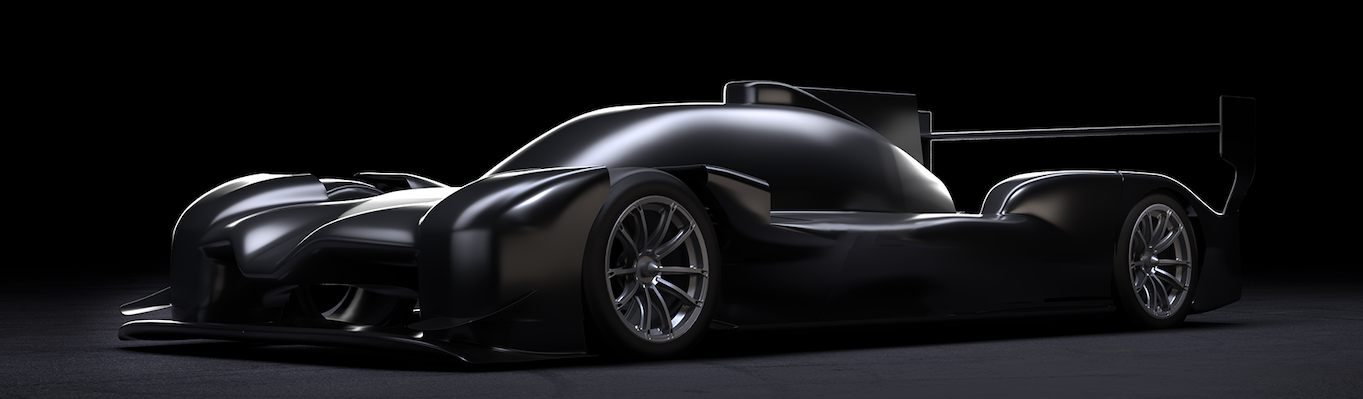
IBM-Dallara LMP2 concept car

IBM and Dallara reported early results from a physics-based AI method for evaluating multiple rear diffuser configurations on a conceptual LMP2-like race car. In the described comparison, the traditional CFD approach took a few hours to compute all configurations. In contrast, the AI method completed the same evaluations in about 10 seconds, reported error margins comparable to CFD, and identified an optimal configuration.

IBM characterized this as a path to compressing the evaluation of hundreds of configurations from days to minutes, enabling earlier exploration in the design cycle while reserving full CFD for deeper validation and final optimization. The release also referenced pressure-field modeling for a rear diffuser angle adjustment from -2 to +4 degrees, with AI outputs described as closely matching CFD results.

Quantum and hybrid approaches under evaluation

In parallel, the teams said they are assessing where quantum or hybrid quantum-classical techniques could fit into simulation and optimization workflows. The near-term framing is exploratory: identifying workloads where these methods could complement established CFD pipelines, and mapping longer-term opportunities as quantum systems mature.

Research publication and model lineage (arXiv and ICLR)

IBM and Dallara tied the work to recent publications:

The companies said they presented related advances at the International Conference on Learning Representations (ICLR) on April 26, 2026, in Rio de Janeiro.

Fabrizio Arbucci, CIO of Dallara, highlighted the broader significance of neural surrogate models, initially tested in high-performance vehicles. He emphasized that advancements in aerodynamic efficiency, such as a one to two percent reduction in drag, can lead to substantial fuel savings across various transport modes, including passenger cars and aircraft, benefiting industries reliant on aerodynamics.

The post The MIT-IBM Computing Research Lab Expands Scope to Quantum, AI, and Algorithms appeared first on StorageReview.com.

Scality Introduces ARTESCA+ Veeam HA with Integrated Triple High Availability

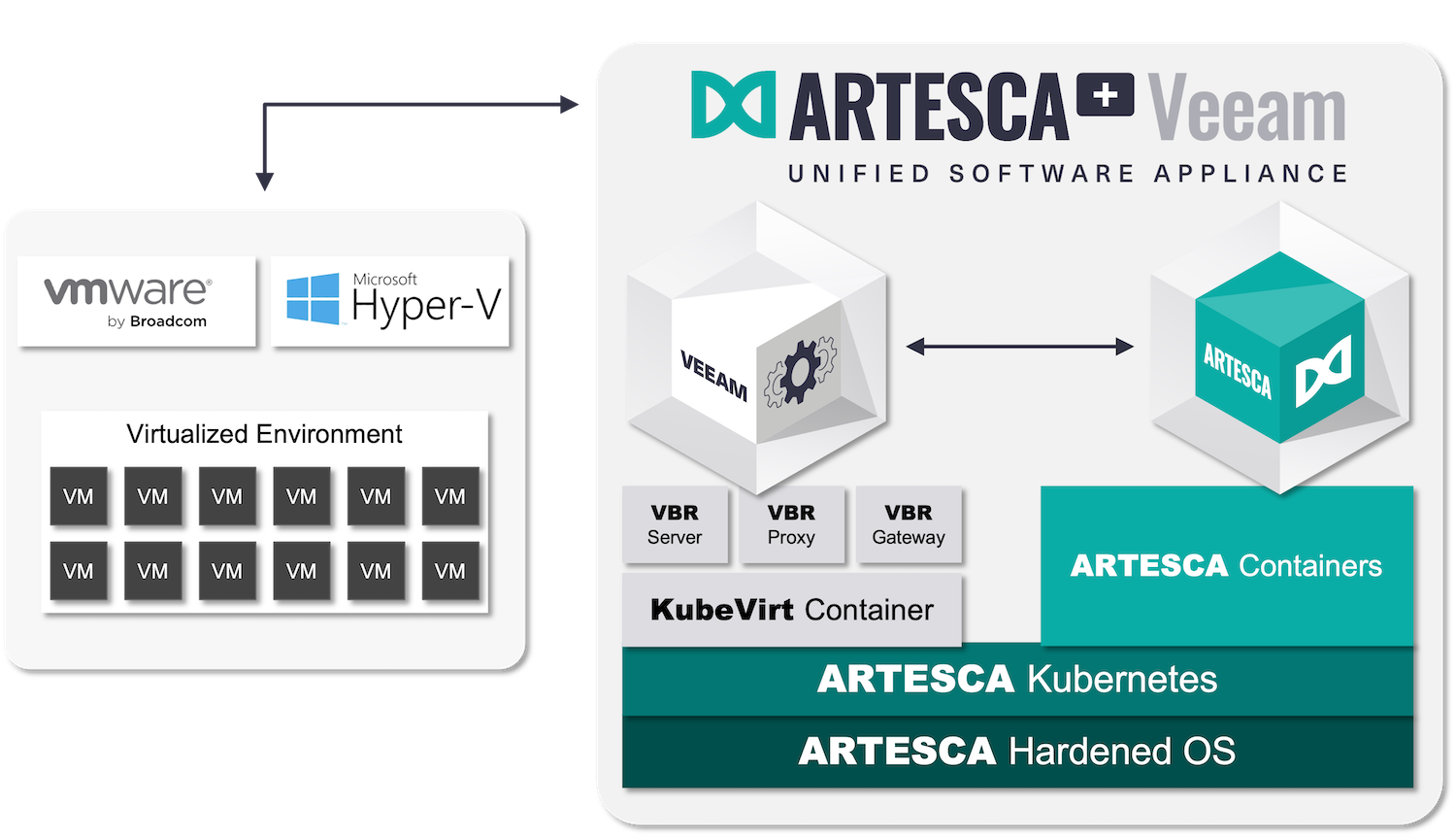
Scality has announced ARTESCA+ Veeam HA, an updated version of its unified software appliance that combines the Veeam Data Platform with Scality ARTESCA object storage on a single system. The release extends the original single-node design into a multi-node, highly available architecture, positioning the platform as a turnkey backup and recovery solution for mid-size enterprises.

Artesca+ Veeam architecture graphic

At the core of the update is native integration with the Veeam Software Appliance and its built-in high availability capabilities. Scality delivers what it calls triple-high availability across the application, database, and storage layers. This includes high availability for the Veeam Data Platform, resilience for the Veeam configuration database, and distributed storage availability through ARTESCA. All components run on the same hardware platform, eliminating the need for external plugins or additional infrastructure.

The combined system is designed to operate without a single point of failure. If a node becomes unavailable, workloads continue to run without interruption. The architecture scales from 50TB to 10PB, allowing the platform to address mid-market requirements while extending to larger enterprise deployments.

Focus on Backup Resilience and Attack Surface Reduction

The announcement reflects the growing focus on backup infrastructure as a primary target for ransomware. With the majority of attacks now targeting backup repositories, the ability to maintain clean, immutable copies of data has become critical for recovery operations.

ARTESCA is positioned as a backup-centric object storage platform, with S3 Object Lock enforcing immutability at the storage layer. Once data is written in compliance mode, it cannot be altered or deleted during the defined retention period. This applies across users and administrators, effectively preventing tampering or encryption by attackers.

The platform also incorporates a zero-trust security model, requiring authentication for all access and limiting exposure across the stack. Scality’s CORE5 framework extends this approach across multiple layers of the architecture, from API interactions through underlying infrastructure, to reduce potential entry points.

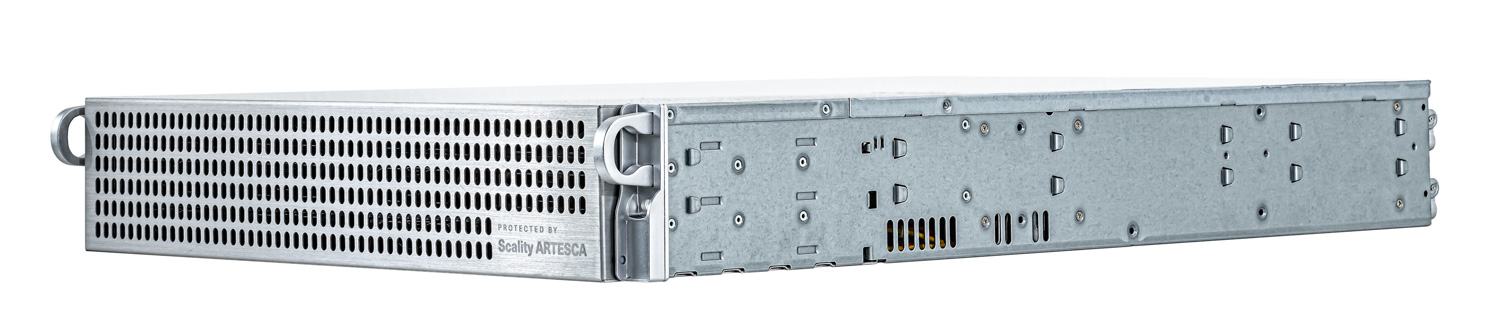
Scality Artesca Appliance left facing

A key architectural decision is the co-location of Veeam and ARTESCA on the same appliance. By keeping all communication internal, the design removes external data paths and prevents exposure of access credentials. A predefined firewall and least-privilege access model further reduce the attack surface. The result is a tightly integrated system that minimizes configuration overhead and reduces operational risk.

Metric/Field Tower S Tower L 2U Rack S 2U Rack M 2U Rack L 2u Rack XL 24 LFF Expandable
Overview
Form factor Tower / 1U Rack Tower / 1U Rack 2U Rack 2U Rack 2U Rack 2U Rack 2U Rack
Storage Configuration
HDD 4x 8TB 4x 16TB 12x 8TB 12x 12TB 12x 16TB 12x 24TB 12-24x 24TB
Source data 10TB 20TB 40TB 60TB 80TB 120TB 240TB
Usable capacity 21.1TB 42.2TB 73.7TB 110.5TB 147.4TB 221TB 442TB
Virtualization
Qty VMs 40 80 160 240 320 480 960

High-Availability Multi-Server Options

Metric/Field 3 Server 12 LFF Chassis 3 Server 24 LFF Chassis 6 Server 24 LFF Chassis
Overview
Form Factor 3 Server 12 LFF Chassis 3 Server 24 LFF Chassis 6 Server 24 LFF Chassis
Storage Configuration
HDD
Source data 170TB 340TB 470TB 720TB 1,150TB 1,700TB
Usable capacity 251TB 502TB 670TB 1,006TB 1,617TB 2,426TB
Virtualization
Qty VMs 500 1,000 1,500 2,500 4,000 6,000

Simplified Deployment with Built-In High Availability

The unified appliance approach is intended to simplify deployment and ongoing operations. Integration between backup software and storage is preconfigured, reducing the need for manual setup and lowering the likelihood of misconfiguration. Automation across deployment and lifecycle management further supports consistency in production environments.

Michael Cade, EMEA Field CTO at Veeam, noted that Scality ARTESCA+ Veeam’s integrated high-availability features facilitate the adoption of immutable backups by simplifying deployment, streamlining daily operations, and incorporating safeguards to ensure continuous protection and availability of backups even if a component fails.

Thomas Danan, Senior Product Director at Scality’s ARTESCA, highlighted that running Veeam and ARTESCA together on the same platform reduces external attack vectors, creating a deployment that’s simple, more secure, and highly available. He added that the integrated solution features triple high availability, CORE5 security, and a $100,000 cyber guarantee, bringing enterprise-level cyber resilience to mid-sized organizations.

Availability

ARTESCA+ Veeam HA is available through Scality’s global channel network and supports deployment on standard x86 platforms from vendors including Supermicro, HPE, Lenovo, Cisco, and Dell. The offering includes Scality’s $100,000 cyber guarantee, which applies to customers using ARTESCA with immutable storage protections.

The post Scality Introduces ARTESCA+ Veeam HA with Integrated Triple High Availability appeared first on StorageReview.com.

Google Announces TPU v8t Sunfish and TPU v8i Zebrafish

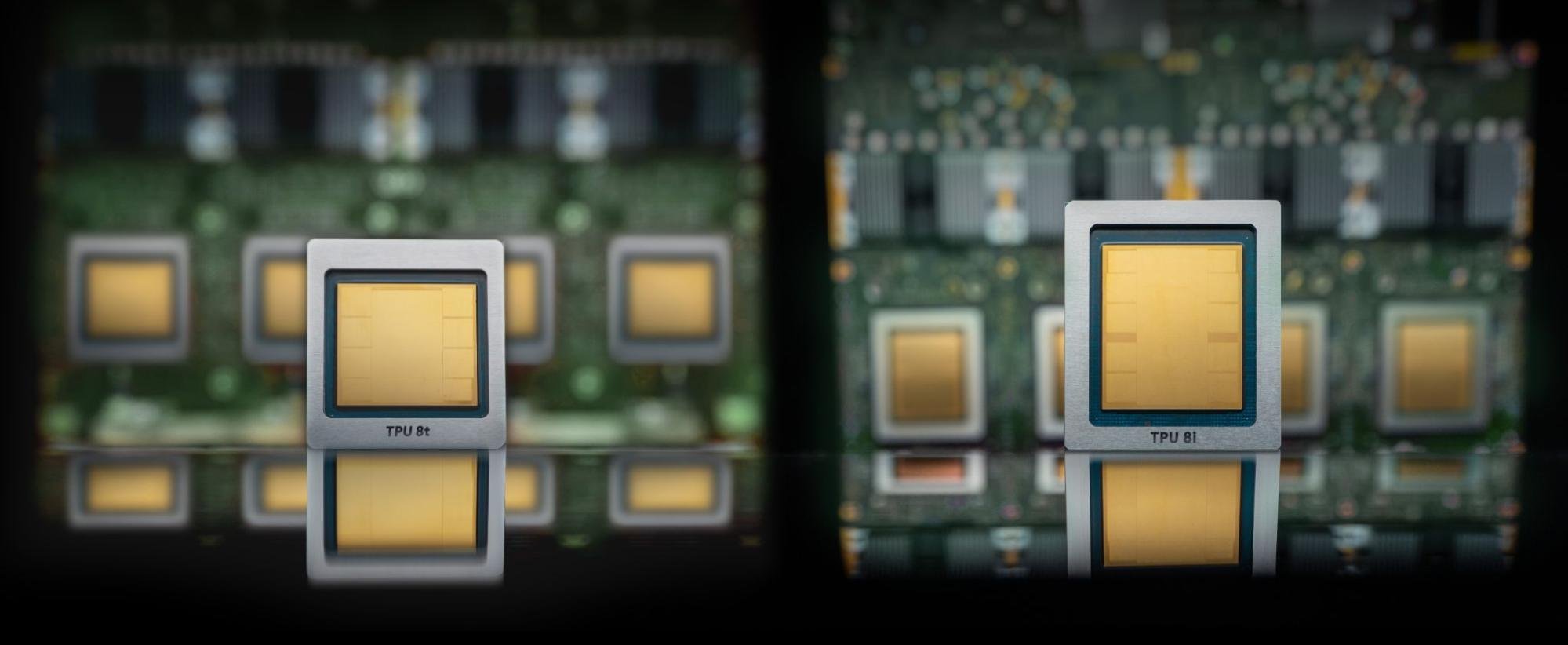
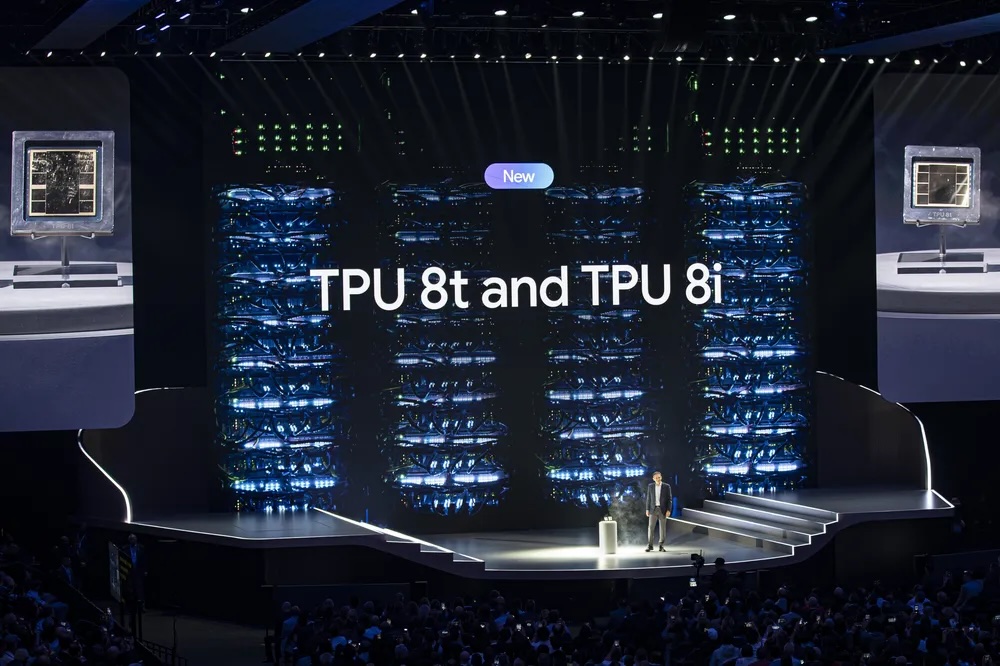
At Google Cloud Next, Google announced its next-generation AI accelerators: the TPU v8t “Sunfish” for training and the TPU v8i “Zebrafish” for inference, along with its new Virgo data center fabric. From Google’s blog posts, it is clear these chips are optimized for “the agentic era”: training frontier mixture-of-experts models at the hundreds-of-thousands-of-chips scale, and then serving those same models at low latency and aggressive price-per-token targets. The v8t and v8i are two architecturally distinct chips that share a host platform and a fabric but diverge on memory capacity, on-chip SRAM, interconnect topology, and on-die specialization. The v8t is built for dense matrix multiplication (matmul) at scale, while the v8i is built around KV cache on silicon and per-token collective latency.

A single v8t superpod scales to 9,600 chips, holds 2 PB of HBM, and delivers 121 EFLOPS of FP4 compute, nearly 3x the per-pod compute of an Ironwood superpod. v8i pairs 288 GB of HBM with 384 MB of on-chip SRAM (3x Ironwood) within a 1,152-chip scale-up domain and claims 80% better performance-per-dollar than Ironwood for LLM inference. Virgo binds both chip families into a single data center fabric that links more than 134,000 v8t chips at 47 Pb/s of non-blocking bisection bandwidth, with up to 4x the per-accelerator bandwidth and 40% lower unloaded latency than the prior generation.

What a TPU Actually Is

Before getting into the v8 silicon, some background on what a TPU is and how it differs from a GPU, because the v8 design decisions only make sense against that context.

A Tensor Processing Unit is a custom ASIC that Google has been iterating on since 2015. Every generation has been built around the same core idea: instead of scheduling thousands of small cores dynamically, as a GPU does, a TPU centers on a small number of very large MXUs (matrix multiply units), fed by an on-chip, software-managed SRAM scratchpad, and driven by an ahead-of-time compiler. Each chip carries a handful of TensorCores, each built around one large systolic-array MXU, plus a smaller set of SparseCores dedicated to the irregular gather-scatter lookups that dominate recommendation embeddings. Data flows from HBM through the scratchpad, through the MXU, back to the scratchpad, and out again, with a Vector Processing Unit handling activations, normalizations, and reductions alongside. There is no hardware warp scheduler, no L1 or L2 cache hierarchy in the GPU sense, and no dynamic dispatch.

The upside of this design is efficiency in dense linear algebra. With an ahead-of-time compiler deciding where every tensor lives and when every collective fires, there is no cache-miss jitter and no warp-scheduler tax, which matters more than it sounds when tens of thousands of chips have to stay synchronized through a collective. Real-world model FLOP utilization on TPUs for well-tuned training workloads tends to be higher than on traditional GPUs. The downside is that anything that does not map cleanly to large dense matmuls, specifically dynamic shapes, irregular sparsity patterns, MoE routing with uneven token distribution, or graph neural networks, is harder to express efficiently. TPUs have also historically carried less HBM per chip than their GPU counterparts and have had much narrower framework support. XLA and JAX are first-class; PyTorch has, until recently, required a translation layer; in addition, the compiler, runtime, networking libraries, and multi-pod software stack remain closed-source within Google.

Sparsity is the cleanest example of the philosophical gap between GPUs and TPUs, and the reason is structural rather than marketing. NVIDIA has supported 2:4 structured sparsity on Tensor Cores since Ampere, and, on paper, performance for sparse workloads is double that of dense workloads. A Tensor Core is fundamentally a dispatch unit: it takes explicit operand loads per MMA instruction, so adding a sparse MMA variant that accepts a compressed 2-out-of-4 block plus index metadata is a straightforward extension of the existing instruction set. Each cycle, the hardware pulls only the non-zero values and their indices into the multiplier array, implicitly skipping the zeros.

A systolic array works the opposite way. Every PE (processing element) computes every cycle, with operands streaming through the array in lockstep via direct register-to-register paths from one PE to the next. That deterministic dataflow is exactly where the power-efficiency advantage over SIMT comes from: no repeated SRAM reads, no instruction dispatch overhead, maximum operand reuse. But it also means the hardware cannot skip a zero-valued element per cycle without breaking the pipeline.

Source: Google

TPUs can still exploit sparsity at the tile level; if an entire MXU-sized tile is all zeros, the compiler does not schedule work on it. However, Google’s choice not to add hardware acceleration for structured sparsity is deliberate. Adding M:N structured sparsity to a systolic array can be achieved using multiple techniques, each with different trade-offs. One such technique requires a compression unit sitting between SRAM and the array’s input ports. But a systolic array is a pipeline, not a dispatcher. Its efficiency guarantee comes from operands arriving in a deterministic cadence, with every processing element busy every cycle. Allowing operands to be skipped forces one of two costs. Stall the pipeline on the zeros, which erases the efficiency advantage that motivated the architecture in the first place. Or add dedicated decompressor hardware to reconstruct a full-width stream from the compressed input before it enters the array, which would consume die area and add latency.
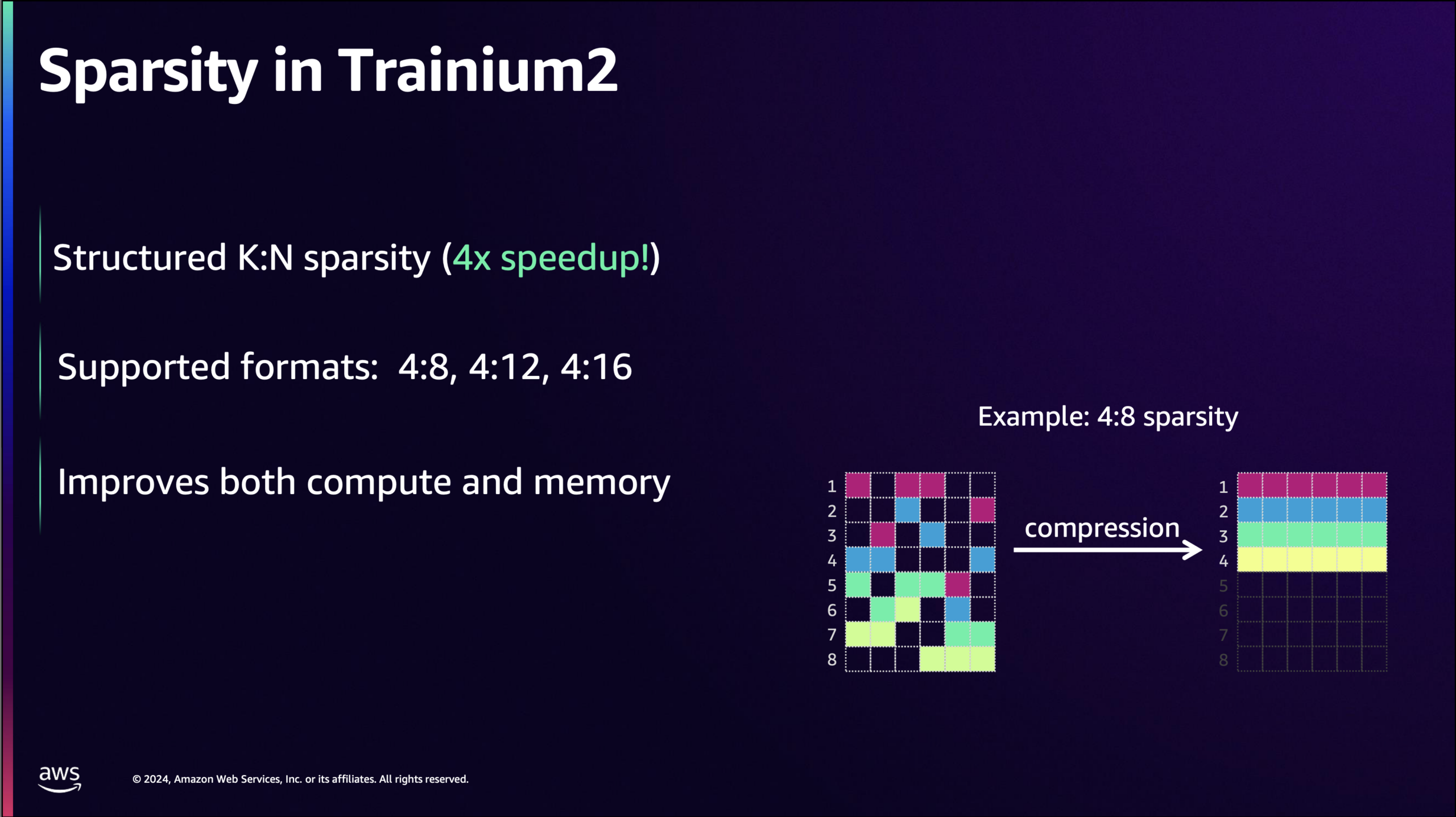
Source: AWS

Some accelerators pair systolic arrays with hardware support for sparsity. AWS built one starting with NeuronCore-v3, the engine inside Trainium2 and Trainium3. The implementation shows what a hardware-sparse systolic array looks like. The NeuronCore-v3 Tensor Engine is a 128×128 systolic array that operates on a stationary weight matrix and a streaming activation matrix, with the contraction dimension aligned to the array’s partition dimension. In sparse mode, the input datapath widens from 2×128 elements per cycle on dense BF16 and FP16 to 5×128 elements per cycle, and the stationary side feeds from a compressed representation of the weight matrix rather than the original dense weights. At compile time, the weight tensor is processed into an M:N format. Out of every N contiguous elements along the contraction dimension, only M are retained, with a compact bitmask encoding which positions are non-zero. The compressed buffer stores only the M values, shrinking by a factor of N/M. When the matmul instruction executes, the hardware reads the compressed weights and uses the bitmask to route the corresponding activations from the stationary tile to the right processing elements. PEs that would have multiplied by a zero do not receive work for that slot. Because the bitmask lookup and routing live in the decompressor that feeds the array rather than in the array itself, the pipeline keeps clocking at full throughput on non-zero values instead of stalling on zeros.

Dense matrix multiplication is not the only thing a TPU does. For several generations now, TPUs have included a SparseCore alongside the TensorCores. SparseCore is a domain-specific engine designed for the irregular gather-scatter access patterns that define recommendation models. A YouTube ranking model or a search ad relevance model does not resemble a dense transformer. Most of its parameters live in embedding tables that can range from hundreds of gigabytes to the petabyte scale, and most of its compute time is spent performing small lookups from those tables, lightly transforming the retrieved values, and combining the results. That access pattern is a worst case for an MXU and only marginally better for a GPU’s cache hierarchy. SparseCores are tuned precisely for this: high-throughput gather-scatter operations against HBM-resident embedding tables, with hardware support for the deduplication and combine operations that the rest of the embedding pipeline depends on. The same hardware also helps with MoE expert routing because, once top-k selection produces expert indices, the rest of the routing process (permuting tokens by expert, dispatching them across chips, gathering expert outputs back, and performing the weighted reduction) follows the same gather/scatter/reduce pattern as the embedding pipeline, with SparseCore’s sort support covering the top-k step itself.

With that background, here are the announcements.

TPU v8t “Sunfish”

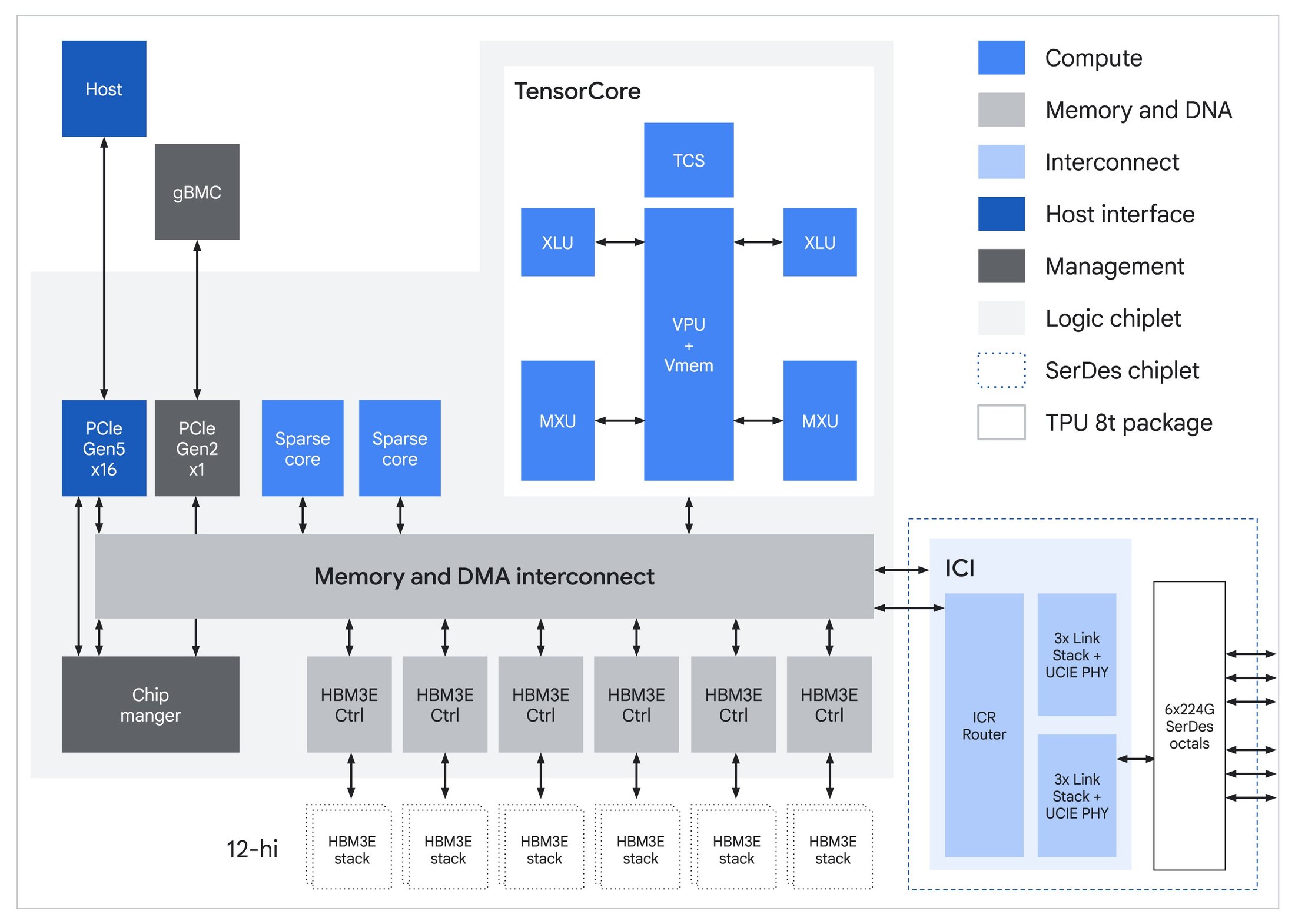
The first announcement, TPU v8t codenamed Sunfish, is the training chip. The generational step from Ironwood follows the expected trajectory in most respects: more memory, more bandwidth, native support for narrower datatypes. Each chip carries a single TensorCore fed by six 12-Hi HBM3e stacks totalling 216 GB at 6.5 TB/s, up from Ironwood’s 192 GB across eight stacks. The on-chip Vmem SRAM stays at 128 MB.

Native FP4 in the MXU is where most of the compute jump comes from. Running matmuls in 4-bit instead of 8-bit doubles throughput per cycle for the same physical array, which is how Google gets from Ironwood’s 4.6 PFLOPS FP8 to v8t’s 12.6 PFLOPS FP4. Mixed-precision training still keeps an FP32 master copy of weights for the optimizer step; FP4 shrinks the working tensors that consume the bulk of compute time.
Source: Google

The interconnect story is straightforward. ICI bandwidth doubles to 19.2 Tb/s per chip, the 9,600-chip superpod aggregates 2 PB of HBM and 121 EFLOPS, and the 3D torus topology is retained. The torus makes sense for training because frontier jobs are dominated by ring-friendly collectives: all-reduces for data and tensor parallelism, all-gathers and reduce-scatters for FSDP, and pipeline-parallel point-to-point sends. All of these map cleanly to the torus axes.

Google also retains the SparseCores that have shipped on every TPU since v4. Their original purpose was DLRM-style recommendation models, where most compute time goes to irregular gather-scatter against massive embedding tables. The same hardware also handles MoE routing. JAX exposes ragged all-to-all and a matching ragged_dot as first-class operations, in which each chip can send a different-sized chunk to each peer. This matches the actual shape of MoE dispatch, because top-k routing is data-dependent and the number of tokens flowing to each expert varies at every step. The compiler fuses the irregular communication and the irregular expert matmul into a single scheduled operation, while SparseCore handles the surrounding sort and permute. With mixture-of-experts now the dominant architecture in frontier models, this hardware proves its value on every modern training job, not just the ads and ranking workloads it was originally designed for.

These are evolutionary steps. The bigger changes are TPUDirect and the move to Axion-based hosts, both of which address bottlenecks that only become visible at frontier scale.

TPUDirect RDMA and TPUDirect Storage

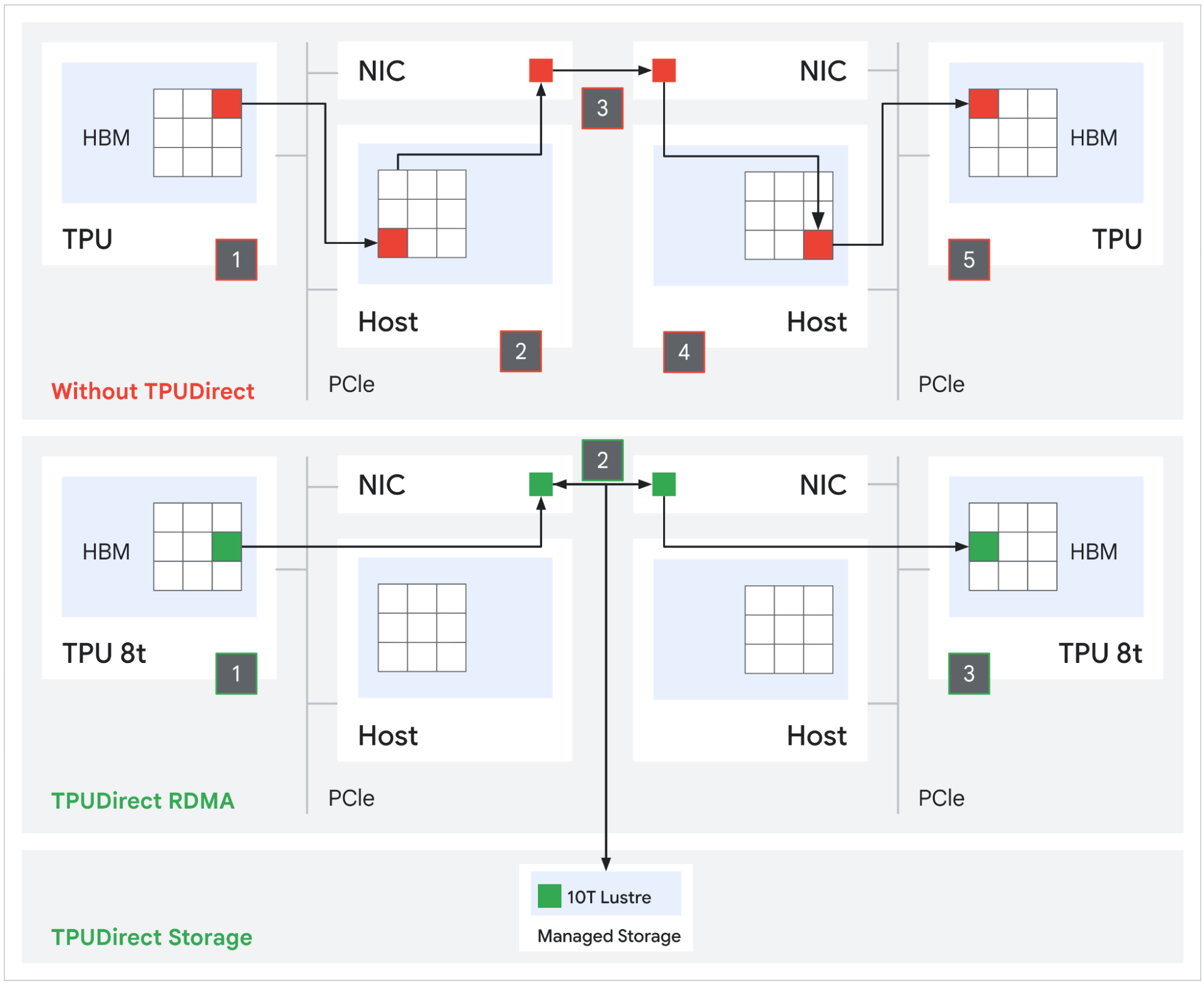
Prior TPU generations used a host-mediated path for network and storage I/O: packets landed in host DRAM first, then a separate DMA copied them into TPU HBM. That is two memory transactions with the host CPU in the loop. TPUDirect RDMA eliminates the bounce buffer. The NIC reads and writes TPU HBM directly via PCIe peer-to-peer, removing the host from the data path. NVIDIA has offered the equivalent capability with GPUDirect RDMA for years and quotes roughly 10x improvement over the host-mediated path. Google is now matching that on the TPU side.
Source: Google

TPUDirect Storage extends the same principle to persistent storage. Tensors move directly between TPU HBM and Managed Lustre at an aggregate rate of 10 TB/s, which Google claims delivers 10x faster storage access than the equivalent path on Ironwood. At the frontier scale, where checkpoints can run into the hundreds of terabytes, the difference is whether a multi-week training run streams checkpoints and datasets at line rate or stalls the MXU pipeline waiting on host I/O.

Arm Axion Hosts

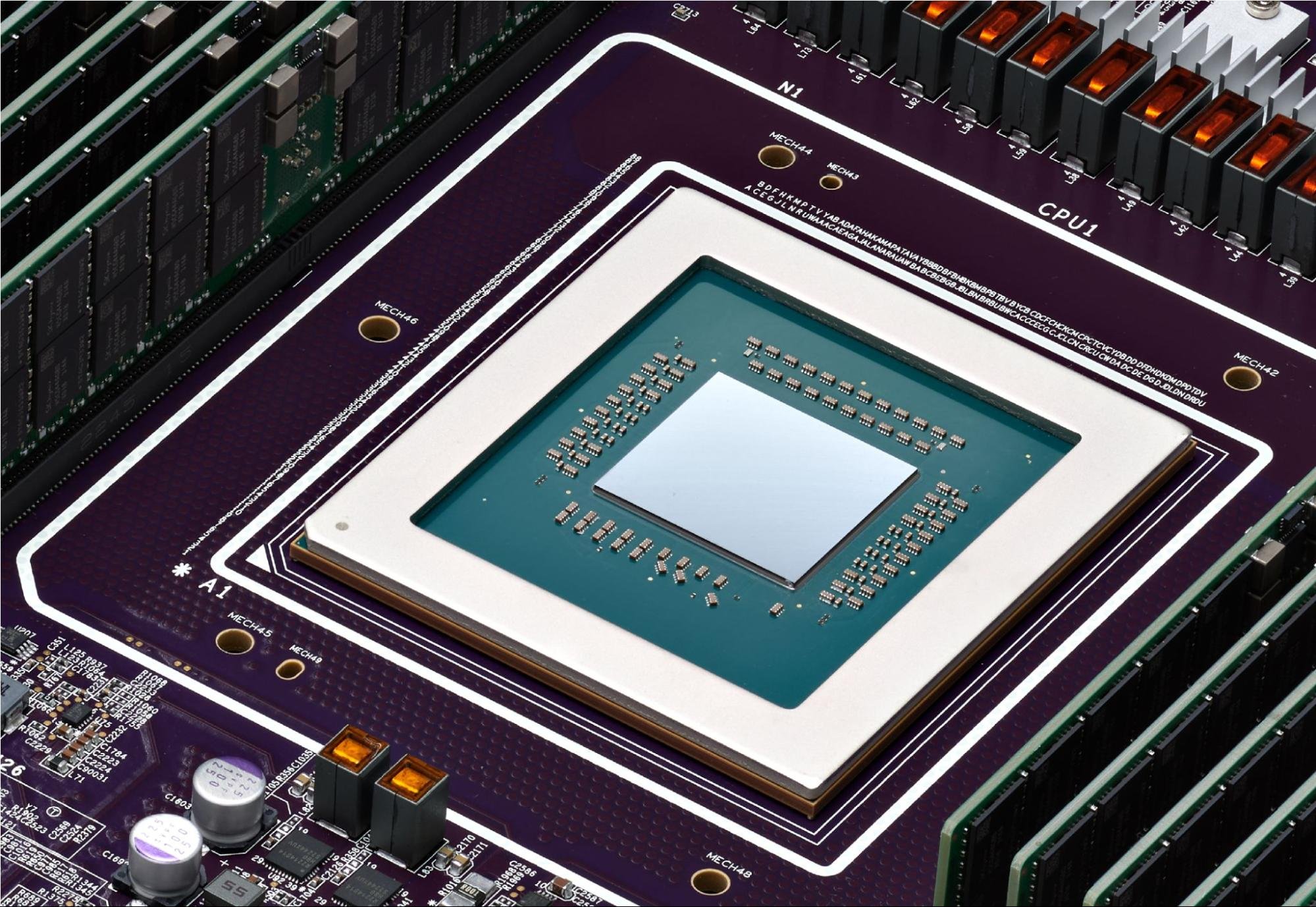
Every prior TPU generation ran on third-party x86 hosts. v8t is the first to use Google’s own Axion processor, an Arm Neoverse V2-based CPU, as the system header. The host CPU’s job on a TPU pod is real and gets harder at frontier scale: it drives the input pipeline, decodes and shuffles multi-petabyte datasets, manages the JAX/XLA control plane, handles checkpoint serialization, and coordinates SPMD dispatch across thousands of chips. If the host stalls, the MXU sits idle.
Google Cloud Arm Axion Chip

Google specifically calls out Axion-powered NUMA isolation on v8t as the mechanism keeping host-side jitter from leaking into the synchronized collective phases of training. At 9,600 chips per pod, even small per-host hiccups compound into measurable loss of goodput. TPUDirect handles the data-path side by removing the host from bulk transfers. Axion handles the control-path side by giving each TPU enough dedicated CPU bandwidth so that preprocessing never becomes the bottleneck. Google has also increased the ratio of physical Axion hosts per server on the eighth-generation platform, giving the orchestration overhead, which scales with chip count, more headroom than Ironwood’s host configuration provided.

TPU v8i “Zebrafish”

The inference chip shares v8t’s Axion host platform, native FP4, and HBM3e memory generation, but the silicon underneath targets a different bottleneck. Training is compute-bound; inference decode is memory-bandwidth-bound. Most of v8i’s architectural differences follow from that.

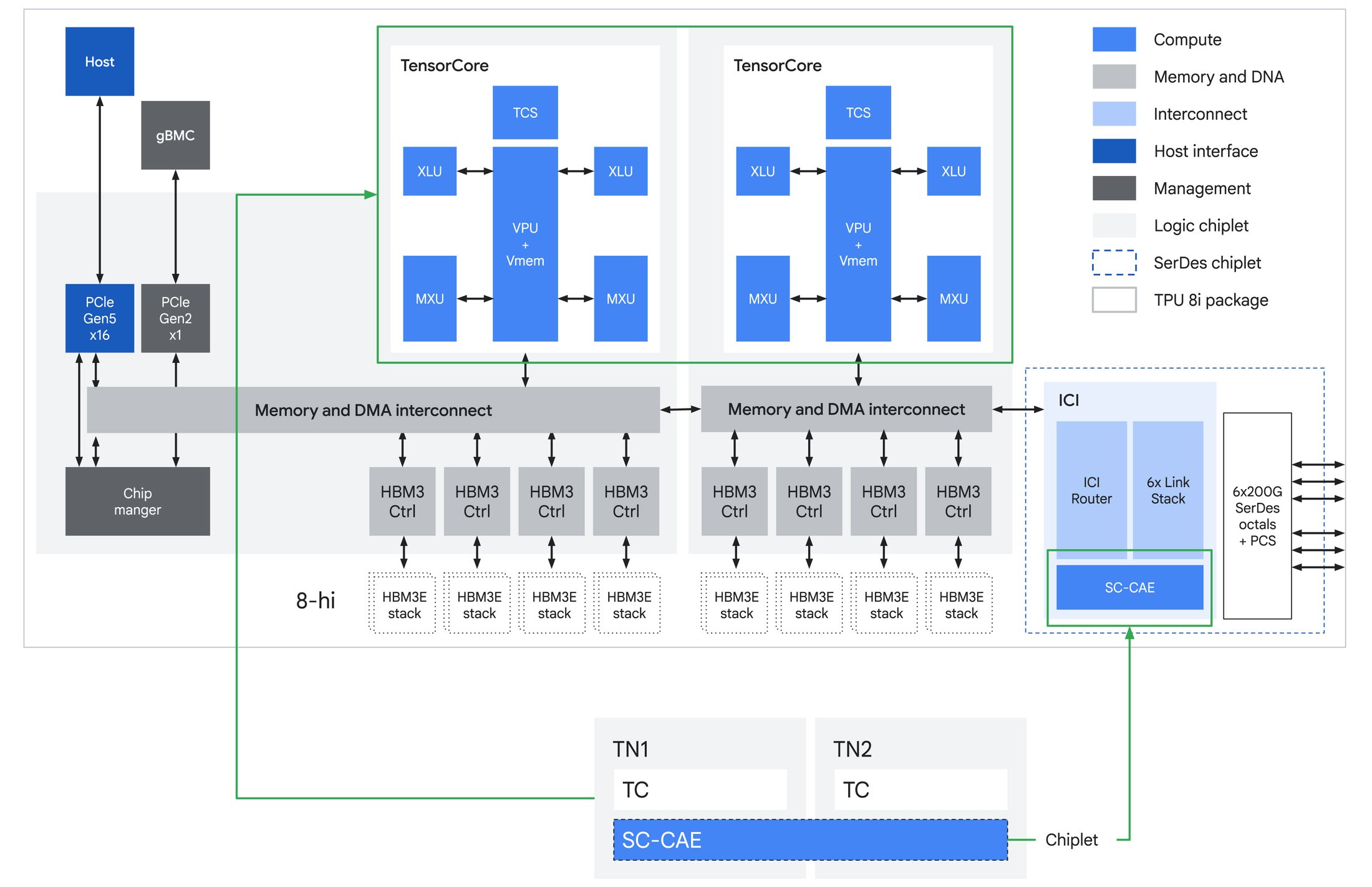
The largest change is on-chip SRAM. v8i carries 384 MB of Vmem, three times as much as Ironwood had. The reason this matters is KV cache. During long-context decoding, each generated token requires reading the accumulated key-value states from prior tokens. On most accelerators, that read comes from HBM, which means decode throughput is gated by memory bandwidth rather than compute. v8i is sized to hold meaningful KV cache footprints entirely on silicon. On-chip SRAM bandwidth is roughly an order of magnitude higher than HBM, so every KV read served from SRAM rather than HBM means shorter per-token latency and higher tokens-per-second at the same power.
Source: Google

The TensorCore configuration is the other major departure. Where v8t uses a single TensorCore at 12.6 PFLOPS, v8i splits compute across two TensorCores at a combined 10.1 PFLOPS. Lower peak throughput sounds like a downgrade until you consider what inference actually looks like at the chip level. Training workloads are batch-dominated: large matmuls amortize fixed overhead, and a single large MXU can sustain near-peak utilization. Inference decoding is the opposite. Batch sizes are small, per-token compute windows are short, and the chip spends a material fraction of its time on collectives, sampling, and routing rather than pure matmul. A single large engine stalls during those irregular gaps. Splitting into two TensorCores lets v8i overlap compute phases more effectively, with each TensorCore fed by its own four directly attached HBM stacks, totaling 288 GB at 8.6 TB/s across the package. The result is higher sustained utilization at the batch sizes that actually run in interactive serving.

At the scale-up domain level, the 1,024 active chips in a Boardfly pod aggregate to roughly 295 TB of HBM, 384 GB of on-chip SRAM, and 10.3 EFLOPS of FP4 compute. The SRAM number is the one that matters most for inference: 384 GB of on-chip cache across the domain is enough to hold substantial KV state without touching HBM, which is what makes long-context serving at low latency viable.
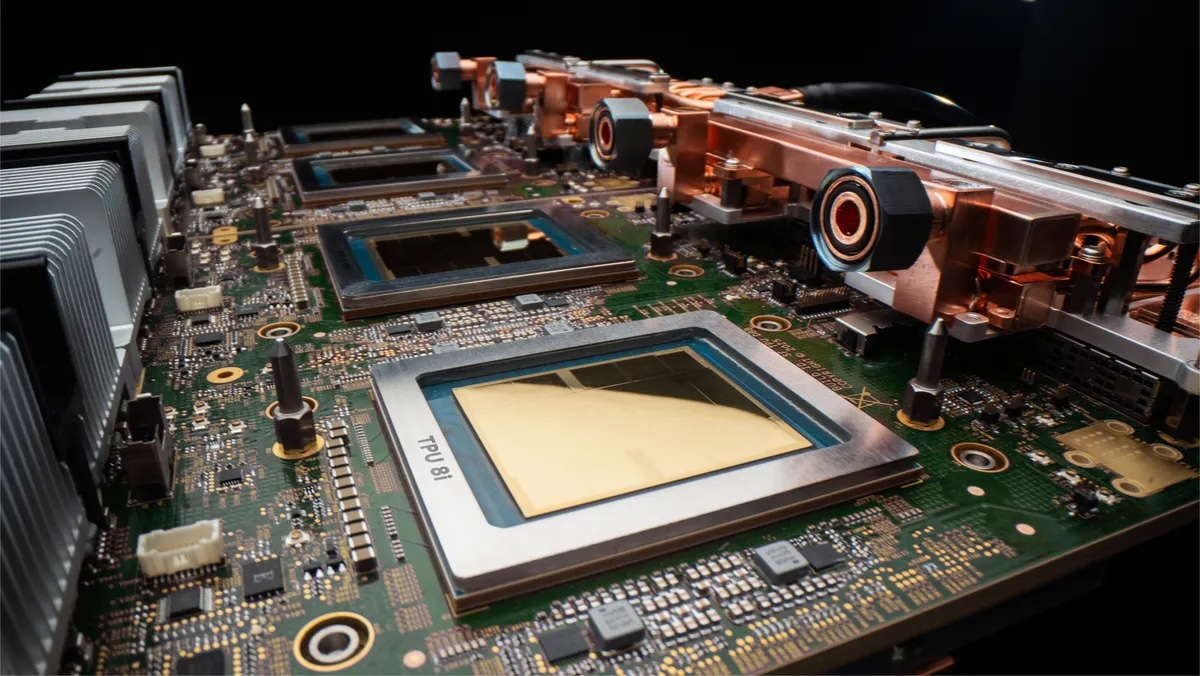
The host side follows the same logic. Google says it has increased the number of physical Axion hosts per server on v8i compared to Ironwood. Inference servers spend a nontrivial fraction of per-token time on tokenization, sampling logic, routing, batching, and agent runtime orchestration. These overheads scale with concurrency rather than model size, and at the request rates that agentic workloads generate, the host can become the bottleneck. More host CPU per accelerator is the straightforward fix.

Collectives Acceleration Engine

The other major on-die change is the Collectives Acceleration Engine, which replaces the four SparseCores that Ironwood carried. SparseCores handle MoE routing and embedding lookups with dedicated gather-scatter hardware, so removing them from the inference chip signals that v8i optimizes for a different bottleneck.

The bottleneck CAE addresses is collective latency. Every decoded token requires the participating chips to synchronize: attention outputs must be all-reduced, expert routing metadata must be broadcast, and sampled tokens must propagate to the next step. On GPUs, this coordination happens in software through NCCL, which schedules collectives as a sequence of kernel launches and network operations. On v8i, the CAE is a dedicated silicon sitting on its own chiplet die alongside the TensorCores, handling these synchronization primitives in hardware.

Google claims up to 5x lower on-chip collective latency versus Ironwood. At training-scale batch sizes, that improvement would be swallowed by compute time; the collective is a small fraction of the step. At the small batches and short per-token windows of interactive inference, collective latency can dominate per-token time, so the 5x reduction shows up in tokens per second and price per token.

v8i also moves from the 3D torus topology to what Google calls Boardfly, a Dragonfly-inspired hierarchical topology that trades ring-collective bandwidth for all-to-all latency. We will examine Boardfly in detail below.

Boardfly Topology

v8i uses a different topology than v8t because training and inference have different communication patterns.

The 3D torus is ideal for ring collectives: each chip has six neighbors, data rotates around the ring, and no chip routes arbitrary traffic. Training is dominated by these ring-friendly patterns, which is why v8t retains the torus. A ring all-reduce maps perfectly to a single torus axis. Frontier jobs typically place data parallelism on one axis, tensor parallelism on another, and pipeline parallelism on the third. The topology and the workload are matched.
Google Accelerator connection graphic

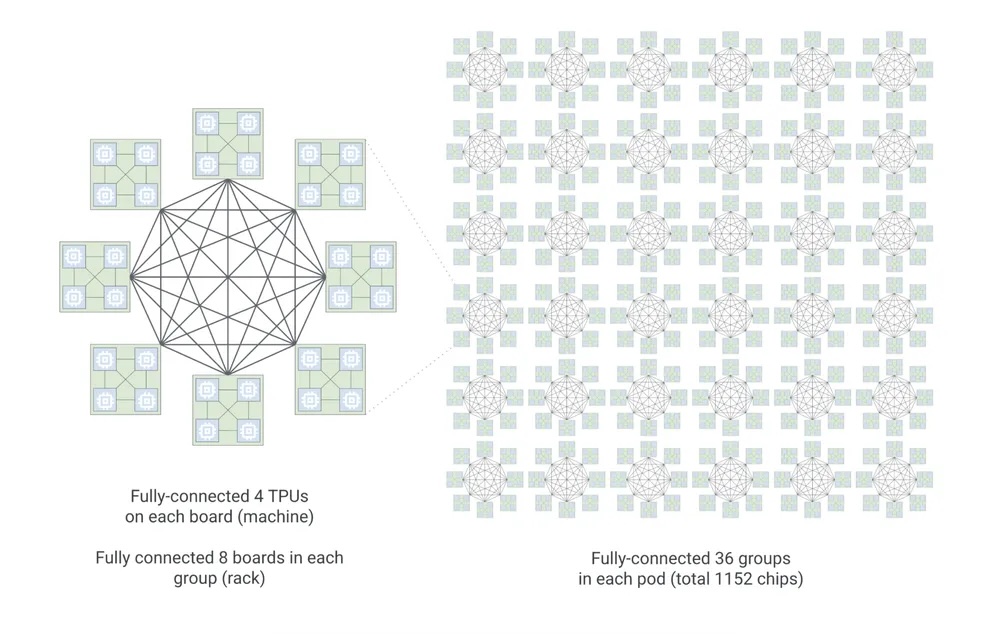
Inference serving a large MoE model has a different communication profile. Experts are pinned across many chips, and every decoded token triggers an all-to-all: tokens must reach their assigned experts scattered across the fabric, and expert outputs must return. This is not a ring. It is arbitrary point-to-point traffic, and on a 1,024-chip 3D torus, the worst-case path between any two chips is 16 hops. Google breaks down this math for us “In a 3D torus, nodes are arranged in a grid where each dimension wraps around like a ring. To reach the furthest possible chip in a 8 x 8 x 16 (1024-chip) configuration, a packet must traverse half the distance of each ring:

3D torus = 8/2(X) + 8/2(Y) + 16/2(Z) = 16 hops

While the torus is highly efficient for the neighbor-to-neighbor communication typical of dense training, it creates a latency tax for all-to-all communication patterns. In the era of reasoning models and MoE, where any chip may need to talk to any other chip to route a token, this hop count matters.”

For latency-sensitive interactive serving, those extra hops push per-token latency outside its SLO.
Source: Google

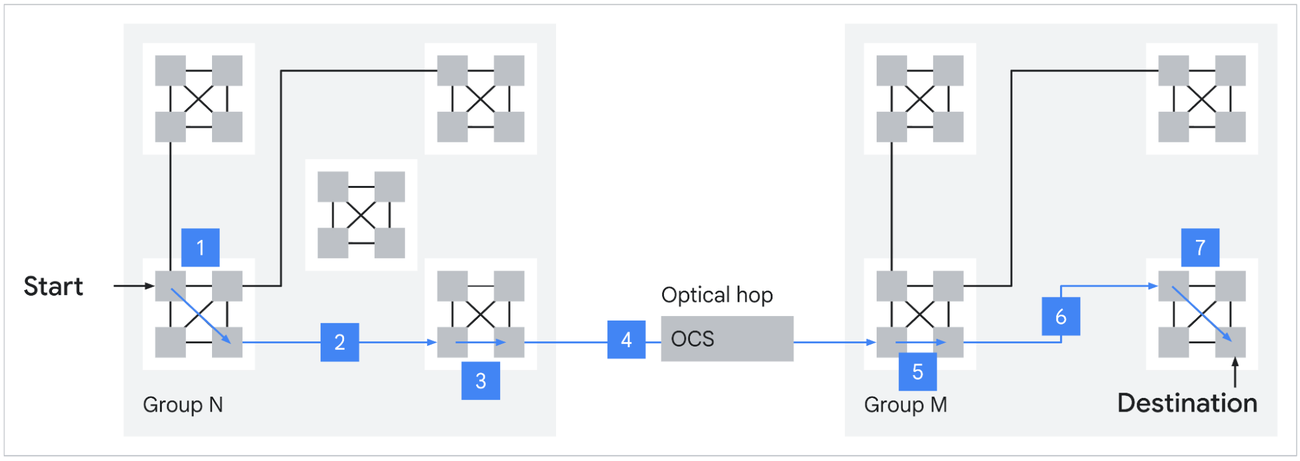
Boardfly is a Dragonfly-inspired hierarchy designed to compress that diameter. The structure has three levels. The building block is a four-chip ring with 16 external connections. Eight of these building blocks form a group, fully connected via copper cabling with 11 links per group. Thirty-six groups connect through Optical Circuit Switches to form a pod. The result is a 1,152-chip scale-up domain (1,024 active) with a maximum of 7 hops between any two chips, a 56% reduction from the torus. Google claims this yields up to 50% improvement in latency for communication-intensive workloads like MoE all-to-all.
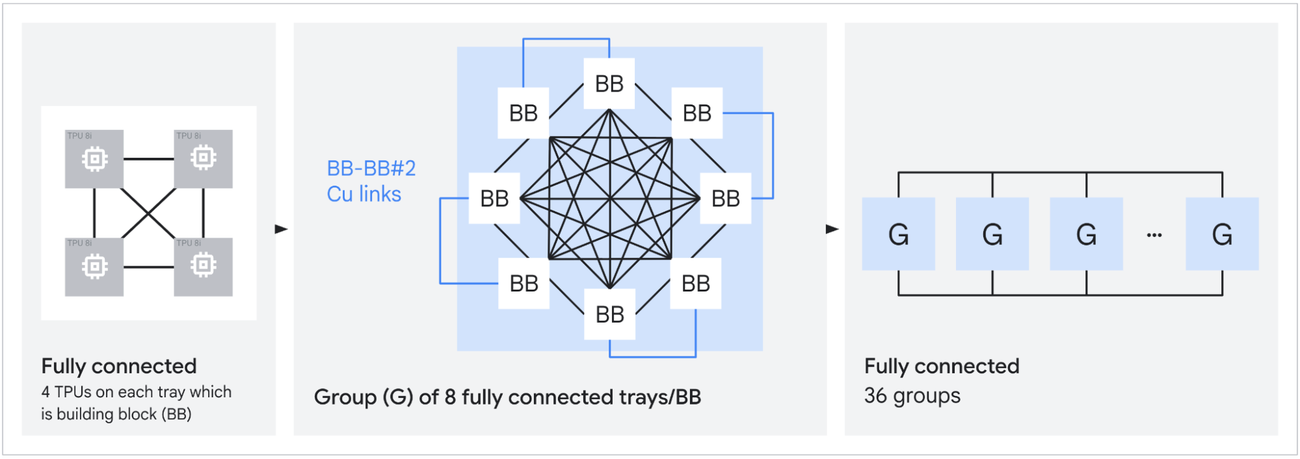
The larger scale-up domain also matters for expert replication. More chips per ICI fabric means each expert in a large MoE can be replicated more times, which smooths routing imbalance and keeps decode latency flat when token distribution is skewed. Top-k routing is data-dependent; some experts will see more tokens than others on any given step. Replication absorbs that variance. ICI bandwidth was doubled to 19.2 Tb/s per chip in part to handle the resulting traffic.

Virgo Network

A 9,600-chip superpod is large, but frontier training runs increasingly require more. Virgo is the scale-out fabric that connects superpods within a data center, handling east-west RDMA traffic between pods when a job outgrows a single scale-up domain.

A single Virgo fabric links more than 134,000 v8t chips at 47 Pb/s of non-blocking bisectional bandwidth, up to 4x the per-accelerator bandwidth and 40% lower unloaded latency compared to the previous generation. The architecture is a flat, two-layer non-blocking topology built on high-radix switches with a multi-planar design and independent control domains.
Traditional Clos fabrics oversubscribe at higher tiers to keep port counts and costs manageable. That works fine when most traffic is north-south, which is the pattern in general-purpose cloud: clients hit load balancers, load balancers hit application servers, application servers hit storage. AI training workloads are almost entirely east-west, chip-to-chip across the fabric, and the collectives are bisection-dominated. Any oversubscription at any tier drops straight into training step time. Virgo’s flat two-layer design with high-radix switches eliminates the spine-tier bottleneck by building switches with enough ports per ASIC to terminate a meaningful fraction of the fabric in two hops.

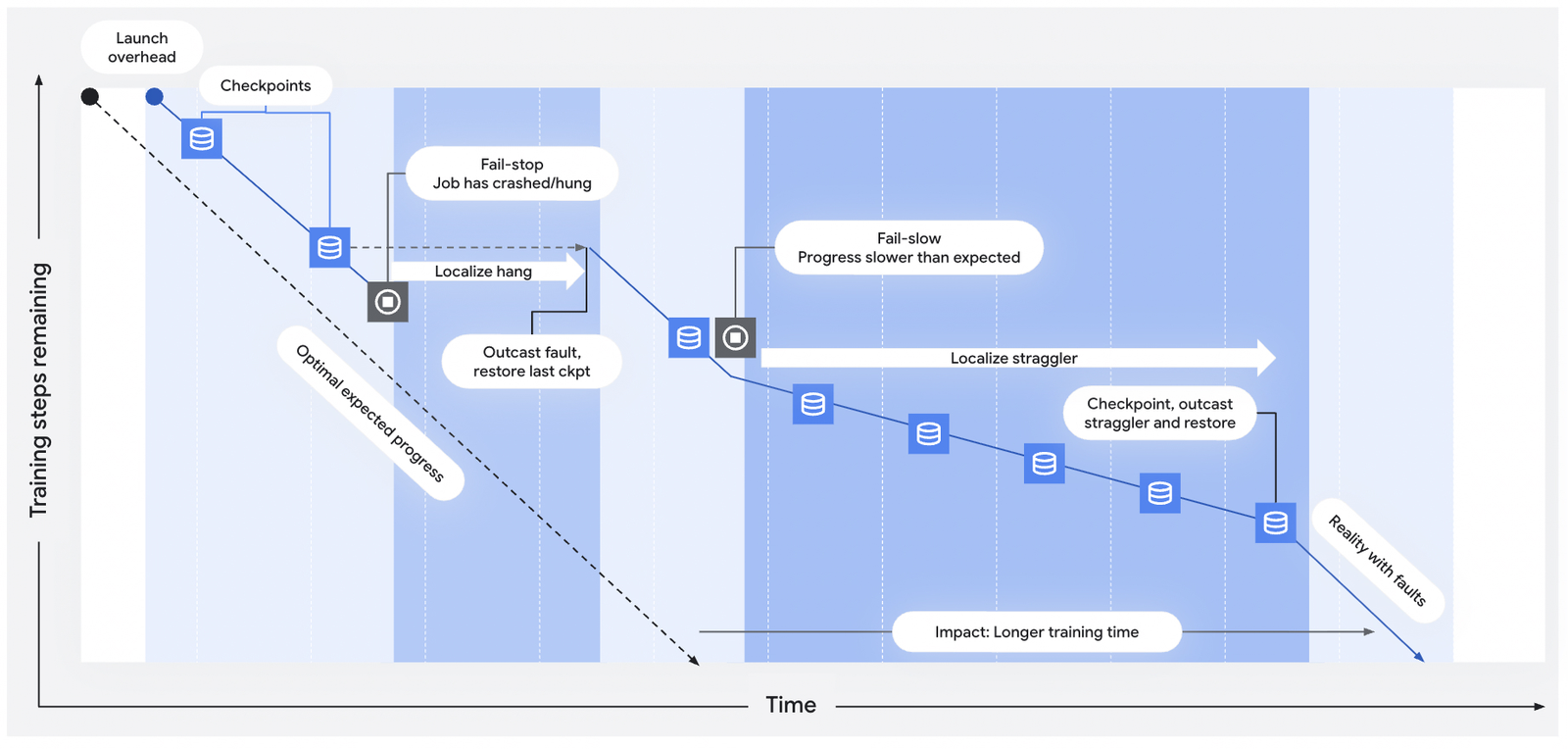
The reliability engineering matters at this scale and depends heavily on Google’s MEMS-based Optical Circuit Switches. OCS lets Google reconfigure the physical topology between jobs without rewiring anything, and more critically, route around failed chips or links mid-run. When a failure is detected, OCS can remap the affected portion of the fabric in milliseconds, eliminating the need for manual intervention. Sub-millisecond telemetry feeds automated straggler and hang detection. The combination of fast detection and OCS-based rerouting optimizes mean time between interrupts and mean time to recovery at 100,000+ chip scale, where the statistical certainty of some failure during a multi-week run approaches 100%. The 97% goodput target Google quotes for v8t pods depends on this infrastructure. The same OCS technology appears throughout the TPU stack: it stitches cubes into superpods at the ICI layer, connects Boardfly groups at the v8i scale-up layer, and handles inter-pod traffic at the Virgo layer.

At 134,000 chips, the aggregate compute reaches roughly 1,690 EFLOPS of FP4, or about 1.7 ZFLOPS. Google states that the architecture supports near-linear scaling for up to a million chips in a single logical training cluster, though current deployments have not yet reached that ceiling.

Jupiter and Multi-Data-Center Scale

Virgo handles east-west accelerator traffic within a data center, but it is not the top of the stack. Jupiter is Google’s existing north-south fabric, now in its fifth generation, which handles front-end traffic and access to distributed storage and compute resources. Jupiter was not announced at Cloud Next; it is the existing infrastructure that the v8 generation builds on.

The latest Jupiter iteration delivers 13 Pb/s of bisectional bandwidth per data center building with 99.999% availability, using Apollo MEMS OCS switches at roughly 108 W per OCS versus roughly 3,000 W for an equivalent electrical packet switch. This is the fabric that connects Google’s data centers to the outside world and to each other.
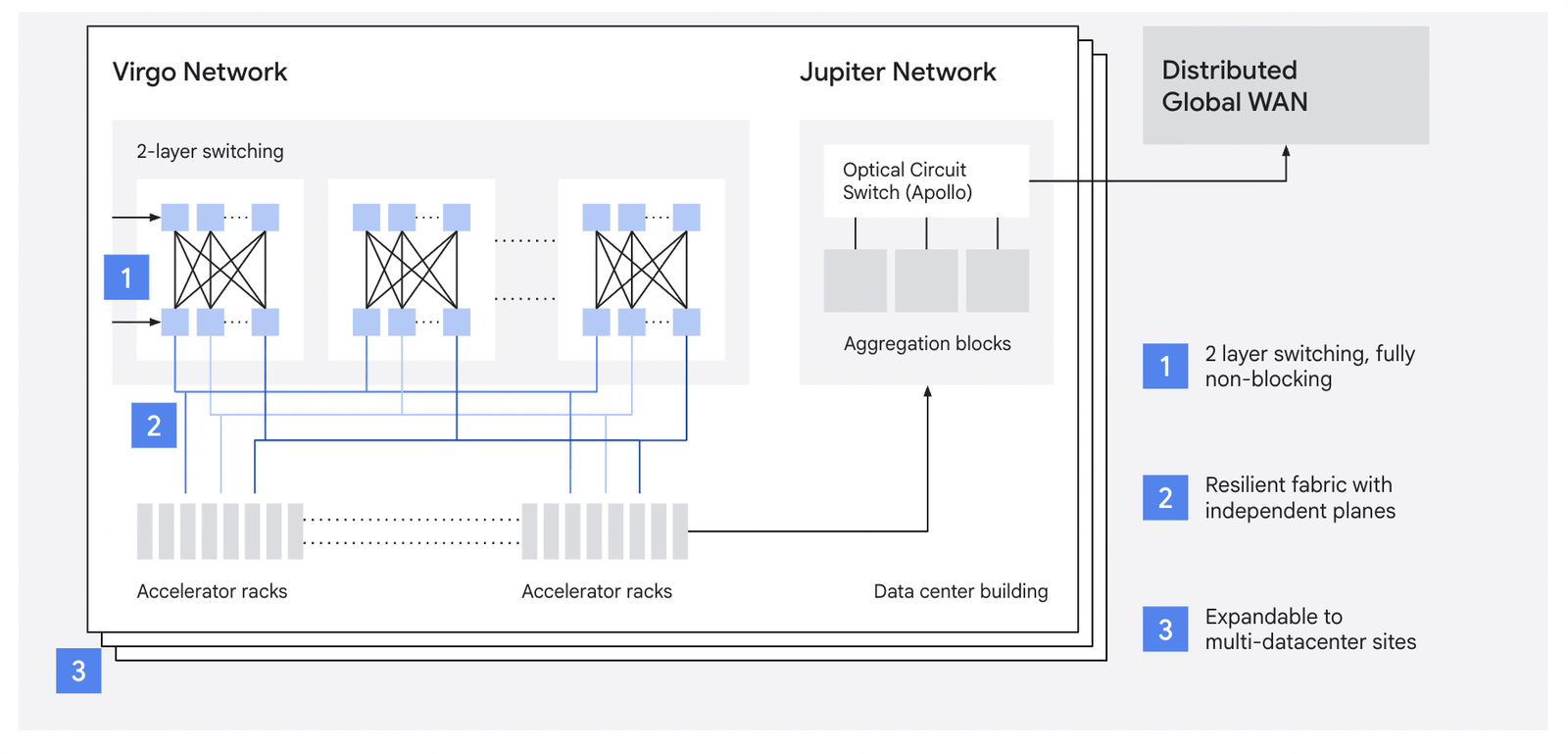
For training runs that exceed the power and space of a single data center, Jupiter is what enables scaling across multiple sites. The combination is layered: ICI within a pod, Virgo between pods within a site, Jupiter between sites. Google’s Pathways software stack can address workloads across these multi-data-center domains as a single logical cluster.

At ~1.7 ZFLOPS, a single Virgo fabric is the largest announced AI training cluster. Multiple Virgo fabrics linked by Jupiter can address over a million TPU chips, which is the scale Google is targeting, even if current deployments have not reached it.

Goodput and Utilization

Raw FLOPs matter less than the fraction of those FLOPs that produce useful work. Google quotes a 97% goodput target for v8t superpods, meaning 97% of wall-clock time is spent on productive compute rather than recovery, stalls, or coordination overhead. That number depends on the OCS-based fault tolerance and sub-millisecond telemetry covered above.

Model FLOPs Utilization (MFU) is the other variable. MFU measures what fraction of peak theoretical FLOPs the chip actually sustains on a real workload. SemiAnalysis estimates that at 40% TPU MFU, the cost per effective training FLOP drops by roughly 62% compared to GB300 NVL72, with breakeven at roughly 15% TPU MFU. Anthropic’s publicly disclosed TPU economics suggest they operate well above that breakeven. The combination of high goodput (keeping chips running) and competitive MFU (keeping chips busy when running) is what makes TPU TCO work at scale.

Where v8 Sits

Comparing TPU v8 to NVIDIA’s current and upcoming platforms requires careful attention to units. NVIDIA quotes NVLink bandwidth as bidirectional aggregate; a B200 at 1.8 TB/s NVLink 5 is 900 GB/s per direction. NVIDIA’s headline FLOPs are usually 2:4 sparse; dense is half that. Google’s TPU numbers are dense and bidirectional. When reading any comparison, check whether the bandwidth is unidirectional or bidirectional and whether the FLOPs are dense or sparse.
 

Per-chip FP4, v8t at 12.6 PFLOPS dense sits between GB200’s 10 PFLOPS sparse (5 PFLOPS dense) and GB300’s 20 PFLOPS sparse (15 PFLOPS dense). The per-chip comparison is close. The scale-up comparison is not. A GB300 NVL72 rack carries 72 GPUs in one NVLink domain. A v8t superpod consists of 9,600 chips in a single 3D torus. That is 133x more chips in a single collective domain, which is the gap that separates the platforms for frontier training.

NVIDIA is not standing still. Vera Rubin ships in H2 2026 with 50 PFLOPS of NVFP4 inference per package (though SemiAnalysis has questioned whether that number assumes adaptive compression), 288 GB of HBM4 at 22 TB/s, and NVLink 6 at 3.6 TB/s bidirectional. Rubin Ultra in H2 2027 stitches four reticle dies for up to 100 PFLOPS FP4 and 1 TB of HBM4e per package. Kyber NVL576 will bind 576 Rubin Ultra GPUs in a single rack at 15 EFLOPS FP4 inference. That starts to narrow Google’s scale-up advantage, though 576 GPUs is still an order of magnitude smaller than a v8t superpod.

Where v8 leads: scale-up domain size (9,600 chips versus 72 GPUs, or 576 post-Kyber), single-fabric scale (134,000+ chips at 47 Pb/s), deterministic latency from static XLA scheduling, and TCO for workloads that fit the TPU model.

Where v8 trails: per-chip HBM capacity (216 GB versus Rubin’s 288 GB HBM4), sparsity (NVIDIA has a 2:4 hardware path, Google does not), and ecosystem breadth (CUDA, cuDNN, TensorRT-LLM, and the PyTorch-first serving stack land on NVIDIA first; native PyTorch on TPU is still preview).

Both platforms have demand. Meta is reportedly in discussions for a multi-billion-dollar deal to deploy Google TPUs in its data centers starting in 2027, with potential Cloud TPU rentals as early as 2026. At the same time, Google Cloud announced A5X instances built on NVIDIA Vera Rubin NVL72, scaling to 80,000 Rubin GPUs within a single site and 960,000 GPUs across multi-site deployments. Google is building out both at scale.

Wrap Up

The eighth-generation TPU is two chips rather than one, built for what large-scale training and agentic inference look like now rather than for general-purpose AI workloads. v8t pushes scale-up to 9,600 chips per superpod and scale-out to 134,000+ chips per Virgo fabric. v8i trades SparseCores for collective-acceleration silicon and swaps the 3D torus for Boardfly to meet the latency targets required by MoE serving at scale. NVIDIA’s roadmap, with Vera Rubin, Rubin Ultra, and Kyber, will narrow some of these gaps over 2026-2027, but the scale-up domain advantage persists for now. For frontier labs running mixture-of-experts models on hundreds of thousands of chips, v8 is a credible alternative to Grace Blackwell, and Meta’s discussions suggest the market is starting to price that in.

The post Google Announces TPU v8t Sunfish and TPU v8i Zebrafish appeared first on StorageReview.com.

QNAP Introduces QAI-h1290FX Edge AI Storage Server for Private LLM and Generative AI Workloads

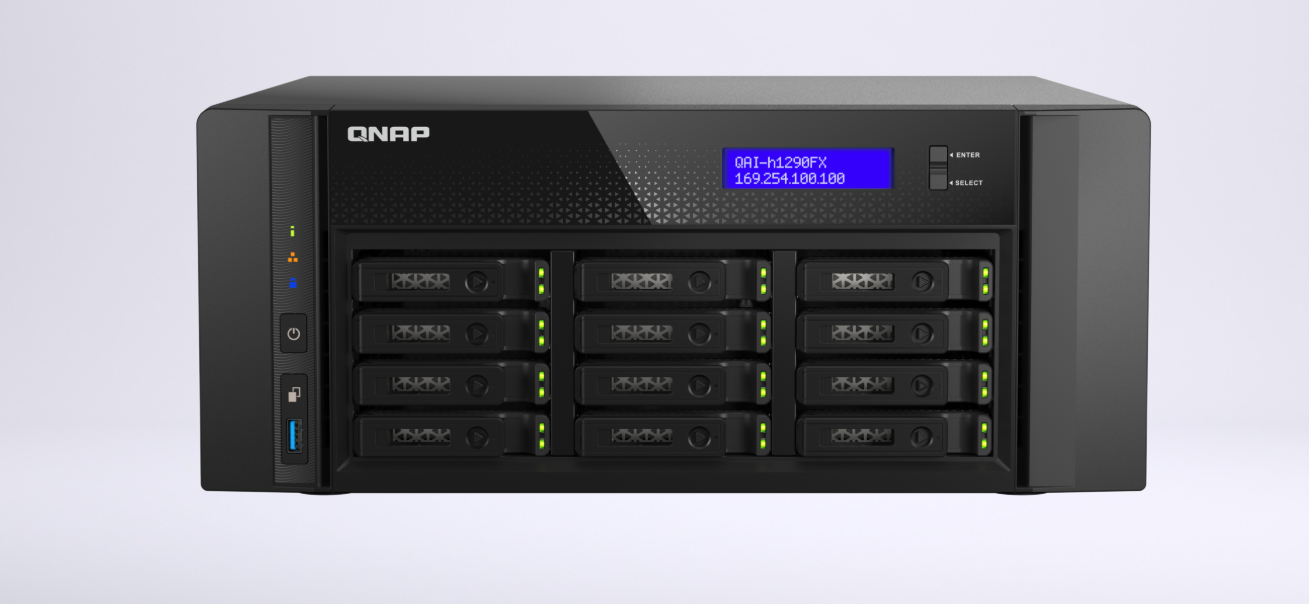
QNAP QAI h1290FX front panel QNAP QAI h1290FX front panel

QNAP Systems has introduced the QAI-h1290FX, an edge AI storage server designed for organizations that want to run large language models, retrieval-augmented generation search, and other generative AI workloads on their own infrastructure. The system is designed for enterprises that balance AI adoption with requirements for data privacy, low latency, governance, and operational control, enabling teams to deploy AI applications locally rather than sending sensitive data to public cloud platforms.

QNAP QAI h1290FX front panel

Organizations can use the QAI-h1290FX to deploy internal AI assistants for employee training, policy questions, and knowledge lookup, keeping the underlying data within the business. Legal, finance, HR, and operations teams can build private RAG pipelines to search contracts, reports, and internal records, providing more context than traditional keyword searches. Creative teams can run image-generation tools such as Stable Diffusion or ComfyUI for design and content workflows. In contrast, IT teams can use automation tools such as n8n to trigger inference tasks, generate content, or route alerts across business systems.

QNAP QAI-h1290FX Components, Expansion, and I/O

Built around an AMD EPYC 7302P processor and twelve U.2 NVMe/SATA SSD bays, the QAI-h1290FX combines server-grade compute with an all-flash storage design tailored for AI workloads requiring fast data access. The 16-core, 32-thread processor supports inference, virtualization, and parallel workloads. At the same time, the SSD architecture is designed for frequent model execution, high-speed data streaming, and responsive access to datasets, embeddings, documents, and generated content.

The system also supports optional NVIDIA RTX PRO 6000 Blackwell Max-Q Workstation GPU acceleration, providing up to 96GB of GPU memory for more demanding local AI workloads. Support for CUDA, TensorRT, and Transformer Engine acceleration enables teams to run large language model inference, image generation, and deep learning applications on-premises without building a separate GPU workstation from scratch.

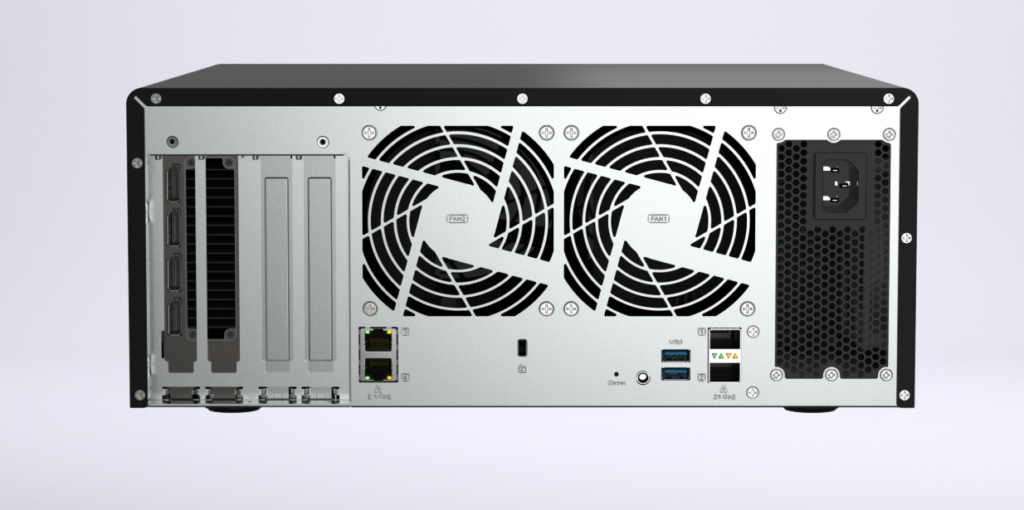
QNAP QAI h1290FX rear panel

The QAI-h1290FX offers built-in high-speed networking with two 25GbE SFP28 SmartNIC ports and two 2.5GbE ports, and supports Wake-on-LAN via the 2.5GbE ports. For expansion, it includes four PCIe slots, with three PCIe Gen 4 x16 slots and one PCIe Gen 4 x8 slot, providing room to add higher-speed networking, a GPU, or other compatible expansion cards. Additional I/O includes three USB 3.2 Gen 1 ports, jumbo frame support, SR-IOV, GPU pass-through, and compatibility with 2.5-inch SATA SSDs and U.2 NVMe PCIe Gen4 x4 SSDs across its twelve drive bays.

QNAP QAI-h1290FX Specifications

Specification QNAP QAI-h1290FX
Overview
Model AI-h1290FX-7302P-128G
Processor and Memory
CPU AMD EPYC™ 7302P 16-core/32-thread processor, up to 3.3 GHz
CPU Architecture 64-bit x86
Encryption Engine  (AES-NI)
System Memory 128 GB RDIMM DDR4 ECC
Maximum Memory 1 TB (8 x 128 GB)
Memory Slot 8 x RDIMM DDR4
Flash Memory 8GB (Dual boot OS protection)
Storage
Drive Bay 12 x 2.5-inch U.2 PCIe NVMe / SATA 6Gbps
The system is shipped without SSDs.
For the SSD compatibility list, please visit https://www.qnap.com/compatibility/
Drive Compatibility 2.5-inch bays:
2.5-inch SATA solid state drives
2.5-inch U.2 NVMe PCIe Gen4 x4 solid state drives
Hot-swappable Yes
SSD Cache Acceleration Support Yes
GPU and Virtualization
GPU pass-through Yes
SR-IOV Yes
Networking
2.5 Gigabit Ethernet Port (2.5G/1G/100M) 2 (2.5G/1G/100M/10M)
25 Gigabit Ethernet Port 2 x 25GbE SFP28 SmartNIC port
Wake on LAN (WOL) Only the 2.5GbE port
Jumbo Frame Yes
Expansion and Ports
PCIe Slot 4
Slot 1: PCIe Gen 4 x16
Slot 2: PCIe Gen 4 x16
Slot 3: PCIe Gen 4 x8
Slot 4: PCIe Gen 4 x16
Card dimensions for PCIe slot 1 & Slot 2:185 x 111.15 x 18.76 mm / 7.28 x 4.38 x 0.74 inches.
Card dimensions for PCIe slot 3 & Slot 4:280 x 111.15 x 18.76 mm / 11.02 x 4.38 x 0.74 inches.
Wider cards can be installed if the next PCIe slot will not be used.
USB 3.2 Gen 1 port 3
Physical Design
Form Factor Tower
LED Indicators Power/Status, LAN, USB, SSD1-12
LCD Display/ Button Yes
Buttons Power, Reset, USB Auto Copy
Dimensions (HxWxD) 150 × 368 × 362 mm
Dimensions do not include the foot pad (foot pad may be up to 10mm / 0.39 inches high, depending on model)
Weight (Net) 10.4 kg
Weight (Gross) 11.3 kg
Environment and Power
Operating Temperature 0 – 40 °C (32°F – 104°F)
Storage Temperature -20 – 70°C (-4°F – 158°F)
Relative Humidity 5-95% RH non-condensing, wet bulb: 27˚C (80.6˚F)
Power Supply Unit 750W, 100-240V
Fan 2 x 92mm, 12VDC
System Warning Buzzer
Kensington Security Slot Yes
Warranty and Connections
Standard Warranty 5
Max. Number of Concurrent Connections (CIFS) – with Max. Memory 10000

Built Around Fast Storage, GPU Acceleration, and Local Control

Running on QNAP’s ZFS-based QuTS hero operating system, the QAI-h1290FX includes enterprise-grade storage features such as data integrity protection, extensive snapshot support, and inline deduplication. These capabilities are relevant to AI deployments because organizations often handle large volumes of repeated or related data across documents, embeddings, model files, training materials, and generated outputs.

Developers and IT teams can run AI tools in containerized environments with native GPU access via QNAP Container Station. At the same time, Virtualization Station supports GPU pass-through for virtual machines. This gives organizations more control over how compute resources are assigned, whether workloads are deployed in containers for speed and portability or in virtual machines for separation, testing, and administrative control.

The QAI-h1290FX also includes preloaded AI tools such as AnythingLLM, OpenWebUI, and Ollama, enabling teams to set up private LLM workflows and local chat interfaces more quickly. Additional applications (including Stable Diffusion, ComfyUI, n8n, and vLLM) are being integrated to support text generation, image creation, workflow automation, and inference use cases on the same local platform.

A Local Infrastructure Option for Enterprise AI Teams

QNAP says the platform can reduce the manual work typically involved in building local AI infrastructure, including assembling a GPU workstation, installing AI tools, and configuring separate environments. Users can deploy supported AI models and applications directly on the system while retaining control over their data and avoiding reliance on cloud services.

It’s also compatible with QNAP JBOD expansion enclosures, providing organizations with a path to scale storage capacity as AI datasets, internal knowledge bases, model files, and generated content continue to grow.

QNAP QAI-h1290FX Product Page

The post QNAP Introduces QAI-h1290FX Edge AI Storage Server for Private LLM and Generative AI Workloads appeared first on StorageReview.com.

HPE Expands ProLiant Portfolio for Rugged Edge and AI Workloads

HPE has announced an expansion of its ProLiant edge compute portfolio, introducing new hardware designed to support AI inferencing and mission-critical applications in distributed or harsh environments. The update includes the new HPE ProLiant Compute EL2000 chassis, which serves as the foundation for two Gen12 servers, and an enhanced version of the HPE ProLiant DL145 Gen11. These platforms target sectors such as national security, manufacturing, and telecommunications, where standard data center infrastructure is not feasible.

HPE Proliant Compute EL2000 Chassis front view

HPE ProLiant Compute EL2000 Gen12 Chassis

A key addition to the lineup is the Environmental Ruggedization Option Kit. This modular enhancement allows systems to operate at high or low altitudes, in extreme temperatures, and under hazardous transit conditions. The portfolio emphasizes enterprise-grade security and automated operations, enabling organizations to scale edge deployments in remote locations with minimal on-site staffing.

Next-Generation Rugged Performance with the EL2000

The HPE ProLiant Compute EL2000 chassis is a purpose-built solution for size, weight, and power (SWaP) constrained environments. It supports either two HPE ProLiant Compute EL220 Gen12 servers or a single EL240 Gen12 server. Built on Intel Xeon 6 processors, these servers offer scalability from 8 to 144 cores and support CPUs with a thermal design power of up to 350 watts.

HPE Proliant EL240 Gen12 Server

HPE ProLiant EL240 Gen12 Server

The EL2000 systems are engineered for durability, maintaining reliable operation in temperatures ranging from -40 to 55 degrees Celsius and up to 95 percent humidity. Design considerations include resistance to heavy vibration, environmental contaminants, and electromagnetic interference. For AI-heavy workloads, the EL240 Gen12 server supports NVIDIA RTX PRO 4500 or Blackwell Server Edition RTX PRO 6000 GPUs. The integration includes support for NVIDIA AI Enterprise software, targeting high-assurance environments that require rigorous security standards.

HPE Proliant Compute EL220 Gen12 inside

HPE ProLiant Compute Gen12 EL220

Enhanced DL145 Gen11 and Telco Optimization

HPE also introduced a revised version of the HPE ProLiant DL145 Gen11 server. This 2U system is powered by AMD EPYC 8005 series processors, offering up to 84 energy-efficient cores. The server is optimized for distributed telco environments and quiet retail or manufacturing deployments, with an operating temperature ceiling of 55 degrees Celsius.

HPE Proliant DL145 Gen11 inside

HPE ProLiant Compute DL145 Gen11

The DL145 Gen11 has been validated for edge AI inferencing performance, as noted in recent MLPerf Inference results. Additionally, HPE is offering the ProLiant DL145 Gen11 Premier Solution for Azure Local. This configuration is designed specifically for edge sites running Azure services, and supports Azure Local Disconnected Operations to ensure continuity at remote sites with intermittent connectivity.

(At the time of this news release, we were only able to get the HPE ProLiant DL145 Gen11 Spec Sheet.)

Model HPE ProLiant DL145 Gen11
Processor
Processor type AMD
Processor family 4th/5th Generation AMD EPYC™ Processors
Processor core available 8 to 84 cores
Processor cache Up to 384 MB L3, depending on the processor
Processor number 1P
Processor speed Up to 4.5 GHz, depending on the processor
Memory
Maximum memory Up to 768 GB memory capacity (using 128 GB DIMMs)
Memory slots 6
Memory type HPE DDR5 Smart Memory
Memory protection features ECC
Storage
Drive supported 2 SFF or 6 EDSFF SATA/NVMe
Storage controller HPE Compute MR Gen11 Controllers
for detailed descriptions reference the QuickSpecs.
Security
Security TPM 2.0, silicon root of trust, secure boot, chassis intrusion detection and bezel lock, and
Kensington lock, optional data-at-rest hardware encryption. For full security features refer
to the QuickSpecs.
Management
Infrastructure management HPE iLO Standard with Intelligent Provisioning (embedded), HPE OneView Standard
(requires download), HPE iLO Advanced, HPE iLO Advanced Premium Security Edition,
and HPE OneView Advanced (require licenses), HPE Compute Ops Management
(subscription included).
Refer to the iLO 6 User Guide
Expansion & Networking
Expansion slots 4x PCIe Gen5 (2 FHFL, 1 FHHL, 1 OCP 3.0)
for detailed descriptions reference the QuickSpecs
Network controller Optional OCP and/or optional PCIe network adapters, depending on model.
Power & Cooling
Power supply type 2 Flexible Slot power supplies maximum, depending on model
System fan features 4 Standard or Performance Fans, depending on environment, N+1 redundancy
Form factor
Form factor 2U Rack


Standards Compliance and Remote Management

The expanded portfolio meets several high-consequence environmental and security standards. This includes U.S. national security benchmarks for survivability under thermal stress, altitude changes, shock, and vibration. The systems also adhere to electromagnetic interference (EMI) protection standards and telecom network specifications, supporting 5G core and RAN infrastructure with an aim for five-nines availability.

Management is handled through Integrated Lights-Out (iLO) and HPE Compute Ops Management. This combination provides centralized control and real-time visibility across geographically dispersed sites. By automating compliance and deployment tasks, HPE aims to bridge the gap between traditional IT management and the inherent physical exposure of edge computing.

According to Krista Satterthwaite, senior vice president and general manager of Compute at HPE, organizations are increasingly deploying AI inferencing and remote operations at the edge, areas where traditional IT frameworks often fall short. She emphasized that the HPE ProLiant platform is designed with enterprise-grade security, optimized performance, and integrated management and automation capabilities. Satterthwaite added that these features facilitate the deployment, management, and scaling of edge environments, enabling organizations to effectively handle the complexities of edge computing with durable, high-performance hardware.

Availability

The enhanced HPE ProLiant DL145 Gen11 and the Environmental Ruggedization Option Kit are available immediately. The HPE ProLiant DL145 Gen11 Premier Solution for Azure Local is expected in May 2026, while the EL2000 chassis and its corresponding Gen12 servers are scheduled for release later in 2026.

The post HPE Expands ProLiant Portfolio for Rugged Edge and AI Workloads appeared first on StorageReview.com.

Proxmox Backup Server 4.2 Adds Sync Controls And S3 Storage Support

Proxmox Backup Server 4-2 Dashboard Proxmox Backup Server 4-2 Dashboard

Proxmox has released Proxmox Backup Server 4.2, a new update built on Debian 13.4 “Trixie” with refreshed packages, improved hardware support, and security updates from the newer base system. The release also moves to Linux kernel 7.0 as the stable default and includes ZFS 2.4 for storage environments that rely on ZFS-backed infrastructure.

Proxmox Backup Server 4-2 Dashboard The update covers backup organization, sync security, transfer performance, and S3-backed storage. For larger or distributed backup environments, the changes should make it easier to reorganize data, protect sync jobs, and monitor storage activity without adding extra manual steps.

Backup Groups and Namespaces Can Now be Moved Inside a Datastore

Administrators can now move backup groups and namespaces to different locations within the same datastore. This gives teams more room to reorganize existing backup structures without needing to rebuild or duplicate data in less direct ways.

The process also includes per-group locking to help maintain consistency. At the same time, backup data is being moved, which is useful when backup sets are active, large, or shared across multiple workloads.

Sync Jobs Gain Server-side Encryption and Decryption Options

Proxmox Backup Server 4.2 adds support for server-side encryption and decryption in sync jobs. Push sync jobs can now encrypt snapshots as they are sent to a remote datastore, which is useful when synchronizing backup data to a less-trusted remote Proxmox Backup Server instance.

Proxmox Backup Server 4-2 Sync Job

Pull sync jobs can also be configured to decrypt snapshots that were encrypted on remote datastores. This gives administrators more flexibility when moving protected backup data between systems. Key management has also been brought into a single location, with tape and sync encryption keys now managed from the same centralized panel.

Parallel Sync Processing Improves Performance on Difficult Networks

Sync jobs can now process multiple backup groups simultaneously via the new worker-threads property. This change is intended to improve throughput, especially on high-latency networks where serial processing can limit transfer performance.

The update also helps address HTTP/2 connection limitations by allowing sync jobs to run concurrently across multiple groups. Logging has also been improved, with contextual prefixes for log messages and better visibility into push sync job activity. These additions should make it easier to understand what a sync task is doing and where issues may be occurring.

S3-Compatible Object Stores are Now Officially Supported as Backup Storage

Proxmox Backup Server 4.2 officially supports S3-compatible object stores as a backup storage backend. This gives S3-backed datastores a more formal role in Proxmox Backup Server deployments where object storage is part of the backup strategy.

Version 4.2 also adds request counters and traffic statistics for S3-backed datastores, providing administrators with a clearer view of activity and helping identify unexpected traffic early. The request counters are shown in the datastore summary, making it easier to check this information during routine monitoring.

Availability and Support

Proxmox Backup Server 4.2 is available for download as a full ISO image that can be installed directly on bare-metal systems using the guided installer. Existing installations can be upgraded through the standard APT package management system, and Proxmox Backup Server can also be installed on top of an existing Debian system.

Proxmox Backup Server 4.2 is released as Free/Libre and Open Source Software under the GNU AGPLv3 license. Enterprise support is available through Proxmox subscription plans, with pricing starting at EUR 560 per server per year. The subscription includes unlimited backup storage and clients, access to the stable Enterprise Repository, web interface updates, and certified technical support.

Proxmox Backup Server 4.2

The post Proxmox Backup Server 4.2 Adds Sync Controls And S3 Storage Support appeared first on StorageReview.com.

Backblaze Q1 2026 Network Stats: Neocloud Cools, CDN Climbs, Geography Comes into View

Backblaze Q1-2026 network report monthly sum of bits 95th by network type Backblaze Q1-2026 network report monthly sum of bits 95th by network type

Backblaze’s Q1 2026 Network Stats report shows a slower winter period for neocloud and hyperscaler traffic, with activity beginning to rise again in March. The report examines network-level infrastructure data across Backblaze’s environment, providing context on how data movement is changing as AI-related workloads continue to influence cloud and storage usage patterns.

Since the launch of B2 Overdrive in April 2025, Backblaze has been tracking traffic between its storage layers and neocloud environments used for processing, inference, and modeling. In Q1, hosting and ISP traffic remained close to historical norms; CDN traffic increased over the winter months; and both neocloud and hyperscaler traffic followed a quieter winter pattern before trending upward toward the end of the quarter.

Where Backblaze sent and received the most traffic

The first set of heatmaps compares total bits transferred by Backblaze region and network type in Q1 2026 against Q4 2025. The pattern shows the US-West remaining the most active region for ISP-regional traffic, which Backblaze said was expected given the region’s larger infrastructure footprint and its connections to internet exchanges.

The quarter-over-quarter change was more visible in CDN traffic. While neocloud and hyperscaler activity slowed during the winter period, traffic to CDN partners increased across US-West, US-East, and EU-Central. That shift suggests more data was moving through content delivery networks during the quarter, even as AI-adjacent neocloud and hyperscaler traffic cooled from the previous quarter’s higher levels.

Backblaze Q1-2026 network report monthly sum of bits 95th by network type

Data Transfers With the Most Magnitude (bits per IP Address)

Backblaze’s next view looks at “magnitude,” or the amount of data transferred per IP address. It is a useful way to separate broad, distributed traffic from heavier point-to-point flows. When a large amount of traffic is distributed across many IPs, it is generally easier to balance the load across the network. When a large amount of traffic is concentrated across fewer IPs, it becomes more challenging from a network engineering standpoint because individual flows carry more weight.

Even though total neocloud traffic declined during the winter months, the bits-per-IP view shows that neocloud transfers remained highly concentrated. That reflects how GPUs and compute clusters tend to move data: when ingesting datasets or producing outputs, they can push high-bitrate traffic through a relatively small number of endpoints. Backblaze said the strongest concentration remained around its US-East cluster, with additional increases showing up in US-West and EU-Central, setting up a closer look later in the report at where neocloud traffic is coming from geographically.

How Many Unique Addresses Backblaze Interacts With

The unique-address view adds another layer to the traffic picture by showing how many distinct IP addresses Backblaze interacted with across each network type. In this case, the Q1 2026 heatmap looks very similar to Q4 2025, which supports the idea that the underlying dataset remained consistent even as traffic volumes shifted during the winter period.

US-West continued to show the highest overall uniqueness, largely because it is Backblaze’s most mature region and supports a wider mix of data centers, workloads, and ISP-regional traffic. Neocloud traffic looked different, with fewer and more persistent endpoints involved. That fits the pattern Backblaze has been describing throughout the report: AI-related storage and compute flows often move large amounts of data between stable endpoints, creating the kind of “elephant flows” that stand out more clearly when traffic is measured by concentration rather than just total volume.

Backblaze Q1-2026 network report monthly sum of bits IP 95th by network type 2026 Q1

Seasonal Change in Traffic Flows

Backblaze’s summary view shows how the winter slowdown changed the overall traffic mix in Q1 2026. With neocloud and hyperscaler traffic easing from the previous quarter, CDN traffic became a much larger share of total network activity, rising from roughly 20% in Q4 2025 to 32% in Q1 2026.

Localized ISP-regional traffic also grew as a share of the total, increasing from 21.5% to 27.8%. At the same time, neocloud and hyperscaler traffic together fell from 36.4% in Q4 2025 to 25.5% in Q1 2026. AI-adjacent traffic did not disappear, but it accounted for a smaller share of Backblaze’s network activity during the quieter winter period, while CDN and regional ISP traffic filled the gap more.

Backblaze’s report then shifts from network type to geography, examining where traffic is concentrated across Backblaze’s infrastructure.

In March 2026, Backblaze added geographic information to its dataset for the first time, allowing the company to break down traffic concentration by location and network type. The analysis looks at three views: global traffic by country, country-level traffic excluding the United States, and traffic across U.S. states.

Highest Concentration of Traffic by Network Type (Countries)

The first geographic heatmap shows traffic concentration by network type across the top 20 countries in March 2026. Across neocloud, hyperscaler, and CDN traffic, the United States stands out clearly as the largest concentration point in Backblaze’s dataset.

That concentration may reflect a mix of Backblaze’s own infrastructure footprint, with US-West and US-East serving as two of its largest deployments, and the broader shape of the AI infrastructure market. The U.S. remains a major hub for data center capacity, so it is not surprising that network-level traffic tied to cloud, CDN, and neocloud activity would cluster heavily there as well.

Highest Concentration of Traffic by Network Type (Countries, Excluding US)

With the United States removed from view, the second heatmap provides a clearer picture of where international traffic is concentrated. The Netherlands stands out for CDN traffic, which Backblaze links in part to its connectivity with AMS-IX, the Amsterdam Internet Exchange. That reflects a broader difference in European network design, where local internet exchanges often play a larger role than major Tier 1 transit providers because of cost, routing preferences, and regional network politics.

Other international patterns also come into focus in the ex-U.S. view. Singapore shows notable CDN activity, while Germany appears more prominently in hosting traffic. The neocloud category is more scattered, with visible concentrations in Finland, Brazil, France, and Canada. That spread suggests AI-related data movement outside the U.S. is not centered on a single market but is beginning to appear across several regions with meaningful cloud, compute, or connectivity footprints.

The U.S. state-level heatmap further narrows the geographic view and shows neocloud traffic is heavily concentrated in California. That lines up with the broader pattern in the report, where AI-related data flows tend to cluster around regions with dense compute, cloud, and connectivity infrastructure.

Hyperscaler traffic shows a more expected split, with California and Virginia standing out. Virginia’s presence is especially notable because of the Ashburn-Reston corridor, one of the country’s major cloud and data center hubs. CDN traffic, meanwhile, is more concentrated within Backblaze’s footprint, particularly in its US-West region, its largest and longest-running cluster. That makes it more likely to serve older, longer-lived content from those sites, giving the region a stronger role in CDN-related traffic.

Highest Concentration of Traffic by NetworkType (By State)

The U.S. state-level heatmap further narrows the geographic view and shows neocloud traffic is heavily concentrated in California. That lines up with the broader pattern in the report, where AI-related data flows tend to cluster around regions with dense compute, cloud, and connectivity infrastructure.

Hyperscaler traffic shows a more expected split, with California and Virginia standing out. Virginia’s presence is especially notable because of the Ashburn-Reston corridor, one of the country’s major cloud and data center hubs. CDN traffic, meanwhile, is more concentrated within Backblaze’s footprint, particularly in its US-West region, its largest and longest-running cluster. That makes it more likely to serve older, longer-lived content from those sites, giving the region a stronger role in CDN-related traffic.

Backblaze also covered how neocloud and hyperscaler traffic behave over time, and why those categories are harder to plan for than more predictable network types such as CDN, hosting, and ISP-regional traffic. They indicated that neocloud and hyperscaler flows were bursty and high-magnitude, meaning they can move large amounts of data through a smaller number of endpoints. That makes them more demanding from a network engineering perspective, especially compared with traffic that is spread across many sources and destinations.

The newer charts showed several patterns:

  • Neocloud and hyperscaler traffic remained more volatile than other categories. Backblaze saw a burst of activity from August through December 2025, followed by a slower winter period and then a renewed increase in high-magnitude neocloud traffic in March 2026.
  • Neocloud activity was still strongest in US-East, but March showed a wider spread. Earlier traffic was heavily concentrated, while the March data showed neocloud activity extending more visibly across US-West, US-East, and EU-Central. Backblaze said it will be watching whether that spread continues or narrows in future reports.
  • Hyperscaler traffic also slowed in the winter, especially in January. Unlike neocloud traffic, though, hyperscaler patterns remained more consistently visible in US-East from month to month.
  • CDN, hosting, and ISP-regional traffic were more stable. These categories showed occasional spikes, including stronger CDN activity in September and some hosting increases in May and October 2025, but the overall pattern was easier to model. Because this traffic tends to involve many IPs communicating with many destinations, it is generally easier to balance across the network.
  • ISP-regional traffic was the clearest example of predictable demand. Backblaze tied this category more closely to consumer-driven workflows, which tend to produce steadier patterns than AI-related compute and storage activity.

For Backblaze’s network engineering team, the split creates two different planning models. Neocloud and hyperscaler traffic requires capacity planning for sudden bursts, including large bandwidth additions in 100G and 400G increments, stronger inter-switch capacity within data centers, and private network-to-network connections with selected partners where appropriate. CDN, hosting, and ISP-regional traffic, by contrast, follow steadier growth curves that are easier to forecast.

Geography is becoming a bigger part of that planning as well, as Backblaze said demand is especially concentrated in the United States, with California, Virginia, Illinois, and Georgia standing out in the data. The company is still cautious about drawing firm quarter-over-quarter conclusions. Still, the added views make the contrast clearer: neocloud and hyperscaler traffic is more concentrated, more dynamic, and more operationally demanding than the steadier traffic patterns Backblaze sees from CDN, hosting, and regional ISP activity.

Backblaze Q1 2026 Network Stats Report

The post Backblaze Q1 2026 Network Stats: Neocloud Cools, CDN Climbs, Geography Comes into View appeared first on StorageReview.com.

KIOXIA Launches BG8 Client SSDs For Mainstream PC OEMs

KIOXIA BG8 KIOXIA BG8

KIOXIA has introduced the BG8 Series, a new client SSD line aimed at PC OEMs that brings the PCIe Gen5 interface into more mainstream systems. The lineup is designed for a broad range of everyday computing hardware, including slim laptops, consumer and commercial notebooks, and desktop PCs.

KIOXIA BG8

KIOXIA BG8 Features and Performance

KIOXIA’s BG8 Series features 8th-generation BiCS FLASH TLC 3D flash memory, which improves both speed and power efficiency over the previous generation. KIOXIA indicates performance gains of up to 47% in sequential read, 67% in sequential write, 44% in random read, and 30% in random write, with that comparison tied specifically to its earlier generation based on BiCS FLASH generation 5 memory.

For raw throughput, the company says the BG8 Series can reach sequential read speeds of up to 10,300MB/s and sequential write speeds of up to 10,000MB/s. Random performance is rated at up to 1.4 million read IOPS and 1.3 million write IOPS, figures that place the drive in the high end of client storage performance, even though the product itself is meant for mainstream PC designs. KIOXIA says this combination enables OEMs to build faster, more responsive PCs across a wider range of workloads.

The BG8 is a DRAM-less SSD, so instead of onboard DRAM, it uses Host Memory Buffer support, which allows the drive to tap the host system’s memory to help balance speed, power use, and cost. DRAM-less SSDs have often involved compromises, especially under heavier workloads. KIOXIA is essentially using the BG8 to enable faster PCIe Gen5 speeds while maintaining the cost and power efficiency that matter for mainstream PC designs.

KIOXIA BG8 Form Factors, Capacities, and Compliance

KIOXIA will ship the drives in multiple M.2 form factors, including Type 2230, Type 2242, and Type 2280, giving OEMs the flexibility to use the same family across compact and standard layouts. That range is particularly useful for thin-and-light laptops and other systems where board space and mounting constraints vary from one product design to another.

In terms of standards support, the new SSD is compliant with PCIe Gen5 in a Gen5 x4 configuration and NVMe 2.0d. KIOXIA is also offering Self-Encrypting Drive support based on Trusted Computing Group Opal version 2.02, although the document notes that availability of SED models may vary by region.

Capacity options listed for the BG8 Series are 512GB, 1TB, and 2TB.

KIOXIA BG8 Availability

The BG8 Series is currently sampling to select PC OEM customers. Systems using the new SSD are expected to begin shipping in the 2nd quarter of 2026, which means the first commercial appearances should come through finished PCs rather than retail-branded standalone drives.

KIOXIA Client SSDs

The post KIOXIA Launches BG8 Client SSDs For Mainstream PC OEMs appeared first on StorageReview.com.

IBM and Google Cloud Expand Partnership to Streamline Enterprise AI and Hybrid Cloud Operations

IBM watsonx.data platform graphic IBM watsonx.data platform graphic

At Google CloudNext, IBM and Google Cloud announced an expanded collaboration to address a recurring challenge for enterprise customers: modernizing core systems and operationalizing AI across hybrid and multi-cloud environments without increasing complexity. The joint effort focuses on improving interoperability across platforms, data, and tooling while maintaining operational consistency and security.

The partnership combines Google Cloud’s AI infrastructure and developer-focused services with IBM’s portfolio in hybrid cloud, data management, and automation. The goal is to provide enterprises with a more unified approach to deploying and managing AI workloads across distributed environments. Rather than prescribing a single architecture, the companies are emphasizing flexibility and integration across existing enterprise investments.

Google Cloud AI infrastructure graphic

Current Integrations and Availability

Several IBM and partner technologies are now available through the Google Cloud Marketplace, reflecting a focus on simplifying procurement, deployment, and lifecycle management.

IBM watsonx.data is now available on the Google Cloud Marketplace, enabling organizations to manage structured, unstructured, and multimodal data pipelines for large-scale AI workloads. The platform is positioned to support real-time data processing and analytics in hybrid environments.

IBM watsonx.data platform graphic

HashiCorp tools, including Terraform Enterprise, Vault, and Consul, are also available via the marketplace. These tools provide infrastructure automation, secrets management, and service networking capabilities. Their inclusion supports standardized infrastructure provisioning and security across multi-cloud deployments.

Confluent Cloud, a managed Apache Kafka service, is offered through Google Cloud Marketplace to support real-time data streaming architectures. This enables enterprises to build event-driven systems that integrate data across applications and environments.

Red Hat OpenShift, including OpenShift Virtualization, is now directly accessible through the Google Cloud Console and marketplace. This integration allows organizations running both virtual machines and containers to manage workloads within a consistent control plane. It also enables unified billing and alignment with committed Google Cloud spend. IBM and Red Hat report that OpenShift and Red Hat Enterprise Linux have been validated at scale on Google Cloud infrastructure, supporting enterprise-grade hybrid deployments.

Google Cloud Marketplace graphic

Additionally, the Red Hat Lightspeed Agent for Google Cloud extends AI-assisted development and operational capabilities to improve productivity for engineering teams managing hybrid environments.

Roadmap and Ongoing Development

IBM and Google Cloud outlined several areas for continued collaboration to reduce operational complexity and expand AI capabilities.

The companies are working to integrate Google’s Gemini models and Gemini Enterprise offerings into IBM’s software portfolio. This effort aims to integrate advanced foundation models into enterprise workflows while maintaining compatibility with existing IBM platforms.

On the infrastructure side, HashiCorp Terraform is being integrated more deeply into Google Cloud Infrastructure Manager. This is expected to enable more consistent infrastructure-as-code practices, improving automation and governance across deployments.

IBM also continues to expand the availability of its software portfolio on Google Cloud Marketplace, enabling customers to utilize committed cloud spend better while standardizing procurement and deployment processes.

Positioning for Enterprise Adoption

The expanded partnership reflects a broader industry shift toward open, interoperable architectures that support hybrid and multi-cloud strategies. By aligning IBM’s hybrid cloud stack, Red Hat’s container platform, and Google Cloud’s AI and infrastructure services, the companies aim to reduce friction in deploying AI at scale.

The approach centers on enabling enterprises to connect data, models, and infrastructure across environments while maintaining control over operations and security. For organizations navigating complex modernization initiatives, integrating these platforms provides a more consistent foundation for deploying and managing next-generation workloads.

The post IBM and Google Cloud Expand Partnership to Streamline Enterprise AI and Hybrid Cloud Operations appeared first on StorageReview.com.

HP ZGX Nano G1n AI Station Review: A Secure, Sustainable Desk-Side AI Node

The DGX Spark platform is familiar territory for us at this point. We’ve reviewed the Dell, ASUS, Acer, and Gigabyte takes on NVIDIA’s GB10 Grace Blackwell reference design, and the core ingredients are consistent across all of them: 1,000 TOPS of FP4 compute, 128GB of unified LPDDR5x memory, and dual 200GbE networking in a 150mm chassis. HP’s ZGX Nano G1n AI Station builds on that foundation, but the way HP has built around it sets this unit apart from the rest of the Spark field.

HP ZGX Nano G1n front bezel

The most visible differences are in materials and construction. HP wraps the ZGX Nano in a chassis built from up to 75% recycled aluminum and 20% recycled steel, with packaging that carries up to 93% recycled content. The internal layout splits the chassis into upper and lower halves, making it easier to access components like the SSD and coin-cell battery than on several of the Spark units we’ve tested. Thermally, HP rates the system at 22 dBA idle and 27.6 dBA under intensive workloads, quiet for a system dissipating approximately 780 BTU/hr at peak.

Security is where HP pushes furthest past the reference platform. The ZGX Nano ships with TPM 2.0 operating in FIPS 140-2 certified mode, meets Common Criteria EAL4+, and includes BIOS-level secure boot and PXE controls. Storage is factory-installed as a self-encrypting OPAL NVMe drive. Taken together, HP is positioning this unit not only as a developer desk-side AI node but also as a system that can operate within regulated environments where supply chain certifications, encryption at rest, and tamper resistance matter for procurement.

Specification HP ZGX Nano G1n AI Station
Overview
Product Name HP ZGX Nano G1n AI Station
Form Factor Mini
Operating System NVIDIA DGX OS 7 / Ubuntu 24.04
NOTE: This product does not support Microsoft Windows.
Hardware
Processor NVIDIA GB10 Grace Blackwell Superchip
Blackwell Architecture GPU
20-core Arm CPU (10x Cortex-X925 + 10x Cortex-A725)
Blackwell CUDA Cores
5th Gen Tensor Cores
4th Gen RT Cores
1x NVENC
1x NVDEC
Memory 128GB LPDDR5x, unified, 16 channels, soldered
Memory Bandwidth 273 GB/s
Storage (Internal I/O) 1x M.2 PCIe Gen5 x4
Options: 2TB or 4TB PCIe Gen4 x4 NVMe (2242, SED OPAL TLC)
Networking & I/O
Rear I/O Ports 1x USB-C power (240W)
3x USB-C 20Gbps (DisplayPort 1.4a, 30W total)
1x HDMI 2.1a
1x 10GbE RJ-45
2x QSFP 200GbE (ConnectX-7)
Network Controllers Realtek RTL8127-CG 10GbE
NVIDIA ConnectX-7 200GbE
WLAN & Bluetooth AzureWave AW-EM637
Wi-Fi 7 + Bluetooth 5.4
Performance
AI Compute Up to 1,000 TOPS (FP4)
Model Capacity Up to 200B parameters
Physical & Power
Dimensions (H x W x D) 2.01″ (no feet) / 2.1″ (with feet)
5.9″ x 5.9″
Weight Starting at 1.25kg (2.76 lbs)
Power Supply 240W USB-C external adapter, 89% efficiency, active PFC

Build and Design

The HP ZGX Nano G1n takes a noticeably different approach to the DGX Spark design compared with the other systems we have looked at so far (see our Dell/ASUS/Acer/Gigabyte reviews). Instead of the more common build, where the internals feel tucked into a top cover, HP splits the chassis into upper and lower halves, making the internal layout easier to understand once inside. What first appears more complicated turns out to be fairly practical, with straightforward access to parts like the coin-cell battery and SSD after removing just a handful of screws. That more considered internal structure also carries over to the outer build, where HP places greater emphasis on how the system is constructed and the materials used throughout.

That said, HP wraps it in a sleek black case with a 150mm-square footprint and relies heavily on recycled materials. Specifically, the build uses up to 75% recycled aluminum, 20% recycled steel, and significant amounts of post-consumer recycled plastics. Even the packaging reflects this commitment. Corrugated materials contain up to 93% recycled content, and plastic packaging incorporates at least 30% recycled content.

Thermally, the system relies on forced-air cooling. This is a notable engineering choice given the density of the NVIDIA GB10 Grace Blackwell Superchip. Despite its compact footprint, HP specifies a full thermal envelope. Under maximum load, the system dissipates up to approximately 780 BTU/hr, depending on configuration. Peak system power draw reaches approximately 228W. Furthermore, HP advertises relatively low noise levels, rated at 22 dBA at idle and 27.6 dBA under intensive workloads.

HP ZGX Nano G1n bottom

Physically, the unit measures 5.9 x 5.9 x 2.01 inches without feet, firmly placing it in ultra-compact territory. HP explicitly states that the unit is not rack-mountable, reinforcing its role as a desk-side AI node rather than traditional data center infrastructure. Serviceability is minimal by design. Users need a #1 Phillips screwdriver to access internal components, and most components, including memory, are non-user-replaceable.

HP ZGX Nano G1n internal fan section

Internally, the ZGX Nano uses NVIDIA’s reference board design, as do many other OEMs building on the DGX Spark platform. The LPDDR5x memory is soldered directly to the board and runs at up to 8533 MHz. Overall, the platform prioritizes efficiency and density over modularity.

Security and Upgradability

HP locks down the ZGX Nano G1n by design. It features an integrated TPM 2.0 module that operates in FIPS 140-2-certified mode, meets Trusted Computing Group specifications, and is Common Criteria EAL4+ certified. BIOS-level protections include secure boot controls, PXE-based remote boot capabilities, and the ability to disable boot from removable media entirely.

HP ZGX Nano G1n with bottom cover off

From a hardware standpoint, HP is explicit: this system is not upgradeable. The 128GB of LPDDR5x unified memory sits soldered directly to the board. Additionally, buyers must select storage at the time of purchase. While the single M.2 slot supports PCIe Gen5 x4 electrically, factory configurations ship with PCIe Gen4 x4 NVMe SSDs. These come in 2TB or 4TB capacities and are all self-encrypting OPAL drives.

HP notes that spare parts will remain available for up to five years after production ends. Nevertheless, this is fundamentally an appliance-style system rather than a modular workstation.

I/O and Expansion

The front of the unit is minimalist, featuring only a power button and a status LED. On the back, the system offers a dense array of high-performance connectivity options. HP delivers power via a standard NVIDIA-recommended 240W USB-C adapter and warns that third-party adapters may cause degraded performance or instability.

HP ZGX Nano G1n rear ports and connectivity

Three USB 3.2 Type-C ports provide USB connectivity, each operating at 20 Gbps and supporting DisplayPort 1.4a Alt Mode. A dedicated HDMI 2.1a port provides additional display output. For networking, the system includes both a Realtek RTL8127-CG 10GbE controller and an NVIDIA ConnectX-7 controller, providing dual 200GbE QSFP112 ports, each with 200 Gbps throughput.

The networking stack supports a wide range of enterprise features. These include PXE boot, Wake-on-LAN, VLAN tagging (802.1Q), time synchronization (802.1as/1588), and full-duplex operation across all supported speeds. Additionally, a Wi-Fi 7 (802.11be) 2×2 module with Bluetooth 5.4 provides wireless connectivity and supports MU-MIMO, WPA3 security, and operation across the 2.4GHz, 5GHz, and 6GHz bands.
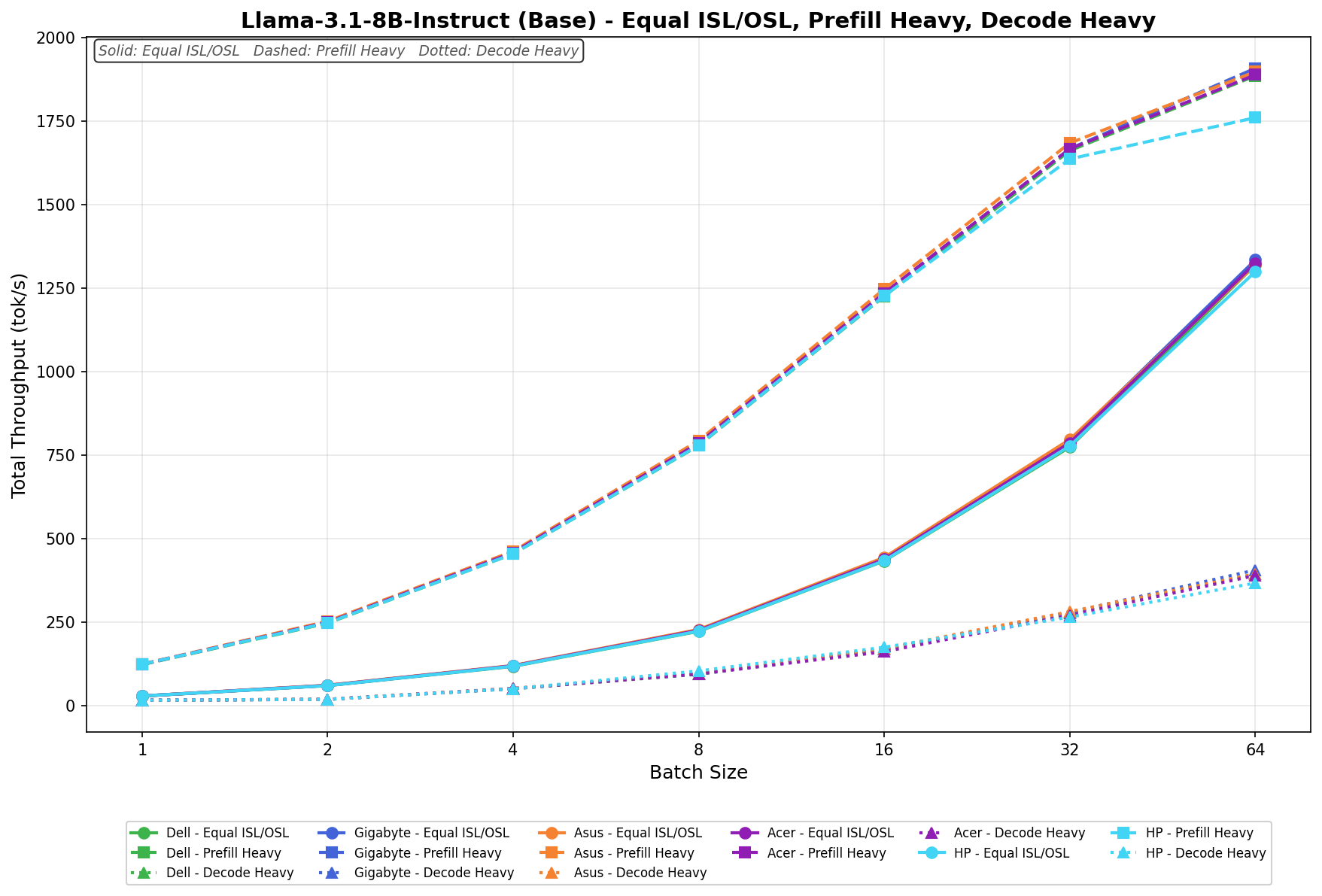
Graphics and Audio

The integrated NVIDIA Blackwell GPU in the GB10 Superchip handles all graphics tasks. The system supports up to 8K output at 60Hz via USB-C DisplayPort 1.4a and 8K at 30Hz via HDMI 2.1a. HP recommends using direct cable connections for 8K output, as adapters or docks may cause instability or degrade signal quality.
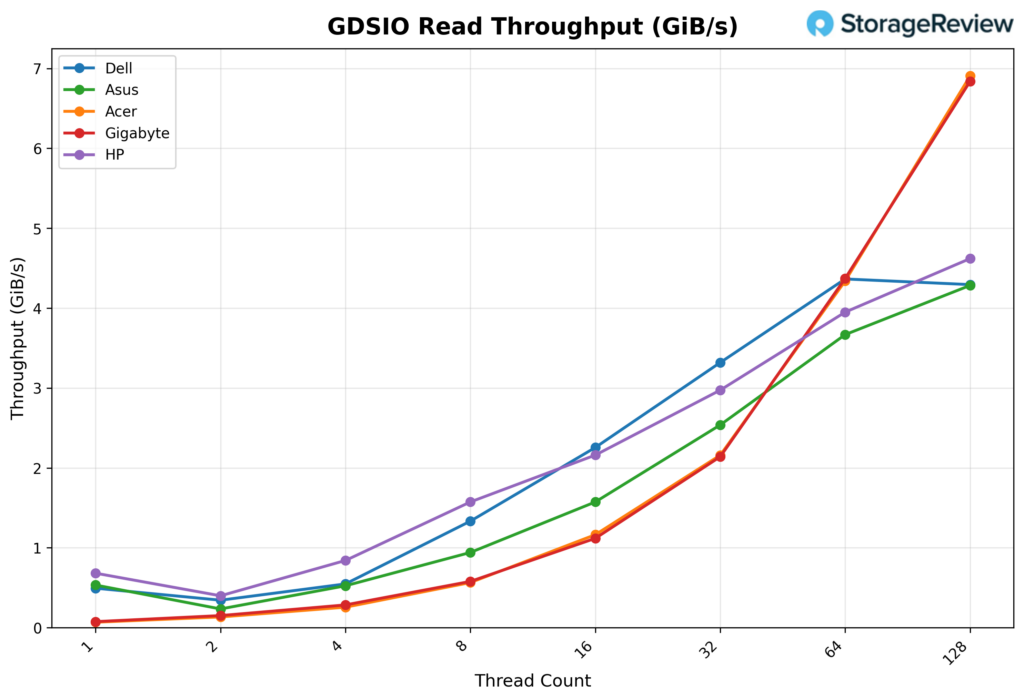
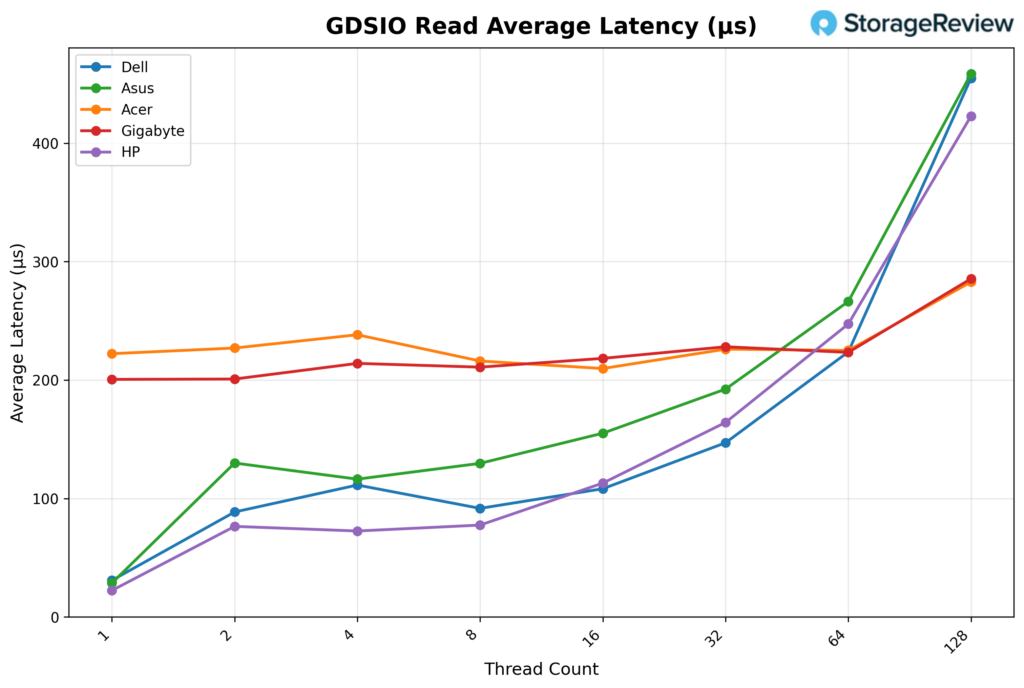
Audio runs over HDMI, with no dedicated analog audio outputs. This aligns with the system’s positioning as a compute node rather than a traditional multimedia workstation.

Thermals Testing

CPU Temperature

During CPU thermal testing, the HP ZGX Nano G1n reached a peak temperature of 77.3°C during the workload’s more intense bursts. This places HP below the hottest systems in the comparison stack during peak transitions, as other units climbed into the 90°C range. As the workload transitioned into Equal ISL/OSL and then Decode Heavy, CPU temperatures stabilized rather than continuing to rise sharply.

At the lower end, the CPU recorded a minimum temperature of 36.4°C during light-load conditions. This means the HP has effective heat dissipation when the system is not under heavier computational stress. Overall, the ZGX demonstrated controlled burst CPU thermal behavior with stable sustained-load performance.


GPU Temperature

GPU thermals followed a similar pattern. During periods of heavy acceleration, the GPU reached a maximum temperature of 69°C. This positions HP on the cooler side of the comparables during peak burst conditions, with several other systems (like the Dell, ASUS, and Founders Edition) running noticeably warmer at the top end. As activity shifted into Equal ISL/OSL and Decode Heavy phases, GPU temperatures leveled off and remained stable.

The GPU recorded a minimum temperature of 34°C during lighter phases, indicating solid idle thermal capabilities.

NVMe Temperature

During the Equal phase, the NVMe drive reached roughly 42°C, showing only a gradual rise from its resting baseline. As the workload shifted to Prefill Heavy, the storage temperature rose noticeably, ranging from 42°C to 47°C. In Decode Heavy, the drive operated in its warmest range, 47°C to 54°C, where it peaked, yet remained noticeably below most other Spark systems.

NIC Temperature

During the Equal phase, NIC temperature ranged from 39°C to 52°C, showing a steady climb, indicating moderate thermal buildup as network activity ramps up early in the run.

In Prefill Heavy, NIC thermals increased, ranging from 48°C to 64°C, because this phase places much more sustained pressure on the networking subsystem. During Decode Heavy, NIC temperature was in its warmest range, 52°C to 68°C, where the peak was reached. Nonetheless, thermal behavior remained stable throughout the test.

GPU Power Consumption

During the Equal phase, GPU power consumption ranged from 2.86W to just over 40W, placing the HP ZGX Nano G1n in the middle of the pack.

In Prefill Heavy, GPU power started at roughly 37W, dipped to as low as 35W, and spiked to as high as 69W, making this the most power-intensive phase of the run.

During Decode Heavy, GPU power consumption settled into a lower, more stable range of 35W to 46W, indicating that power demand eased as the workload shifted away from the more aggressive burst behavior.

Thermal Summary

Under load, the ZGX Nano G1n operates within a tightly controlled thermal envelope. Maximum system power consumption is approximately 228W, and heat dissipation is approximately 780 BTU/hr. By contrast, idle power draw remains low at approximately 36–38W, which indicates efficient power scaling when the system is not active. The forced-air cooling solution maintains stable operation within HP’s specified range of 5°C to 30°C.

HP ZGX Nano AI Performance Testing

To evaluate the HP ZGX Nano with GB10, we tested Spark units using the vLLM Online Serving benchmark, the most widely adopted high-throughput inference and serving engine for large language models. The vLLM online serving benchmark simulates real-world production workloads by sending concurrent requests to a running vLLM server and measuring key metrics, including total token throughput (tokens per second), time to first token, and time per output token, across varying load conditions.

Our testing spanned a range of models, including dense architectures and micro-scaling data types, and evaluated performance across three workload scenarios: Equal ISL/OSL, Prefill Heavy, and Decode Heavy. These scenarios represent distinct real-world serving patterns, from balanced input and output loads to compute-intensive prompt processing and memory-bandwidth-bound token generation.

In addition to the HP ZGX Nano with GB10, we benchmarked other OEM systems from Dell, ASUSAcer, and Gigabyte. This allowed us to place HP’s results within the broader competitive landscape and understand where it leads, keeps pace with the pack, or trails across different models and workloads.

GPT-OSS-120B

With GPT-OSS-120B, the HP ZGX Nano G1n posts its strongest results in Prefill Heavy, where throughput climbs from 304.5 tok/s at batch 1 to 2773.3 tok/s at batch 64. Equal ISL/OSL also scales steadily, rising from 69.6 tok/s to 722.9 tok/s across the sweep. Decode Heavy is much lighter by comparison, starting at 183.7 tok/s in batch 1, dipping slightly in batch 2, then recovering to 262.9 tok/s by batch 64.


GPT-OSS-20B

With GPT-OSS-20B, HP’s highest numbers come from Prefill Heavy, but the scaling is less linear than with the other models. Prefill starts at 1626.6 tok/s at batch 1, climbs to 1980.3 tok/s at batch 2, drops sharply to 1120.3 tok/s at batch 4, then recovers to 4345.1 tok/s by batch 64. Equal ISL/OSL scales more smoothly from 92.6 tok/s to 1550.6 tok/s, and Decode Heavy rises from 94.4 tok/s to 670.4 tok/s.

Qwen3 Coder 30B A3B FP8

For Qwen3 Coder 30B A3B (FP8), HP again excels in Prefill Heavy, with throughput increasing from 432.2 tok/s at batch size 1 to 2069.4 tok/s at batch size 64. Equal ISL/OSL rises from 104.2 tok/s to 1274.4 tok/s, while Decode Heavy improves from 55.9 tok/s to 480.4 tok/s. This is among HP’s stronger overall results.

Qwen3 Coder 30B A3B Base

On Qwen3 Coder 30B A3B (Base), HP delivers steady growth across all three phases, although the topline remains in the Prefill Heavy phase. That phase increases from 258.6 tok/s at batch 1 to 1629.4 tok/s at batch 64. Equal ISL/OSL scales from 60.3 tok/s to 690.3 tok/s, while Decode Heavy rises from 33.0 tok/s to 331.8 tok/s.

Llama 3.1 8B Instruct FP4

With Llama-3.1-8B-Instruct (FP4), HP shows a clear step up in throughput. Equal ISL/OSL climbs from 76.4 tok/s at batch 1 to 2774.1 tok/s at batch 64, making it the strongest of HP’s three phases on this model. Prefill Heavy also scales aggressively, rising from 316.8 tok/s to 2397.1 tok/s at batch 32 before slipping to 2270.4 tok/s at batch 64. Decode Heavy increases from 40.7 tok/s to 547.6 tok/s across the sweep.

Llama 3.1 8B Instruct (Base)

On Llama-3.1-8B-Instruct (Base), the HP ZGX Nano G1n scales cleanly across all three phases. In Equal ISL/OSL, throughput rises from 28.2 tok/s at batch 1 to 1298.6 tok/s at batch 64. In Prefill Heavy, HP increases from 123.2 tok/s to 1759.5 tok/s, with gains remaining strong throughout the sweep before tapering slightly at the top end. Decode Heavy is much lighter by comparison, rising from 15.5 tok/s at batch 1 to 366.4 tok/s at batch 64.

GPU Direct Storage

How GPU Direct Storage Works

Traditionally, when a GPU processes data from an NVMe drive, the data must first pass through the CPU and system memory before reaching the GPU. This process creates bottlenecks because the CPU acts as a middleman, adding latency and consuming system resources. GPU Direct Storage eliminates this inefficiency by allowing the GPU to access data directly from the storage device over the PCIe bus. This direct path reduces data movement overhead, enabling faster, more efficient transfers.

AI workloads, especially those involving deep learning, are highly data-intensive. Training large neural networks requires processing terabytes of data, and any delay in data transfer leads to underutilized GPUs and longer training times. Accordingly, GPU Direct Storage addresses this challenge by delivering data to the GPU as quickly as possible, minimizing idle time and maximizing computational efficiency.

In addition, GDS benefits workloads that stream large datasets, such as video processing, natural language processing, and real-time inference. By reducing CPU reliance, GDS accelerates data movement and frees CPU resources for other tasks, further enhancing overall system performance.

GDSIO Read Throughput 16K

Looking at GDSIO Read Throughput 16K, the HP ZGX Nano G1n starts at 0.70GiB/s with 1 thread, placing it among the stronger low-thread performers in the group. It dips to 0.41GiB/s at 2 threads, then climbs back to 0.86GiB/s at 4 threads, showing the same small early-thread inconsistency seen in a few of these systems. From there, scaling becomes much more consistent. Throughput rises to 1.6GiB/s at 8 threads and 2.2GiB/s at 16 threads, then continues upward to 3.0GiB/s at 32 threads. At the higher queue depths, the HP keeps gaining ground, reaching 3.9GiB/s at 64 threads and peaking at 4.6GiB/s at 128 threads.

GDSIO Read Average Latency 16K

Looking at GDSIO Read Average Latency (16K), the HP ZGX Nano G1n starts at approximately 0.02ms with 1 thread and remains low through 2 threads (0.08ms) and 4 threads (0.07ms). Latency edges up slightly at 8 threads (0.08ms) and 16 threads (0.11ms), then increases more noticeably at 32 threads (0.16ms) and 64 threads (0.25ms). At 128 threads, latency reaches 0.42ms, still a bit below the highest results in the group while tracking the system’s steady throughput scaling across the test.

GDSIO Write Throughput 16K

Looking at GDSIO Write Throughput 16K, the HP ZGX Nano G1n starts at 0.84GiB/s on 1 thread, rises to 1.4GiB/s on 2 threads, and reaches 2.2GiB/s on 4 threads. Performance continues to scale strongly at 8 threads (3.0 GiB/s) and reaches 3.3GiB/s at 16 threads, where it effectively levels off. From there, throughput remains nearly flat at 3.3GiB/s with 32 and 64 threads, then eases slightly to 3.2GiB/s with 128 threads, indicating the platform reaches its write ceiling relatively early and sustains that level consistently through the rest of the sweep.

GDSIO Write Average Latency 16K

Looking at GDSIO Write Average Latency (16K), the HP ZGX Nano G1n starts at approximately 0.02ms with 1 thread and remains very low through 2 threads (0.02ms) and 4 threads (0.03ms). Latency rises modestly at 8 threads (0.04ms) and 16 threads (0.07ms), then jumps at 32 threads (0.15ms) and 64 threads (0.30ms). At 128 threads, latency reaches 0.61ms, still fairly well controlled overall, though the upward trend aligns with the point where write throughput has already flattened at higher thread counts.

GDSIO Read Throughput 1M

Looking at GDSIO Read Throughput 1M, the HP ZGX Nano G1n starts at 3.2GiB/s on 1 thread and rises to 4.1GiB/s on 2 threads. Performance continues to climb at 4 threads (5.2GiB/s) and 8 threads (5.5GiB/s), after which the platform effectively reaches its ceiling. Throughput then holds essentially flat at 5.5GiB/s for 16, 32, and 64 threads, before easing slightly to 5.3 GiB/s at 128 threads, indicating a strong early ramp followed by a very stable high-thread plateau.

GDSIO Read Average Latency 1M

Looking at GDSIO Read Average Latency (1M), the HP ZGX Nano G1n starts at approximately 0.31ms with 1 thread and remains relatively low at 2 threads (0.47ms) and 4 threads (0.76ms). Latency increases with concurrency, rising to 1.4ms at 8 threads, 2.9ms at 16 threads, and 5.9ms at 32 threads. The trend continues at 64 threads (12.8ms) and reaches 27.2ms at 128 threads, tracking the higher queue depths even though throughput had already flattened much earlier in the sweep.

GDSIO Write Throughput 1M

Looking at GDSIO Write Throughput 1M, the HP ZGX Nano G1n starts at 3.1GiB/s with 1 thread and rises to 3.5GiB/s with 2 threads, then holds that level at 4, 8, and 16 threads. Performance dips slightly to 3.3GiB/s at 32 threads before returning to 3.5GiB/s at 64 threads. At 128 threads, throughput increases to 3.7GiB/s, indicating a mostly flat write profile across the sweep with only minor variation and a small uptick at the highest thread count.

GDSIO Write Average Latency 1M

Looking at GDSIO Write Average Latency (1M), the HP ZGX Nano G1n starts at approximately 0.31ms with 1 thread, rising to 0.57ms with 2 threads and 1.1ms with 4 threads. Latency continues to climb as concurrency increases, reaching 2.2ms with 8 threads, 4.4ms with 16 threads, and 9.4ms with 32 threads. The upward trend continues at 64 threads (17.7ms) and reaches 37.3ms at 128 threads, reflecting steadily increasing queue pressure even though write throughput itself remains fairly flat through most of the sweep.

Conclusion

HP’s ZGX Nano G1n carries the DGX Spark platform’s expected performance profile and adds engineering choices that set it apart from the other Spark systems in the field. In our testing, CPU temperatures peaked at 77.3°C and GPU temperatures at 69°C, both on the cooler side of the Spark units we’ve benchmarked. vLLM performance was strongest in Prefill Heavy workloads across all six models we tested, with scaling that held cleanly through higher batch sizes. GPU Direct Storage read throughput reached 4.6 GiB/s at 16K and 5.5 GiB/s at 1M block sizes, and write throughput plateaued early but held that level consistently across the remaining thread counts.

HP ZGX Nano G1n stacked

Where the ZGX Nano G1n separates itself from the rest of the Spark field is in the work HP did around the reference design. The recycled-materials content, the upper/lower-chassis split that improves internal serviceability, and the acoustic envelope that holds at 27.6 dBA under load all reflect deliberate engineering choices beyond what the GB10 platform itself requires. The security stack follows the same pattern. TPM 2.0 in FIPS 140-2 mode, Common Criteria EAL4+, and SED OPAL storage push this unit past a developer appliance and toward a system that can clear procurement in regulated environments.

Like other Sparks, this is not a general-purpose workstation, and HP does not position it as one. For developers, small teams, and organizations that need local AI compute with credible sustainability and security stories behind the purchase, the ZGX Nano G1n is a clear differentiated option within the Spark lineup. For shops where those criteria do not apply, the underlying platform is the constant across all five OEM systems we’ve reviewed, and the decision comes down to ecosystem, support, and price.

Product Page – HP ZGX Nano G1n AI

The post HP ZGX Nano G1n AI Station Review: A Secure, Sustainable Desk-Side AI Node appeared first on StorageReview.com.

NVIDIA and Google Cloud Expand AI Hypercomputer Platform at Next 2026

NVIDIA and Google Cloud used Google Cloud Next in Las Vegas to outline a new phase of their long-standing engineering partnership, introducing updates to the Google Cloud AI Hypercomputer platform to scale agentic and physical AI for production environments. The companies continue to co-design infrastructure spanning silicon, systems, networking, and software to support increasingly complex AI workloads, including autonomous agents, robotics, and digital twins.

NVIDIA and Google Cloud logos

Vera Rubin-Based A5X Infrastructure Targets Large-Scale AI Factories

Google Cloud introduced A5X bare-metal instances built on NVIDIA Vera Rubin NVL72 rack-scale systems. These systems are designed to significantly improve inference economics and efficiency, delivering up to 10x lower cost per token and 10x higher token throughput per megawatt than the prior generation.

Vera Rubin Stack from GTC 26

The A5X platform integrates NVIDIA ConnectX-9 SuperNICs with Google’s next-generation Virgo networking stack. This architecture enables cluster scaling to 80,000 Rubin GPUs within a single site and to 960,000 GPUs across multi-site deployments. The design targets hyperscale AI training and inference environments where network performance and system-level optimization are critical.

Google Cloud emphasized that tightly integrated infrastructure and managed AI services are required to support the next wave of AI workloads. The combined stack enables customers to train, fine-tune, and deploy models with an emphasis on performance, efficiency, and operational scalability.

Broad Blackwell Portfolio Enables Right-Sized Acceleration

Google Cloud also outlined its portfolio of NVIDIA Blackwell-based instances, spanning a wide range of deployment sizes and performance profiles. Offerings include A4 VMs based on NVIDIA HGX B200 systems, A4X and A4X Max configurations built on the GB200 and GB300 NVL72 platforms, and fractional GPU access via G4 instances with RTX PRO 6000 Blackwell Server Edition GPUs.

RTX PRO 6000

This range allows organizations to align infrastructure with workload requirements. Configurations range from fractional GPUs for lighter inference tasks to full NVL72 racks with 72 GPUs interconnected via fifth-generation NVLink and NVLink Switch technology. At the high end, deployments can scale to tens of thousands of GPUs for large-model training and distributed inference.

These systems are designed to support a range of AI workloads, including mixture-of-experts (MoE) models, multimodal inference, large-scale data processing, and simulation workloads for robotics and physical AI.

Early adopters are already leveraging the platform. Thinking Machines Lab is using GB300 NVL72-based A4X Max instances to scale training for its Tinker API, while OpenAI is running large-scale inference workloads, including ChatGPT, on GB200 and GB300-based instances on Google Cloud.

Confidential AI Extends to Blackwell GPUs

Google Cloud is extending confidential computing capabilities to its AI infrastructure. Gemini models running on NVIDIA Blackwell and Blackwell Ultra GPUs are now available in preview on Google Distributed Cloud, enabling organizations to deploy models closer to sensitive data sources.

Google Cloud Security Controls graphic

NVIDIA Confidential Computing enables encrypted execution environments in which prompts and fine-tuning data remain protected from unauthorized access, including by cloud operators. This capability is also coming to multi-tenant environments through Confidential G4 VMs with RTX PRO 6000 Blackwell GPUs.

This marks the first confidential computing implementation for Blackwell GPUs in the public cloud, targeting regulated industries that require strict data protection while maintaining access to high-performance AI infrastructure.

Open Models and Managed RL Pipelines for Agentic AI

The platform supports a broad model ecosystem, including Google’s Gemini and Gemma models and NVIDIA’s Nemotron open models. NVIDIA Nemotron 3 Super is now integrated with the Gemini Enterprise Agent Platform, enabling developers to build and deploy reasoning-driven agentic workflows.

Google Cloud is also introducing Managed Training Clusters with a reinforcement learning API built on NVIDIA NeMo. This service automates cluster provisioning, job orchestration, and fault handling, enabling large-scale RL training. The goal is to reduce operational complexity and allow teams to focus on model behavior and optimization.

CrowdStrike uses NVIDIA NeMo tools, including Data Designer, Automodel, and Megatron Bridge, to generate synthetic data and fine-tune domain-specific cybersecurity models. These workflows run on Blackwell-based infrastructure, accelerating threat detection and response pipelines.

Expanding Industrial and Physical AI Workloads

The joint platform also targets industrial and physical AI use cases. Applications from Cadence and Siemens Digital Industries Software are now available on Google Cloud with NVIDIA acceleration, supporting design, simulation, and manufacturing workflows across industries such as semiconductors, automotive, aerospace, and heavy equipment.

NVIDIA Omniverse libraries and Isaac Sim are available on Google Cloud Marketplace, enabling the development of physically accurate digital twins and robotics simulation pipelines. These tools allow organizations to simulate and validate systems before deployment.

In addition, NVIDIA NIM microservices can be deployed on Vertex AI and Google Kubernetes Engine to support vision AI and robotics workloads. These services enable capabilities such as real-time video analytics, robotic planning, and automated data processing.

Platform Focus: From Experimentation to Production

The updates position Google Cloud AI Hypercomputer as a full-stack platform for moving AI workloads from research to production. With tightly integrated compute, networking, software, and security capabilities, the platform is designed to support large-scale agentic systems, industrial automation, and real-time AI applications.

The post NVIDIA and Google Cloud Expand AI Hypercomputer Platform at Next 2026 appeared first on StorageReview.com.

LaCie 8big Pro5 Review: 256TB of HAMR-Powered Thunderbolt 5 DAS

LaCie has been a fixture in our lab for well over a decade. From the 8big Rack Thunderbolt 2 we covered in 2014 through the many generations of 5big, 6big, 8big, and Rugged devices that have followed, the formula has been consistent: premium Neil Poulton-designed enclosures, Seagate drives inside, Mac-centric polish, a solid warranty, and a clear focus on creative professionals. The new LaCie 8big Pro5 carries that pedigree forward in build quality, design, and purpose, and arrives at a notable inflection point for high-capacity direct-attached storage.

With eight 32TB HAMR-based Seagate IronWolf Pro drives on board, the 8big Pro5 tops out at 256TB of raw capacity. As far as turnkey desktop DAS products go, nothing else on the market ships at that capacity today. Competing 8-bay Thunderbolt enclosures from OWC, Sabrent, and others cap out at around 192 TB with the previous-generation PMR drives. While it is technically possible to roll your own by pairing a bare enclosure with eight 32TB IronWolf Pros, that DIY route leaves you stitching together the warranties across vendors. Seagate backs the complete LaCie kit end-to-end, including the drives, which is an advantage at this capacity point and for the value of the workloads involved.

Heat-assisted magnetic recording has been more than two decades in the making, and it has finally moved from hyperscale sampling to a product that a creative professional can put on a desk. For teams working with multi-stream 4K and 8K RAW footage, large photogrammetry or virtual production asset libraries, or AI-assisted content pipelines that consume storage faster than any prior generation, the jump from 24TB-era PMR drives to 32TB HAMR in the same eight bays is a meaningful change. We walked through the technical foundations of HAMR with Seagate’s Colin Presly on Podcast #124: The Path to 50TB HDDs with Frickin Lasers. The roadmap Colin laid out then is now shipping as product, with Mozaic 3+ drives at 30TB and up, Mozaic 4+ pushing to 44TB, and a longer arc toward 100TB drives as platter density continues to climb.

Around that storage core, LaCie delivers the rest of the package you would expect. The 8big Pro5 connects via Thunderbolt 5, which Seagate quotes at up to 80Gbps bidirectional for data, with additional headroom when combined with display traffic. In practice, the ceiling for a hard-drive array is set by the drives themselves. The IronWolf Pro 32TB is rated for up to 285 MB/s sustained, so eight drives in parallel have a theoretical maximum of about 2.2 GB/s before caching effects are taken into account.

The host port delivers up to 140W of power to a connected laptop, with two downstream Thunderbolt 5 ports rated at 30W each and a USB 20Gbps port rated at 15W for daisy-chained peripherals and displays. The LaCie 8big Pro5 ships preconfigured as a single RAID 5 array for 224TB of usable capacity, with RAID 0, 1, 6, 10, 50, and 60 available through LaCie RAID Manager. Build quality, thermals, and design are vintage LaCie, which we will cover in detail throughout the rest of this review. Pricing starts at $5,979 for the 32TB base configuration, with SKUs available up to 64TB, 128TB, 192TB, and 256TB.

LaCie 8big Pro5 – Build and Design

At the front of the LaCie 8big Pro5, the unit features a clean, minimal industrial design that aligns with its professional focus. It measures 11.69 inches in length, 9.13 inches in width, and 8.46 inches in height, giving it a compact yet substantial footprint for an eight-bay system.

Our review unit shipped fully populated with eight of Seagate’s new IronWolf Pro 32TB drives, for a total raw capacity of 256TB. With all drives installed, the system weighs just over 29 pounds, underscoring both its density and solid construction.

The enclosure itself is crafted from a single-piece aluminum chassis finished in metallic gray, giving it a premium, durable feel. Up front, each drive bay is tool-less, allowing quick, easy access to swap or service drives. Each tray is paired with an individual status LED, providing clear, at-a-glance visibility into drive activity and health without requiring interaction with the software.

At the rear, the LaCie 8big Pro5 maintains the same clean, functional design, with heavy perforations across the back panel to support airflow in a fully populated chassis. Power is handled via a standard C19 input and a physical power switch, confirming that the power supply is fully integrated into the unit rather than relying on an external brick.

Connectivity centers on four USB-C ports, each clearly labeled for its role. The leftmost port serves as the primary host connection, operating over Thunderbolt 5 with up to 80Gbps bandwidth and delivering up to 140W of power, making it well-suited for powering and connecting a laptop with a single cable.

Next to it are two additional Thunderbolt 5 downstream ports. These ports enable expansion beyond the enclosure, supporting external storage devices or displays while also delivering up to 30W of power to connected peripherals. This makes the unit function as both a high-capacity storage array and a compact docking hub.

The final USB-C port supports a 20 Gbps connection, intended primarily for additional storage expansion. It also provides up to 15W of power, which is sufficient for bus-powered drives and similar accessories.

To round things out, there is a Kensington lock slot for physically securing the device, a practical addition for shared workspaces or studio environments where the unit may not always be in a controlled rack or locked room.

From a wider rear view, the airflow design becomes much more apparent. The majority of the back panel is perforated, allowing the system to move a significant amount of air across all eight drives. Cooling is handled by a three-fan setup, with two larger fans serving the primary drive bay area and a smaller fan dedicated to the lower section housing the controller and power components. This separation helps ensure consistent airflow across both the storage and internal electronics. This is especially important in a fully populated 256TB configuration where thermal buildup can become a limiting factor over sustained workloads.

You can also see the subtle branding here, with “LaCie – design by Neil Poulton” centered along the upper portion of the rear panel, reinforcing the industrial design heritage that has been a hallmark of LaCie systems for years.

Up top, LaCie adds a simple yet practical touch with the integrated handle cutouts. Machined directly into the aluminum, these recessed grips provide a secure way to lift and move the unit without compromising the clean design language.

Given that the system weighs just over 29 pounds when fully populated, a built-in grip like this makes a noticeable difference during deployment or repositioning. It is a small detail, but one that reflects an understanding that this is not a lightweight desktop accessory and will occasionally need to be handled with a bit more care.

LaCie 8big Pro5 – LaCie RAID Manager software

To manage the 8big Pro5’s storage configuration, LaCie requires its RAID Manager software. This utility is available for Windows and macOS and is necessary to configure the array in RAID modes or switch the unit to JBOD, depending on your deployment needs.

Through RAID Manager, users can choose from a full range of RAID levels, including RAID 0, RAID 1, RAID 5, RAID 6, RAID 10, RAID 50, and RAID 60. This flexibility allows the unit to be tailored for everything from maximum performance to high levels of redundancy and fault tolerance. As shown here, a RAID 5 configuration using all eight 32TB drives yields 224TB of usable capacity and provides single-drive fault tolerance through parity.

In addition to RAID configuration, the software also allows you to format the array in either APFS for macOS environments or NTFS for Windows deployments, making it easy to integrate into mixed or platform-specific workflows. The interface itself is straightforward, providing visibility into drive status, serial numbers, and overall array health, while also confirming valid configurations before deployment.

LaCie 8big Pro5 – Performance

For Windows testing, we leveraged a Dell Pro Max 14 with the following configuration:

  • Intel Core Ultra 9 285H
  • NVIDIA RTX PRO 2000 8GB GDDR7
  • 64GB LPDDR5X-8400
  • 1TB SSD

For macOS testing, we used an M4 MacBook Air.

To evaluate the performance of the 8big Pro5, we began testing in a Windows environment with ExFat, configuring the array in RAID 5. This setup reflects a common balance of capacity, performance, and redundancy for general-purpose use. In this configuration, we ran a series of benchmarks, including IOMeter for synthetic workload analysis, Blackmagic Disk Speed Test for media-focused throughput, and PCMark 10 Disk Benchmark to capture more real-world application behavior.

After completing Windows testing, we switched to a macOS environment using RAID 5 and ExFAT. This allowed us to measure the performance of the same configuration across Windows and Mac environments. In this configuration, we reran Blackmagic Disk Speed Test to compare results in a macOS-native workflow and added ATTO Disk Benchmark to analyze performance across varying transfer sizes.

Blackmagic Disk Speed Test

The Blackmagic Disk Speed Test benchmarks a drive’s read and write speeds to estimate its performance, especially for video editing tasks. It helps users ensure their storage is fast enough for high-resolution content, such as 4K or 8K video.

The Blackmagic results show clear, real-world performance gains across RAID configurations. In RAID 5 in Windows, the 8big Pro5 delivers 1,418.4 MB/s read and 2,061.5 MB/s write speeds, offering a strong balance of performance and data protection. When moved to macOS, read performance remains nearly identical at 1,414.9 MB/s, while write speeds are 1,751.3 MB/s, reflecting some platform differences rather than a limitation of the array itself.

Looking at the Blackmagic workload breakdown, RAID 5 still proves more than capable for high-resolution media workflows. At these speeds, the array comfortably supports formats up through 8K, including 8K DCI and even 12K playback in several codecs, with consistent results across ProRes 422 HQ and H.265. This reinforces that RAID 5 is not just a safe option, but a practical one for professional video editing where both performance and redundancy matter.

In practice, RAID 5 delivers more than enough performance for demanding video workflows while maintaining data protection.

Blackmagic (higher is better) LaCie 8big Pro5 – Windows Raid 5 ExFat LaCie 8big Pro5 – macOS Raid 5 ExFat
Read 1,418.4 MB/s 1,414.9 MB/s
Write 2,061.5 MB/s 1,751.3 MB/s

PCmark 10 Storage

PCMark 10 Storage Benchmarks evaluate real-world storage performance using application-based traces. They test the system and data drives, measuring bandwidth, access times, and consistency under load. These benchmarks offer practical insights beyond synthetic tests, enabling users to compare modern storage solutions effectively.

The PCMark 10 result of 717 gives a useful look at how the 8big Pro5 behaves under real-world workloads rather than pure synthetic throughput. This benchmark incorporates traces from everyday applications, which tend to be more sensitive to latency and mixed I/O patterns than large sequential transfers.

PCmark 10 Storage (higher is better) LaCie 8big Pro5 – Windows Raid 5 ExFat
Overall Score 717

IOMeter

We also ran the LaCie 8big Pro5 array through IOMeter. This lets us dig deeper into workloads, including random and sequential performance. We tested the 8big with a single queue to simulate lighter use and with four queue to see how the DAS handles heavier, more demanding scenarios.

At 1 queue, sequential performance is 1,752.2 MB/s read and 1,851.5 MB/s write, showing strong throughput even under a lighter load. Random 2MB performance lands at 233.8 MB/s read, and 654.1 MB/s write, while small-block 4K operations reach 297 IOPS read and 5,482 IOPS write.

IOMeter (1  queue) LaCie 8big Pro5 – Windows Raid 5 Raw
Seq 2MB Read 1,752.2 MB/s
Seq 2MB Write 1,851.5 MB/s
Random 2MB Read 233.8 MB/s
Random 2MB Write 654.1 MB/s
Random 4K Read 297 IOPS
Random 4K Write 5,482 IOPS

Scaling to 4 queue, sequential reads increase to 1,949.1 MB/s, while writes remain steady at 1,873.6 MB/s, indicating the array is already near its write ceiling. Random 2MB performance improves more noticeably, with reads rising to 391.1 MB/s and writes to 980.5 MB/s. For 4K workloads, reads scale to 1,103 IOPS, while writes settle at 4,458 IOPS.

IOMeter (4 queue) LaCie 8big Pro5 – Windows Raid 5 Raw
Seq 2MB Read 1,949.1 MB/s
Seq 2MB Write 1,873.6 MB/s
Random 2MB Read 391.1 MB/s
Random 2MB Write 980.5 MB/s
Random 4K Read 1,103 IOPS
Random 4K Write 4,458 IOPS

ATTO Disk Benchmark Summary (LaCie 8big Pro5 – macOS RAID 5, ExFat)

The ATTO results provide a clear picture of how the 8big Pro5 behaves in macOS when pushed to maximum throughput across a wide range of transfer sizes in a RAID 5 configuration.

At lower transfer sizes, performance ramps up gradually, as expected for an HDD-based array. Small-block operations (under 16KB) remain relatively modest, but once you move to larger transfer sizes, the system scales more effectively.

From around 64KB onward, throughput stabilizes and becomes a far more representative measure of real-world performance. Peak read speeds reach approximately 3.4 GB/s, while write performance settles slightly lower in the 2.7-3.1 GB/s range across larger block sizes.

Overall, the results show strong sequential performance, with the array delivering high read throughput and slightly lower, but still consistent, write speeds under sustained workloads.

Conclusion

The LaCie 8big Pro5 marks a meaningful leap forward for the line. At 256TB raw over Thunderbolt 5, with eight HAMR-based IronWolf Pro drives housed in a well-designed Neil Poulton enclosure, it is the first turnkey desktop DAS to deliver both a massive capacity jump and next-generation interface bandwidth to creative pros in a single box. The 8big formula is all here: premium build, thoughtful thermals, quiet operation, mature RAID management through LaCie RAID Manager, and a clear focus on the video, photo, and 3D asset workflows that have consistently outpaced the storage they rely on.

Performance lands where a well-tuned eight-bay array should. In RAID 5, the array comfortably handles multi-stream 4K and 8K editing with room to spare. Small-block random performance is modest, as expected for any HDD-based array, but that is not the workload profile this product is built for. For bulk sequential transfers, active project storage, and long-form media ingest, the array delivers the throughput that modern creative workflows need. The Thunderbolt 5 host port with 140W of power delivery, plus the two downstream TB5 ports and the 20Gbps USB-C, also make the unit a legitimate one-cable docking solution for a laptop-based edit bay, not just a storage target.

Pricing starts at $5,979 for the 32TB base configuration and scales up through 64TB, 128TB, 192TB, and 256TB tiers. That is a meaningful investment, but a 5-year warranty that covers both the enclosure and the drives end-to-end, Rescue Data Recovery Services, and the operational simplicity of a single-box deployment distinguish it from a DIY build using bare IronWolf Pros and a third-party enclosure. For creative professionals, production teams, and studios working at 4K, 8K, and beyond, and for anyone whose project data has outgrown what previous-generation PMR arrays could deliver in the same footprint, the 8big Pro5 is the most capable turnkey desktop DAS available today and earns the shortlist spot for high-end workflows that need both the capacity and the interface to match.

Product Page – LaCie 8big Pro5

The post LaCie 8big Pro5 Review: 256TB of HAMR-Powered Thunderbolt 5 DAS appeared first on StorageReview.com.

Seagate FireCuda X Vault Review: 20TB of Single-Cable Storage for Massive Game Libraries

Seagate’s FireCuda X Vault is the gaming-flavored half of a two-drive launch that brings bus-powered USB-C to 3.5-inch external hard drives for the first time. Available in 8TB and 20TB capacities starting at $269.99, it runs on a single USB-C cable for both data and power, provided the host port can supply at least 15W. That’s the same category-first hook Seagate is pitching with the new One Touch Desktop HDD, but the FireCuda X Vault trades the One Touch’s clean-desk minimalism for customizable RGB with Windows Dynamic Lighting support, Xbox on PC certification, and a one-month Xbox Game Pass Ultimate trial.

Seagate FireCuda X Vault front

The pitch here is overflow storage for buyers who’ve outgrown smaller drives and want a clean way to add serious capacity to a gaming PC or streaming rig. Large game libraries, captured gameplay, archived installs, and media collections are the target workloads. It’s worth being upfront about what it isn’t: the 5400 RPM drive inside won’t deliver SSD-like load times, so this isn’t the place to install the games you actually play. The better pairing is an internal NVMe for active titles and the FireCuda X Vault for everything else. Despite the Xbox branding on the box, the drive is PC-only and is not compatible with Xbox Series X/S. And because 15W USB-C delivery isn’t universal on older systems, it’s worth confirming your port can feed it before committing.

Seagate bundles Toolkit with the FireCuda X Vault, adding a decent set of storage management features beyond basic file transfers. Incremental backup copies only files that are new or changed after the first run, which helps reduce backup time for repeat jobs, and it supports both scheduled backups and manual runs. The software also includes folder mirroring for keeping selected directories synced, password protection on supported setups, and direct import from USB devices or memory cards.

Seagate FireCuda X Vault side

The FireCuda X Vault 8TB model is estimated to hold roughly 110 to 145 games, based on installations ranging from 80GB to 150GB, along with about 800 hours of 1080p video or around 120 hours of 4K footage. The 20TB version increases that to around 275-360 games, about 2,000 hours of 1080p video, or roughly 300 hours of 4K video.

Backed by a 2-year warranty, Seagate includes the drive, a 0.5-meter USB-C cable, Toolkit software, a quick start guide, and two years of Rescue Data Recovery Services. Seagate also adds a one-month Xbox Game Pass Ultimate offer for new users and a two-month Adobe Creative Cloud Pro subscription, which makes sense given its gaming and content-creation use cases.

Seagate FireCuda X Vault Specifications

Specification/Feature Seagate FireCuda X Vault
Overview
Product Name Seagate FireCuda X Vault
Product Type Bus-powered USB-C external hard drive
Form Factor 3.5-inch USB-C desktop drive
Target Audience PC Gamers, Streamers, and Content Hoarders
Capacities offered 8TB, 20TB
Connectivity and Compatibility
Connection USB-C
Power Bus-powered, single-cable USB-C desktop storage, no external power required
USB-C power requirement USB-C port must supply equal to or greater than 15W for drive operation
Operating System Compatibility Compatible with most Windows and macOS systems
Time Machine Reformatting required for use with Time Machine
Toolkit software compatibility Toolkit software not compatible with ChromeOS
Xbox on PC Designed for Xbox on PC
Software and Features
Toolkit included Yes
Toolkit features Incremental Backup: Keeps data protected while minimizing backup time by saving only new or changed files
Scheduled or “Backup Now” Options: Supports both hands-off automation and manual control
Mirroring (RealTime Sync): Maintains an always-updated copy of active folders on the drive
Seagate Secure (Password Protection): Helps prevent unauthorized access if the drive is lost or shared
Import from USB / Memory Cards: Simplifies photo and video offloads directly to the drive
RGB: Allows for various RGB illumination customization options
RGB lighting Customizable RGB lighting with Windows Dynamic Lighting support
Rescue Data Recovery Services Included
Capacity Estimates
8TB ~800 hours (≈10 GB/hr) 1080p HD Video
~120 hours (≈60–70 GB/hr) 4K Video
~110-145 (≈80-150GB Each) Games
20TB ~2,000 hours 1080p HD Video
~300 hours 4K Video
~275-360 (≈80-150GB Each) Games
In the Box and Bundles
What’s in the box Firecuda X Vault Main Unit
1.64-foot (0.5m) USB-C cable
Toolkit software
Quick start guide
Warranty 2-year limited warranty (may vary in region)
Data recovery coverage 2-year Rescue data recovery services (may vary in region)
Bundled offers Free month of Xbox Game Pass Ultimate included in box (for new users)
Complimentary 2-month subscription to Adobe Creative Cloud Pro (All Apps)

Seagate FireCuda X Vault Design and Build

The FireCuda X Vault has a very distinct desktop look. The front features vertical ribbing wrapped by the outer shell, with a distinct opening at the top where the LED emits light. It provides immediate power feedback via this LED, glowing white when the drive is getting enough power and red when the USB-C source is not supplying enough.

There are no ports or controls on the front panel. One side carries only the FireCuda X branding, while the rear has only a single USB-C port. The design is pretty basic, and the LED light may make it a bit much for some work environments; however, for gaming or home use, the drive will fit in well.

The outer shell is mostly plastic, and the base uses a high-friction material that helps keep the drive in place on a desk. It runs on bus power and passive cooling.

For everyday use, the single-cable design keeps setup simple, and the shape leaves enough open space around the ribbed sections, so placing two units one above the other does not appear to create an obvious airflow problem. However, the weak point is the RGB lighting. The top light bar fits the overall style, but the diffusion is uneven, so the glow looks patchy rather than smooth.

Seagate FireCuda X Vault Performance

To evaluate the performance of the Seagate FireCuda X Vault, we compared it against the Seagate One Touch Desktop HDD across a variety of benchmarks.

Here’s the high-performance test rig we used for benchmarking:

  • CPU: AMD Ryzen 7 9850X3D
  • Motherboard: Asus ROG Crosshair X870E Hero
  • RAM: G.SKILL Trident Z5 Royal Series DDR5-6000 (2x16GB)
  • GPU: NVIDIA GeForce RTX 4090
  • OS: Windows 11 Pro

The drive inside our 8TB Seagate FireCuda X Vault self-reported as the Seagate SkyHawk (ST8000VX009) at 5400 RPM.

Blackmagic Diskspeed Test

First up is the Blackmagic test, where we evaluated the Seagate FireCuda X Vault against the One Touch Desktop HDD.

The Blackmagic Disk Speed Test benchmarks a drive’s read and write speeds to estimate its performance, especially for video editing tasks. It helps users ensure their storage is fast enough for high-resolution content, such as 4K or 8K video.

In this run, the FireCuda X Vault reached 222.4MB/s read and 158.9MB/s write. The read performance stands out here, coming in noticeably ahead of the One Touch’s 211.9MB/s, and landing fairly close to Seagate’s quoted maximums for its internal FireCuda drives. Write performance tells a different story, where the One Touch leads at 211.2MB/s, putting the FireCuda’s 158.9MB/s more in line with typical HDD behavior.

Blackmagic (higher is better) Seagate FireCuda X Vault 8TB Seagate One Touch Desktop HDD 8TB
Read 222.4 MB/s 210.9 MB/s
Write 158.9 MB/s 152.0 MB/s

IOMeter

In the 1-queue IOMeter test, the FireCuda X Vault demonstrated strong sequential performance, reaching 224.03 MB/s read and 223.37 MB/s write, outperforming the One Touch Desktop HDD, which came in at 211.26 MB/s read and 211.48 MB/s write. This reinforces the FireCuda’s advantage in sustained, large-block transfers.

Random 2MB performance was much closer between the two drives. The FireCuda posted 117.17MB/s read and 149.59MB/s write, while the One Touch slightly edged ahead in write performance at 150.06MB/s and trailed slightly in reads at 113.83MB/s. These small differences are within the margin expected for mechanical drives.

Small-block performance remained predictably low across both drives. The FireCuda delivered 429 IOPS in random 4K writes and 126 IOPS in reads, nearly identical to the One Touch at 424 IOPS in writes and 129 IOPS in reads. At this level, neither drive is designed for latency-sensitive workloads, and their performance is effectively comparable.

IOMeter Test Seagate FireCuda X Vault 8TB Seagate One Touch Desktop HDD 8TB
Seq 2MB Write 223.37 MB/s 211.48 MB/s
Seq 2MB Read 224.03 MB/s 211.26 MB/s
Random 2MB Write 149.59 MB/s 150.06 MB/s
Random 2MB Read 117.17 MB/s 113.83 MB/s
Random 4K Write 429 IOPS 424 IOPS
Random 4K Read 126 IOPS 129 IOPS

PCMark 10

PCMark 10 Storage Benchmarks evaluate real-world storage performance using application-based traces. They test the system and data drives, measuring bandwidth, access times, and consistency under load. These benchmarks offer practical insights beyond synthetic tests, enabling users to compare modern storage solutions effectively.

In PCMark 10’s Data Drive Benchmark, both drives performed nearly identically, with the Seagate One Touch Desktop HDD scoring 750 and the Seagate FireCuda X Vault close behind at 746. This minimal difference indicates that, in trace-based workloads, there is no meaningful performance gap between the two.

As expected for high-capacity HDDs, both drives are better suited for bulk storage tasks such as backups, media libraries, and large file transfers rather than latency-sensitive workloads. Overall, this result shows that real-world responsiveness between the two is effectively on par in this test.

PCMark 10 Storage (higher is better) Seagate FireCuda X Vault 8TB Seagate One Touch Desktop HDD 8TB
Overall Score 746 750

Conclusion

The FireCuda X Vault’s appeal comes down to the same category-first hook as its One Touch sibling: a 3.5-inch desktop HDD that runs off a single USB-C cable with no power brick in the mix. For gamers and streamers who want to add significant capacity to a PC or laptop setup without another power supply on the floor, that’s a quality-of-life improvement over every desktop external HDD that came before it.

Performance lands where it should, for a 5400-RPM hard drive. Sequential read and write throughput sits in the 220 MB/s range; random workloads are modest; and small-block IOPS behave like the mechanical storage they are. Those numbers are fine for bulk transfers and archival use, but they confirm this isn’t a drive for running modern games directly. Pair it with an internal NVMe for active titles and use the FireCuda X Vault for everything that doesn’t need fast access.

Starting at $269.99 for 8TB, the pricing is competitive with other high-capacity external HDDs and considerably less than that of equivalent external SSDs. The RGB execution could be cleaner, the USB-C cable is short, and buyers should verify their host port can deliver 15W before committing. Those caveats aside, the FireCuda X Vault earns its spot on the shortlist for PC gamers, streamers, and media collectors who need ample local storage with minimal cable clutter.

Product Page – Seagate FireCuda X Vault

The post Seagate FireCuda X Vault Review: 20TB of Single-Cable Storage for Massive Game Libraries appeared first on StorageReview.com.

Seagate One Touch Desktop HDD Review: 24TB Without the Power Brick

Seagate’s new One Touch Desktop HDD sidesteps one of the staples of the desktop external drive category: the power brick. The refreshed lineup runs 8TB, 20TB, and 24TB in a 3.5-inch chassis, but instead of a DC input and wall adapter, it draws everything it needs over a single USB-C cable. Seagate bills it as the industry’s only bus-powered USB-C desktop HDD, which is a meaningful shift in a segment where cable count and desk clutter have long been accepted costs of doing business. Pricing starts at $259.99 for 8TB and tops out at $619.99 for 24TB.

Beyond the cable story, the One Touch Desktop HDD is straightforward mechanical storage aimed at backup and archive workloads. It slots between the complexity of a NAS and the cost of high-capacity SSDs, working well as a companion to a smaller internal NVMe or as a bulk offload destination for photos, video, and project files. The bus-powered design also opens up use cases that traditional desktop drives can’t cover, such as pulling footage off a laptop in the field with no outlet nearby. Pair that with Windows and Mac support, Seagate’s Toolkit for backup and mirroring, and two years of Rescue Data Recovery Services, and the pitch comes down to storage headroom, data safety, and a cleaner desk at a competitive cost per terabyte.

Design & Features

The One Touch Desktop HDD features a refined, premium aesthetic, combining aluminum and plastic for a solid, high-quality feel. Rubber feet on the bottom also help stabilize the device and prevent unwanted movement during operation. To keep things clean and minimal, Seagate has also avoided adding unnecessary lighting elements.

Seagate One Touch bottom view

For connectivity, the drive uses a single USB-C cable and does not require a separate power adapter, provided the host port can supply at least 15W. While this requirement may be a limitation for older systems, it ultimately simplifies setup for modern devices. A small front-facing status light is the only visual indicator, blinking red if insufficient power is detected.

Seagate One Touch USB-C view

Getting started is pretty straightforward; simply plug in the cable and wait for the volume to mount. You can optionally install the Seagate Toolkit software, but it works out of the box with both Windows and macOS. Time Machine users will need to reformat before initial use, though.

Inside the box, Seagate includes a (0.5m) USB-C cable, Toolkit software, a quick-start guide, and a 2-year limited warranty. In addition, users receive 2-year Rescue Data Recovery Services, which include one in-lab recovery attempt, with recovered data returned on an encrypted device if the attempt is successful. The turnaround time for the recovery service is about 30 days, which provides peace of mind for anyone relying on the drive for long-term storage.

For creatives, Seagate provides a complimentary 2-month trial subscription to Adobe Creative Cloud Pro (All Apps). This inclusion gives users access to tools they might otherwise pay for separately, making the overall package more compelling.

Feature 8TB 20TB 24TB
Specifications
Connector USB-C
Interface USB 3.2 Gen 1 (up to 5Gb/s)
Power Bus-powered via USB-C (≥15W required)
Compatibility Windows & macOS (Time Machine requires reformat; ChromeOS not supported for Toolkit)
In the Box & Software
What’s in the Box One Touch HDD, 1.64ft USB-C cable, Toolkit software, Quick Start Guide
Included Software Seagate Toolkit, 2-month Adobe Creative Cloud Pro (All Apps) trial
Support & Pricing
Warranty 2-year limited (may vary by region)
Rescue Data Recovery 2-year included (may vary by region)
MSRP $259.99 $519.99 $619.99

Toolkit Software

Seagate Toolkit is a bundled utility that enhances the One Touch Desktop HDD’s functionality without complicating the user experience. After the initial backup, its incremental backup feature saves only modified files, helping keep backup times and system load manageable. At the same time, the Mirroring (RealTime Sync) feature continuously maintains updated copies of selected folders in the background. Additionally, Seagate Secure provides password protection for supported drives, while the Import function automatically transfers files from connected USB devices or memory cards, making it especially useful for frequent media offloads.

Moreover, Toolkit supports both scheduled and manual backups. Users who prefer automation can rely on scheduled backups, while those who want more control can trigger backups manually. Either way, it delivers essential data protection features without requiring third-party software.

Capacity in Context

To better understand available capacities, Seagate provides real-world storage estimates for common file types. Although actual results will vary depending on codec, compression, and workflow, these figures still offer a helpful baseline for planning:

Capacity 1080p HD Video (approx.) 4K Video (approx.) RAW Photos (approx.)
8TB ~800 hours ~120 hours ~200,000
20TB ~2,000 hours ~300 hours ~500,000
24TB ~2,400 hours ~360 hours ~600,000

Performance

To evaluate the performance of the Seagate One Touch Desktop HDD, we compared it against the Seagate FireCuda X Vault across a variety of benchmarks.

Here’s the high-performance test rig we used for benchmarking:

  • CPU: AMD Ryzen 7 9850X3D
  • Motherboard: Asus ROG Crosshair X870E Hero
  • RAM: G.SKILL Trident Z5 Royal Series DDR5-6000 (2x16GB)
  • GPU: NVIDIA GeForce RTX 4090
  • OS: Windows 11 Pro

The drive inside our 8TB Seagate One Touch HDD self-reported as the Seagate SkyHawk (ST8000VX009) at 5400 RPM.

Blackmagic Disk Speed Test

The BlackMagic Disk Speed Test benchmarks a drive’s read and write speeds to estimate its performance, especially for video editing tasks. It helps users ensure their storage is fast enough to handle high-resolution content, such as 4K or 8K video.

In Blackmagic, the Seagate FireCuda X Vault posted the stronger read speed at 222.4 MB/s, edging out the Seagate One Touch Desktop HDD at 210.9 MB/s. Write performance also showed a similar edge, with the One Touch measuring 152.0 MB/s compared to 158.9 MB/s from the FireCuda X Vault. Overall, both drives landed in expected territory for high-capacity external hard drives, though the FireCuda showed slightly better read and write speed.

Blackmagic (higher is better) Seagate One Touch Desktop HDD 8TB Seagate FireCuda X Vault 8TB
Read 210.9 MB/s 222.4 MB/s
Write 152.0 MB/s 158.9 MB/s

IOMeter

In the 1-queue IOMeter run, the FireCuda X Vault led in sequential throughput, reaching 224.03 MB/s read and 223.37 MB/s write, compared to 211.26 MB/s read and 211.48 MB/s write from the One Touch Desktop HDD. Random 2MB performance was much closer. The One Touch slightly led in random 2MB writes at 150.06MB/s versus 149.59MB/s, while the FireCuda posted the better random 2MB read at 117.17MB/s versus 113.83MB/s.

Small-block performance remained low on both drives, as expected for HDD-based storage, with the FireCuda reaching 429 IOPS in random 4K writes versus 424 IOPS on the One Touch, while the One Touch narrowly led in random 4K reads at 129 IOPS versus 126 IOPS on the FireCuda. Overall, the FireCuda showed a modest advantage in sequential performance, while the two drives were very close in lighter random workloads.

IOMeter Test Seagate One Touch Desktop HDD 8TB Seagate FireCuda X Vault 8TB
Seq 2MB Write 211.48 MB/s 223.37 MB/s
Seq 2MB Read 211.26 MB/s 224.03 MB/s
Random 2MB Write 150.06 MB/s 149.59 MB/s
Random 2MB Read 113.83 MB/s 117.17 MB/s
Random 4K Write 424 IOPS 429 IOPS
Random 4K Read 129 IOPS 126 IOPS

PCMark 10 Storage

PCMark 10 Storage Benchmarks evaluate real-world storage performance using application-based traces. They test the system and data drives, measuring bandwidth, access times, and consistency under load. These benchmarks offer practical insights beyond synthetic tests, enabling users to compare modern storage solutions effectively.

In PCMark 10’s Quick System Drive Benchmark, both drives delivered nearly identical performance, with the Seagate One Touch Desktop HDD scoring 750 and the Seagate FireCuda X Vault coming in at 746. This narrow gap suggests that, in trace-based workloads, the two drives perform very similarly, with no meaningful advantage for either.

As expected for high-capacity HDDs, both are best suited for bulk storage tasks such as backups, media libraries, and large file transfers rather than latency-sensitive workloads. Overall, this result shows that real-world responsiveness between the two is effectively on par in this test.

PCMark 10 Storage (higher is better) Seagate One Touch Desktop HDD 8TB Seagate FireCuda X Vault 8TB
Overall Score 750 746

Conclusion

The Seagate One Touch Desktop HDD is a category-first product in a commoditized space. Bus-powered USB-C on a 3.5-inch desktop drive genuinely changes how the drive fits on a desk or travels in a bag, and it’s the feature most likely to sway buyers who’ve grown tired of juggling bulky power bricks. Cross-platform support, Toolkit for backup and mirroring, and two years of Rescue Data Recovery Services round out a package that covers the basics without asking for much from the user.

Performance lands where it should for 5400 RPM mechanical storage. Sequential throughput sits in the low 200s MB/s, random workloads are modest, and small-block IOPS are firmly in HDD territory. That rules it out for anything latency sensitive or for active video editing off the drive, but those aren’t the workloads this product targets. For backup, archive, media libraries, and bulk offload, it does the job.

At $259.99 for 8TB and $619.99 for 24TB, pricing is competitive against other high-capacity external HDDs, and the single-cable design is a real differentiator rather than a marketing one. For users who want maximum capacity with minimum desk footprint and cable clutter, the One Touch Desktop HDD earns its spot on the shortlist.

Product page – Seagate One Touch Desktop HDD

The post Seagate One Touch Desktop HDD Review: 24TB Without the Power Brick appeared first on StorageReview.com.

❌