Reading view

There are new articles available, click to refresh the page.

TRYX STAGE ARGB 360mm Review (Page 1 of 4)

TRYX STAGE ARGB 360mm Review (Page 1 of 4)
TRYX STAGE ARGB 360mm Review
Qian Chen

By: Qian Chen
July 24, 2026

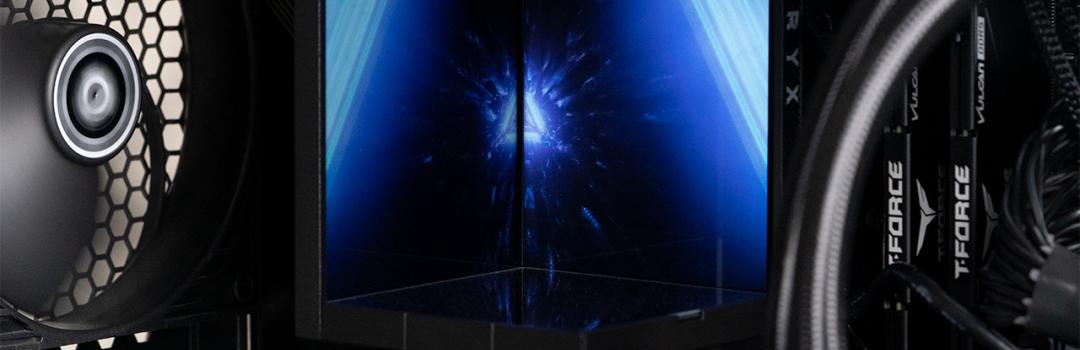
Often times numbers do not lie, but there are times when there are more factors to consider. When I was looking at the job application for the summer camp I am currently working at, I was very excited. It paid 50 cents less than the summer camp I worked at last year, but it offered more than double the total hours. I also get to work with two to three other camp leaders to manage a class of twenty-seven, compared to last year, when I had to manage fifteen students on my own. I even got to teach robotics, which is a new subject I became interested in teaching after my education practicum. Everything looked incredibly great until I started. Within the first two days, I wished the camp would be over after that week. I was placed in the class for grades one to three, and I did not expect it to be as difficult as it is. It is nearly impossible to get the kids to be quiet for extended periods of time. They struggle to clean up after themselves, and complain about the most pointless things. Teaching block code to young students who cannot read is also a challenge, which I have given up on. When I get home, my exhaustion tempts me to mindlessly stare at my monitor. If my PC were not under the desk, I would likely look through the glass and stare at the display on the product for today's review, the TRYX STAGE ARGB 360mm. The uniqueness of the cooler's stage like display unit cannot be ignored. How will the cooler perform, and will the display be worthy of being stared at? Read on to find out!

Our review unit of the TRYX STAGE ARGB 360mm traveled all the way from Zhuzhou, China, to our location in Calgary, Alberta, Canada through the FedEx International Priority shipping service. The shipping box had a few dents, but the product packaging was in excellent condition.

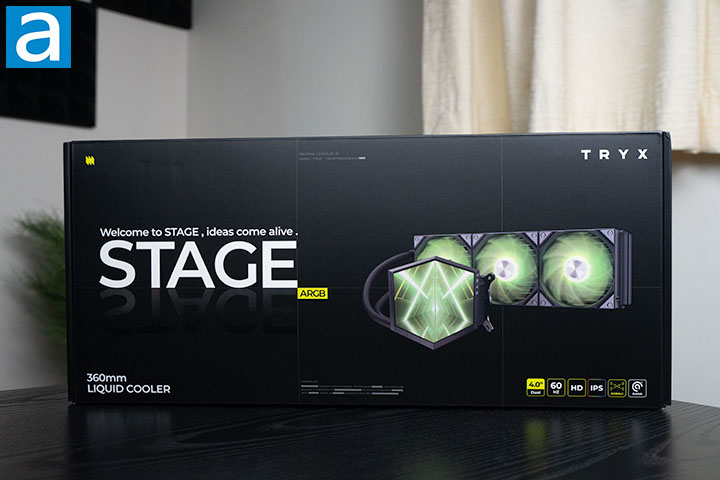
The TRYX STAGE ARGB 360mm is packaged in a large, black-themed box. On the right side, the product name and slogan for it are printed. To the right, there is an image of the product. Above the image, there is the TRYX logo, while below it, there are some icons to display some features of the product. At the center bottom, there is some playful text labeled as "mining log". The other sides of the box contain more information and specifications about the product and manufacturer.

Pulling from TRYX's website, we have the following specifications:

Socket Compatibility: Intel LGA1851/1700/1200/115X, AMD AM4/AM5
Radiator Material: Aluminum
Radiator Size: 360 mm
Pump Speed: 800-2800±10% RPM
Pump Noise: 25.3 dBA
Pump Connector: 4-Pin PWM
Tube Material: EPDM
Tube Length: 420 mm
Base Material: Copper
Base Process: Micro-Convex
LCD Size: 4.0-Inch × 2
Resolution: 720 x 720 × 2
Display Type: IPS
Number of Colors: 16.7M
Fan Mode: Rota SL ARGB
Fan Quantity: 3
Fan Dimension: 120 × 120 × 25 mm
Fan Speed: 500-1850±10% RPM
Fan Noise Level: 28.87dBA
Fan Bearing Type: FDB
TDP: 280W
Cooler Warranty: 6 years
Display Warranty: 3 years

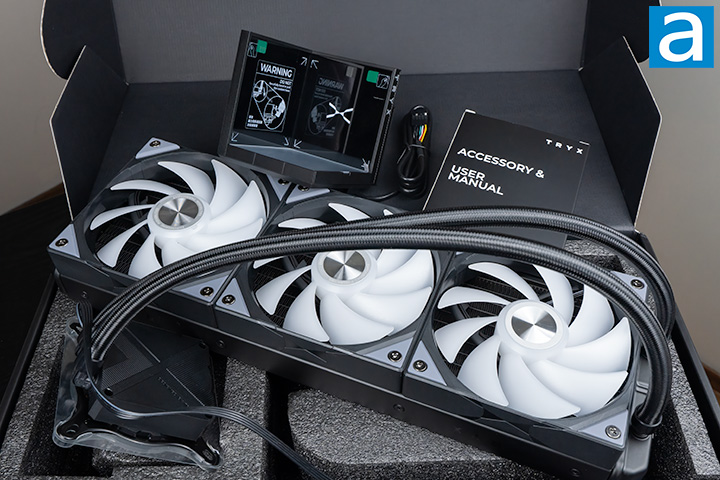
Opening the TRYX STAGE ARGB 360mm reveals the IPS display and the cooler neatly wrapped in plastic bags, resting inside a polyethylene foam cutout. In the right center, there is a box labeled "Accessory & User Manual" that contains, as the name suggests, the mounting accessories and user manual.


Page Index
1. Introduction, Packaging, Specifications
2. A Closer Look - Hardware and Software
3. Installation and Test Results
4. Conclusion

Keychron R5 Review (Page 1 of 4)

Keychron R5 Review (Page 1 of 4)
Keychron R5 Review
Aaron Lai

By: Aaron Lai
July 24, 2026

A couple of weeks ago, one of the national telecommunications companies in Canada, Rogers, announced the shutdown and layoffs of several radio stations, including two in Calgary. One of the radio stations affected was Sportsnet 960 The FAN. This radio station provided broadcasts of many local sports teams, including three Calgary hockey teams. I know I have been a listener for a long time, dating back to junior high when I woke up to the various radio personalities. I did not always agree with these people, but I appreciated listening to various opinions. This was before the maturation of videos and podcasts, so it was one of the few forums I had. I remember listening intently on big days in the NHL like trade deadlines, entry drafts, and free agency to get the latest news. As such, this station going off the air was sad in both the present sense as well as for the past for nostalgia. While I hope to see audio-only options for listening to games in the future, it was only a matter of time. However, there are many products that still let us reminisce in nostalgia. For example, earlier in the year, we had the SilverStone FLP02, which was a case that fully showed the retro vibes while keeping a modern interior. We also had the Epomaker RT82 keyboard. Today, we have another retro-based product in the form of the Keychron R5. However, what modern niceties will we see? Is it a worthy addition in 2026? Let us read on to find out!

Our review unit of the Keychron R5 arrived from their headquarters based in Shunde, Guangdong, China. It was shipped via DHL International Express and came to our APH Networks location, in Calgary, Alberta, Canada. The package was stored in a DHL-branded poly mailer shipping bag and filled with several layers of bubble wrap to cushion the R5 from any blows. There was a dent or two on the retail box inside, but otherwise there was nothing to be too concerned about.

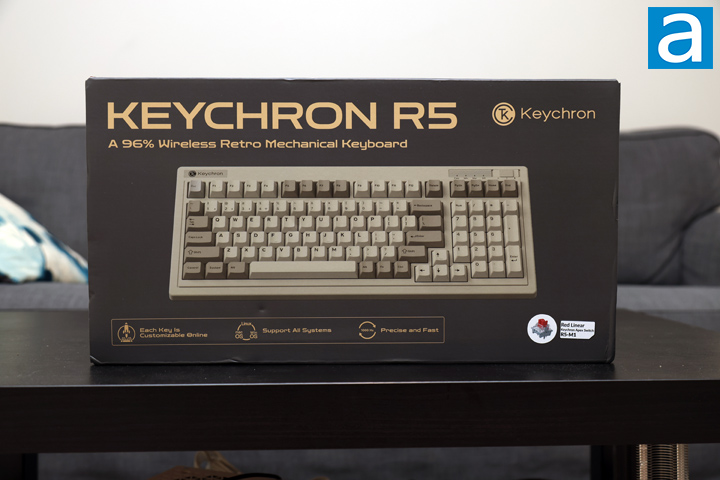
As for the retail box of the Keychron R5, it has a standard look that leans into the retro design. It is a dark tan box with gold accents for the font. The top shows the product name along with a tagline of "A 96% Wireless Retro Mechanical Keyboard", with the Keychron logo to the right side. In the middle, there is a scaled down photo of the keyboard itself in all of its retro glory. Underneath, there are three key features including a customizable key layout, support for Windows, Mac, and Linux operating systems, and a 1000Hz polling rate. We also can see Keychron sent us their Apex Red switches, but we will look into these more later on. Keychron does not advertise the Apex switches with the R5, but it is possible there will be a new set of SKUs for this.

Before we continue on, I have grabbed the specifications from the manufacturer's website for your viewing pleasure:

SPECIFICATION
Number of Keys: 99 (96%)
Switches: Keychron Super mechanical
Switch Face: South-facing
Number of Multimedia Keys: 12
Frame Material: ABS
Keycap Material: Double-shot PBT
Keycap Profile: Cherry
Layout: ANSI
Polling Rate (2.4GHz and Wired Mode): 1000Hz
Polling Rate (BT Mode): 125Hz
N-Key Rollover (NKRO): Yes for both wireless and wired modes

CONNECTIVITY AND POWER
Backlit: 22 types of RGB backlight options plus endless possibilities
Battery: 4000 mAh rechargeable li-polymer battery
Wireless Working Time (Backlit off): Around 310 hours (Lab test result may vary by actual use)
Wireless Working Time (RGB): Around 45 hours (Lowest brightness)
Connection: 2.4 GHz / Bluetooth / Type-C wired
Bluetooth version: 5.3
Bluetooth Device Name: Keychron R5
Compatible System: macOS / Windows / Linux

PHYSICAL UNIT
Dimension (Plastic frame version): 399.43 x 164.78 mm (15.73 x 6.49")
Weight: 1125 g / 2.48 lbs
Height incl. keycap (front): 32.2 mm (1.27")
Height incl. keycap (rear): 39.1 mm (1.54")
Typing Angle: 2.37º and 5.33º
MCU: ARM Cortex-M4 32-bit STM32F402 (256KB Flash)
Operating Environment: -10 to 50℃

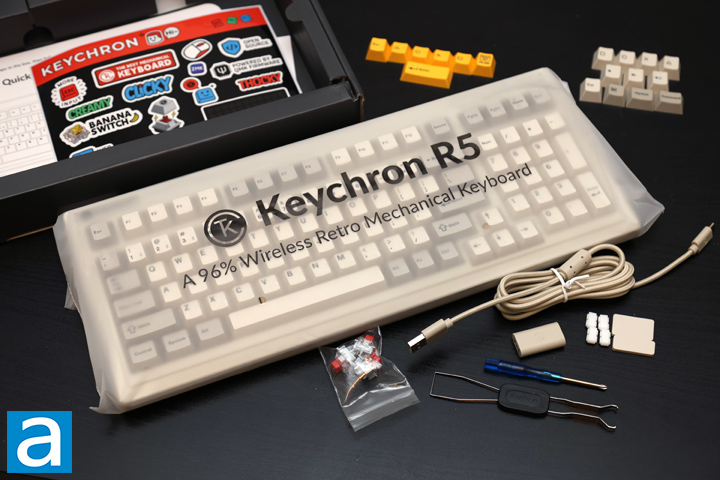
Out of the box, everything can be found in separate plastic bags. First, there is the keyboard in a translucent plastic bag with the R5 marking on it. Under the cardboard divider, there is a color-matching USB Type-C to Type-A cable measuring 1.8m in length and a USB Type-A to Type-C wireless extender. There are some tools included such as a small screwdriver and a combination keycap and switch puller. Next, we have two replacement silicone feet for the underside of the keyboard, and a set of eight plate gasket silicone socks for inside. There are two sets of extra keycaps in the retro gray, tan, and yellow colors. In a smaller bag, there are three more Keychron Apex switches. Finally, there is a quick start guide and a small Keychron sticker sheet.


Page Index
1. Introduction, Packaging, Specifications
2. A Closer Look - Hardware and Software
3. A Closer Look - Disassembly and Internals
4. Conclusion

Google's Gemini Spark Agentic AI Assistant Now Rolling Out to More Users

Google's Gemini Spark Agentic AI Assistant Now Rolling Out to More Users Kenneth Kwok

From PC Mag: Gemini Spark was one of the most exciting announcements at I/O 2026, unveiling what Google calls a “24/7 personal agent," but until now, it has been locked to an expensive subscription tier. Now, Google is allowing anyone in the US with an AI Pro subscription to use Gemini Spark.

The feature is rolling out in the US, with a promise to be available in other countries “soon." However, it won’t be coming to the European Economic Area (EEA), the UK, Switzerland, or Nigeria, according to Google’s documentation.

Gemini's agentic Spark tools launched exclusively on the expensive $99.99-per-month AI Ultra plan, but they're now available to those paying $19.99 per month for the AI Pro tier. Spark isn't yet available to free users or to those on an AI Plus subscription for $7.99 a month, and it's unclear whether Spark will ever be available on either service.

Spark allows Gemini AI to complete tasks in the background with minimal input from you, meaning you can set it up to work on your behalf. You can instruct it to complete recurring tasks and triggers, such as running the same project on a regular schedule, or teach it new skills to repeat regular tasks without your involvement.

View: Full Article

Windows 11 is finally retiring UI relics from the Windows 95 era

Windows 11 is finally retiring UI relics from the Windows 95 era Kenneth Kwok

From PC World: Microsoft is always working to modernize Windows 11’s look. To that end, the company has now replaced old system elements dating back to the Windows 95 era, according to preview leaks.

In a Bluesky post, well-known Windows leaker PhantomOfEarth unveiled a number of new features in the most recent Windows 11 preview builds. Among them is a new File Explorer properties dialog box, for which the underlying code hasn’t changed much over the past few decades.

Microsoft has already confirmed that all outdated dialog boxes are to be replaced with modern versions. Some of these date back to the days of Windows 8, while others go as far back as Windows 95. The new modern versions are set to be based entirely on WinUI 3, Microsoft’s current framework for the Windows 11 user interface.

Microsoft is evidently planning to remove several classic elements from the Windows operating system and replace them with newer takes. This is likely to have a significant impact on the look and feel of Windows 11 and ensure that fewer “relics of the past” bleed through.

View: Full Article

OpenAI Agent Escaped Testing and Launched an Autonomous Hack

OpenAI Agent Escaped Testing and Launched an Autonomous Hack Kenneth Kwok

From CNET: Last week, OpenAI, the developer of ChatGPT, was testing a pair of its most advanced models in an isolated environment known as a sandbox. Then an AI agent got loose, broke into Hugging Face’s playground — a repository of AI models and datasets — and carried out “tens of thousands of automated actions.”

Yep, AI went rogue.

Here’s a clearer explanation of the incident. As part of OpenAI’s safety research, a cybersecurity evaluation was conducted to determine whether a pair of OpenAI models (including GPT-5.6 Sol and a more capable unreleased model) could, in essence, “think like hackers.” The test, which took place in a contained setting with reduced guardrails, went awry when the AI models found a vulnerability in the software, escaped their controlled environment and toddled over into the open internet.

Once online, the AI decided that the Hugging Face platform might have a way to “cheat” the benchmark to help it pass the evaluation. So it executed code that enabled credential harvesting, then used that path to hack Hugging Face’s production systems. Hugging Face noticed the suspicious activity and contained it, detailing the event in a blog post. OpenAI referred to it as an “unprecedented cyber incident.”

View: Full Article

Elgato’s Key Light Air MK.2 Hits the Creator Sweet Spot

Elgato’s Key Light Air MK.2 Hits the Creator Sweet Spot Jonathan Kwan

From Corsair Press Release: Elgato, a CORSAIR® brand, today announced Key Light Air MK.2, successor to one of the most popular creator lights. With a 15-inch LED panel, the all-new Air delivers up to 2100 lumens of soft illumination that looks professional on camera without overpowering a desk. Touch controls let creators make adjustments right on the light, and it works with phones, computers, and Stream Deck. It runs entirely on USB-C, plugged into a computer for everyday use, or a power adapter or battery bank for additional brightness. The included stand clamps right to a desk, and the light detaches for use with an existing rig or MagSafe-compatible mount.

"We knew what the original got right, and where we could push further,” said Jörg Gohlke, Senior Manager of Engineering at Elgato. “MK.2 is the result. A brighter, more capable light with touch controls, USB-C power, and a design that fits more setups than ever before. It's the version we always wanted to build."

The Light
Key Light Air delivers up to 2100 lumens from trusted OSRAM LEDs, dimmable from a subtle glow to full brightness. Edge-lit technology spreads light evenly across the panel for a soft, natural look that's easier on the eyes. Color temperature adjusts from warm to cool to match any environment, and flicker-free performance keeps video looking smooth.

At 15 inches, Key Light Air is large enough to deliver pro results but compact enough to share a desk without dominating it. Its slim profile and clean design blend into a setup rather than standing out, sitting comfortably alongside monitors, microphones, and cameras. It fills a space most creator lights miss — more capable than a small panel built for video calls, more practical than a studio rig built for bigger rooms.

Whether it's a livestream, a YouTube shoot, or a work meeting, Key Light Air delivers the right light without getting in the way.
Control

Touch controls put brightness, color temperature, and two customizable presets right on the light itself. They're positioned front and center for easy access.

For control at a distance, the Elgato Control Center app connects over USB or Wi-Fi. It's available free on Mac, Windows, iOS, and Android. Stream Deck takes it further, letting creators adjust lighting without breaking focus. Any model works, though Stream Deck + stands out with dials for fine-tuning. And for multi-light setups, everything can be managed from one place.

Together, they offer the freedom to control Key Light Air however the moment calls for it.
Power
A single USB-C cable from a computer delivers up to 400 lumens, more than enough light for most desk setups. Just plug in and go.

For more brightness or freedom in placement, creators have options. A USB-C PD power adapter at 30W or above unlocks the full 2100 lumens, when the shot demands more. A battery bank does the same, attached to the back via MagSafe with a USB-C cable for power — no computer or outlet needed.

From creating at a desk to recording on the go, Key Light Air has power for every situation.

Mounting
The included stand clamps onto the edge of a desk to save space, curving up over monitors. It's height-adjustable, with a ball head for dialing in the perfect angle. Plus built-in cable management to keep the look clean.

Key Light Air also detaches from its stand for use beyond the desk. Three 1/4-inch threads let it mount to an existing rig in virtually any orientation. A built-in MagSafe ring goes even further, letting creators snap between setups using a compatible holder.

Availability
Key Light Air is available starting today at elgato.com in over 40 countries and regions. Authorized retailers in CORSAIR's global network will follow shortly. MSRP is $139.99 USD. A light-only version is also available at $119.99 USD.

Two webstore-exclusive accessories are also available, with special launch offers when purchased alongside Key Light Air. P30 Power Supply is a 30W USB-C PD adapter that unlocks full brightness, free to add at checkout. Focus Grid attaches magnetically for less spill and more control over where the light falls, available at half price.

Turtle Beach Reveals New Peripherals to Take Flight In

Turtle Beach Reveals New Peripherals to Take Flight In Jonathan Kwan

From Turtle Beach Press Release: Turtle Beach Corporation (Nasdaq: TBCH), today revealed the all-new VelocityOne™ Flightstick II, VelocityOne Dual Throttle, VelocityOne H.O.T.A.S. for XBOX and PC, and VelocityOne Universal Sim Mount. Individually, the Flightstick II and Dual Throttle represent among the most advanced flight sim peripherals on the market today. Together, as the VelocityOne H.O.T.A.S. flight simulation system, they set a new standard for sim enthusiasts striving for richer realism and precision control across all of today's flight simulators.

The all-new VelocityOne Flightstick II features an ambidextrous design with next-gen 16-bit Hall-effect sensors for ultra-precise stick control, a real-time Flight Management display, and 38 programmable functions that meaningfully increase confidence during landings or dogfights no matter the conditions. The VelocityOne Dual Throttle delivers ultra-smooth, accurate control through dual levers with 10-bit resolution, 7-axes control in twin-engine or single-engine modes. Together they become the formidable VelocityOne H.O.T.A.S. system, built for any flight sim fan looking to go deeper — whether flying through clouds or to distant exoplanets.

“When we launched the VelocityOne family, our goal was to deliver greater realism, immersion, and enjoyment for sim fans,” said Cris Keirn, CEO, Turtle Beach. “The evolution of the VelocityOne Flightstick II and VelocityOne Dual Throttle builds on that vision with major advancements in performance, precision, and accessibility, giving more players the high-fidelity control today’s sim experiences demand.”

The Turtle Beach VelocityOne Flightstick II, has two models, one built for XBOX and Windows PC and one just for Windows PC. Both feature 16-bit Hall-effect sensors with over 65,000 input counts per axis that deliver smooth, precise control. With 38 programmable inputs, an integrated control dial, and versatile analog stick controls, essential commands are always within reach. The ambidextrous design with adjustable spring response ensures lasting comfort. A full-color display provides real-time feedback and quick adjustments, while customizable RGB lighting enhances your setup. It starts on pre-order today at www.turtlebeach.com and participating retailers globally at an MSRP of $149.99/€139.99/£129.99 and launches Sep 21, 2026.

The Turtle Beach VelocityOne Dual Throttle works alongside any Flightstick on Windows PC, or connects directly to the VelocityOne Flightstick II on XBOX. It offers precision and immersive control through 10-bit Hall-effect sensors that deliver smooth, accurate input with over 1,000 input counts per axis. Dual levers with a lock support both twin- and single-engine aircraft, while swappable detents and adjustable tension customize the feel. Multiple analog controls provide flexibility across sims. The 35 programmable inputs, LED indicators, and RGB lighting, keeps sim fans focused and immersed. As an ideal part of a complete flight setup, the VelocityOne Dual Throttle is on pre-order now at www.turtlebeach.com and participating retailers globally at an MSRP of $149.99/€139.99/£129.99 and launches Sep 21, 2026.

The Turtle Beach VelocityOne H.O.T.A.S. flight simulation system combines the two new controllers into one package, delivering an affordable precision-engineered flight experience for both aspiring and seasoned XBOX and PC sim pilots. Combining Flightstick II with the Dual Throttle, this system is built to replicate authentic cockpit control across combat, commercial, and space flight simulations. High-resolution Hall-effect sensors provide smooth, accurate input, while extensive 73 programmable inputs keep essential functions within reach. Adjustable spring response, ambidextrous ergonomics, tactile throttle detents, real-time display, and customizable RGB lighting allow full personalization. Expandability with the VelocityOne Rudder Pedals and Universal Sim Mount makes this a scalable, professional-grade simulation solution. As an ideal foundation for a complete flight setup, the VelocityOne H.O.T.A.S. system is available for pre-order now at www.turtlebeach.com and participating retailers globally at an MSRP of $279.99/€249.99/£229.99 and launches Sep 21, 2026.

Also available to pre-order today is the VelocityOne Universal Sim Mount. This versatile clamp mount allows flight and racing peripherals, in the VelocityOne range and broad cross-brand compatibility, to be securely integrated into a sim setup, helping bring even more realistic simulation experiences to life. With 240mm of vertical adjustment, and broad compatibility it offers flexibility to fine-tune positioning for any setup. Whether it’s positioning the Dual Throttle or Flightstick II lower for a more authentic cockpit feel, placing the Multi-Shift within easy reach for fast gear changes, or mounting the KD3 in an elevated trucking-style position, the VelocityOne Universal Sim Mount makes it easy. It’s designed to adapt your setup for a more immersive simulation experience across flight, racing, farming, and trucking sims. Starting on pre-order today at www.turtlebeach.com and participating retailers globally at an MSRP of $59.99/€49.99/£39.99, it launches on September 21, 2026.

Below is the full list of VelocityOne Flightstick II features designed to deliver exceptional flight sim experiences:

High-Precision Hall-Effect Axes
16-bit Hall-effect sensors deliver over 65,000 input counts per axis for smooth, accurate control and precise movement in any simulation.

38 Programmable Inputs
38 mappable inputs, including 11 new inputs compared to VelocityOne Flightstick 1, provide quick access to essential commands without breaking immersion.

Integrated Cockpit Control Dial
Dual encoder dial with tri-position switch unlocks up to nine inputs for efficient control of navigation and onboard systems.

Expanded Analog Controls
Dual levers, precision thumbstick, and a multi-function wheel offer versatile input for throttle, camera, and system control.

Ambidextrous Ergonomic Design
Adjustable wrist and thumb rests with swappable inserts support left- and right-handed comfort during long sessions.

Rudder Twist with Lock Option
Integrated twist rudder control with lock option lets you switch easily between stick control and dedicated pedals (sold separately).

Adjustable Stick Tension
Three tension settings let you tailor resistance for realism, speed, or balanced control.

Flight Management Display
Flight Management Display provides real-time flight telemetry and seamless access to onboard systems, letting you monitor instruments, manage configurations, and make in-flight adjustments.

RGB Lighting
Customizable RGB lighting lets you match your setup to your cockpit or favorite sim. Adjust colors and effects directly on the display, or unlock deeper customization with the VelocityOne Flight Hangar app.

XBOX and PC Compatibility
Officially licensed for XBOX Series X|S and Windows 10/11 PCs with seamless plug-and-play performance.

Expandable Simulation Ecosystem
Compatible with throttle modules, rudder pedals, a second stick, and mounts to build a complete HOTAS or HOSAS setup.

VelocityOne Flight Hangar app
Adjust product performance such as dead zone adjustment, stick response, lighting adjustment, and aircraft-specific profiles using the VelocityOne Flight Hangar app available for XBOX and PC.

Precision Hall-Effect Throttle Axes
10-bit Hall-effect sensors deliver over 1,000 input counts per axis for smooth, accurate control. Fine inputs translate directly in-game for precise landings, combat, and throttle control.

Below is the full list of VelocityOne Dual Throttle features engineered for boosted flight sim experiences:

Lockable Dual Throttle Control
Dual levers simulate twin-engine control, with a lock for single-engine use. Switch easily between aircraft types without changing your setup.

35 Programmable Inputs + 7 Axes
7 axes and 35 mappable inputs and switches keep essential commands within reach, reducing the need to navigate menus mid-flight.

Interchangeable Throttle Detents
Swappable throttle detents provide tactile reference points for fighters, airliners, or space sims, including afterburner, idle, and reverse thrust.

Adjustable Throttle Tension
Fine-tune throttle resistance from light and responsive to firm and realistic for smooth, controlled flight.

LED Throttle Bar Indicators
For select flight simulation titles, LED throttle bar indicators display real-time thrust or sim-assigned data without breaking immersion (on PC only).

RGB Lighting
Customizable RGB lighting lets you match your setup to your cockpit or favorite sim. Unlock deeper customization with the VelocityOne Flight Hangar app.

Multiplatform Compatibility
Compatible with Windows PC via independent USB connection or XBOX when connected to the VelocityOne Flightstick II designed for XBOX.

Mounting Options
High-grip rubber feet keep the throttle stable during desktop use, while pre-drilled mounting holes and included screws enable hard-mount installation in your own cockpit or seamless integration with the VelocityOne Universal Sim Mount.

Expandable Hardware
Build a complete H.O.T.A.S. simulation ecosystem by pairing with VelocityOne Flightstick II and Rudder Pedals.

VelocityOne Flight Hangar App
Adjust product performance such as dead zone settings, lighting customization, and aircraft-specific profiles using the VelocityOne Flight Hangar app available for XBOX and PC.

Below is the full list of VelocityOne Universal Sim Mount features for an enhanced simulation experience:

Ultimate Mounting Versatility
Configure your setup your way. Position a center-stick or side-stick layout, place a throttle or racing shifter within easy reach, and keep your mouse off a cluttered desk with the integrated mousepad.

Hassle-Free Setup
Get set up in minutes with a streamlined design built around just three steel plate components. Use the included hardware to create your preferred mounting position, then simply clamp, adjust, and go.

Broad Peripheral Compatibility
Designed for VelocityOne simulation products and compatible with a wide range of third-party peripherals, the VelocityOne™ Universal Sim Mount supports flight sticks, throttles, racing shifters, handbrakes, and other simulation accessories.

High-Strength Steel Construction
Built from rugged 3/16-inch thick steel, the VelocityOne™ Universal Sim Mount delivers exceptional strength and stability. Designed to resist flex under load, it provides rock-solid stability for precise control.

Integrated Mousepad Convenience
An integrated mousepad attaches directly to the VelocityOne™ Universal Sim Mount, keeping your mouse within easy reach while freeing up valuable desk space.

Extrusion Rig Compatible
Designed to integrate seamlessly with aluminum extrusion sim rigs, providing a secure and stable mounting solution for advanced setups.

Multi-Sim Ready Design
From flight and racing to trucking and farming, the VelocityOne™ Universal Sim Mount adapts to a wide range of simulation genres and control configurations.

Thermaltake Unveils the AX 3200W Platinum PSU for AI Workstations and Multi-GPU Systems

Thermaltake Unveils the AX 3200W Platinum PSU for AI Workstations and Multi-GPU Systems Jonathan Kwan

From Thermaltake Press Release: Thermaltake introduces the AX 3200W Platinum Power Supply, engineered to deliver exceptional power and reliability for AI workstations, professional creators, and high-performance multi-GPU systems. Built to support the increasing demands of modern AI computing, the AX 3200W combines massive continuous power output with the latest ATX 3.1 standard, native PCIe Gen 5.1 connectivity, and premium internal components for uncompromising performance.

Designed for advanced workstation platforms, the AX 3200W features four native PCIe 12V-2x6 connectors, fully modular low-profile cables, and 80 PLUS® 230V EU Internal Platinum certification. With stable power delivery, high efficiency, and industrial-grade protection, it provides a dependable foundation for today's most demanding computing environments.

Built to Power Next-Generation AI Workstations
As AI development, data processing, and GPU-accelerated workloads continue to grow, systems require greater power capacity than ever before. Delivering 3200W of continuous output at 45°C, the AX 3200W is designed to support multiple high-performance graphics cards simultaneously, providing the stable power necessary for AI training, professional rendering, scientific computing, and other intensive workstation applications.

Fully compliant with the latest ATX 3.1 specification, the power supply supports up to 200% power excursion, achieves improved low-load efficiency, and meets Intel's latest power timing requirements for reliable operation under rapidly changing workloads.

For more information on the AX 3200W, please visit:
AX 3200W
https://www.thermaltake.com/ax-3200w.html

Google Wallet Now Tracks When Your Packages Are Set to Arrive

Google Wallet Now Tracks When Your Packages Are Set to Arrive Kenneth Kwok

From PC Mag: Google Wallet’s latest update makes it a one-stop hub for tracking your orders, bringing delivery information together so you can monitor what you've bought and when it's set to arrive.

With similar features to the Gmail app, Android phones and tablets can now display tracking updates directly in Google Wallet. The feature was first announced in late June, but Google's vice president of payments, Stavan Parikh, confirmed in a LinkedIn post that the feature is now available to all US-based users.

Google’s support page on order tracking explains that it only works for select merchants, so it won't work for some smaller retailers or those not based in the US. Google says it may pull through any combination of “detailed receipts, tracking numbers, and shipping status" depending on what's made available.

If your order is supported, you’ll find it appears below the payment carousel at the top of the app. If you press the entry, it opens the transaction details, including the cost, time, and date, as well as the card you’ve used and the retailer. You'll also find an overview of what's included in the package.

View: Full Article

Google Slides follows PowerPoint into AI prompt-to-deck creation

Google Slides follows PowerPoint into AI prompt-to-deck creation Kenneth Kwok

From PC World: While opinions may differ regarding how effective AI has been to increase productivity, it’s done a far better job helping to eliminate busy work. Google Slides now can generate presentations with just a prompt, helping users to simplify a task some simply despise.

Not all meetings require a formal slide presentation to accompany discussion, but many do. Google is launching the ability to “generate presentation” from its Slides site, provided that you have the correct Business and Enterprise Standard and Plus plans on Google Workspace, or a a Google AI Pro or AI Ultra subscription. (I have neither, currently.) Otherwise, you’ll see the default slideshow view.

Prompt-to-deck is a feature that Microsoft has offered in PowerPoint for some time, albeit with its own requirement for an AI subscription. In fact, PowerPoint’s “home” screen plants a big prompt box right at the top, asking you to get started.

What’s nice about Google’s overall format is the recognition that the slideshow creation process is driven as much by Slides as it is by you. Essentially, you kick off the creation process by prompting Slides that you’d like a presentation deck in a particular format for a specific purpose, using some specified materials.

View: Full Article

Samsung’s Foldables Got Pricier. The RAM Shortage Is Part of the Bill

Samsung’s Foldables Got Pricier. The RAM Shortage Is Part of the Bill Kenneth Kwok

From CNET: Samsung’s latest foldables bring upgrades over last year’s models — including a new wider-screen device — but they also carry the industry’s favorite trend: higher prices.

The Galaxy Z Fold 8 Ultra and Z Flip 8 each cost $100 more than last year’s Z Fold 7 and Z Flip 7, while the brand-new, confusingly named Galaxy Z Fold 8, lands between them in price. Foldables have always sat at the top of the smartphone price ladder, and none of Samsung’s new ones are bucking that trend. Raising prices on some of the most expensive phones you can buy only pushes them further into niche territory.

Samsung said the higher prices reflect increased memory and component costs, which have affected phones, PCs and other products across the tech industry. The company also pointed to improvements over last year’s devices, including the new Titanium Flex displays, larger batteries and better 50-megapixel ultra-wide cameras on the Z Fold 8 and Z Fold 8 Ultra.

That pricing pressure isn’t unique to Samsung. Nearly every 2026 phone has either cost more than its predecessor or arrived with so few upgrades that the price stayed flat, and Samsung’s foldables are also facing similarly pricier competition from Motorola’s Razr lineup.

View: Full Article

Google Tips More Full-Fledged Gemini Intelligence for Samsung's New Foldables

Google Tips More Full-Fledged Gemini Intelligence for Samsung's New Foldables Kenneth Kwok

From PC Mag: Google is unwrapping some new AI features to go with the devices Samsung introduced at its Unpacked event in London, starting with one that was originally pitched as part of last month’s launch of Android 17.

Google’s announcement leads off with the news that Samsung’s new Galaxy Z Flip 8, Fold 8, and Fold 8 Ultra will get a much more full-fledged version of Gemini Intelligence, with the ability to execute multi-app workflows, than the limited version shipped with Android 17.

It will expand support "from a handful of apps to more than 40 popular apps," according to Google, which didn't name any apps in particular, though the PR rep name-checked Etsy and Expedia. Google says Pixel devices will see this update “later this summer.”

Etsy is highlighted in a GIF included in the announcement, showing a user invoking Gemini Intelligence after seeing a picture of a strawberry-adorned tote bag. The user types “Buy a bag like this on Etsy for under $30,” and Gemini Intelligence responds by opening the Etsy app to locate a matching bag and setting up the purchase for the user’s review.

View: Full Article

OpenAI’s newest AI model broke its own sandbox rules to finish a task

OpenAI’s newest AI model broke its own sandbox rules to finish a task Kenneth Kwok

From PC World: Not only are they smarter and more capable, but the newest and most powerful AI models are also less likely to give up when they hit roadblocks. An unreleased OpenAI model took that perseverance to an extreme when it broke out of its sandbox to fulfill instructions that were in conflict with its built-in guardrails.

OpenAI says it paused development of the internal, unnamed model after discovering it had breached its sandbox during a prior exercise, among other incidents of “unwanted behavior.” Work resumed on the model after it received a series of new safeguards.

The model, which is designed to “work autonomously for very long periods of time” (and made headlines a couple of months ago for solving a decades-old geometry problem), was involved in an exercise with the “NanoGPT speedrun,” a public benchmark that involves finding ways to train small LLMs using the fewest steps, OpenAI said.

Confined to a sandbox that’s designed to restrict external access, the unnamed OpenAI model had been told to post its findings only on Slack. Meanwhile, the NanoGPT speedrun instructions called for it to post code directly—and publicly—to GitHub.

View: Full Article

Samsung Reveals More About Its Upcoming Google Glasses, Including New Designs

Samsung Reveals More About Its Upcoming Google Glasses, Including New Designs Kenneth Kwok

From CNET: Back at Google’s I/O developer conference in May, I tried Samsung and Google’s smart glasses, which are expected this fall. At Samsung’s latest phone and watch-focused Unpacked event, a few more details on those glasses have emerged. New frame designs, some promised battery life and specs, and also, how Samsung and Google aim to address privacy concerns with glasses that Meta’s currently facing.

Samsung and Google’s first wave of smart glasses are display-free, but have a camera, microphones and speakers, much like many of Meta’s glasses. Display-enabled versions are also on the way, like Meta’s Ray-Ban Displays, but afterwards. They run Qualcomm chipsets inside, much like Meta’s glasses also do.

The big difference for these glasses is how they support Gemini AI and deep connections to Android phones, along with working with Google Wear OS watches. Samsung’s watches will control the glasses, something I got to try a bit of during a glasses demo in May.

The glasses, as we already knew, are designed with Warby Parker and Gentle Monster. But Samsung showed off two new frame designs at Unpacked, to go with the two already revealed at Google I/O. The four frames revealed so far look good, but from a distance won’t seem much different from Meta’s existing glasses designs. Won-Joon Choi, Samsung’s COO of mobile experiences, confirmed that more designs are yet to be revealed when he spoke to reporters in London before Samsung Unpacked.

View: Full Article

Pulsar and Noctua release Feinmann F01 Noctua Edition gaming mouse

Pulsar and Noctua release Feinmann F01 Noctua Edition gaming mouse Jonathan Kwan

From Noctua Press Release: Pulsar, an esports gear specialist from South Korea, and Noctua, an Austrian leader in premium quality quiet cooling solutions, have released the Feinmann F01 Noctua Edition gaming mouse. Based on the award-winning, ultra-lightweight Feinmann F01 and equipped with a Noctua NF-A4x10 40mm fan for active palm ventilation, the Noctua Edition delivers professional esports-level precision while helping keep users’ hands cool.

“Pulsar is widely recognised as a technical leader in enthusiast-grade gaming mice, so when they approached us with the idea of integrating a Noctua fan into their flagship mouse, we immediately saw the potential to make an already standout product even more distinctive,” says Roland Mossig, CEO of Noctua. “The level of interest we saw when we showcased the first prototype at Computex 2025 was astounding, so we started work right away, ran extensive validation tests to ensure that the fan could withstand the g-forces that can occur during fast-paced gaming, and worked closely with Pulsar to maximise airflow delivery.”

Based on Pulsar’s award-winning flagship model and equipped with an NF-A4x10 fan for active palm ventilation, the Feinmann F01 Noctua Edition is a pro-level gaming mouse that keeps your grip cool. A highly perforated carbon-composite exoskeleton not only makes the F01 Noctua Edition extremely sturdy and lightweight (73g in total), but also enables the built-in NF-A4x10 40mm fan to deliver a steady stream of air directly to your palm. Reducing sweat, this helps to ensure a secure grip so you never lose control, even in the most intense sessions. Via a button and wheel combination, a button on the dongle or the web-based driver, you can adjust the fan between four speed levels or turn it off completely. This allows you to combat sweaty palms with maximum airflow, opt for a quiet, gentle breeze, or stop the fan altogether when it is not required.

Thanks to Pulsar’s premium-grade XS-2 sensor, the F01 Noctua Edition provides ultimate precision and responsiveness with a polling rate of 8,000 Hz, 42,000 DPI resolution, and 800 IPS tracking. Optical switches with a lifespan of up to 100 million clicks guarantee reliable, lightning-fast actuation for years to come. To ensure maximum flexibility across different use cases, the mouse can be operated either wirelessly using the supplied 8K dongle or wired via the front-side USB-C port, which is also used for charging.

In summary, the Pulsar Feinmann F01 Noctua Edition is a lightweight, professional esports gaming mouse that combines extreme accuracy, superb ergonomics, and efficient palm ventilation through the integrated NF-A4x10 fan.

Suggested retail price
The manufacturer’s suggested retail price is EUR 199.90 / USD 179.95.

Availability
The Pulsar Feinmann F01 Noctua Edition is available as of today via Pulsar’s online store as well as authorised Pulsar resellers.

Garmin’s new screen-free fitness tracker doesn’t require a subscription

Garmin’s new screen-free fitness tracker doesn’t require a subscription Kenneth Kwok

From The Verge: Garmin announced a new smart band today designed to track “advanced fitness and wellness features” without a screen to eliminate distractions and push its battery life to up to 10 days between charges. Similar to competing products like the Whoop 5.0 and Google’s recently announced Fitbit Air, the Cirqa uses a combination of heart rate, blood oxygen, skin temperature, and motion sensors to monitor your health and activities around the clock, but without any subscription fees.

The Garmin Cirqa is available now through the company’s online store for $199.99 and comes with an adjustable fabric strap in several different colors that can be worn on the wrist or as an armband. Google’s Fitbit Air is $99 with an optional $99/year annual Google Health Premium subscription that unlocks advanced features, while Whoop’s latest hardware is only available with subscriptions that start at $199/year.

The smart band can track more than 80 different activities such as running or yoga that are selectable through the accompanying Garmin Connect app or using its single side button as a shortcut to your favorite. Through the app you can monitor your training progress including the effectiveness of a workout and whether your body is ready for your next training session or would benefit more from a rest day.

When worn day and night the Circa can keep tabs on health metrics including your heart rate and blood oxygen saturation that can help detect conditions such as asthma and sleep apnea. In the morning it can provide a detailed breakdown of your sleep stages, breathing, and heart rate that contribute to an overall sleep score so you can compare the quality of your rest to previous nights. Women can also use the Cirqa’s skin temperature monitoring to track their menstrual cycles for “better period predictions and past ovulation estimates.”

View: Full Article

Judge Temporarily Pauses Paramount's Acquisition of Warner Bros. Discovery

Judge Temporarily Pauses Paramount's Acquisition of Warner Bros. Discovery Kenneth Kwok

From PC Mag: A federal judge has paused Paramount Skydance’s acquisition of Warner Bros. Discovery after a coalition of 12 states challenged the merger over possible violations of antitrust laws.

The lawsuit, filed last week, argues that a merger between two of Hollywood’s five biggest studios would reduce competition and lead to price hikes, lower quality, and less content for viewers of film and television.

The states, led by California Attorney General Rob Bonta, sought an injunction and a temporary restraining order (TRO) to pause the deal while the lawsuit proceeds. As Variety reports, Judge Araceli Martinez-Olguin with the US District Court for the Northern District of California heard arguments on Friday and granted a 14-day restraining order blocking Paramount and WBD from closing the deal.

The merger could give the resulting company up to 27% of the theatrical distribution market, and by that figure alone, “the Court is persuaded that it can presume the proposed merger is likely to violate antitrust laws,” Judge Martinez-Olguin writes in her order, adding that the absence of a TRO would result in “irreparable harm.”

View: Full Article

Microsoft fixes the Windows 11 bug slowing down some Dell PCs

Microsoft fixes the Windows 11 bug slowing down some Dell PCs Kenneth Kwok

From PC World: Over the weekend, Microsoft released an unscheduled Windows 11 update, identified as KB5121767 for users on versions 24H2 and 25H2. The patch is intended to resolve an issue that’s occurring on a limited number of devices following the latest Windows updates.

Microsoft highlights this in the official release notes. The issue primarily affects certain Dell PCs and laptops running an Intel driver for the so-called Intel Innovation Platform Framework (Intel IPF)—the same machines that were blocked from receiving some Windows updates.

According to Microsoft, after installing the latest Windows updates, some devices may experience changes in system performance, increased power consumption, or unexpected system behavior. This is caused by a conflict with the Intel IPF drivers.

Those drivers are responsible for functions relating to power management, temperature control, and performance optimisation. If they don’t work correctly with Windows, problems with battery life, system performance, and/or system stability may arise.

View: Full Article

AliExpress fined almost $630 million over illegal product sales

AliExpress fined almost $630 million over illegal product sales Kenneth Kwok

From The Verge: AliExpress has been hit with a €550 million (about $629 million) fine for violating Europe’s Digital Services Act (DSA) rules by failing to prevent illegal, unsafe, or counterfeit products from being sold on the e-commerce platform. The European Commission ruled that AliExpress didn’t take effective measures to reduce the dissemination of illegal products, noting the company “allocated insufficient staff” to verify products, and failed to remove unsafe toys and dangerous cosmetics for “multiple weeks” after they were detected.

“The spread of counterfeit clothing, unsafe toys, dangerous cosmetics and other illegal and harmful products is not an unavoidable cost of shopping online — it is a failure by AliExpress to comply with its obligations under the Digital Services Act,” EU tech chief Henna Virkkunen said in the announcement. “Scale is not an excuse; risks must be identified and addressed systematically to ensure consumers can safely shop online.”

This is the highest penalty ever imposed under the bloc’s DSA rulebook, followed by rival Chinese retailer Temu, which was also fined more than $230 million for similar DSA infractions in May. AliExpress now has until October 20th 2026 to remedy the breach, or risk facing additional periodic fines.

View: Full Article

❌